Issue i2cdetect and unable to run Update.sh #5

Description

Hello!
I have a Raspberry Pi 3 Model B with only Sensly connected.
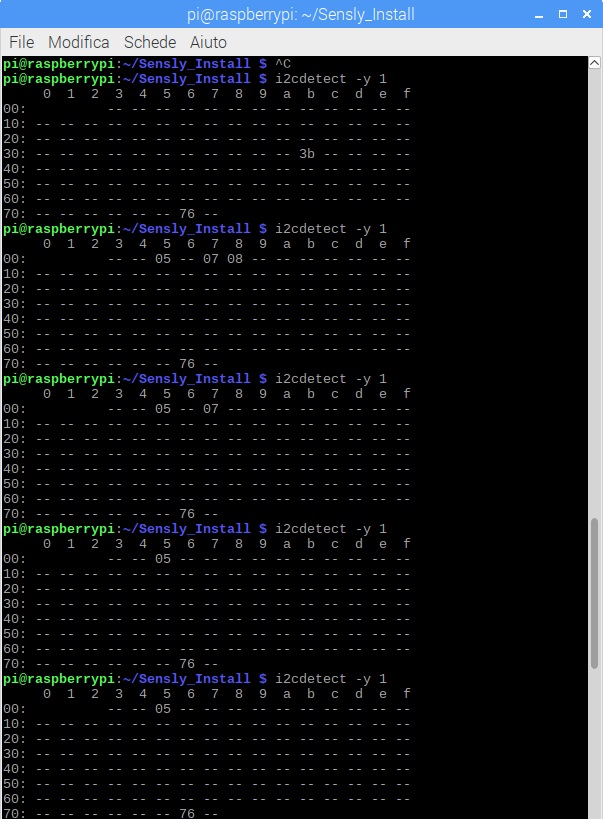
As you can see from the attached image, "i2cdetect -y 1" I got strange results after many attempts every 5 seconds.
Even the script Update.sh has some problems. Similar to what was said by other users, the script entered in a infinite waiting. Checking and running its source code, I have tried to test it separately thus I got:
"sudo python stm32loader.py -e -w -v -p /dev/ttyS0 -b 115200 Sensly.binary" ---> [Errno 2] could not open port /dev/ttyS0: [Errno 2] No such file or directory: '/dev/ttyS0'.
For clarity "ls -l /dev/ttyS0" give me an error.
Instead the second command placed in "OR" sudo "python stm32loader.py -e -w -v -p /dev/ttyAMA0 -b 115200 Sensly.binary" is fine. As you can see:
"ls -l /dev/ttyAMA0" ---> crw-rw---- 1 root dialout 204, 64 apr 6 15:27 /dev/ttyAMA0
Anyway the last command crashes at line #109 of "stm32loader.py" (self.sp.write("\x7F")).
Did any of you have had similar problems?