ScriptReference/MenuItem #34
 giscus[bot]
bot
giscus[bot]
bot
Replies: 4 comments

-
|
If you're using simple shortcuts with shift key alone (eg. Shift+x) that keyboard event will be consumed regardless of whether you have a validation method or not. if (EditorGUIUtility.editingTextField)
{
EditorWindow focused = focusedWindow;
if (focused == null)
return false;
Event keyboardEvent = Event.KeyboardEvent("X");
keyboardEvent.character = 'X'; //The variable that TextFields seem to actually use.
keyboardEvent.modifiers = EventModifiers.Shift;
keyboardEvent.shift = true;
focused.SendEvent(keyboardEvent);
return false;
}
return true; |
Beta Was this translation helpful? Give feedback.
-
|
You can use |
Beta Was this translation helpful? Give feedback.

-
|
When you use this via the context menu with multiple objects selected it will execute multiple times. [MenuItem("GameObject/How Many Objects Are Selected")]
private static void HowManyObjectsAreSelected(MenuCommand menuCommand) {
if (Selection.gameObjects.Length > 1 && menuCommand.context != Selection.gameObjects[0]) {
return;
}
Debug.Log($"You have {objects.Length} objects selected");
} |
Beta Was this translation helpful? Give feedback.

-
|
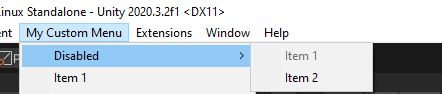
It is very simple to disable the use of a certain menu item, yet the Unity docs are not clear. To disable a menu item, we must make use of what Unity called a Validation Function. A Validation Function is a static bool method which gets executed before Unity displays your custom menu to you. To make a disabled menu item, simply return false from this method. Conversely, returning true (or not having a Validation Function) will cause the menu item to be enabled. The confusion comes in by assigning the Validation Function. To do so, you must use the exact same MenuItem attribute as before, with the exact same path given as the first parameter. This tells Unity which menu item to apply this Validation Function to. You must then give true as the second parameter, which tells Unity that this is a Validation Function. The above is made with the following code. Note how Item1 has a Validation Function assigned which returns false. This will mean Item1 is always disabled. Also note that Item2 has no Validation Function, which acts the same as a Validation Function which returns true, meaning Item2 is always enabled. [MenuItem(Item1MenuPath, priority = 1)]
private static void Item1() {
Debug.Log("Item 1!");
}
[MenuItem(Item1MenuPath, true)]
private static bool Item1Validate() {
return false;
}
[MenuItem(Item2MenuPath, priority = 2)]
private static void Item2() {
Debug.Log("Item 2!");
} |
Beta Was this translation helpful? Give feedback.


Uh oh!
There was an error while loading. Please reload this page.
Uh oh!
There was an error while loading. Please reload this page.
-
ScriptReference/MenuItem
https://docs.unity3d.com/ScriptReference/MenuItem.html
Beta Was this translation helpful? Give feedback.
All reactions