It's always great to see a GUI being made in Python.  Adding a readme and screenshot may get some additional attention.
You can even use an image from a GitHub issue to "host" your screenshots.
I made a couple of simple changes that I don't think add too much complexity. The default value on the Combo may be going a bit far. readonly is a good option to use for Combos that you don't expect users to manually enter a value. When made readonly the arrow is not needed to make a selection. You can click on the entire Combo elment.
The other change was to simply add size on the Text elements which makes the window a little more aligned:
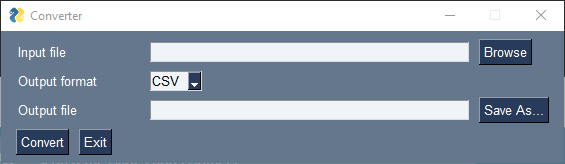
You can add right justification to them to get it a bit nicer maybe... it's all just personal taste.
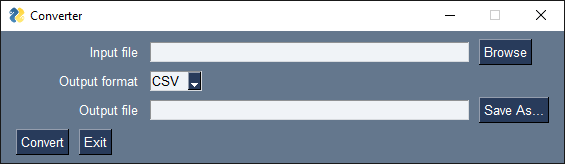
This is the layout and Window call I used to get the one with right justified text:
layout = [
    [sg.Text('Input file', size=15), sg.Input(), sg.FileBrowse()],
    [sg.Text('Output format', size=15), sg.Combo(['CSV', 'JSON'], default_value='CSV', readonly=True)],
    [sg.Text('Output file', size=15), sg.Input(), sg.FileSaveAs()],
    [sg.Button('Convert'), sg.Exit()]
]

window = sg.Window('Converter', layout, text_justification='r')
Thanks for the tutorial!

It's always great to see a GUI being made in Python. Adding a readme and screenshot may get some additional attention.
You can even use an image from a GitHub issue to "host" your screenshots.
I made a couple of simple changes that I don't think add too much complexity. The default value on the Combo may be going a bit far.
readonlyis a good option to use for Combos that you don't expect users to manually enter a value. When made readonly the arrow is not needed to make a selection. You can click on the entire Combo elment.The other change was to simply add
sizeon the Text elements which makes the window a little more aligned:You can add right justification to them to get it a bit nicer maybe... it's all just personal taste.
This is the layout and
Windowcall I used to get the one with right justified text:Thanks for the tutorial!