Closure #7

Description

Closure
@Ippo343 trying to make sense of your explanation about 'fixing username' for getUserData in:
getUsername(
    function(username) {
        getUserData(username,
            function (response) {
                var result = findMinStrengthSkill(response);
                if (result) {
                    goToTraining(result);
                }
            },
            renderStatus
        );
    }
)
I downloaded and installed your extension in my browser to be able to play with the code into the debugger. I now have the opportunity to better explain what I meant by 'closure' (I wasn't able to explain it well I think). check this screenshot:
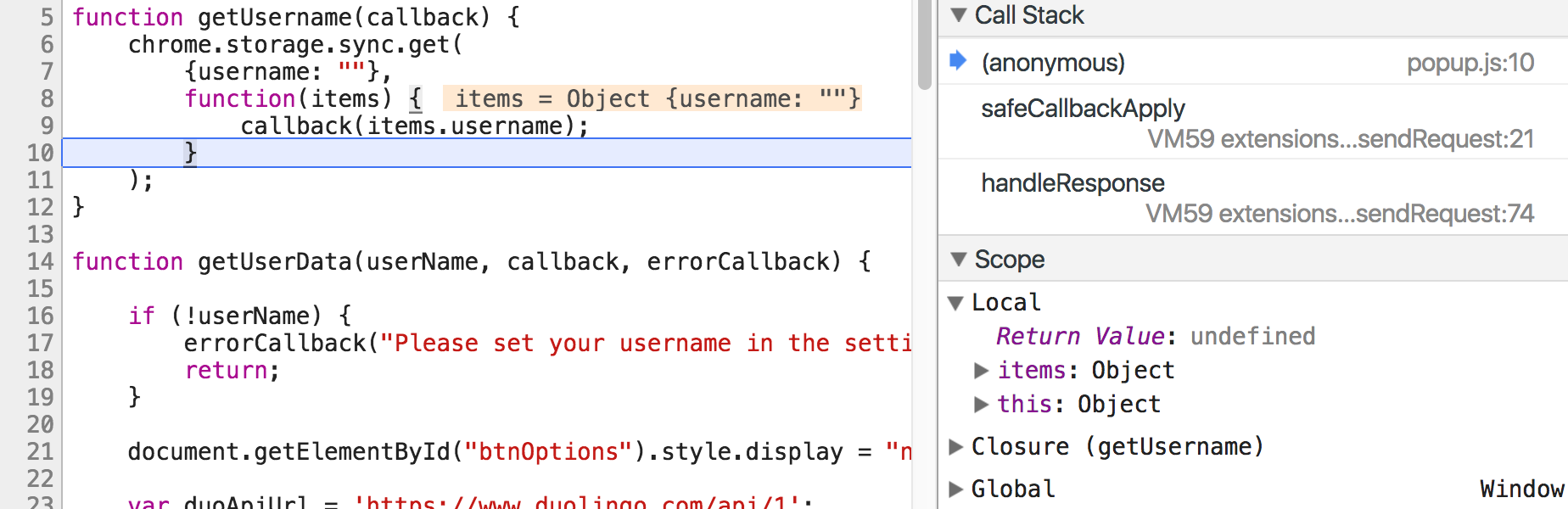
we are in the context of the anonymous function (check the call stack on the right of the screenshot):
function (items) { callback(items.username) }here we can 'see' the local scope variables, and we can see the variables of the outer scope created by the function that encloses us, which is getUserName (you can check on the right of the screenshot the debugger is so kind to tell us that this is called a 'closure'). from where we are, we can also see the most outer scope, the global scope.
it's a matter of perspective. from the global scope we can't see variables in getUserName. that's what I meant when I said 'I understood a Closure is used to hide variables'. As far as I know a classic use in javascript of the idea of closure is this:
(function enclosingFunction() {
    var name: 'michele';

    function sayName() {
      console.log(name);
    }

    window.sayName = sayName;
 })();
the enclosingFunction is immediately called (usually this is an anonymous function (the idea it's called IIFE, don't know if you are familiar with it), I named it enclosingFunction to point out the idea of the closure). Every variable declared inside enclosingFunction is hidden from the Global scope, avoiding global pollution ;-)
We have access to these variables through sayName, that naturally have access to its outer context (because we created the new property in the global object).
It was very interesting to listend to your explanation, which gave me a different, most probably better, perspective.
Wrapping my head around callbacks
I have to admit I'm still not sure I understood all these nested callback. e.g.
function getUsername(callback) {
    chrome.storage.sync.get({username: ""}, function(items) {callback(items.username)});
}
get is a function that accepts 2 parameters, one of which is a callback, which calls another callback, the one that I passed into getUsername....wow!
I'll look into it....it seems interesting!