Metrics - Year picker doesn't filter shifts #1

Description

Metrics - Year picker doesn't filter shifts
Issue:
To replicate this issue, you need to enter the "Metrics" branch and start the test server.
Once you start a session with a fake account:
- Go to the "Metrics" page; there, you will see the "Shifts" tab open by default, stay there.
- Look for a black button that says "Select Period" and click it.
- This will release a dropdown menu, select the option named "Year."
- Once you do, locate the date selector at the right of the black button, it has an input field that you must click.
- After you click it, a calendar will open and you will see one year highlighted in dark blue. Click any other year, and it will be highlighted.
Here comes the problem, if you chose a year where no shifts exist, not even as drafts, the table and graph below should display zeros and "NaN" values. Because no shifts exist within that year. However, this is not the case.
Even if the year is supposed to have no shifts in it, it shows the same shifts as the active ones today. This means that the filter of shifts based on their date is malfunctioning. Look at the picture below for an example:
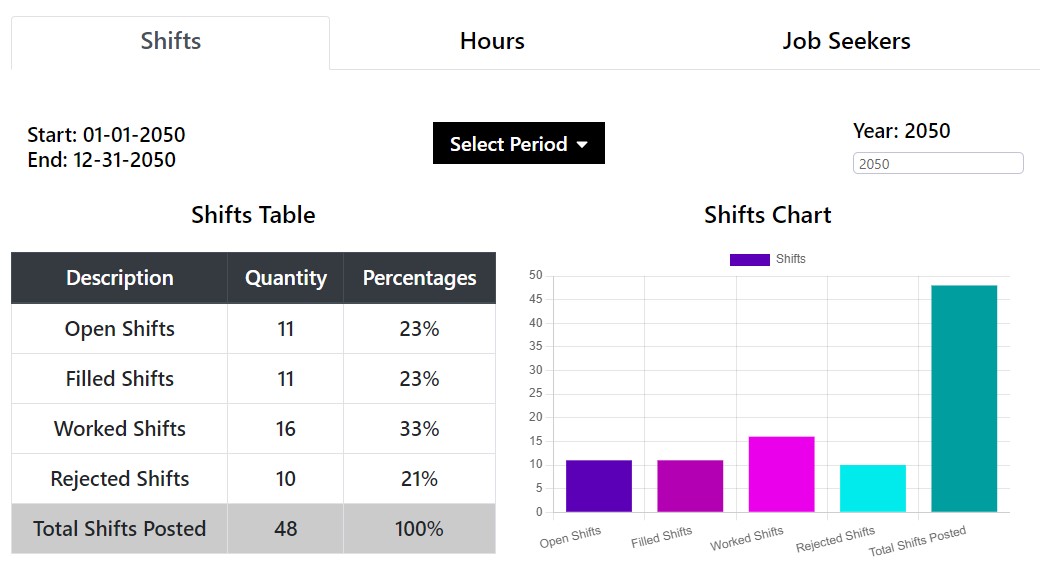
In this case, all the shifts were created for 2022 only, so the year 2050 should be empty, yet the filter allowed all 2022 shifts to pass to the 2050 display. I have no idea why this happens.
For reference, the code for this issue exists in different lines of src/js/views/metrics/general-stats/Shifts/Shifts.js The key is to search for the word "year" and see all its mentions.
Solution:
Find a way for the shifts to be correctly filtered based on the year selected.
Solution Steps:
- Investigate why the filtering method is not working, and make the necessary adjustments.
- Once finished, run all the tests provided in the repo to make sure that your integration was successful
- Create a pull request so that your code can be evaluated by the Lead Developer before deployment.
- Keep an eye out for any new bugs that arise after the change is deployed to the code.