Payroll 1/4: Duplicate buttons for W4 and I-9 forms #19

Description

Duplicate buttons for W4 and I9 forms
Issue:
To replicate this issue, you need to enter the main JobCore account and ask your supervisor for the credentials to enter.
Once you enter the main account, follow these steps:
- Go to the "Payroll" page; there, you will see 4 black buttons on the right side of the screen. one of them says "Search by Timesheet."
- If you click this button, you will see a list of available timesheets by payroll periods. Feel free to select any of them.
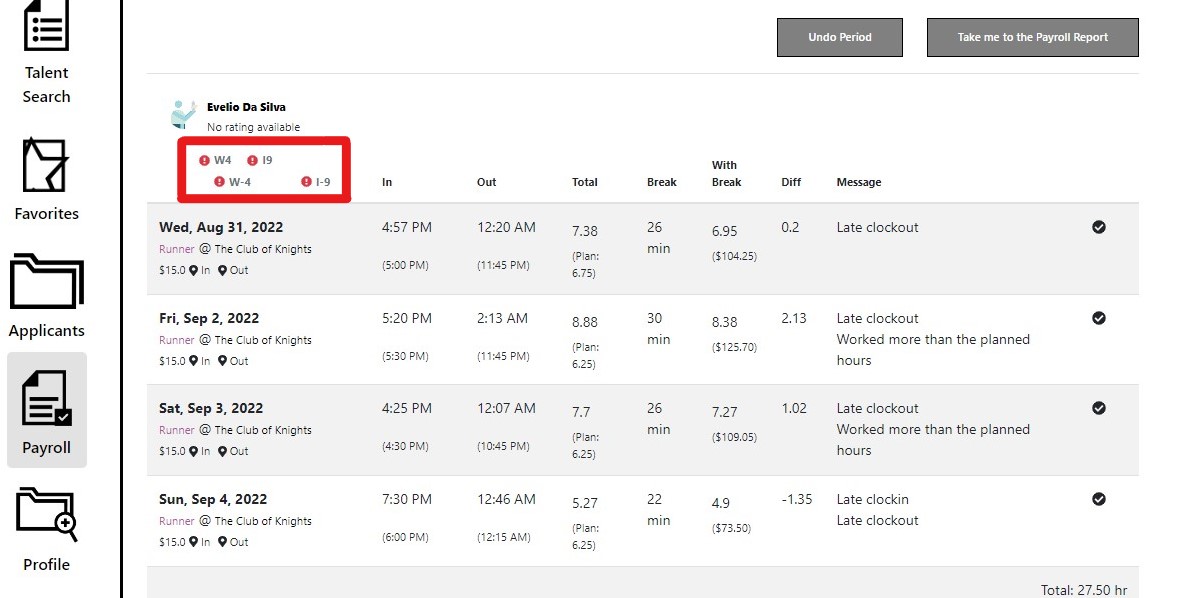
- Once you select one of them, you will see a block of information per employee.
Here comes the problem, the buttons to view the W4 and the I9 appear twice. They should only appear once.
For reference, the code for this issue exists between lines 434 and 615 of /workspace/employer-web-client/src/js/components/applicant-card/EmployeeExtendedCard.jsx
Solution:
A developer should make it so that the W4 and I9 buttons appear only once.
Solution Steps:
- Investigate how the buttons are rendered in the first place; check for loops or conditional renderings.
- Once finished, run all the tests provided in the repo to make sure that your integration was successful
- Create a pull request so that your code can be evaluated by the Lead Developer before deployment.
- Keep an eye out for any new bugs that arise after the change is deployed to the code.