Metrics - The week picker has an incorrect display #2

Description

Metrics - The week picker has an incorrect display
Issue:
To replicate this issue, you need to enter the "Metrics" branch and start the test server.
Once you start a session with a fake account:
- Go to the "Metrics" page; there, you will see the "Shifts" tab open by default, stay there.
- Look for a black button that says "Select Period" and click it.
- This will release a dropdown menu, select the option named "Week."
- Once you do, locate the date selector at the right of the black button, it has an input field that you must click.
- After you click it, a calendar will open and you will see one day highlighted in dark blue. Click any other day, and a full row of days will be highlighted, from Sunday to Saturday. Like the picture below.
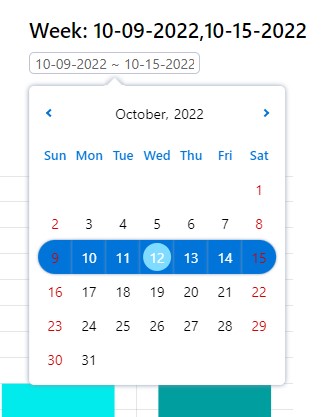
Here comes the problem, is incorrect since the days highlighted should go from Monday to Sunday, not from Sunday to Saturday.
This issue arises because: 1) The tool causing this (react-multi-date-picker) is only equipped to select weeks from Sunday to Saturday. One can change the display of the days to be from Monday to Sunday, but the highlighted portion will still go from Sunday to Saturday, creating an ugly display, with highlights in two different rows. Like this:
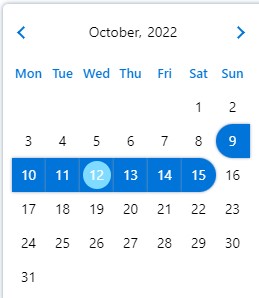
We must find a way for the highlight of days to go from Monday to Friday, instead of Sunday to Saturday.
The to see how to handle the tool is https://shahabyazdi.github.io/react-multi-date-picker/
For reference, the code for this issue exists in different lines of src/js/views/metrics/general-stats/Shifts/Shifts.js The key is to search for the word "week" and see all its mentions.
Solution:
Find a way for the highlight of days to go from Monday to Friday, instead of Sunday to Saturday.
Solution Steps:
- Either create a plugin or change the highlight feature of the tool. We must read the documentation to do this.
- Once finished, run all the tests provided in the repo to make sure that your integration was successful
- Create a pull request so that your code can be evaluated by the Lead Developer before deployment.
- Keep an eye out for any new bugs that arise after the change is deployed to the code.