







| Images | Feature Description |
|---|---|
 |
Large Text Box |
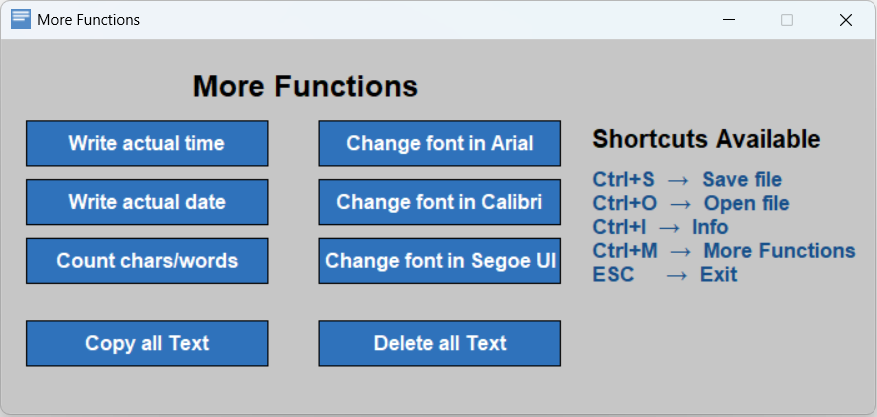 |
More Functions and shortcuts |
NeonNote/
├── src/
│   └── neonnote/                # Application source code
│       ├── main.py              # Application entry point
│       ├── file_ops.py          # File operations
│       ├── config.py            # Configuration
│       ├── info_window.py       # Info window logic
│       └── assets/              # Application assets
│           ├── NeonNote_Icon.ico
│           └── NeonNote_Logo.png
|
├── docs/                        # Website Source Code
│   ├── index.html
│   ├── style.css
│   └── images                   # Website images and ico
│
├── LICENSE.txt                  # GPL License
├── README.md                    # Project overview
├── CHANGELOG.md                 # Version history
├── CONTRIBUTING.md              # Contribution guidelines
├── pyproject.toml               # Project metadata and build config
├── requirements.txt             # Project Library file
├── SECURITY.md                  # Security Policy
└── .gitattributes               # Git repository settings
About assets:
Assets (icons and data files) are stored inside so the application can find them when run from source or packaged.
About the docs/ folder:
The docs/ folder contains files used for the source code of website. It is not required to run the application locally.
 You can access NeonNote Website from this link: NeonNote Website
To download NeonNote V1.2 follow this link, the software is for Windows OS, for linux use Wine: Download NeonNote V1.2
For macOS
The EXE file is not available.
However, the application can be run from source by executing the main.py file,
provided that Python and the required dependencies are installed.
Warning
For proper program execution, please read the notes below
Do not delete the .ico or .txt other file types in the download folder they are required for the program to function correctly.
git clone https://github.com/Lorydima/NeonNote.gitpip install -r requirements.txtrun main.pyI do my best to keep this project stable and reliable, but bugs can still happen. If you spot any issues or errors, feel free to open a GitHub issue. Your feedback really helps me improve the project.
Thanks for contributing and helping make this project better from LDM Dev❤️
Before you use the software please read the GPL License license at this link: License