Import-CallQueue -> Error 401 #19


-
|
Hi
Can you help me? |
Beta Was this translation helpful? Give feedback.
Replies: 6 comments 8 replies

-
|
Hi @donky-bison, It looks like that in that case the authentication piece might not be correctly configured. When you are running the workflow manually can you tell me which step exactly fails? What I suspect is that this might be an issue getting the secrets from the Azure Key vault however to confirm that I will need to understand which step exactly fails. In the meantime you can validate the permissions on the Azure Keyvault by performing the following steps:
In addition to this validate the following secrets are listed on the Secrets section:
Regards, |
Beta Was this translation helpful? Give feedback.
-
|
Hi
Thank you for your help.
The Access policies looks like that and "2 selected means" Get and List
***@***.***
Here are the defined secrets
***@***.***
Which steps failed running the workflow manually?
***@***.***
Best regards - Urs Egli
Von: Johan Veldhuis ***@***.***>
Gesendet: Freitag, 19. August 2022 16:38
An: OfficeDev/TACO ***@***.***>
Cc: Egli Urs ***@***.***>; Mention ***@***.***>
Betreff: Re: [OfficeDev/TACO] Imkport-CallQueue -> Error 401 (Discussion #19)
Hi @donky-bison<https://eur03.safelinks.protection.outlook.com/?url=https%3A%2F%2Fgithub.com%2Fdonky-bison&data=05%7C01%7Curs.egli%40bithawk.ch%7Cb3ba7202d61d494c10f608da81f05fda%7Cb58f94a366ad4b34bd9e7d8af8addb7d%7C0%7C0%7C637965166652613980%7CUnknown%7CTWFpbGZsb3d8eyJWIjoiMC4wLjAwMDAiLCJQIjoiV2luMzIiLCJBTiI6Ik1haWwiLCJXVCI6Mn0%3D%7C3000%7C%7C%7C&sdata=JiHk5wiHxVpJ4rxOZvypuNB0nCyb9V6cgStGghAPUZo%3D&reserved=0>,
It looks like that in that case the authentication piece might not be correctly configured. When you are running the workflow manually can you tell me which step exactly fails? What I suspect is that this might be an issue getting the secrets from the Azure Key vault however to confirm that I will need to understand which step exactly fails.
In the meantime you can validate the permissions on the Azure Keyvault by performing the following steps:
* go to the Azure portal
* search for the Key Vault used by the App
* select Access policies
* make sure the service account is listed
* validate the permissions assigned to the account are at least the get permissions
In addition to this validate the following secrets are listed on the Secrets section:
* TACO-appSecret
* Teams-service-account-name
* Teams-service-account-secret
*
Regards,
Johan
-
Reply to this email directly, view it on GitHub<https://eur03.safelinks.protection.outlook.com/?url=https%3A%2F%2Fgithub.com%2FOfficeDev%2FTACO%2Fdiscussions%2F19%23discussioncomment-3432042&data=05%7C01%7Curs.egli%40bithawk.ch%7Cb3ba7202d61d494c10f608da81f05fda%7Cb58f94a366ad4b34bd9e7d8af8addb7d%7C0%7C0%7C637965166652613980%7CUnknown%7CTWFpbGZsb3d8eyJWIjoiMC4wLjAwMDAiLCJQIjoiV2luMzIiLCJBTiI6Ik1haWwiLCJXVCI6Mn0%3D%7C3000%7C%7C%7C&sdata=ETwy0hvNbTnRByArAaOIK2%2FIfxDjto%2F8Tu%2FxTaVOS0g%3D&reserved=0>, or unsubscribe<https://eur03.safelinks.protection.outlook.com/?url=https%3A%2F%2Fgithub.com%2Fnotifications%2Funsubscribe-auth%2FADRCHBYWH67W47EQBYVCM4LVZ6L3LANCNFSM57AC2OVA&data=05%7C01%7Curs.egli%40bithawk.ch%7Cb3ba7202d61d494c10f608da81f05fda%7Cb58f94a366ad4b34bd9e7d8af8addb7d%7C0%7C0%7C637965166652769691%7CUnknown%7CTWFpbGZsb3d8eyJWIjoiMC4wLjAwMDAiLCJQIjoiV2luMzIiLCJBTiI6Ik1haWwiLCJXVCI6Mn0%3D%7C3000%7C%7C%7C&sdata=WQJ6eMN%2BT6qQs6lwXYUuSxEghxGBKLmwA01Kk%2FVw5mg%3D&reserved=0>.
You are receiving this because you were mentioned.Message ID: ***@***.******@***.***>>
|
Beta Was this translation helpful? Give feedback.

-
|
Hi Urs, Can you post a screenshot of the workflow failed so we can check which part failed? Johan |
Beta Was this translation helpful? Give feedback.
-
Beta Was this translation helpful? Give feedback.
-
|
@donky-bison no but probably I should have been more clear. Please perform the steps below:
Johan |
Beta Was this translation helpful? Give feedback.
-
Beta Was this translation helpful? Give feedback.
-
|
@donky-bison it is probably me but I don't see a screenshot in this post |
Beta Was this translation helpful? Give feedback.
-
|
Hi It should work know to see the screenshots
best regards |
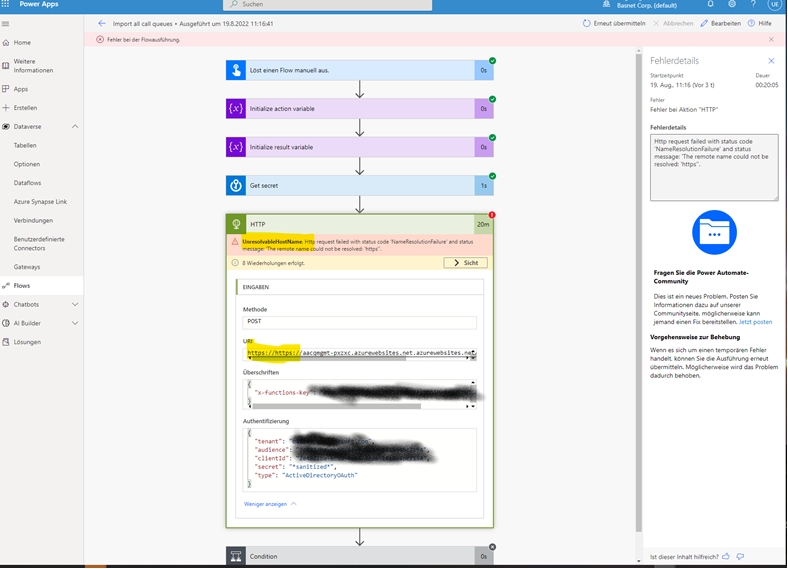
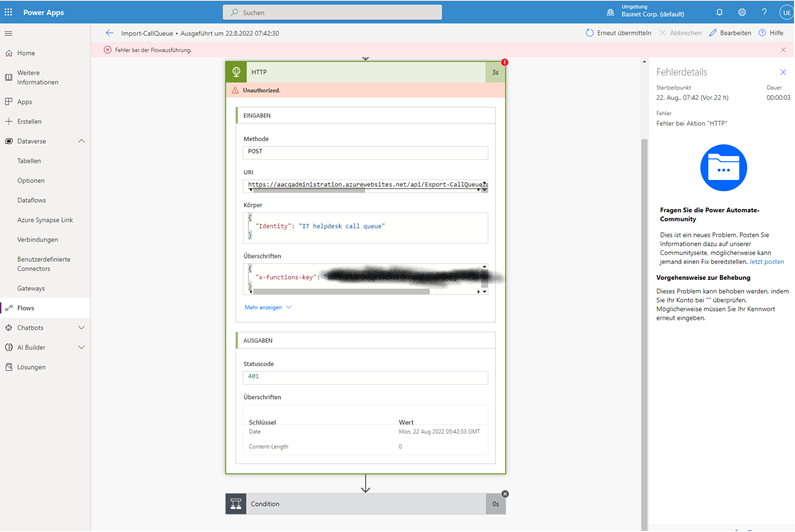
Beta Was this translation helpful? Give feedback.
-
|
@donky-bison looks like the Azure Function url is not configured correctly. Please perform the following steps:
Johan |
Beta Was this translation helpful? Give feedback.

-
|
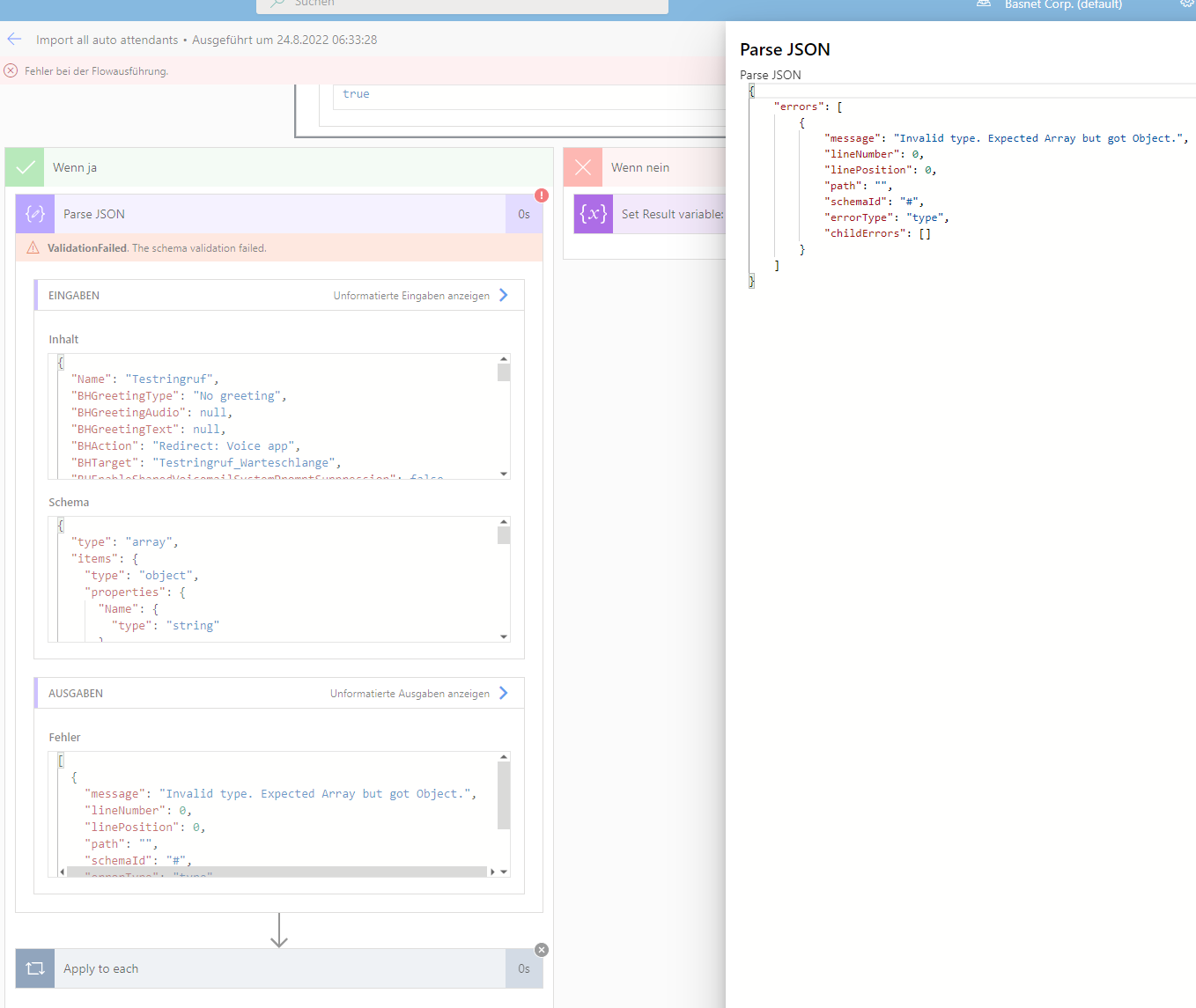
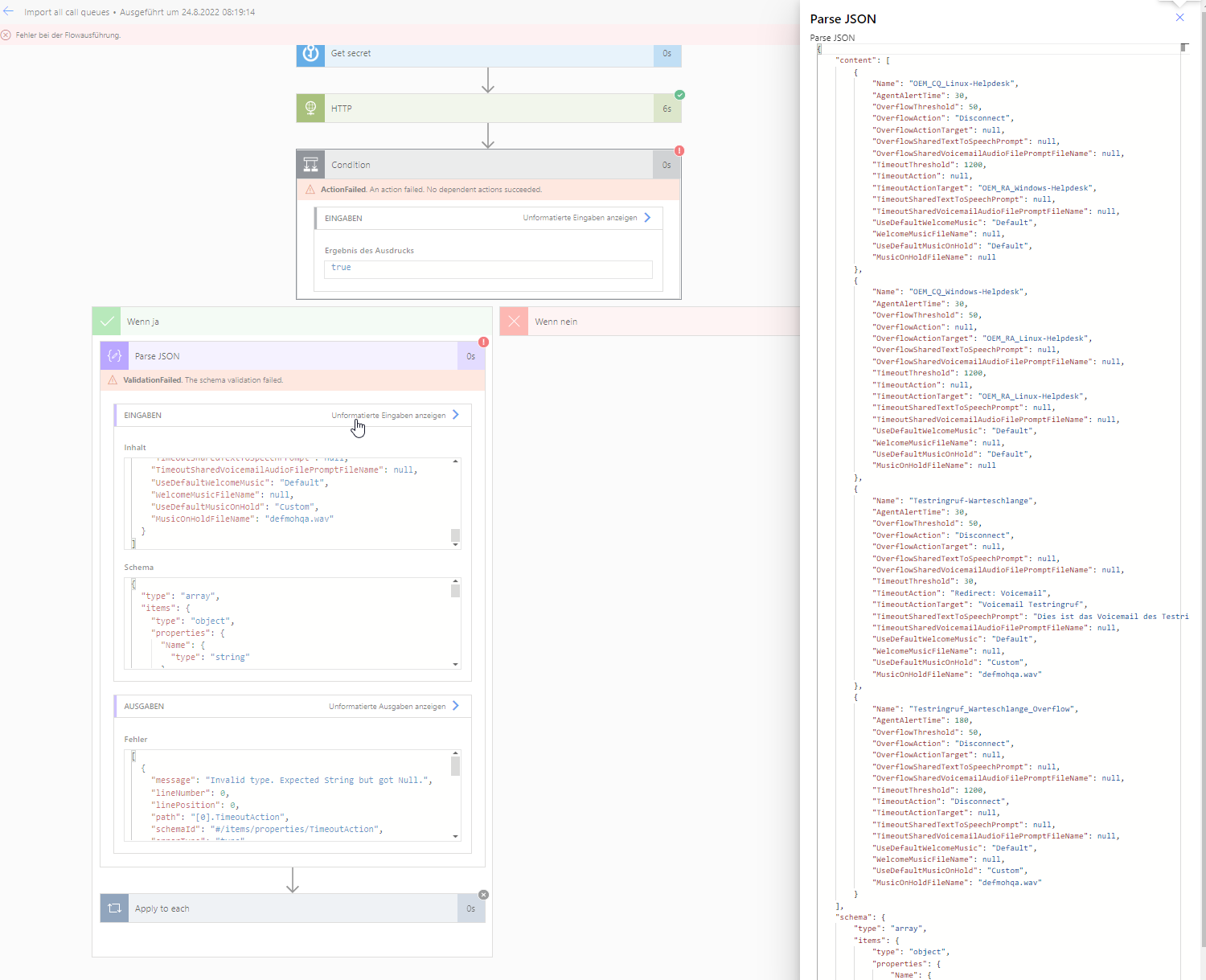
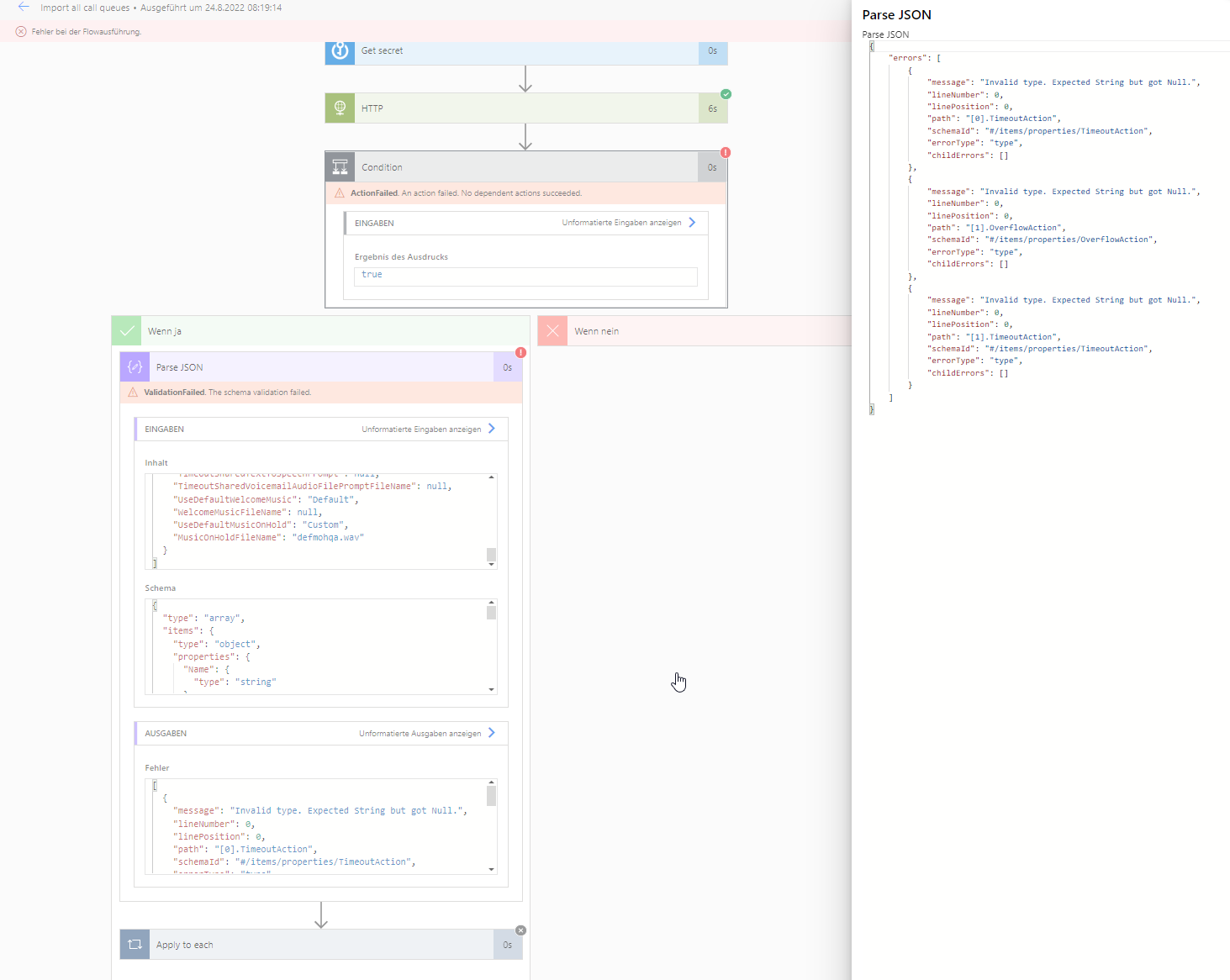
import all autoattendant import all call queues Many thanks for your help |
Beta Was this translation helpful? Give feedback.
-
|
@donky-bison good to hear it resolved your issue. We didn't thought about the scenario that there is only one AA or CQ so I will add that to our to do list to update the workflow to take this into account. For the CQ issue please replace the JSON in the workflow with the one below: { } Regards, |
Beta Was this translation helpful? Give feedback.
-
|
it works - thanks |
Beta Was this translation helpful? Give feedback.
-
|
@donky-bison good to hear it resolved the issue I have created an issue to make sure we fix this in the next version of the app. |
Beta Was this translation helpful? Give feedback.
-
|
Solution for this issue was:
|
Beta Was this translation helpful? Give feedback.


Solution for this issue was: