This project is a Minecraft-inspired game implemented in Python using Pyglet for graphics rendering. It aims to replicate some of the core mechanics and features of Minecraft while serving as a learning exercise in 3D graphics programming, game development, and Python.
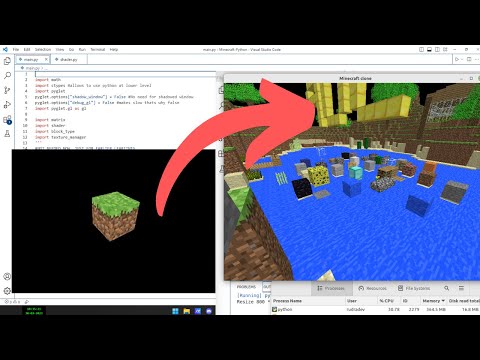
- 3D voxel-based world generation
- Customizable block types with different textures and properties
- First-person camera and movement
- Chunk-based world loading and rendering
- Basic terrain generation
- Block placement and destruction
- Texture management system
- Shader-based rendering
- Save and load functionality for world persistence
Here's a task list for further development of the project:
- Enhance world generation
- Implement more diverse terrain features (hills, caves, etc.)
- Add different biomes
- Improve block interaction mechanics
- Add block variants (e.g., different wood types)
- Implement more complex terrain generation
- Add biomes
- Implement noise-based terrain generation
- Add an inventory system
- Create UI for inventory
- Implement item pickup and storage
- Implement crafting mechanics
- Design crafting recipes
- Create crafting UI
- Optimize rendering for better performance
- Implement occlusion culling
- Add level of detail (LOD) for distant chunks
- Implement multiplayer functionality
- Set up client-server architecture
- Implement network synchronization
- Add sound effects and music
- Implement a day/night cycle
- CUDA Parllelization
- ✨ENJOY - ✨
If you're new to game development or some of the concepts used in this project please go through the reading-material.txt files where crude logic and resources are pasted
- Python 3.x
- Pyglet
- OpenGL
- nbtlib (for save file handling)
- base36 (for save file path encoding)
main.py: Entry point of the application, sets up the game window and runs the main loopworld.py: Manages the game world, chunks, and block typeschunk.py: Handles individual chunks of the worldsubchunk.py: Manages subchunks for more efficient renderingblock_type.py: Defines different types of blocks and their propertiescamera.py: Implements the first-person camera and movementtexture_manager.py: Manages loading and handling of texturesshader.py: Handles shader compilation and usagematrix.py: Provides matrix operations for 3D transformationshit.py: Implements ray casting for block selection and interactionsave.py: Handles saving and loading of the world data
- Clone this repository.
- Ensure you have all the required dependencies installed.
- Create virtual environment
python -m venv myenvmyenv\Scripts\activatepip install pygletpip install nbtlibpip install base36- Run
python main.pyto start the game.
- WASD: Move around
- Space: Move up
- Left Shift: Move down
- Mouse: Look around
- Left Click: Break block
- Right Click: Place block
- Middle Click: Pick block
- G: Cycle through block types
- O: Save the world
- Escape: Release mouse capture
You can add new block types by editing the data/blocks.mcpy file. The format is as follows:
block_id: name "Block Name", texture.all "texture_name", model models.cube
Textures should be placed in the textures/ directory.
This project was inspired by Minecraft, created by Mojang Studios. It is not affiliated with or endorsed by Mojang or Microsoft.
Special thanks to the Pyglet and OpenGL communities for their excellent documentation and resources.