This repository provides guidelines and examples for APIs at PSA. These guidelines intend to encourage consistency, maintainability, and best practices across all APIs and applications.
These guidelines were strongly inspired from Paypal's API Standards and some other references.
The key words "MUST", "MUST NOT", "REQUIRED", "SHALL", "SHALL NOT", "SHOULD", "SHOULD NOT", "RECOMMENDED", "MAY", and "OPTIONAL" in this document are to be interpreted as described in RFC2119.
The OpenAPI specification (formerly known as the Swagger Specification) is a powerful definition format to describe RESTful APIs. All REST APIs PSA MUST be defined using this format. As it is both human and machine readable, Swagger is the essential link between any unit involved in an API's lifecycle, starting from business & technical specifications, to deployment.
As shown in the official documentation, a sample Swagger specification written in YAML (as opposed to JSON) looks like this :
swagger: "2.0"
info:
  title: Sample API
  description: API description in YAML.
  version: 1.0.0

host: api.example.com
basePath: /v1
schemes:
  - https

paths:
  /users:
    get:
      summary: Returns a list of users.
      description: Optional extended description in Markdown.
      produces:
        - application/json
      responses:
        200:
description: OKIBM API Connect, PSA's API manager, natively interfaces with Swagger, meaning a well designed Swagger heavily accelerates the API's publication process. Before submitting an REST API for deployment, conception/development teams MUST :
- Provide a Swagger file describing the API
- Ensure the file reflects its implementation
- Ensure the file file contains all of the information required for publication.
HTTP defines a set of request methods to indicate the desired action to be performed for a given resource. The primary or most-commonly-used HTTP verbs (or methods, as they are properly called) are POST, GET, PUT, PATCH and DELETE. There are a number of other verbs, too, but are utilized less frequently. All APIs MUST only use the verbs listed in the table below.
| Method | Action |
|---|---|
POST |
Method requests the server to create a resource in the database |
GET |
Method requests data from the resource and should not produce any side effect |
PUT |
Method requests the server to update resource or create the resource, if it doesn’t exist |
PATCH |
Method requests the server to partially update resource |
DELETE |
Method requests that the resources, or its instance, should be removed from the database |
Idempotency is an important aspect of building a fault-tolerant API. Idempotent APIs enable clients to safely retry an operation without worrying about the side-effects that the operation can cause. For example, a client can safely retry an idempotent request in the event of a request failing due to a network connection error.
Per HTTP Specification, a method is idempotent if the side-effects of more than one identical requests are the same as those for a single request. Methods GET, HEAD, PUT and DELETE are defined idempotent.
Example - The following statement is idempotent : no matter how many times this statement is executed, the customer’s age will always be set to 20.
customer.age = 20 // idempotentExample - The following statement is not idempotent : executing this 10 times will result in different outcomes.
customer.age += 1 // non-idempotentPer HTTP Semantics and Content request methods are considered "safe" if their defined semantics are essentially read-only; i.e., the client does not request, and does not expect, any state change on the origin server as a result of applying a safe method to a target resource. Likewise, reasonable use of a safe method is not expected to cause any harm, loss of property, or unusual burden on the origin server.
Safe methods are HTTP methods that do not modify resources. Meaning safe HTTP method MUST NOT create, update or delete resources. In addition, safe methods can be cached and prefetched without any repercussions to the resource.
Example - The following request is incorrect if this request actually deletes the resource : GET methods SHALL NOT produce any side effect
GET https://dev.api.inetpsa.com/project/customers/9812763/delete HTTP/1.1
The table below should be read as follows :
GET- MUST NOT create any side-effect (safe)
- More than one identical requests MUST have the same behavior (idempotent)
POST- MAY create side-effect (not safe)
- MAY behave differently when performing identical requests (not idempotent)
PUT- MAY create side-effects (not safe)
- More than one identical requests MUST have the same behavior (idempotent)
PATCH- MAY create side-effect (not safe)
- MAY behave differently when performing identical requests (not idempotent)
DELETE- MAY create side-effects (not safe)
- More than one identical requests MUST have the same behavior (idempotent)
| Idempotent | Safe | |
|---|---|---|
GET |
Yes | Yes |
POST |
No | No |
PUT |
Yes | No |
PATCH |
No | No |
DELETE |
Yes | No |
Per RF7231, the Status-Code element is a 3-digit integer result code of the attempt to understand and satisfy the request.
The first digit of the Status-Code defines the class of response. The last two digits do not have any categorization role. There are 5 values for the first digit:
1xx: Informational - Request received, continuing process2xx: Success - The action was successfully received, understood, and accepted3xx: Redirection - Further action must be taken in order to complete the request4xx: Client Error - The request contains bad syntax or cannot be fulfilled5xx: Server Error - The server failed to fulfill an apparently valid request. (note : API developers MUST NOT explicitly return5xxcodes as it is taken care by the server itself)
It is RECOMMENDED that APIs only return the most commonly used status codes listed in the table below. APIs MAY return a status code that is not defined in this table, in which case API designers must clearly state the reasons behind this choice. However, APIs MUST NOT return a status code that is not listed in the HTTP/1.1 - RFC2616.
| Status Code | Description |
|---|---|
200 OK |
Standard response for successful HTTP requests. The actual response will depend on the request method used. In a GET request, the response will contain an entity corresponding to the requested resource. In a POST request the response will contain an entity describing or containing the result of the action. |
201 Created |
The request has been fulfilled and resulted in a new resource being created. Successful creation occurred (via either POST or PUT). Set the Location header to contain a link to the newly-created resource (on POST). Response body content may or may not be present. |
202 Accepted |
Used for asynchronous method execution to specify the server has accepted the request and will execute it at a later time. For more details, please refer Asynchronous Operations. |
204 No Content |
The server successfully processed the request, but is not returning any content. The 204 response MUST NOT include a message-body, and thus is always terminated by the first empty line after the header fields. |
304 Not Modified |
Used for conditional GET calls to reduce band-width usage. If used, must set the Date, Content-Location, ETag headers to what they would have been on a regular GET call. There must be no body on the response. |
400 Bad Request |
The request could not be understood by the server due to malformed syntax. The client SHOULD NOT repeat the request without modifications. |
401 Unauthorized |
The request requires authentication and none was provided or the provided one is invalid and authentication should be tried again. Note the difference between this and 403 Forbidden. |
403 Forbidden |
The server understood the request, but is refusing to fulfill it. It SHOULD describe the reason for the refusal in the entity. If the server does not wish to make this information available to the client, the status code 404 (Not Found) can be used instead |
404 Not Found |
Used when the requested resource is not found, whether it doesn't exist or if there was a 401 or 403 that, for security reasons, the service wants to mask |
406 Not Acceptable |
The server MUST return this status code when it cannot return the payload of the response using the media type requested by the client. For example, if the client sends an Accept: application/xml header, and the API can only generate application/json, the server MUST return 406. |
415 Unsupported Media Type |
The server MUST return this status code when the media type of the request's payload cannot be processed. For example, if the client sends a Content-Type: application/xml header, but the API can only accept application/json, the server MUST return 415. |
429 Too Many Requests |
The server return this status code when the user has sent too many requests in a given amount of time. Intended for use with rate-limiting schemes. |
500 Internal Server Error |
This is either a system or application error, and generally indicates that although the client appeared to provide a correct request, something unexpected has gone wrong on the server. A 500 response indicates a server-side software defect or site outage. 500 SHOULD NOT be utilized for client validation or logic error handling. |
503 Service Unavailable |
The server is unable to handle the request for a service due to temporary maintenance. |
For each HTTP method, API developers SHOULD use only status codes marked as "X" in this table.
| Status Code | 200 Success | 201 Created | 202 Accepted | 204 No Content | 400 Bad Request | 401 Unauthorized | 403 Forbidden | 404 Not Found | 500 Internal Server Error |
|---|---|---|---|---|---|---|---|---|---|
GET |
X | X | X | X | X | X | |||
POST |
X | X | X | X | X | X | X | ||
PUT |
X | X | X | X | X | X | X | X | |
PATCH |
X | X | X | X | X | X | X | ||
DELETE |
X | X | X | X | X | X | X |
-
GET: The purpose of theGETmethod is to retrieve a resource. On success, a status code200and a response with the content of the resource is expected. In cases where resource collections are empty (0 items in/customers),200is the appropriate status (resource will contain an emptyitemsarray).204SHALL NOT be used even though there is no content. -
POST: The primary purpose ofPOSTis to create a resource. If the resource did not exist and was created as part of the execution, then a status code201SHOULD be returned.- It is expected that on a successful execution, a reference to the resource created (in the form of a link or resource identifier) is returned in the response body.
- Idempotency semantics: If this is a subsequent execution of the same invocation and the resource was already created, then a status code of
200SHOULD be returned. For more details on idempotency in APIs, refer to idempotency.
-
PUT: This method SHOULD return status code204as there is no need to return any content in most cases as the request is to update a resource and it was successfully updated. The information from the request should not be echoed back. -
PATCH: This method SHOULD follow the same status/response semantics asPUT,204status and no response body.200+ response body should be avoided at all costs, asPATCHperforms partial updates, meaning multiple calls per resource is normal. As such, responding with the entire resource can result in large bandwidth usage, especially for bandwidth-sensitive mobile clients.
-
DELETE: This method SHOULD return status code204as there is no need to return any content in most cases as the request is to delete a resource and it was successfully deleted.- As the
DELETEmethod MUST be idempotent as well, it SHOULD still return204, even if the resource was already deleted. Usually the API consumer does not care if the resource was deleted as part of this operation, or before. This is also the reason why204instead of404should be returned.
- As the
A JSON key or attribute MUST :
- Be unique for any given level of data
- Use consistent case for keys : JSON keys MUST be formatted using
camelCase - Respect the informational context by using clear and explicit naming : keys MUST use generic terms reusable in a different context than the application it was first designed for
- Bad - Non-unique keys at the root of the object
"customer" : {
  "id": 19083974,
  "name": "John",
  "name": "Doe",  // Bad : using name twice on the same level of data is forbidden
} - Good - Unique keys at any given level of data
"customer" : {
  "id": 19083974,
  "name": "John Doe",
  "address": {
    "name": "Home", // Good:  this is allowed since it belongs to address and not customer
    "city": "Paris"
  }
} - Bad - Non generic naming
"customer" : {
  "customerId": 19083974, // Bad : since a customer could be a different object in a different context
  "homeAddress" : {       // Bad : not developer friendly as other projects might call it differently
    "city":"Paris"
  }
} - Good - Generic naming
"customer" : {
  "id": 19083974,   // Good: generic naming, can be used in any context
  "address": {      // Good : generic naming
    "name": "Home", // Good : better naming strategy
  }
} This section provides guidelines related to usage of JSON primitive types as well as commonly useful JSON types for address, name, currency, money, country, phone, among other things. APIs MUST follow common formatting rules to insure consistency across all projects.
As per draft-04 JSON Schema defines seven primitive types for JSON values:
- array : A JSON array.
- boolean : A JSON boolean.
- integer : A JSON number without a fraction or exponent part.
- number : Any JSON number. Number includes integer.
- null : The JSON null value
- object : A JSON object.
- string : A JSON string.
APIs MUST NOT produce or consume null values. In JSON, a property that doesn't exist or is missing in the object is considered to be undefined; this is conceptually separate from a property that is defined with a value of null.
For instance, a property address defined as {"type": "null"} is represented as :
"customer" : {
  "id": 19083974,
  "address": "null"
}
While a property address that is undefined MUST NOT be present in the object :
"customer" : {
  "id": 19083974,
} Resource representations in API MUST reuse the common data type definitions below where possible. Following sections provide some details about some of these common types.
The following common types MUST be used with regard to global country, currency, language and locale.
| Type | Example | Rule |
|---|---|---|
| Country code | FR |
All APIs MUST use the ISO 3166-1 alpha-2 two letter country code standard |
| Currency code | EUR |
All APIs MUST use the the three letter currency code as defined in ISO 4217. For quick reference on currency codes, see http://en.wikipedia.org/wiki/ISO_4217. |
| Language | fr-FR |
All APIs MUST use the BCP-47 language tag composed of : the ISO-639 alpha-2 language code (Optional), the ISO-15924 script tag, the ISO-3166 alpha-2 country code |
The following common types MUST be used to express various date-time formats:
| Type | Example | RFC |
|---|---|---|
| Date & Time | 2018-02-06T19:31:29 |
RFC3339 date-time |
| Date | 2018-02-06 |
RFC3339 full-date |
| Time | 19:31:29 |
RFC3339 full-time |
All APIs exposing geolocated data MUST use the open standard format GeoJSON. As per RFC7946, GeoJSON "defines several types of JSON objects and the manner in which they are combined to represent data about geographic features, their properties, and their spatial extents."
Any of the following geometry type MUST be formatted using GeoJSON :
- Points & Multipoints : addresses and locations
{
  "type": "Feature",
  "geometry": {
    "type": "Point",
    "coordinates": [125.6, 10.1]
  },
  "properties": {
    "name": "Home Adress"
  }
}- LineStrings & MultiLineStrings : streets, highways and boundaries
{
  "type": "Feature",
  "geometry": {
     "type": "LineString",
     "coordinates": [
       [102.0, 0.0], [103.0, 1.0], [104.0, 0.0], [105.0, 1.0]
     ]
   },
   "properties": {
     "street": "7th Avenue"
   }
},- Polygons & MultiPolygons : countries, provinces, tracts of land
{ "type": "Feature",
  "geometry": {
     "type": "Polygon",
     "coordinates": [
         [ [100.0, 0.0], [101.0, 0.0], [101.0, 1.0],
           [100.0, 1.0], [100.0, 0.0] ]
      ]
   },
   "properties": {
     "country": "France"
   }
},The HTTP status codes in the 4xx range indicate client-side errors (validation or logic errors), while those in the 5xx range indicate server-side errors (usually defect or outage). However, these status codes and human readable reason phrase are not sufficient to convey enough information about an error in a machine-readable manner. To resolve an error, non-human consumers of RESTful APIs need additional help.
An error response MUST include the following fields:
name: A human-readable, unique name for the error. Should be mapped on the server side to insure consistency.debug: A unique error identifier generated on the server-side and logged for correlation purposes.message: A human-readable message, describing the error. This message MUST be a description of the problem NOT a suggestion about how to fix it.link: HATEOAS links (in HAL format) specific to an error scenario. Use these links to provide more information about the error scenario and how to resolve it.
An error response MUST NOT include any of the following information :
- Internal code
- File path
- Stack trace
Therefore, APIs MUST return a JSON error representation that conforms to the the following schema.
{
  "name":"VALIDATION_ERROR",
  "debug":"123456789",
  "message":"Invalid data provided",
  "link":"http://developer.psa-peugeot-citroen.com/apidoc#VALIDATION_ERROR"
}In the case where APIs serve more than one content type, consumers MUST specify type they need using Accept header.
APIs MAY take as input or output any content type needed (an audio file, a specific text format etc.). Each API endpoint specifies what response type it outputs and what it consumes in cases where it applies (for POST requests for instance) :
GET /URL  HTTP/1.1
Accept : text/*
HTTP/1.1 200 OK
Content-Type : text/html
See complete list of MIME Types
Hypermedia, an extension of the term hypertext, is a nonlinear medium of information which includes graphics, audio, video, plain text and hyperlinks according to wikipedia. Hypermedia As The Engine Of Application State (HATEOAS) is a constraint of the REST application architecture described by Roy Fielding in his dissertation.
In the context of RESTful APIs, a client could interact with a service entirely through hypermedia provided dynamically by the service. A hypermedia-driven service provides representation of resource(s) to its clients to navigate the API dynamically by including hypermedia links in the responses.
APIs MAY use hypermedia, thought it is not mandatory. APIs using hypermedia MUST however do it using HAL.
HAL is a simple format that gives a consistent and easy way to hyperlink between resources in your API. For detailed information on HAL refer to this link. In short, HAL provides a set of conventions for expressing hyperlinks in either JSON or XML.
For simplicity reasons, all APIs using HATEOAS along with HAL formatting MUST only use the following properties.
_links: This property contains links related to the current object. For example, acustomerobject using HAL will contain links to the vehicles owned by the user._embedded: This property contains commonly related objects to the current object. This property SHALL BE empty.
GET /cars/9837127 HTTP/1.1
Sample car object without using HAL
{
  "id" : 9837127,
  "model" : "DS3",
  "createdAt": "2017-08-10T13:46:39.652+0000",
  "updatedAt": "2017-08-10T13:46:39.652+0000",
}
Sample car object using HAL
{
  "_links": {
    "self": {
      "href": "/cars/9837127"
    }
    ...
  },
  "id" : 9837127,
  "model" : "DS3",
  "createdAt": "2017-08-10T13:46:39.652+0000",
  "updatedAt": "2017-08-10T13:46:39.652+0000",
  "_embedded": {
    "owner": {
      "_links": {
        "self": {
          "href": "/customers/0981233"
        }
      },
      "id": "0981233",
      "name": "John Doe"
    }
}
For additional examples, please refer to this list of public hypermedia APIs using HAL
Example : API called factory under the manufacturing domain. This specific endpoint addresses v1 of the API and accesses the ressource customers (filtering by name John)
 https://api-preprod.mpsa.com/manufacturing/factory/v1/customers?name=john
 \___/  \___________________/\____________/\______/\_/\________/ \_______/
   |             |                 |          |     |      |         |
protocol      domain        classification   api version resource  query
           environement                      name                parameters
APIs at PSA MUST be be formatted with the following components :
- protocol : must always be
https - environment : could be
prod,preprodordev - api : specifies that this specific URI is an API endpoint
- domain : specific to PSA, can include a sub domain
- classification : may not always be needed in the case of enterprise APIs as opposed to application APIs
- api name : the name of the API
- version : must only contain the major version (
v1instead ofv1.0)
All API URIs MUST follow the rules listed below :
- MUST NOT contain actions or verbs
- MUST contain the plural form of resources
- MUST use the English language
- HTTP methods SHALL define the kind of action to be performed on the resource
- MUST be formatted using lower
snake-case - MUST only contain UTF-8 encoded characters
Let’s consider a Customer resource on which we would like to perform several actions such as list, update, delete and promote. The API could be defined in a way that each endpoints corresponds to an operation as follows :
GET/getCustomers: return all customersGET/deleteCustomer: delete a customer (usingGEThere because we are not sending any data)GET/promoteCustomer: promote a customer (usingGEThere because we are not sending any data)POST/createCustomer: create customer according to the request bodyPOST/updateCustomer: update customer according to the request body
What is wrong with this implementation ?
- The API endpoint MUST NOT contain actions or verbs. URIs must contain the plural form of resources and the HTTP method should define the kind of action to be performed on the resource.
- There will be as many endpoints as there are operations to perform and many of these endpoints will contain redundant actions. This leads to unmaintainable APIs.
If verbs cannot be used in URIs, how can endpoints tell the server about the actions to be performed on a given resource ? This is where the HTTP methods (or verbs as seen before) play the role. Let's consider the same example following REST rules :
GET/customers: return all customersGET/customers/456: return customer with id456POST/customers: create customer according to the requestbodyDELETE/customers/456: delete customer with id456UPDATE/customers/456: update customer with id456GET/companies/123/customers/456: return customer with id #456 in company with id123(if we have a resource under a resource)
Great, but how do we promote (or perform any other specific service using REST)? This is where things get tricky in REST. Since we cannot use verbs in URIs and there is no HTTP method to promote a customer, then how do we do it ?
There are multiple ways of working around this, choose the one that makes sense to you and to your application. Ask yourself what the promote operation does : does it update a field in the user object ? Does it create a new record ? Does it update some kind of resource associated to the user ? Once you have defined the behavior, you can either :
- RESTful way :
PATCH /customers/456which will partially update the customer object to reflect the promotion (given that your models are built this way) - RESTful way :
PATCH /customers/456/gradewhich will partially update a resource calledgradethat is associated to the user - Non-RESTful way though it is clean :
POST /customers/456/promotethis contains a verb and isn't considered RESTful though it is semantically clean and explicit.
As a rule of thumb, anytime a service (as opposed to a ressource) has to be exposed, APIs MAY expose the result as a resource.
Example - Exposing a service to get the average number of trips per car
GET /cars/average-trips or GET /cars/trips/average (depending on how your resources are linked together)
What is better with this implementation ?
APIs are more precise and consistent. They are easier to understand both for humans and machines and thus maintainable.
/customers/{id} : variable parts of a URI path, typically used to point to a specific resource within a collection. Each path parameter must be substituted with an actual value when the client makes an API call.
Example : GET /customers/2097138971 used to target a specific customer resource with ID 2097138971
/customers?name=value : appear at the end of the request URI after a question mark (?) separated by ampersands (&). Avoid putting sensitive information (like a password) in query parameters.
Example : GET /customers?name=John used to target customers with name John
While these parameters are encrypted over TLS, they can be seen as plain-text in unsafe places like server access logs, bookmarks or referrer headers transmitted to other sites. Pass sensitive information as HEADER instead.
X-MyHeader : Value : an API call may require that custom headers be sent with an HTTP request. Some sample headers are Content-Type, Accept, Authorization etc.
Example : curl /customers/456 -H "Content-Type: application/xml" used to retrieve customer 456 in XML format
/company;name=value/customers : apply filters to a particular path element. Matrix params are rarely used but can be useful in some particular use case, and thus should be kept in mind.
Example : GET /companies;name=PSA/customers used to target all customers from company PSA
Reading operations MUST use a GET request for reading operations by specifying filters directly in the URL ; as opposed to doing a POST filtering using a request body containing the filters.
Filtering allows consumers to only fetch data that matches their conditions.
-
Single-Value / Single-Criteria Filtering
GET /customers?name=John: get all customers whose names isJohn -
Single-Value / Multiple-Criteria Filtering
GET /customers?name=John&age=35: get all customers whose names isJohnand age is35 -
Multiple-Value Filtering
GET /customers?name=John,Mark: get all customers whose name isJohnorMark
Selecting fields allows consumers to only fetch data they need within a resource. This mechanism is really useful when dealing with bad internet connection. To select fields simply specify them in the URI.
Example : GET /customers?fields=id,address(city) only fetch id and address with city only of customer 456 :
{
  "id": 19083974,
  "address":{
    "city": "Paris",
  },
}
Sorting allows consumers to fetch data in the order they need. The API will respond with the data in the order specified in the request.
Examples :
GET /customers?sort=namefetch all customers and sort byname(by default sorting is ascending)GET /customers?sort=name,agefetch all customers and sort bynameandageGET /customers?sort=age&desc=agefetch all customers and sort byageindescorder
When the dataset is too large, well designed APIs divide the data set into smaller chunks, which helps in improving the performance and makes it easy for the consumer to handle the response. While there exist several pagination techniques, all APIs MUST use either of the two techniques presented below.
This pagination technique is a bit complicated to implement. However, all APIs MUST use this pagination technique when dealing with large data sets and real time data for the reasons explained above.
Cursors let you specify the exact position in the list you want to begin with, as well as the number of items you want to fetch specified using the limit parameter (should be set by default). With this technique, no matter how many items were removed or added dynamically to the top of the list, we still have a constant pointer to the exact position where we left off.
Cursors cannot be used on resource without a monotonically increasing, unique property to sort on. Cursors MUST satisfy all the characteristic below :
- Unique : if not unique, conflicts may occur while setting the starting point of the pagination
- Sortable : to insure consistency and allow sorting
- Stateless : if not stateless, a cursor might not be available by the time it is used
The ideal cursor is an encoded timestamp of the item or its incremental ID.
Request - Get the first 5 (default limit) items
GET /customers/ HTTP/1.1
Response
{
  "data": [0, 1, 2, 3, 4],
  "before" : "NDMyNzQyODI3",
  "after" : "MTAxNTExOTQ1",
  "count": 5,
  "total" : 200,
}
The following represents the state after the first request :
[0, 1, 2, 3, 4, 5, 6, 7, 8, 9, 10, 11, 12, 13, 14]
 ^---------->|  ^---------->|
 before         after
 NDMyNzQyODI3   MTAxNTExOTQ1
Request - Get the next 5 items
GET /customers/cursor=MTAxNTExOTQ1&limit=5 HTTP/1.1
Response
{
  "data": [5, 6, 7, 8, 9],
  "before" : "NDMyNzQyODI3",
  "after" : "OPAxODJxKLF4",
  "count": 5,
  "total" : 200,
}
The following represents the state after the second request :
[0, 1, 2, 3, 4, 5, 6, 7, 8, 9, 10, 11, 12, 13, 14]
 ^---------->|  ^---------->|  ^--------------->|
 before         cursor         after
 NDMyNzQyODI3   MTAxNTExOTQ1   OPAxODJxKLF4
Using offsets to paginate data is one of the most widely used techniques for pagination. This technique SHALL be used by default. API consumers simply need to specify :
- An
offset(orpage): the start position of the concerned list of data - A
limit: the number of items to be retrieved. Note that a default limit MUST be set.
GET /customers?offset=5&limit=8

[0, 1, 2, 3, 4, 5, 6, 7, 8, 9, 10, 11, 12, 13, 14]
             ^----------------------^
          offset                  limit
Response
{
  "data": [4, 5, 6, 7, 8, 9, 10, 11],
  "count": 8,
  "offset" : 5,
  "total" : 15
}This type of pagination has several advantages:
- It gives the user the ability to see the total number of pages and their progress through that total
- It gives the user the ability to jump to a specific page within the set
- It’s easy to implement as long as there is an explicit ordering of the results from a query
-
Bad for large data sets* - As the
offsetincreases the farther you go within the dataset, the database still has to read up tooffset + countrows from disk (ie.> 10k rows) -
Bad for real-time data* - For mostly static content where items don’t move between pages frequently, offsets pagination is great. But it isn't always the case, specifically because items are sometimes added and removed while the user is navigating to different pages. Here's what can happen when using offsets on dynamic data :
- Displaying the same item twice. This can happen if a new item was added at the top of the list, causing the skip and limit approach to show the item at the boundary between pages twice.
Example : let's consider a list of 6 items at time t. The user performs a request to fetch the first page (
GET /items?limit=3). Now let's say a new item was added at the top of the list and the user performs another request to fetch the second page (GET /items?limit=3&offset=3). It the state hadn't changed, he would have gotten the second page with items[4, 5, 6], though he will get a response containing items[3, 4, 5], item 3 being a duplicate.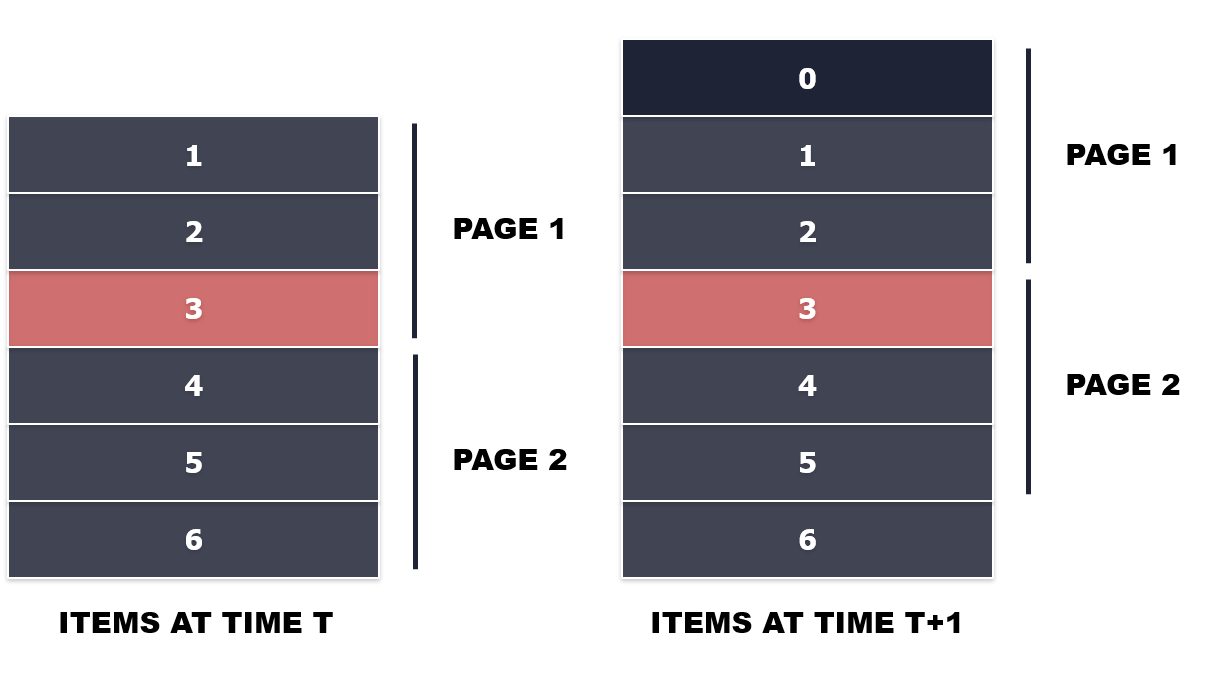
- Skipping an item. Similarly to the example above, if an item is removed from the list we'll skip an item.
Though offsets can be used in 90% of the cases, it also means that for certain kinds of APIs, using this technique doesn’t make sense because the set of data and the boundaries between loaded sections is constantly changing (i.e. real time data). In this case, use cursor based pagination.
Pagination can be made easier for the consumer by returning preformatted URIs to fetch the next and previous pages. All APIs using hypermedia MUST perform pagination using HAL.
GET /cars/ HTTP/1.1
Sample list of car objects using HAL
Note : Using offsets pagination (in the case of cursor based pagination, include cursor instead)
{
    "_links": {
        "self": {
          "href": "/cars"
        },
        "first": {
          "href": "/cars?offset=0"
        },
        "next": {
          "href": "/cars?offset=10&limit=10"
        },
        "prev": {
          "href": "/cars?offset=0"
        },
        "last": {
          "href": "/cars?offset=90&limit=10"
        }
    },
    "count": 3,
    "total": 500,
    "_embedded": {
        "cars": [
            {
                "_links": {
                    "self": {
                        "href": "/cars/123"
                    }
                },
                "id": 123,
                "owner": "John Doe"
            },
            {
                "_links": {
                    "self": {
                        "href": "/cars/283"
                    }
                },
                "id": 283,
                "owner": "Mark Nyse"
            },
        ]
    }
} The ability to cache and reuse previously fetched resources is a critical aspect of optimizing for performance. Every browser comes with an implementation of an HTTP cache. Developers MUST ensure that each server response provides the correct HTTP header directives to instruct the browser on when and for how long the browser can cache the response.
This table summarizes the most used caching techniques :
| Header | Definition |
|---|---|
Cache-Control : no-store |
Disallows the browser and all intermediate caches from storing any version of the returned response. Every time the user requests this asset, a request is sent to the server and a full response is downloaded. This is equivalent to no caching at all. |
Cache-Control : private |
Disallows any intermediate cache to cache the response. For instance, a user's browser can cache an HTML page with private user information, but a CDN can't cache the page. |
Cache-Control : max-age |
Specifies the maximum time in seconds that the fetched response is allowed to be reused from the time of the request. For instance if Cache-Control : maxe-age=60 header is set, any call made within 60 seconds will get a cached response. |
Last-Modified |
Contains the date and time at which the origin server believes the resource was last modified. It is used as a validator to determine if a resource received or stored is the same. Must be validated against If-Modified-Since & If-Unmodified-Since headers. |
Expires |
Tells the client when the resource is going to expire. Usually has a date value that specifies from when the resource will be considered stale (possibly out-of-date), and so it needs to be re-validated. For instance if Expires : Wed, 31 Dec 2018 07:28:00 GMT header is set, any request made to the server before the specified date will return a cached response. |
Etag |
The ETag is a unique identifier for your response: it is used on conditional requests using If-None-Match header. Note: you have to make sure the server provides a validation token (ETag) service |
API developers and designers MUST define and configure the appropriate per-resource settings, as well as the overall "caching hierarchy." : try to find a balance between good and bad reactivity depending on the resource type. API designers MUST determine the best cache hierarchy for their API : the combination of resource URLs with content fingerprints (Etag) and short or no-cache lifetimes allows you to control how quickly the client picks up updates.
You cannot cache for long periods of time, such as days, hours or sometimes even minutes because data becomes stale too quickly. That doesn't mean, however, that such data shouldn't be cached at all. When caching resources for short periods of time you should be using HTTP caching instructions that do not rely on shared understanding of time, such as Cache-Control : max-age, Expires and ETags
Dynamic data is data that is often changing includes GPS location, battery voltage, tire pressure etc.
If you are caching resources (API responses) for sufficiently long periods of time (hours, days, potentially: months) you usually do not have to worry about the issues related to date-time-based caching. For facilitating caching of near-static data, you could use two approaches:
ETagsthat do not rely on shared agreement on timeLast-Modified: header that is date-time-centric
Near static data includes country codes, static images like icons, localization labels etc.
You can choose not to cache response, in real-time systems for examples, however this comes with great responsibility. The ability to cache and reuse previously fetched resources is a critical aspect of optimizing for performance. Even for dynamic data, caching can tremendously increase performance.
Real time data includes car speed, precise GPS location etc.
There's no one best cache strategy. API designers and developers MUST take several parameters into account while working on caching strategy :
- Type of data served : as we've seen before, dynamic and static data will not have the same caching policy.
- Traffic patterns : caching was designed to optimize performances by limiting server calls - if your API is used be a few consumers, caching might not be as critical as if your API was used by millions of people.
- Application-specific requirements for data freshness : caching is application specific, meaning that a resource might not be cached the same way across all applications.
example : a GPS location might not be cached the ame way in :
- Real-time applications (Waze for instance) : data has ~1sec or less lifetime
- A car dealership application to know approximately where the car is located : data has a ~1min lifetime
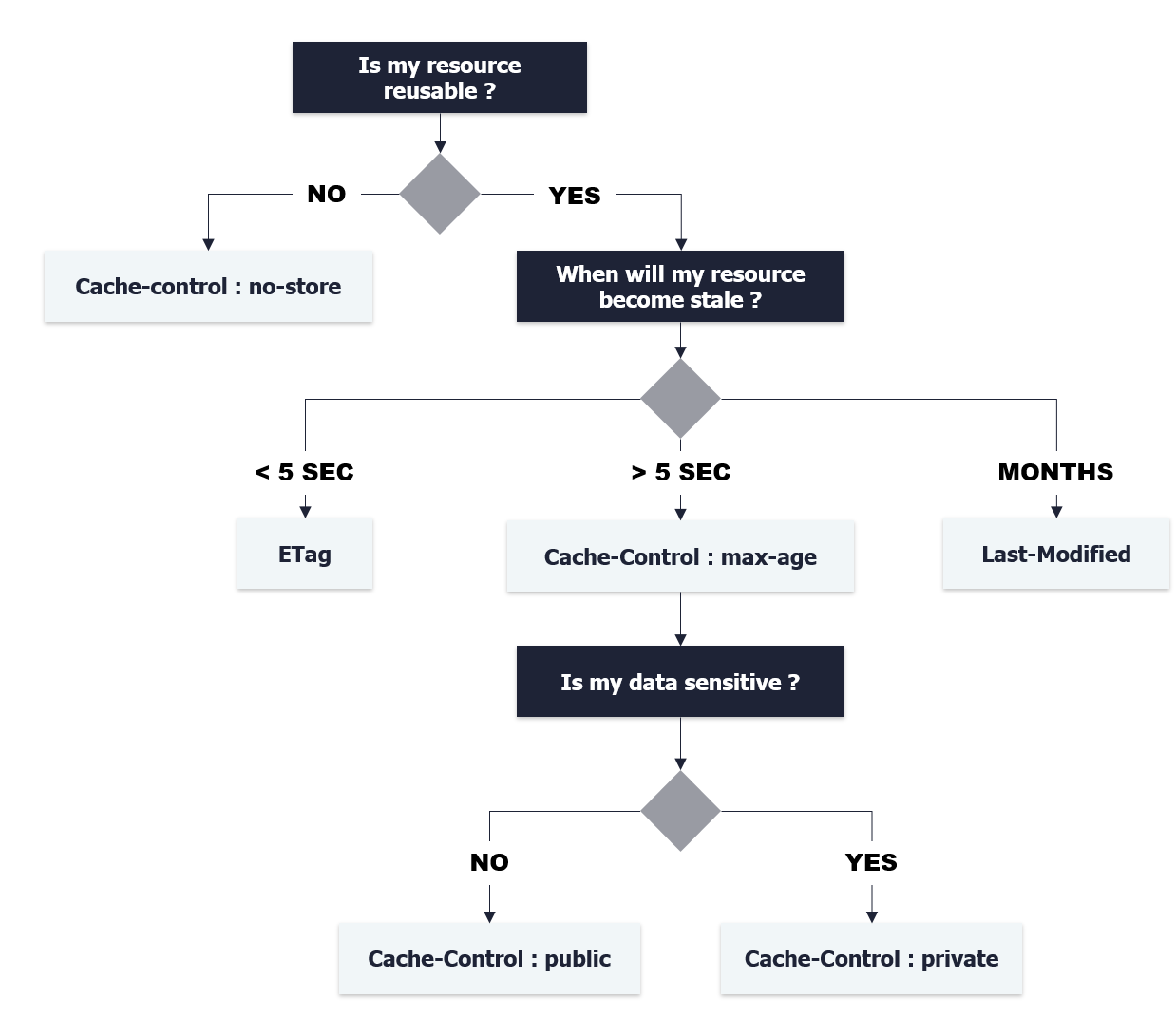
Developers MAY refer to this diagram when deciding on which caching technique to choose :
This section describes how to version APIs and most specifically what are the invocation rules.
A version is written as follows :
- major version : non-retro compatible updates
- minor version : retro compatible updates
- patch version : mostly bug fixing
*Retro compatibility : updates that are still compatible with previous versions of the API
API’s are versioned products and MUST adhere to the following versioning principles, as per semantic versionning.
- API specifications MUST follow the versioning scheme where where the
vintroduces the version, the major is an ordinal starting with1for the first LIVE release, and minor is an ordinal starting with0for the first minor release of any major release - API endpoints MUST only reflect the major version
- A minor API version MUST maintain backward compatibility with all previous minor versions, within the same major version
- A major API version MAY maintain backward compatibility with a previous major version
APIs MUST invoke the version in the url of the request.
https://api.mpsa.com/manufacturing/factory/v1/customers/456
APIs MUST NOT invoke the version number in the header of the request.
Certain types of operations might require processing of the request in an asynchronous manner in order to avoid long delays on the client side and prevent long-standing open client connections waiting for the operations to complete. Usually, asynchronism should be considered when a delays exceed 400ms. If that is the case, API designers should ask themselves if such delay is problematic or not.
There exists multiple ways to notify the API consumer that the operation has finished executing :
- Webhooks : force the consumer to implement web hooks to retrieve the operation's response. While this solution is ideal and is RECOMMENDED for all APIs, consumer might not always support it.
- Polling : force the consumer to poll until the operation has finished executing
- External Notifications : notify the operation completion via external notifications such as email, text message etc. Mostly used in cases where the consumer is a human.
The time it takes for an operation to finish may vary : polling forces consumers to figure out how often to make the polling calls which is far from being optimal. Instead, it is RECOMMENDED that APIs use webhooks whenever possible.
Webhooks solve this problem by allowing a web service to provide other services with near real-time information using HTTP POST requests. In short : instead of asking the server if it has data, the consumer will be notified to a given URI that the data is available.
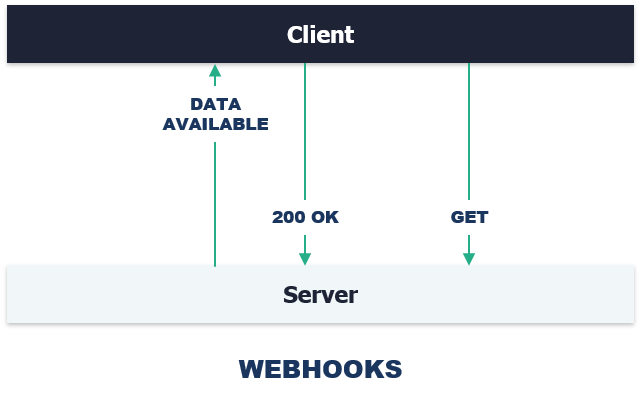
What API conceptors need to provide :
-
Documentation the way consumers can specify the URI the webhook will serve
-
Provide information regarding the webhooks' payload : a webhook MUST at least provide the information in the table below :
Attribute Type Description idstringUnique identifier for the webhook. createdtimestampUnique identifier for the webhook. dataurlURL to retrieve data associated with the event. typestringDescription of the event (e.g: car.registeredoruser.created)
Sample webhook payload
{
  "id": "evt_1BqTZj2eZvKYlo2CvwY0ZQBr",
  "created": 1517435823,
  "data":  "https://api.mpsa.com/manufacturing/factory/v1/customers/123123",
  "type": "user.created"
}
What API consumers must implement :
Consumer MUST setup an API endpoint to receive webhook's payloads and returing appropriate status codes. In pseudo code :
post "/my/webhook/url" do
  # Retrieve the request's body and parse it as JSON
  event_json = JSON.parse(request.body.read)

  # Do something with event_json

  status 200
end
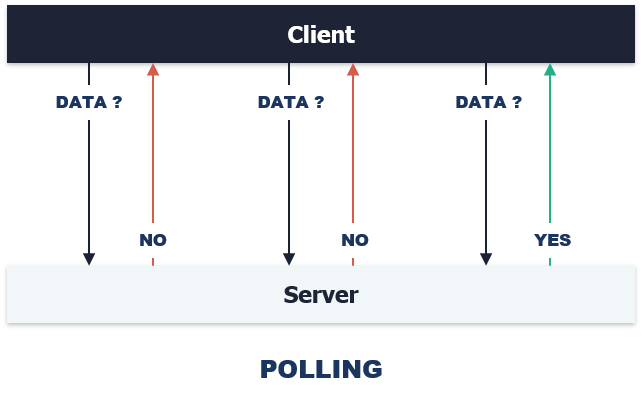
In use cases where webhooks cannot be used, APIs MUST employ the following pattern :
For POST requests :
-
Return the
202 AcceptedHTTP response code. -
In the response body, include one or more URIs as hypermedia links, which could include:
- The final URI of the resource where it will be available in future if the ID and path are already known. Clients can then make an HTTP
GETrequest to that URI in order to obtain the completed resource. Until the resource is ready, the final URI SHOULD return the HTTP status code404 Not Found. This is equivalent to polling.
{ "rel": "self", "href": "/v1/namespace/resources/{resource_id}", "method": "GET" }- A temporary request queue URI where the status of the operation may be obtained via some temporary identifier. Clients SHOULD make an HTTP
GETrequest to obtain the status of the operation which MAY include such information as completion state, ETA, and final URI once it is completed. This is equivalent to polling.
{ "rel": "self", "href": "/v1/queue/requests/{request_id}, "method": "GET" }" - The final URI of the resource where it will be available in future if the ID and path are already known. Clients can then make an HTTP
For PUT/PATCH/DELETE/GET requests:
Like POST, you can support PUT/PATCH/DELETE/GET to be asynchronous. The behaviour would be as follows:
- Return the
202 AcceptedHTTP response code. - In the response body, include one or more URIs as hypermedia links, which could include:
-
A temporary request queue URI where the status of the operation may be obtained via some temporary identifier. Clients SHOULD make an HTTP
GETrequest to obtain the status of the operation which MAY include such information as completion state, ETA, and final URI once it is completed.{ "rel": "self", "href": "/v1/queue/requests/{request_id}, "method": "GET" }"
-
APIs that support both synchronous and asynchronous processing for an URI:
APIs that support both synchronous and asynchronous operations for a particular URI and an HTTP method combination, MUST recognize the Prefer header and exhibit following behavior:
- If the request contains a
Prefer=respond-asyncheader, the service MUST switch the processing to asynchronous mode. - If the request doesn't contain a
Prefer=respond-asyncheader, the service MUST process the request synchronously.
It is desirable that all APIs that implement asynchronous processing, also support webhooks as a mechanism of pushing the processing status to the client.
API consumers can be notified via external notfications such as an email, sms etc. This technique is rarely used and can be applied only to very specific use cases.