Socket programming allows you to create networked applications that can communicate over a network using the socket interface. Sockets provide a mechanism for communication between two devices (hosts) over a network, either locally or across the internet. The most common use cases are client-server applications, where the client sends requests to the server, and the server responds.
Socket programming is a way of connecting two nodes on a network to communicate with each other. One socket(node) listens on a particular port at an IP, while the other socket reaches out to the other to form a connection. The server forms the listener socket while the client reaches out to the server.
TCP/IP provides end-to-end connectivity specifying how data should be
- formatted
- addressed
- transmitted
- routed
- received at the destination

| Feature | TCP (Transmission Control Protocol) | UDP (User Datagram Protocol) |
|---|---|---|
| Reliability | Reliable, ensures data delivery and order | Unreliable, no guarantee of delivery or order |
| Connection | Connection-oriented (requires handshake to establish connection) | Connectionless, no connection setup |
| Speed | Slower due to overhead (error checking, connection setup) | Faster, minimal overhead |
| Data Order | Guarantees correct order of packets | Does not guarantee packet order |
| Error Checking | Built-in error checking, retransmission if data is lost or corrupted | Uses checksums for error detection but no retransmission |
| Flow Control | Yes, uses flow control and congestion control | No flow control, relies on the application for handling |
| Congestion Control | Yes, adjusts transmission rate to avoid network congestion | No congestion control |
| Use Cases | Web browsing, file transfer, email, etc. (reliable applications) | Streaming, VoIP, online gaming, DNS (real-time apps) |
| Header Size | Larger (20 bytes) | Smaller (8 bytes) |
| Performance | Lower performance due to overhead | Higher performance due to less overhead |
Some common examples of TCP and UDP with their default ports:
- DNS lookup UDP 53
- FTP TCP 21
- HTTP TCP 80
- POP3 TCP 110
- Telnet TCP 23
Berkeley Sockets is a programming interface for network communication that is used in the Unix operating system. The Berkeley Sockets API provides a set of functions that enable communication between computers over a network, allowing software programs to send and receive data through network connections. It is a crucial part of the TCP/IP stack and is used in many networking applications, such as web browsers, file transfer tools, and email clients.
- Universally known as Sockets
- It is an abstraction through which an application may send and receive data
- Provide generic access to interprocess communication services
- e.g. IPX/SPX, Appletalk, TCP/IP
- Standard API for networking
-
Uniquely identified by
- an internet address
- an end-to-end protocol (e.g. TCP or UDP)
- a port number
-
Two types of (TCP/IP) sockets
- Stream sockets (e.g. uses TCP)
- provide reliable byte-stream service
- Datagram sockets (e.g. uses UDP)
- provide best-effort datagram service
- messages up to 65.500 bytes
- Stream sockets (e.g. uses TCP)
-
Socket extend the convectional UNIX I/O facilities
- file descriptors for network communication
- extended the read and write system calls
lets explain the last point Socket extend the convectional UNIX I/O facilities
UNIX I/O Facilities: In a typical UNIX-based system, communication with files, devices, and other resources happens through file descriptors. A file descriptor is an integer that represents an open file or a stream in the operating system. When you use standard system calls like read(), write(), open(), and close(), you're interacting with file descriptors.
Sockets for Network Communication: A socket is an endpoint for communication between two machines over a network. Sockets allow processes to communicate with each other over the internet or a local network. A socket is similar to a file in the sense that you can think of it as a resource that can be read from or written to, just like you would with a file on disk.
File Descriptors for Network Communication: In UNIX, a socket is treated just like a file. When you create a socket (using the socket() system call), the system assigns it a file descriptor. You can then use the standard UNIX system calls, like read(), write(), open(), and close(), to communicate over the network through this socket. This is a key point: sockets extend the concept of file descriptors to network communication.
Extended Read and Write System Calls: Normally, the read() and write() system calls are used to read from and write to files. With sockets, these system calls are extended to also handle network communication. For example:
read() can be used to receive data over a network connection through a socket. write() can be used to send data over a network connection via the socket.
The socket() function in c has the following parameters
int sockid = socket(family, type, protocol);The "family" in a socket refers to the communication domain or the type of addresses that will be used with the socket. The communication domain determines how the socket communicates with other sockets (i.e., over the network, locally, etc.). Here are some of the most common socket families:
-
PF_INET(IPv4):- Meaning: Stands for "Protocol Family: Internet". This is used for IPv4 (Internet Protocol version 4) communication over the network.
- Used For: Standard networking, such as web browsers, email, file transfers, etc.
- Address Type: IPv4 addresses (e.g.,
192.168.1.1). - Protocol: Typically TCP or UDP.
sockfd = socket(PF_INET, SOCK_STREAM, 0); // For TCP/IP communication
-
PF_INET6(IPv6):- Meaning: Stands for "Protocol Family: Internet Version 6". This is used for IPv6 (Internet Protocol version 6), which is the successor to IPv4.
- Used For: Networking with IPv6 addresses (e.g.,
fe80::1), which allows for a larger address space and better routing. - Address Type: IPv6 addresses (e.g.,
fe80::1). - Protocol: Typically TCP or UDP.
sockfd = socket(PF_INET6, SOCK_STREAM, 0); // For IPv6 communication
-
PF_UNIXorPF_LOCAL(Local Communication):- Meaning: Used for inter-process communication (IPC) on the same machine (local communication). The socket operates using file system paths instead of IP addresses.
- Used For: Local applications or processes running on the same system (e.g., a database server and a client on the same machine).
- Address Type: Unix file system paths (e.g.,
/tmp/mysocket). - Protocol: Local communication.
sockfd = socket(PF_UNIX, SOCK_STREAM, 0); // For local communication
-
PF_PACKET(Raw Packet Communication):- Meaning: This is used for low-level network interface communication. It allows the socket to directly access the network interface to send/receive raw packets.
- Used For: Specialized network operations, like packet sniffing or raw socket communication at the data link layer (e.g., Ethernet).
- Protocol: Allows for raw access to the network stack (e.g., working with Ethernet frames).
sockfd = socket(PF_PACKET, SOCK_RAW, htons(ETH_P_ALL)); // For raw packet access
-
PF_NETLINK(Kernel/User-space Communication):- Meaning: Used for communication between the kernel and user-space applications. This is mainly used for network configuration and netlink sockets.
- Used For: Kernel communication with user-space programs, for example, for network configuration tasks or network interface status monitoring.
sockfd = socket(PF_NETLINK, SOCK_RAW, NETLINK_ROUTE); // For netlink communication
-
PF_TIPC(Transparent Inter-Process Communication):- Meaning: The TIPC (Transparent Inter-Process Communication) protocol family is used for highly available, fault-tolerant, and distributed systems.
- Used For: Communication in a cluster of machines. Typically used in high-availability systems (like databases or distributed applications).
sockfd = socket(PF_TIPC, SOCK_RDM, 0); // For TIPC communication
-
PF_KEY(IPsec):- Meaning: Used for IPsec (Internet Protocol Security) related operations.
- Used For: Handling key management protocols related to IPsec.
sockfd = socket(PF_KEY, SOCK_RAW, 0); // For IPsec key management
-
PF_XDP(eXpress Data Path):- Meaning: This is used for high-performance networking with eBPF (extended Berkeley Packet Filter). It allows high-throughput packet processing, often used in low-latency applications like network switches.
- Used For: Advanced network performance techniques, often in data centers or network appliances.
sockfd = socket(PF_XDP, SOCK_RAW, 0); // For high-performance data path
| Family | Description | Common Use |
|---|---|---|
PF_INET |
IPv4 (Internet Protocol version 4) | Standard networking (web, email, etc.) |
PF_INET6 |
IPv6 (Internet Protocol version 6) | Networking with IPv6 addresses |
PF_UNIX |
Local communication using file paths | IPC between processes on the same machine |
PF_PACKET |
Raw packet communication (access to the link layer) | Packet sniffing, raw socket communication |
PF_NETLINK |
Communication with the kernel and user-space apps | Network configuration, kernel-user space comm |
PF_TIPC |
Transparent Inter-Process Communication | High availability systems, distributed apps |
PF_KEY |
IPsec (Internet Protocol Security) | Key management for IPsec |
PF_XDP |
High-performance network data path | Low-latency, high-throughput networking |
PF_INETandPF_INET6are the most commonly used families for Internet-based communication. They use IP addresses (IPv4 or IPv6) to identify the source and destination of communication.PF_UNIXis used for communication between processes on the same machine and does not use IP addresses, but instead uses file system paths to create and access sockets.PF_PACKETallows for direct access to network hardware and is used for specialized tasks like monitoring or processing raw packets.
- In socket programming, the type of socket defines the communication characteristics, such as whether the communication is reliable, connection-based, connectionless, and whether it is stream-oriented or message-oriented. Here are the key socket types that you might encounter:
-
Description:
- Reliable, two-way, connection-based communication.
- This type of socket is used for stream-oriented communication, which means data is sent in a continuous stream of bytes.
- It is used when you need reliable communication where the data is guaranteed to be delivered in order and without errors (thanks to protocols like TCP).
-
Characteristics:
- Connection-based: Before sending or receiving data, a connection must be established between the sender and receiver. The connection is maintained for the duration of the communication.
- Reliable: It ensures that the data reaches the destination without errors. If there is any packet loss, retransmission will occur automatically.
- Two-way communication: Data can be sent and received in both directions (client to server and server to client).
- In-order delivery: Data is received in the exact order in which it was sent.
-
Common Protocols:
- TCP (Transmission Control Protocol): Used for ensuring reliable and ordered delivery of data over the network.
-
Example Use Case:
- Web Browsing (HTTP), Email (SMTP, IMAP), FTP.
-
Example Code:
int sockfd = socket(AF_INET, SOCK_STREAM, 0); // TCP Socket
-
Description:
- Unreliable, connectionless, message-oriented communication.
- This type of socket is used for datagram communication, where data is sent as discrete packets or messages.
- It does not guarantee delivery, order, or error correction, so the application needs to handle these issues (if needed).
-
Characteristics:
- Connectionless: No need to establish a connection before sending data. Each message is sent independently from the others, and the receiver may not even be ready to receive it.
- Unreliable: The system makes no guarantees about the delivery or integrity of the data. If the data is lost, it is not automatically retransmitted.
- Message-oriented: Data is sent in discrete chunks (datagrams). Each message is sent as a whole and is not broken up into smaller chunks, unlike stream-based sockets.
- No in-order delivery: The order in which messages are received is not guaranteed.
-
Common Protocols:
- UDP (User Datagram Protocol): Provides a fast but unreliable communication service where packets may be lost, duplicated, or arrive out of order.
-
Example Use Case:
- DNS (Domain Name System), Streaming media (audio/video), Online games, VoIP (Voice over IP).
-
Example Code:
int sockfd = socket(AF_INET, SOCK_DGRAM, 0); // UDP Socket
-
Description:
- Raw socket allows direct access to lower layers of the network stack.
- Used to send or receive packets without any protocol-specific headers (e.g., IP, TCP, UDP headers). This allows for custom packet construction or packet inspection.
-
Characteristics:
- Direct access to network layer: No protocol handling (like TCP/UDP) is done by the kernel.
- Used for custom protocols, network diagnostics, or packet sniffing.
- Requires administrative privileges in many systems (because raw sockets can manipulate low-level network packets).
-
Common Protocols:
- IP (Internet Protocol), ICMP (Internet Control Message Protocol).
-
Example Use Case:
- Network tools like ping, traceroute, and custom network security tools.
-
Example Code:
int sockfd = socket(AF_INET, SOCK_RAW, IPPROTO_ICMP); // Raw socket for ICMP
-
Description:
- Reliable, connection-oriented, but message-based communication.
- Data is sent in separate messages that are delivered in the order they were sent and without any loss.
- It's reliable like
SOCK_STREAM, but it is message-oriented likeSOCK_DGRAM.
-
Characteristics:
- Connection-based: A connection is established before communication starts.
- Message-oriented: Data is sent as discrete chunks or packets, similar to
SOCK_DGRAM. - Reliable: Guarantees delivery of each message without duplication, and in order.
- Ordered delivery: Unlike
SOCK_DGRAM, the messages are received in the order they were sent.
-
Common Protocols:
- This socket type is rarely used but could be implemented by protocols like ISO Transport Protocol (ISO 8073).
-
Example Use Case:
- Some specialized transport protocols that need reliable, message-based communication.
-
Example Code:
int sockfd = socket(AF_INET, SOCK_SEQPACKET, 0); // Sequenced, reliable, message-based
-
Description:
- Reliable, connectionless, message-based communication.
- This type is typically used for a communication method where messages are reliable but no connection is established (similar to
SOCK_DGRAMbut with reliability).
-
Characteristics:
- Connectionless: No need to establish a connection before sending data.
- Reliable: Guarantees that the messages will be delivered without loss, and typically in the correct order.
- Message-oriented: Like
SOCK_DGRAM, data is sent as discrete messages.
-
Common Protocols:
- RDM (Reliable Datagram Protocol) or some custom protocols designed for specific applications.
-
Example Use Case:
- Fault-tolerant applications that need reliable delivery but don’t require a connection.
-
Example Code:
int sockfd = socket(AF_INET, SOCK_RDM, 0); // Reliable datagram socket
| Socket Type | Description | Protocol Example | Communication Characteristics |
|---|---|---|---|
| SOCK_STREAM | Reliable, two-way, connection-based (Stream-oriented) | TCP | Connection-based, reliable, in-order data delivery |
| SOCK_DGRAM | Unreliable, connectionless, message-oriented | UDP | Connectionless, unreliable, no order guarantee |
| SOCK_RAW | Low-level communication (access to raw packets) | IP, ICMP | Custom packet manipulation, used for diagnostics or custom protocols |
| SOCK_SEQPACKET | Reliable, connection-oriented, message-based | ISO Transport | Connection-based, reliable, message-based, in-order delivery |
| SOCK_RDM | Reliable, connectionless, message-based (rarely used) | RDM | Connectionless, reliable, message-oriented, in-order delivery |
- SOCK_STREAM (TCP): Use when you need reliable, ordered, and two-way communication, like web browsing, file transfer, or email.
- SOCK_DGRAM (UDP): Use for unreliable, fast, and simple communication where packet loss is acceptable (e.g., real-time applications like video streaming or online gaming).
- SOCK_RAW: Use for custom packet manipulation and network diagnostics (e.g., packet sniffing, custom network tools).
- SOCK_SEQPACKET: Use for situations where you need reliable message-based communication, and you need to send and receive discrete messages reliably.
- SOCK_RDM: Use for connectionless, reliable, and message-oriented communication where you want reliability but don’t need a connection to be established (rare use case).
In socket programming, the protocol field specifies which protocol to use for the communication. The protocol is used in conjunction with the family (e.g., AF_INET for IPv4) and type (e.g., SOCK_STREAM for TCP) to define how data is transmitted between computers.
While the family and type determine the general structure of the communication, the protocol specifies a more specific method or implementation for that communication. Below are explanations for common protocol options used in socket programming.
-
IPPROTO_TCP(Transmission Control Protocol):- Description:
IPPROTO_TCPspecifies that the protocol used for communication will be TCP (Transmission Control Protocol). TCP is a connection-oriented protocol, meaning that before data can be sent, a connection must be established between the sender and the receiver.
- Characteristics:
- Reliable: Ensures that the data is delivered in order and without errors. If a packet is lost, it will be retransmitted.
- Stream-oriented: Data is sent as a continuous stream of bytes, without boundaries.
- Flow Control: Uses mechanisms to prevent network congestion and ensure that the sender does not overwhelm the receiver.
- Connection Establishment: Requires a handshake process (SYN, SYN-ACK, ACK) to establish the connection between the client and the server.
- Common Use:
- Web browsing (HTTP/HTTPS), File Transfer (FTP), Email (SMTP, IMAP).
- Example in Code:
int sockfd = socket(AF_INET, SOCK_STREAM, IPPROTO_TCP); // TCP Socket
- Description:
-
IPPROTO_UDP(User Datagram Protocol):- Description:
IPPROTO_UDPspecifies that the protocol used will be UDP (User Datagram Protocol). UDP is a connectionless and unreliable protocol, which means there is no formal connection setup or guarantee of delivery.
- Characteristics:
- Unreliable: There is no guarantee that data will be delivered. Lost packets are not retransmitted, and out-of-order delivery may occur.
- Datagram-oriented: Data is sent in discrete packets (datagrams), and each packet is treated independently.
- No Connection Setup: No handshake is required to start communication. Each message (datagram) is sent individually.
- Low Overhead: Because of the lack of error correction and connection setup, UDP has lower overhead and is faster than TCP.
- Common Use:
- Real-time applications such as streaming audio/video (e.g., IPTV), online gaming, VoIP (Voice over IP), DNS (Domain Name System) queries.
- Example in Code:
int sockfd = socket(AF_INET, SOCK_DGRAM, IPPROTO_UDP); // UDP Socket
- Description:
-
IPPROTO_ICMP(Internet Control Message Protocol):- Description:
IPPROTO_ICMPspecifies that the protocol used will be ICMP. ICMP is used for network diagnostics and error reporting (e.g., used by tools likepingandtraceroute).
- Characteristics:
- Error Reporting: Used for sending error messages indicating issues with packet delivery (e.g., "Destination Unreachable").
- Diagnostic: Provides feedback about network conditions and operational status.
- Connectionless: ICMP does not establish a connection between endpoints; it simply sends and receives messages.
- Common Use:
- Tools like ping, traceroute, and network diagnostics.
- Example in Code:
int sockfd = socket(AF_INET, SOCK_RAW, IPPROTO_ICMP); // Raw Socket for ICMP
- Description:
-
IPPROTO_RAW(Raw Socket):- Description:
IPPROTO_RAWis used for raw sockets. This allows direct access to the IP layer, bypassing the transport layer protocols like TCP and UDP. It is typically used for custom protocols or network diagnostics (e.g., custom packet generation or packet sniffing).
- Characteristics:
- Direct Access to IP Layer: With raw sockets, the application can create its own packet headers, unlike with TCP or UDP, which automatically handle the headers.
- Network Control: Raw sockets allow more granular control over the packet data but are typically only available to privileged users (admin/root).
- Custom Protocols: It can be used for creating and testing custom network protocols.
- Common Use:
- Packet Sniffing (e.g., Wireshark), Network Security Testing, Custom Protocol Development.
- Example in Code:
int sockfd = socket(AF_INET, SOCK_RAW, IPPROTO_RAW); // Raw Socket for custom protocols
- Description:
-
IPPROTO_IP(Generic IP Protocol):- Description:
IPPROTO_IPis used for generic IP-level communication. It allows applications to work at the IP layer without specifying a specific transport protocol (like TCP or UDP).
- Characteristics:
- Generic Protocol: It is a placeholder that allows sending and receiving packets without defining the transport layer protocol.
- It is generally used with raw sockets to handle IP-level operations.
- Common Use:
- Used in advanced networking tasks where a specific transport protocol is not required, or when working directly with the IP layer.
- Example in Code:
int sockfd = socket(AF_INET, SOCK_RAW, IPPROTO_IP); // Generic IP Protocol
- Description:
-
IPPROTO_UDPandIPPROTO_TCPfor IPv6:IPPROTO_TCPandIPPROTO_UDPcan also be used with IPv6. In this case, the socket family would be set toAF_INET6, and the protocol field specifies whether you are using TCP or UDP for IPv6 communication.- Example for IPv6:
int sockfd = socket(AF_INET6, SOCK_STREAM, IPPROTO_TCP);  // TCP over IPv6
int sockfd = socket(AF_INET6, SOCK_DGRAM, IPPROTO_UDP);  // UDP over IPv6
- Default Behavior: If the protocol field is set to 0, the operating system automatically selects the appropriate protocol based on the socket family and socket type.
- For example, if you choose
SOCK_STREAMfor the socket type, the protocol will default toIPPROTO_TCP. - Similarly, if you choose
SOCK_DGRAM, the protocol will default toIPPROTO_UDP.
- For example, if you choose
| Protocol Name | Protocol Identifier | Typical Use | Common Protocol |
|---|---|---|---|
| Transmission Control Protocol (TCP) | IPPROTO_TCP |
Reliable, connection-oriented communication (e.g., HTTP, FTP) | TCP |
| User Datagram Protocol (UDP) | IPPROTO_UDP |
Connectionless, unreliable communication (e.g., DNS, VoIP) | UDP |
| Internet Control Message Protocol (ICMP) | IPPROTO_ICMP |
Error and diagnostic reporting (e.g., ping, traceroute) | ICMP |
| Raw Protocol | IPPROTO_RAW |
Direct IP-layer communication, custom protocols | Raw |
| Generic IP Protocol | IPPROTO_IP |
Used for IP-level operations, bypassing transport protocols | IP |
IPPROTO_TCP: Use when you need reliable, ordered, and connection-based communication (e.g., web browsing, email).IPPROTO_UDP: Use when you need faster, connectionless communication, where reliability is not critical (e.g., streaming, real-time gaming, DNS).IPPROTO_ICMP: Use when performing network diagnostics or reporting errors (e.g., ping, traceroute).IPPROTO_RAW: Use when you need direct access to the IP layer or want to build a custom protocol (e.g., network tools, packet sniffers).IPPROTO_IP: Use in advanced networking applications requiring access to the raw IP layer.
In general, most socket applications will default to 0 for the protocol field, and the operating system will select the correct protocol automatically based on the socket type (SOCK_STREAM or SOCK_DGRAM). However, specifying a protocol can give you more control over your communication if needed.
NOTE: socket call does not specify where data will be coming from,
nor where it will be going to – it just creates the interface!
When finished using a socket, the socket should be closed
status = close(sockid);sockid: the file descriptor (socket being closed)
status: 0 if successful, -1 if error
- closes a connection (for stream socket)
- frees up the port used by the socket
In socket programming, you need to understand a few basic concepts:
- Socket: An endpoint for communication between two machines.
- Server: Listens for incoming requests from clients and responds.
passive socket: passive socket refers to a socket that is used to listen for incoming network connections
- Client: Sends requests to the server and waits for a response.
active socket: active socket refers to a socket that is used to initiate a connection to a remote server- must know the address and the port of the server
- IP Address: Identifies a device on the network.
- Port Number: Identifies a specific application or service on the device.
- Protocol: Defines the rules for communication (e.g., TCP, UDP).
The two main types of sockets are:
- Stream Sockets (TCP): Reliable, connection-oriented communication. Ensures data arrives in order.
- Datagram Sockets (UDP): Unreliable, connectionless communication. Does not guarantee order or delivery.
Socket programming typically involves the following steps:
- Create a socket.
- Bind the socket to a specific IP and port.
- Listen for incoming connections (on the server-side).
- Establish Connection (on Client side)
- Accept connections (on the server-side).
- Send and receive data.
- Close the socket.
| Primitive | Meaning |
|---|---|
| Socket | Create a new communication endpoint |
| Bind | Attach a local address to a socket |
| Listen | Announce willingness to accept connections |
| Accept | Block caller until a connection request arrives |
| Connect | Actively attempt to establish a connection |
| Send | Send some data over the connection |
| Receive | Receive some data over the connection |
| Close | Release the connection |
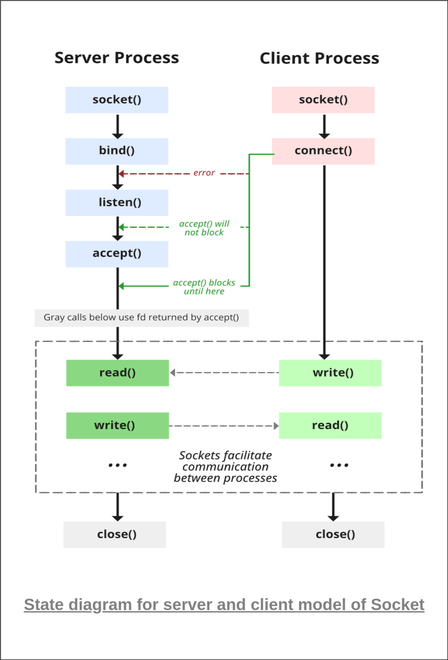
as i have already created an socket in the the socket section i will not be doing it again
but you should also learn about
The struct sockaddr is a generic address structure that is used to store address information for different address families (e.g., IPv4, IPv6, Unix domain sockets). This structure is used to handle all types of socket communications in a uniform way, allowing flexibility across different protocols.
Here’s the structure:
struct sockaddr {
    unsigned short sa_family;  /* Address family (e.g., AF_INET for IPv4) */
    char sa_data[14];          /* Family-specific address information */
};sa_family(16 bits):- This field specifies the address family. The address family indicates what type of addresses are stored in the
sa_datafield. - Common values:
AF_INET: Indicates an IPv4 address.AF_INET6: Indicates an IPv6 address.AF_UNIX: Indicates a Unix domain socket.
- This field specifies the address family. The address family indicates what type of addresses are stored in the
sa_data[14](14 bytes):- This field holds the actual address data for the address family. The content of this field depends on the address family.
- For example:
- For
AF_INET(IPv4): It will contain the IPv4 address and the port number. - For
AF_UNIX: It will contain a path to the Unix domain socket.
- For
The struct sockaddr is a generic structure, meaning that it can be used for any address family, but it does not contain enough details to specifically address certain types (like IPv4). That's where specialized structures like struct sockaddr_in (for IPv4) come into play.
This structure is used to represent an IPv4 address in the struct sockaddr_in structure. It is a specific type used to store the 32-bit IPv4 address.
Here’s the structure:
struct in_addr {
    unsigned long s_addr;  /* 32-bit Internet address */
};s_addr(32 bits):- This is a 32-bit field that holds the actual IPv4 address.
- For example, the IP address
192.168.1.1would be stored in this field as a 32-bit number. - The address is stored in network byte order (big-endian), meaning the most significant byte is stored first.
You can use the inet_addr() or inet_pton() functions to convert an IPv4 address from text form (like "192.168.1.1") into its 32-bit representation.
The struct sockaddr_in is a specialized version of the struct sockaddr structure used for IPv4 addresses. It contains the necessary fields to store an IPv4 address and port number, which are used in networking functions like bind(), connect(), and accept().
Here’s the structure:
struct sockaddr_in {
    unsigned short sin_family;  /* Address family (AF_INET for IPv4) */
    unsigned short sin_port;    /* Port number (16 bits) */
    struct in_addr sin_addr;    /* Internet address (32 bits) */
    char sin_zero[8];           /* Not used, used to pad structure to size of sockaddr */
};-
sin_family(16 bits):- This field indicates the address family. For IPv4, it is always set to
AF_INET(IPv4 address family).
- This field indicates the address family. For IPv4, it is always set to
-
sin_port(16 bits):- This field holds the port number (16-bit) for the connection.
- It is important to note that the port number must be stored in network byte order (big-endian). This is typically done using the
htons()function (host-to-network short) to convert the port number to the correct format.
-
sin_addr(32 bits):- This field holds the IPv4 address. It is a
struct in_addrand stores the IP address in a 32-bit format. The address is usually set using theinet_pton()function orinet_addr().
- This field holds the IPv4 address. It is a
-
sin_zero[8](8 bytes):- This is unused but is included to ensure the size of
struct sockaddr_inis the same asstruct sockaddr(which is typically 16 bytes). - In older systems, padding was required to align the structure to a specific size, but today it is just there for compatibility.
- this will help us to cast one struct into another
- This is unused but is included to ensure the size of
NOTE : sockaddr_in can be casted to a sockaddr
The bind() function is used to associate a socket with a specific IP address and port on the machine. This is a crucial step in setting up network communication, particularly for servers, as it "reserves" the address and port that the server will listen on for incoming connections.
int bind(int sockid, const struct sockaddr *addrport, socklen_t size);-
sockid:
- This is the socket descriptor returned by the
socket()function. It identifies the socket that you want to bind to a specific address and port. - It's an integer, typically returned by a successful
socket()call.
- This is the socket descriptor returned by the
-
addrport:
- This is a pointer to a
struct sockaddr(or more specifically a protocol-specific structure likestruct sockaddr_infor IPv4 orstruct sockaddr_in6for IPv6). - The
addrportstructure holds the IP address and the port number that the socket will be bound to.
For IPv4 (the most common case), you typically use
struct sockaddr_in, which contains:- sin_family: Address family (e.g.,
AF_INETfor IPv4). - sin_port: The port number the socket will listen on (in network byte order).
- sin_addr.s_addr: The IP address of the machine (in network byte order). This can often be set to
INADDR_ANYto allow the socket to accept connections on any available network interface (useful for servers that want to accept connections from all network interfaces).
Here's an example of what the
struct sockaddr_inmight look like:struct sockaddr_in addrport; addrport.sin_family = AF_INET; // IPv4 addrport.sin_port = htons(8080); // Port 8080 (converted to network byte order) addrport.sin_addr.s_addr = INADDR_ANY; // Accept connections from any interface
- This is a pointer to a
-
size:
- This is the size of the structure (in bytes) being passed to the
bind()function. - For
struct sockaddr_in, you would typically passsizeof(struct sockaddr_in). - The reason this is needed is that
bind()works with different address families, so it needs to know how much memory to read from theaddrportstructure.
- This is the size of the structure (in bytes) being passed to the
-
status:
- This is the return value of the
bind()function. - On success,
bind()returns0. - On failure,
bind()returns-1and setserrnoto indicate the specific error. This can happen if:- The port is already in use by another process.
- There are permission issues (e.g., trying to bind to a port number less than 1024 without root privileges).
- The IP address or network interface doesn't exist on the machine.
- This is the return value of the
-
Associates a socket with a local address: When a socket is created using
socket(), it is just a communication endpoint with no actual address associated with it. Thebind()function associates the socket with a specific IP address and port number, making it ready for communication.-
INADDR_ANY: If you setsin_addr.s_addr = INADDR_ANY, the socket will listen on any available network interface (such as Ethernet, Wi-Fi, or localhost), which is typical for a server that needs to listen for incoming connections from any network. -
Reserved port: The operating system "reserves" the port for the socket so that it can send and receive data through that port. Once a port is bound, it cannot be used by another application unless it is unbound or closed.
-
bind can be skipped for both types of sockets
The bind() function is used to associate a socket with a specific local IP address and port number. Whether or not you need to call bind() depends on the type of socket and the operation you're performing. Let's break it down for different types of sockets and operations:
Datagram sockets are typically used for UDP (User Datagram Protocol), which is connectionless. When you create a UDP socket, the system needs to know which local address and port to use. However, binding is only necessary in certain cases:
- When sending data: If you're only sending data and do not need to listen for incoming responses, you don't need to call
bind(). The OS will automatically assign an ephemeral (temporary) port for the outgoing datagram. The system determines the local port number dynamically, so there's no need to bind it to a specific one. - When receiving data: If you're receiving data, you must bind the socket to a specific local address and port. This is because the system needs to know on which port it should listen for incoming datagrams. If you don’t bind, the OS won't know where to direct the incoming data for your application.
So, in summary:
- Sending only: No
bind()required. - Receiving:
bind()required.
Stream sockets are typically used for TCP (Transmission Control Protocol), which is connection-oriented. For TCP, bind() behavior is a bit different:
-
When establishing a connection (client-side): When a client is connecting to a remote server, the client typically does not need to explicitly call
bind(). The OS automatically assigns a local port and address when the socket tries to connect. You just specify the remote address and port with theconnect()call, and during the connection setup, the OS chooses a local port for you.This means that the OS takes care of figuring out the local port number, and the connection is established to the destination IP and port. Therefore, you don't need to explicitly bind the socket to a local address and port when you're the client.
-
When listening for incoming connections (server-side): On the server-side, you do need to call
bind(). Thebind()function allows the server to specify the local address and port on which it will listen for incoming client connections. After binding, the server can calllisten()to start listening for connection requests, and then useaccept()to accept those connections.
So, in summary:
- Client-side connection: No
bind()required (OS assigns local port dynamically). - Server-side listening:
bind()required to specify the local address and port to listen on.
- For sending UDP datagrams: Since the OS dynamically assigns a local port and address to outgoing packets, you don’t have to specify the port with
bind(). This is useful when you only need to send packets (e.g., in a client-server model where the client sends data without expecting a response). - For client-side TCP connections: Since the client doesn't need to specify a port (the OS handles it during the connection setup), calling
bind()is unnecessary. The operating system automatically chooses an available port for the client to use when connecting to the server.
- Receiving UDP packets: When you want to listen for incoming datagrams on a specific port (e.g., a UDP server), you must bind the socket to that port.
- Listening for incoming TCP connections (server-side): When a server is waiting for client connections, you must bind the socket to a specific address and port so that clients can find and connect to the server.
After successfully binding the socket to a local IP address and port, the server can start listening for incoming connection requests. This is done using the listen() function.
int status = listen(sockid, queueLimit);- The first argument is the socket file descriptor (sokid).
- The second argument specifies the backlog, which is the maximum number of incoming connections that can be queued while waiting for accept() to handle them. If more connections are attempted than the backlog allows, those connections will be refused.
When using the listen() function in socket programming, it's important to understand that listen() itself doesn't directly control whether a socket is blocking or non-blocking. Instead, the blocking or non-blocking behavior is managed by the socket itself and the way the socket is configured using other functions like fcntl() or ioctl().
Here’s a breakdown of different types of socket behaviors related to blocking and non-blocking modes:
By default, sockets operate in blocking mode. When a server calls accept() on a listening socket, it blocks until a client makes a connection. In this case, the server will not proceed until a client connects to the server.
Blocking behavior:
- The
accept()call will wait indefinitely for a connection if there are no clients trying to connect. - If the connection request is made,
accept()returns and the server can process the connection. - This is the default behavior when a socket is created.
Example:
int sokid = socket(AF_INET, SOCK_STREAM, 0);
bind(sokid, (struct sockaddr*)&addrport, sizeof(addrport));
listen(sokid, 5);
int client_sockid = accept(sokid, NULL, NULL); // This will block until a client connects- Simplicity: The server doesn't need to worry about polling or handling multiple tasks at once. It simply waits for a connection, handles it, and then moves to the next connection.
- Common for simple applications: Suitable for applications where the server doesn’t need to handle multiple tasks at the same time.
A non-blocking socket does not block when trying to accept connections or perform other socket operations like reading or writing. When a non-blocking socket is used, the accept() function returns immediately (without waiting) if no connections are present. Instead of waiting, it returns -1 and sets the errno value to EAGAIN or EWOULDBLOCK.
To enable non-blocking mode on a socket, you typically use fcntl() to modify the socket's file descriptor.
How to Set Non-blocking Mode:
#include <fcntl.h>
int flags = fcntl(sokid, F_GETFL, 0);  // Get current flags
fcntl(sokid, F_SETFL, flags | O_NONBLOCK);  // Set the socket to non-blocking
Behavior in Non-blocking Mode:
- The
accept()call will not block the server. If no clients are waiting to connect, it immediately returns-1witherrnoset toEAGAINorEWOULDBLOCK. - If a client connects,
accept()returns the client socket as usual.
Example:
int sokid = socket(AF_INET, SOCK_STREAM, 0);
fcntl(sokid, F_SETFL, O_NONBLOCK);  // Set socket to non-blocking mode
bind(sokid, (struct sockaddr*)&addrport, sizeof(addrport));
listen(sokid, 5);
int client_sockid = accept(sokid, NULL, NULL); // Non-blocking; may return -1 with EAGAIN
if (client_sockid == -1) {
    if (errno == EAGAIN || errno == EWOULDBLOCK) {
        // No clients to accept, continue with other tasks
    }
}- Handling multiple clients simultaneously: In non-blocking mode, the server can use techniques like polling (
select()orpoll()) or epoll to handle multiple connections at once without blocking. - Better control over the flow: The server can do other tasks while it waits for connections, instead of just sitting idle.
- Suitable for high-performance or real-time applications where you don’t want the server to be blocked by waiting on a single client.
In edge-triggered mode, the server only gets notified about state changes, such as when there is new data available or when the connection becomes ready. This is usually used in conjunction with epoll (on Linux) or kqueue (on BSD systems).
This is a more advanced form of non-blocking I/O that reduces the need for constantly polling.
- Epoll in Linux supports two modes: Level Triggered (LT) and Edge Triggered (ET).
- Level Triggered behaves similarly to
select()andpoll(), where the server gets notified as long as there is any readable data or writable data. - Edge Triggered only notifies the server when a change occurs (i.e., when a new client connects or there’s new data).
- Level Triggered behaves similarly to
Edge-triggered mode is more efficient in that it minimizes unnecessary checks, but it requires the server to carefully manage the state of each connection.
- Efficiency: Reduces the need for repeated checks when no new data or events are occurring. This can significantly improve performance, especially when the server handles many connections at once.
- Ideal for scalable systems: Useful when the server needs to handle many thousands of connections with minimal overhead.
Example using epoll (simplified):
int epollfd = epoll_create1(0);
struct epoll_event event;
event.events = EPOLLIN | EPOLLET;  // Enable edge-triggered mode
event.data.fd = sokid;
epoll_ctl(epollfd, EPOLL_CTL_ADD, sokid, &event);

// In the event loop:
struct epoll_event events[MAX_EVENTS];
int n = epoll_wait(epollfd, events, MAX_EVENTS, -1);
for (int i = 0; i < n; i++) {
    if (events[i].data.fd == sokid) {
        // Handle incoming connection (accept())
    }
}In level-triggered mode, the server will continue receiving notifications as long as there is data available or a socket is ready for reading or writing. This is the default behavior for select() and poll(), which are commonly used in non-blocking scenarios.
- Compatibility: Level-triggered behavior is compatible with existing code and libraries like
select()andpoll(). - Simplicity: Easier to implement than edge-triggered mode since you don’t need to manage state changes manually.
- Good for moderate to high concurrency where the number of connections is manageable.
| Mode | Behavior | Use Case |
|---|---|---|
| Blocking Mode | accept() blocks until a connection is made. |
Simple servers with relatively few clients, or where blocking is acceptable. |
| Non-blocking Mode | accept() returns immediately if no connection is available (returns -1 with EAGAIN). |
Servers that need to handle multiple tasks concurrently, such as handling many connections at once. |
| Edge Triggered Mode | Notified only when a change occurs (i.e., new connection, or data becomes available). | High-performance applications that handle thousands of connections concurrently. |
| Level Triggered Mode | Notified as long as a socket has data to read or write, even if no change occurred. | Servers that need to handle connections or I/O operations based on the state of the socket. |
- Blocking mode is simple but can be inefficient if there are multiple clients.
- Non-blocking mode allows the server to perform other tasks while waiting for connections, but it requires more sophisticated handling using functions like
select()orpoll(). - Edge-triggered mode (with
epollorkqueue) is highly efficient and scalable but requires careful handling of events. - Level-triggered mode is the default in many systems and works well for moderate concurrency.
- The client establishes a connection with the server by calling connect()
int status = connect(sockid, &foreignAddr, addrlen);- sockid: integer, socket to be used in connection
- foreignAddr: struct sockaddr: address of the passive participant
- addrlen: integer, sizeof(name)
- status: 0 if successful connect, -1 otherwise
connect() is blocking
- The server gets a socket for an incoming client connection by calling accept()
The accept() function is called on the server socket that is in the listening state (after the listen() function is called) to accept an incoming connection request from a client. It creates a new socket for the client connection, and this new socket is used for communication between the server and that specific client.
- is blocking: waits for connection before returning
- dequeues the next connection on the queue for socket (sockid)
int s = accept(sockid, &clientAddr, &addrLen);- sockid: This is the listening socket's file descriptor
- clientAddr:This is a pointer to a struct sockaddr (usually struct sockaddr_in for IPv4) where the client's address information (IP address and port) will be stored once a connection is accepted. This allows the server to know the IP address and port of the client that is connecting.
- addrLen:This is a pointer to a socklen_t variable that indicates the size of the clientAddr structure.
-
Calls are blocking
- returns only after data is sent / received
int count = send(sockid, msg, msgLen, flags);-
sockid: The socket file descriptor used to send the data to a connected peer.
-
msg: A pointer to the buffer containing the data to send (e.g., a string or binary data).
-
msgLen: The length (in bytes) of the data to send, typically the size of the buffer.
-
flags: Special flags to modify the behavior of the send operation
The
flagsparameter in thesend()function can modify how the data is sent. It is an integer that can be set to one or more special values (bitwise OR'd) to control the behavior of thesend()operation. Here are the most commonly used flags:-
0(Default Behavior):- This is the default flag, which means the
send()function will behave normally, blocking if necessary to send the data.
- This is the default flag, which means the
-
MSG_OOB:- Out-of-band data: This flag is used to send out-of-band data. This type of data is sent with higher priority, typically used for urgent control messages (though rarely used in most modern applications).
-
MSG_NOSIGNAL:- Avoid
SIGPIPE: When a socket is closed by the peer (for example, when the client disconnects), aSIGPIPEsignal is sent to the sending process by default, which can terminate the program. This flag prevents that from happening, allowing thesend()call to return-1witherrnoset toEPIPEinstead.
- Avoid
-
MSG_DONTWAIT:- Non-blocking send: This flag forces the
send()call to be non-blocking. If the socket is not ready to send data, it will immediately return-1witherrnoset toEAGAINorEWOULDBLOCKinstead of blocking until the data can be sent.
- Non-blocking send: This flag forces the
-
MSG_MORE(Linux specific):- Indicate more data will follow: This flag is used to tell the kernel that more data will follow in subsequent
send()calls. It can be used for sending multiple parts of a message as one unit (e.g., TCP segmentation).
- Indicate more data will follow: This flag is used to tell the kernel that more data will follow in subsequent
-
MSG_EOR:
- End of record: This flag indicates that the current message is the last in a sequence, often used for protocols that require message boundaries.
-
is used to receive data from a connected socket (e.g., from a client in a server-client communication). It reads the incoming data and stores it in a buffer.
int count = recv(sockid, recvBuf, bufLen, flags);-
sockid: The socket file descriptor used to receive data from a connected peer.
-
recvBuf: A pointer to the buffer where the received data will be stored.
-
bufLen: The size of the buffer, indicating the maximum number of bytes to read.
-
flags: Special options for the receive operation (e.g.,
0for default,MSG_DONTWAITfor non-blocking).Here are the flags that can be used with the
recv()function, with brief explanations:0: Default behavior, no special flags applied.MSG_WAITALL: Ensures that therecv()call waits until the full buffer (bufLen) is filled before returning, even if data arrives in smaller chunks.MSG_PEEK: Peeks at the incoming data without removing it from the socket's buffer, allowing the data to be received again in a subsequent call.MSG_OOB: Receives out-of-band data if available. This is typically used for urgent data (e.g., TCP urgent data).MSG_DONTWAIT: Non-blocking mode. The function returns immediately if no data is available (returns-1witherrnoset toEAGAINorEWOULDBLOCK).MSG_EOR: Marks the end of a record. Used to signal that this is the last part of the message.MSG_TRUNC: Indicates that the received message was truncated, i.e., it was too large for the buffer and was cut off.
These flags allow fine control over how the
recv()function behaves when reading data from a socket.
after every thing is done then close the sockets
status = close(sockid);