The loading time of the .plx file is affected by the relative position (in time) of the segment requested.
This is a Plexon SDK issue, not a Brainstorm issue.
So for loading 1 second segment from a later stage of the recording takes way more time than a 1 second segment at the start of the recording.
See example loading times for 1 second of all 33 channels at different recording stages:
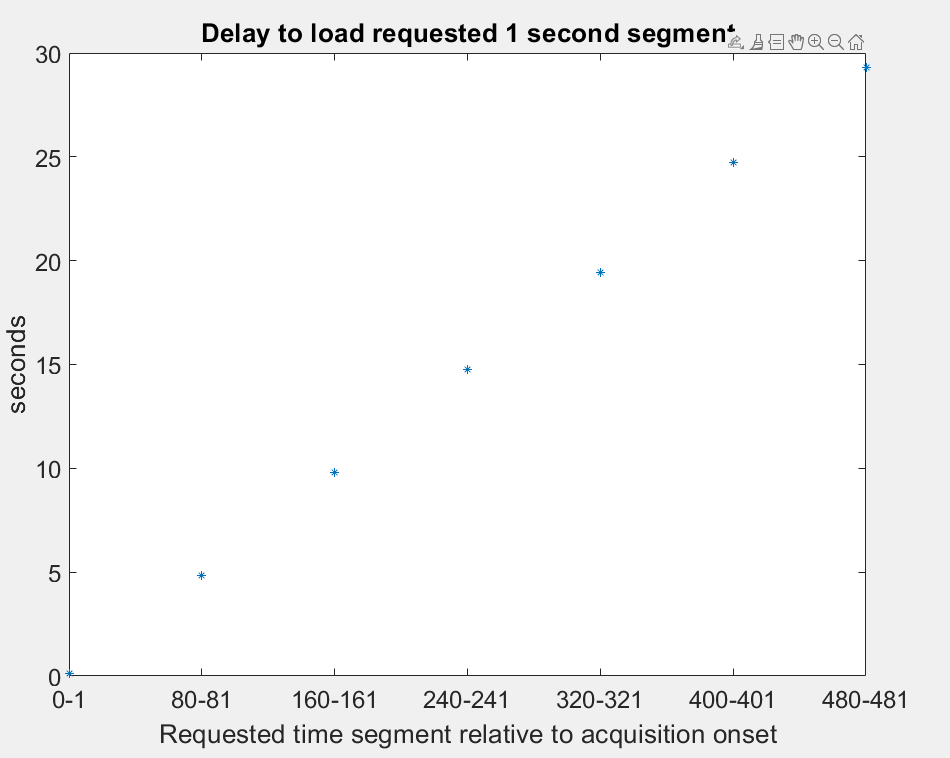
The printed output that summarizes everything is:
Time segment [0.0001-1] took 0.11039 seconds
Time segment [80.0001-81] took 4.8363 seconds
Time segment [160.0001-161] took 9.7937 seconds
Time segment [240.0001-241] took 14.778 seconds
Time segment [320.0001-321] took 19.4196 seconds
Time segment [400.0001-401] took 24.7371 seconds
Time segment [480.0001-481] took 29.2971 seconds
This makes our browsing purposes almost unusable. 30 seconds wait time to display 1 second of recording will not work out.
I've encountered this in the past with an older of an importer (I think it was Tucker Davis, maybe I'm wrong). The entire recording up to the last sample requested was loaded, and then the matrix was chopped to match the requested segment.
The linear character of the wait times is probably an indicator that the same thing is happening here. Memory monitoring while calling the different segments can reveal if that's the case.
Here is the code for replication of the figure:
filename ='C:\Users\knasi\Consulting\Brainstorm\new tutorial files\ytu288c-01.plx';  % fs =10kHz
iSelectedChannels = 1:33;

all_measured_times = zeros(7,1);
all_time_boundaries = zeros(7,2);
all_labels = cell(7,1);

ii = 1;
for iSample = 1:800000:5000000
    SamplesBounds = [(iSample-1)+1,iSample + 9999];  % Read only 1 second since Fs = 10000;
    tic
    for iChannel = 1:length(iSelectedChannels)
        [adfreq, n, data] = plx_ad_span_v(filename, iSelectedChannels(iChannel)-1, SamplesBounds(1), SamplesBounds(2));
    end

    % Gather values
    all_time_boundaries(ii,:) = [SamplesBounds(1)/10000, SamplesBounds(2)/10000];
    all_measured_times(ii) = toc;
    all_labels{ii} = [num2str(round(SamplesBounds(1)/10000)) '-' num2str(round(SamplesBounds(2)/10000))];

    % Display
    disp(['Time segment [' num2str(all_time_boundaries(ii,1)) '-' num2str(all_time_boundaries(ii,2)) '] took ' num2str(all_measured_times(ii)) ' seconds'])
    ii = ii+1;
end

figure(1);
plot(all_measured_times,'*')
ylabel('seconds')
xlabel('Requested time segment relative to acquisition onset')
title('Delay to load requested 1 second segment')
set(gca,'XTickLabel',all_labels)

set(gca,'FontSize', 18)
The same time delay behavior stands both for plx_ad_span_v and plx_ad_span for .plx files.
NOTE:
This is observed only for .plx files. .pl2 files don't show this behavior.
Plexon provides a converter from .plx to .pl2 through PlexUtil 4.0:
https://plexon.com/wp-content/uploads/2017/06/PL2-File-System-Overview.pdf

The loading time of the
.plxfile is affected by the relative position (in time) of the segment requested.This is a
Plexon SDKissue, not aBrainstormissue.So for loading 1 second segment from a later stage of the recording takes way more time than a 1 second segment at the start of the recording.
See example loading times for 1 second of all 33 channels at different recording stages:
The printed output that summarizes everything is:
This makes our browsing purposes almost unusable. 30 seconds wait time to display 1 second of recording will not work out.
I've encountered this in the past with an older of an importer (I think it was Tucker Davis, maybe I'm wrong). The entire recording up to the last sample requested was loaded, and then the matrix was chopped to match the requested segment.
The linear character of the wait times is probably an indicator that the same thing is happening here. Memory monitoring while calling the different segments can reveal if that's the case.
Here is the code for replication of the figure:
The same time delay behavior stands both for
plx_ad_span_vandplx_ad_spanfor.plxfiles.NOTE:
This is observed only for
.plxfiles..pl2files don't show this behavior.Plexon provides a converter from
.plxto.pl2throughPlexUtil 4.0:https://plexon.com/wp-content/uploads/2017/06/PL2-File-System-Overview.pdf