%LocalAppData%\Atlassian\SourceTree\
[
  {
    "$id": "1",
    "$type": "SourceTree.Api.Host.Identity.Model.IdentityAccount, SourceTree.Api.Host.Identity",
    "Authenticate": true,
    "HostInstance": {
      "$id": "2",
      "$type": "SourceTree.Host.Atlassianaccount.AtlassianAccountInstance, SourceTree.Host.AtlassianAccount",
      "Host": {
        "$id": "3",
        "$type": "SourceTree.Host.Atlassianaccount.AtlassianAccountHost, SourceTree.Host.AtlassianAccount",
        "Id": "atlassian account"
      },
      "BaseUrl": "https://id.atlassian.com/"
    },
    "Credentials": {
      "$id": "4",
      "$type": "SourceTree.Model.BasicAuthCredentials, SourceTree.Api.Account",
      "Username": "",
      "Email": null
    },
    "IsDefault": false
  }
]


sourcetree的搭配使用
1.安装篇
下载地址一——最新版:https://www.sourcetreeapp.com/download/
(该工具在首次使用时需要翻墙用到谷歌账号)下载地址二——1.9.6.2中文版:链接:http://pan.baidu.com/s/1bp4gwcn 密码:v9jl
==鉴于现在翻墙工具越来越不稳定的情况下,可以使用以下方案跳过初始设置,免登录直接使用==
方法:
2.soucetree首次使用基础设置
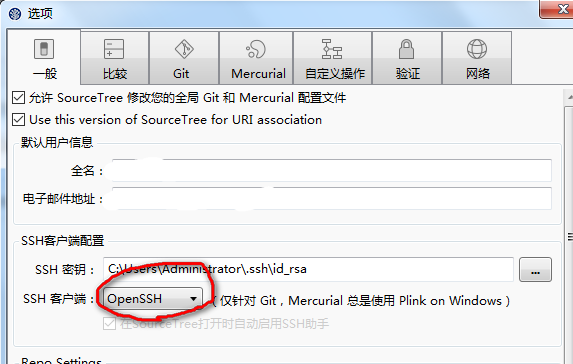
要想ssh私钥和Linux下的通用,要将SourceTree一般选项下的SSH Client类型改为OpenSSH。