


Enhance your Google Workspace development experience with intelligent OAuth2 scope linting, hover documentation, and AI-powered development tools directly in Visual Studio Code.
Automatically validate and document Google Workspace OAuth2 scopes in your code:
- Real-time Validation: Instantly identify invalid or unknown OAuth2 scope URLs
- Security Classification: Visual warnings for restricted and sensitive scopes
- Hover Documentation: See scope descriptions, associated APIs, and documentation links on hover
- Multi-API Support: Coverage for all Google Workspace APIs (Gmail, Drive, Calendar, Chat, Admin, and more)
Get code completions for all Google OAuth2 scopes:
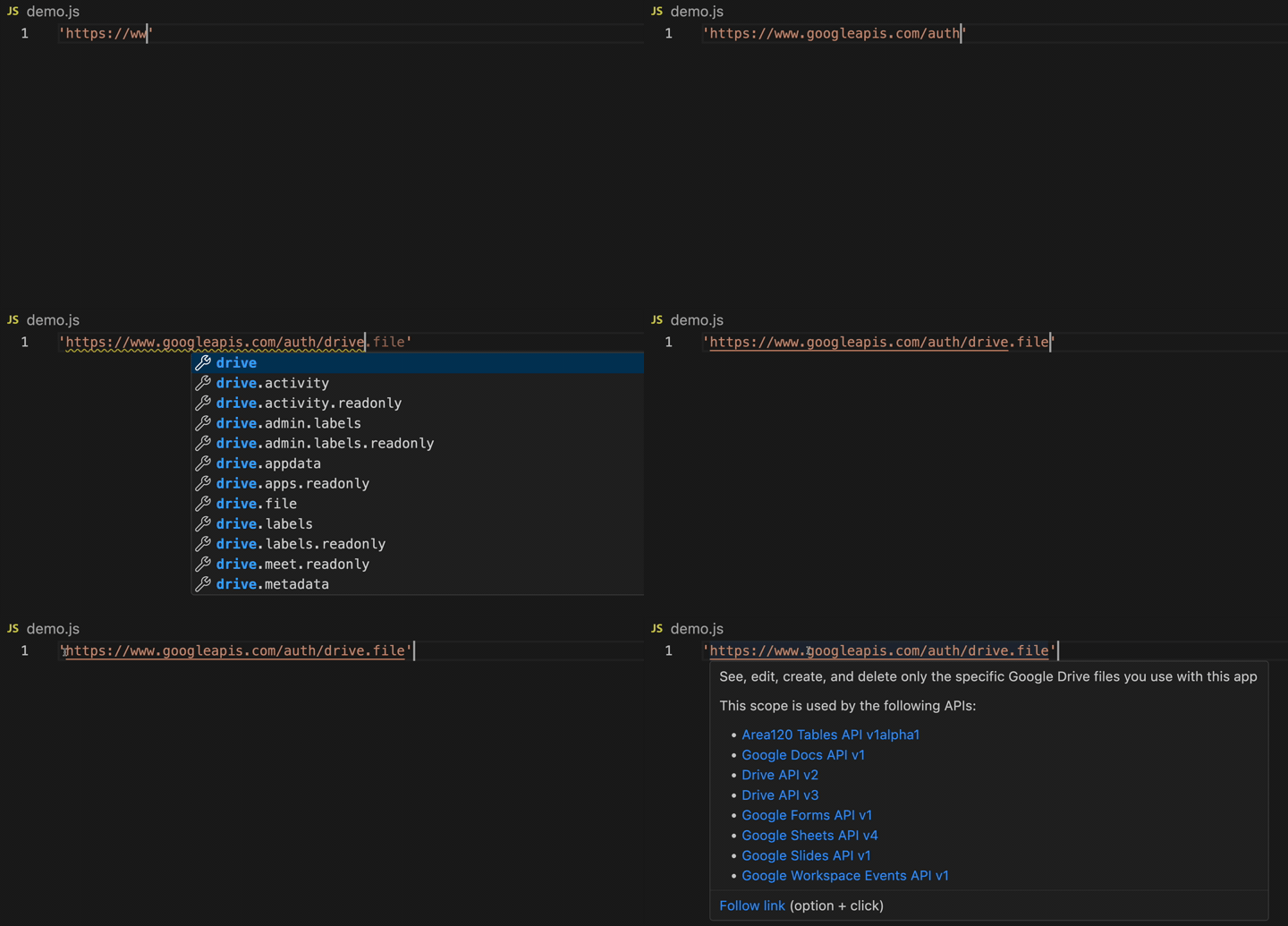
Scope Classifications:
- 🔴 Restricted: Scopes requiring additional verification (e.g.,
drive,gmail.modify) - 🟡 Sensitive: Scopes accessing sensitive user data (e.g.,
gmail.readonly,calendar) - 🟢 Non-Sensitive: Basic access scopes (e.g.,
userinfo.email,userinfo.profile)
Integrated support for AI-powered development through the Google Workspace Developer Tools MCP server:
- Access Google Workspace API documentation directly in your AI coding assistant
- Get context-aware suggestions for Google Workspace development
- Enhanced Copilot and other AI tool capabilities for Google Workspace projects
- Open Visual Studio Code
- Press
Ctrl+Shift+X(Windows/Linux) orCmd+Shift+X(macOS) - Search for "Google Workspace Developer Tools"
- Click Install
code --install-extension google-workspace.google-workspace-developer-toolsThe extension works automatically once installed:
-
Write Code: Include Google OAuth2 scope URLs in your code:
const SCOPES = [
  "https://www.googleapis.com/auth/gmail.readonly",
  "https://www.googleapis.com/auth/drive.file",
];
-
Get Instant Feedback:
- Warnings appear for restricted/sensitive scopes
- Invalid scopes are highlighted with error diagnostics
- Hover over any scope for detailed information
-
Learn More: Click on scope URLs in hover tooltips to access official documentation
Supported File Types: Works in all text files including JavaScript, TypeScript, Python, JSON, YAML, and more.
The extension:
- Scans your code for Google OAuth2 scope URLs (
https://www.googleapis.com/auth/*) - Validates them against the official Google API registry
- Provides real-time diagnostics based on scope classification
- Offers rich hover information with:
- Scope description
- Security classification
- Associated Google Workspace APIs
- Links to API documentation
- Visual Studio Code version 1.50.0 or higher
- No additional dependencies required
This extension works out of the box with no configuration required. Future versions may include customizable settings.
Please report issues on our GitHub Issues page.
See CHANGELOG.md for detailed release notes and version history.
- 0.5.x: Enhanced scope validation and MCP server integration
- 0.4.x: Added support for additional Google Workspace APIs
- 0.3.x: Initial public release with OAuth2 scope linting
We welcome contributions! This extension is part of the Google Workspace Developer Tools monorepo.
Apache 2.0 License - see LICENSE for details.