This repository was archived by the owner on Apr 16, 2019. It is now read-only.
This repository was archived by the owner on Apr 16, 2019. It is now read-only.
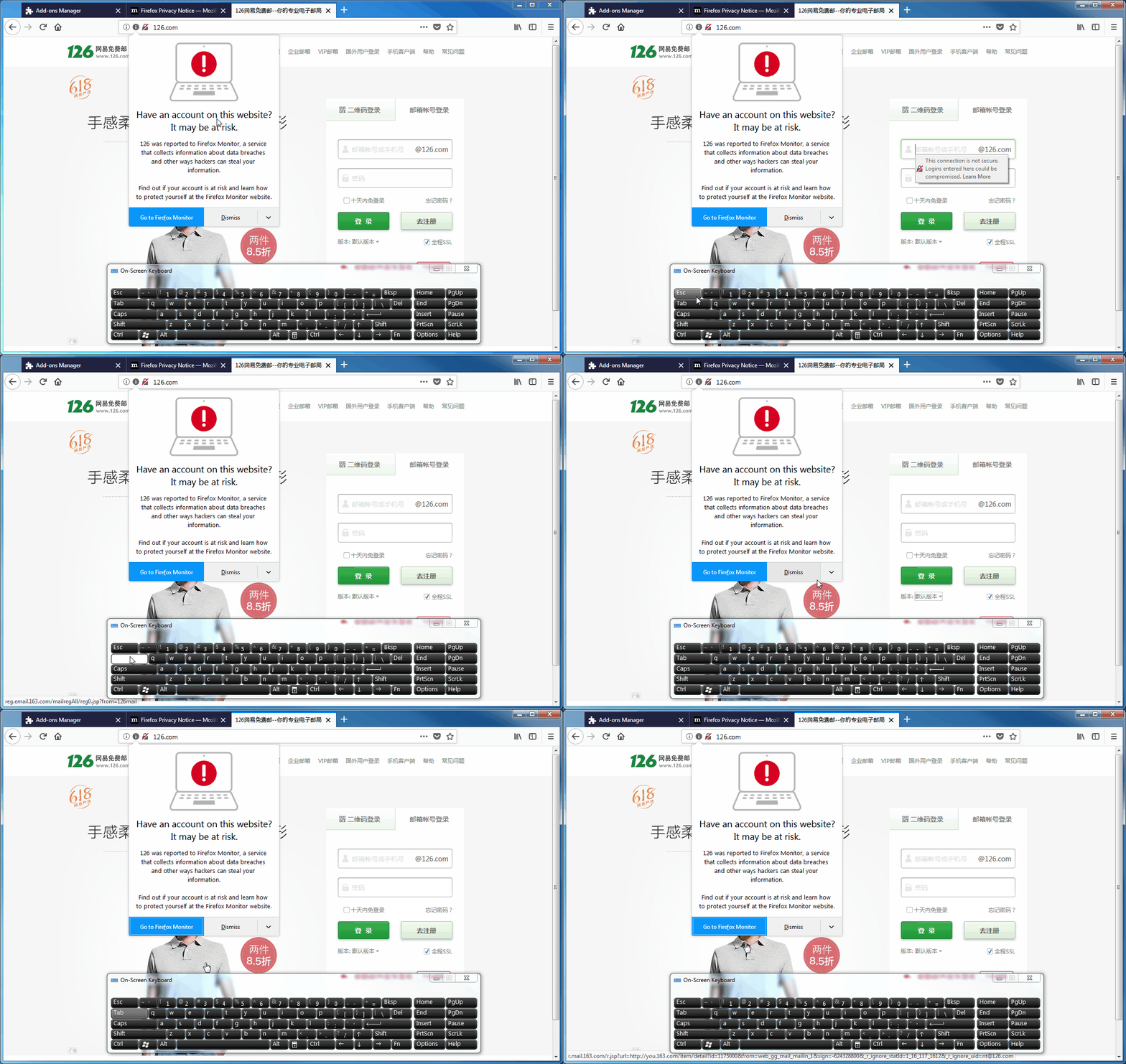
All doorhanger elements cannot be focused using "Tab" key #43

Description

[Affected versions]:
- Firefox 60.0.2
- Firefox Monitor 0.01, All Branches
[Affected Platforms]:
- All Windows
[Prerequisites]:
- Have a clean Firefox profile with the latest Firefox Monitor installed.
[Steps to reproduce]:
- Open the Firefox browser with the profile from prerequisites.
- Navigate to a breached website (eg: https://126.com).
- Click inside an empty space of the doorhanger.
- Press the "Tab" key once.
[Expected result]:
- The first element of the doorhanger is focused.
[Actual result]:
- No element is focused.
[Notes]:
- This issue is also reproducible for the feedback form checkboxes.
- This issue is not reproducible if the user previously focused the "Arrow" button (by clicking it).
- This issue is not reproducible if the user previously focused the email field.
- Here is a screen recording with this issue: