In terminal, type the following command:
bash <(curl -sL https://raw.githubusercontent.com/node-red/linux-installers/master/deb/update-nodejs-and-nodered)
This should take about 20-30 minutes, depending on the speed of the Raspberry Pi. Reference: https://nodered.org/docs/getting-started/raspberrypi
To run Node-RED:
node-red-start
To stop Node-RED:
node-red-stop
To restart Node-RED:
node-red-restart
To view log:
node-red-log
Let us first determine the Raspberry Pi's IP address by typing the following command in the terminal of your Raspberry Pi:
hostname -I

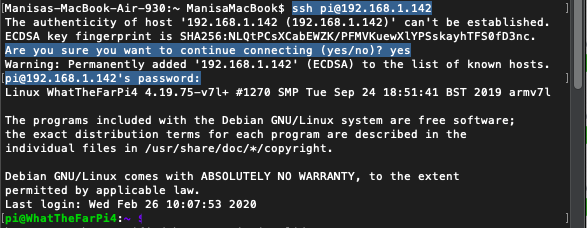
On your Mac, in the terminal type:
ssh pi@<RaspberryPI'IP>
You will be asked for the Raspberry Pi's password. See below:
To turn OFF Rapsberry Pi & keep the SD card and file system safe:
- Type the following command to stop your Raspberry Pi.
sudo halt -p
-
Wait until the LEDs stop blinking on the Raspberry Pi.
-
Wait additional 5 seconds and pull the power supply.