-
Named JSON object that refers to an external resource
-
A Docker image
-
A file stored in GitHub
-
An Amazon Machine Image (AMI)
-
A binary blob in Amazon S3, Google Cloud Storage, etc.
-

Artifacts are one of the most frustrating aspects to Spinnaker
Failed on startup: Unmatched expected artifact ExpectedArtifact(matchArtifact=Artifact(type=s3/object, customKind=false, name=s3://XXXXXXXXXXX-alpha.191%2B926bb3b3.tgz, version=null, location=null, reference=null, metadata={id=01317db7-1e30-4c02-a302-826449d83f94}, artifactAccount=f5cs-spin, provenance=null, uuid=null), usePriorArtifact=false, useDefaultArtifact=false, defaultArtifact=Artifact(type=null, customKind=true, name=null, version=null, location=null, reference=null, metadata={id=ca86ca54-6719-471e-b10e-fb4a6f20e85d}, artifactAccount=null, provenance=null, uuid=null), id=0730e728-e19a-43af-b9e5-9856332e939d, boundArtifact=null) could not be resolved.-
URI of the location of our artifact
-
Provenance information about the commit that triggered the resource
|
Note
|
Provenance def: - The place of origin or earliest known history of something |
-
To allow more provenance information, a JSON is used to describe extras like:
-
name
-
version
-
location
-
-
This is called artifact decoration
-
Every Spinnaker artifact follows this specification whether:
-
Supplied to a pipeline
-
Accessed within a pipeline
-
Produced by a pipeline–follows
-
As an example, an object stored in Google Cloud Storage (GCS) might be accessed using the following Spinnaker artifact:
{
  "type": "gcs/object",
  "reference": "gs://bucket/file.json#135028134000",
  "name": "gs://bucket/file.json",
  "version": "135028134000"
  "location": "us-central1"
}
Another example
{
  "type": "docker/image",
  "reference": "gcr.io/project/image@sha256:29fee8e284",
  "name": "gcr.io/project/image",
  "version": "sha256:29fee8e284"
}| Field | Explanation | Notes |
|---|---|---|
|
How the external resource is classified. (This allows for easy distinction between Docker images and Debian packages, for example). |
|
|
The URI used to fetch the resource. |
|
|
The Spinnaker artifact account that has permission to fetch the resource. |
|
|
The version of the resource. (By convention, version should only be compared between artifacts of the same type and name.) |
Optional. |
|
The relevant URI from the system that produced the resource. (This is used for deep-linking into other systems from Spinnaker.) |
Optional. |
| metadata | Arbitrary key / value metadata pertaining to the resource. (This can be useful for scripting within pipeline stages.) | Optional. |
|---|---|---|
|
The region, zone, or namespace of the resource. (This does not add information to the URI, but makes multi-regional deployments easier to configure.) |
Optional. |
|
Used for tracing the artifact within Spinnaker. |
Assigned by Spinnaker. |
-
Expects a particular artifact to be available
-
Declarable within a pipeline trigger or stage
-
Spinnaker compares an incoming artifact (for example, a manifest file stored in GitHub) to the expected artifact (for example, a manifest with the file path
path/to/my/manifest.yml) -
If there is a match it is bound to that artifact and used

-
Used to disambiguate between similar artifacts coming from the same account
-
e.g. Different
yamlfiles from the same repository
-
-
Filter by fields in the artifact format against which to compare in the incoming artifact
-
Used to specify that the trigger should begin pipeline execution only if the incoming artifact matches the parameters that you provided

-
If Missing
-
Provide fallback behavior for the expected artifact in case the trigger doesn’t find the desired artifact.
-
-
Use prior execution
-
Spinnaker will fall back to the artifact used in the last execution.
-
If you enable the Use default artifact Spinnaker will use a default artifact,
-
Allows you to provide fallback behavior for the first time a trigger is used, when no previous execution exists
-
-
Expected - An artifact that a trigger or stage expects to have
-
Bound - An artifact that has been fulfilled
-
Matched - Enter fields to disambiguate similar artifacts
-
An artifact arrives in a pipeline execution either from an external trigger (for example, a Docker image pushed to a registry)
-
Getting fetched by a stage. That artifact is then consumed by downstream stages based on predefined behavior.
-
Enable a stage to bind an artifact from:
-
Another pipeline execution
-
Stage output
-
Running environment
-
When configuring a pipeline trigger, you can declare which artifacts the trigger expects to have present before it begins a pipeline execution!

-
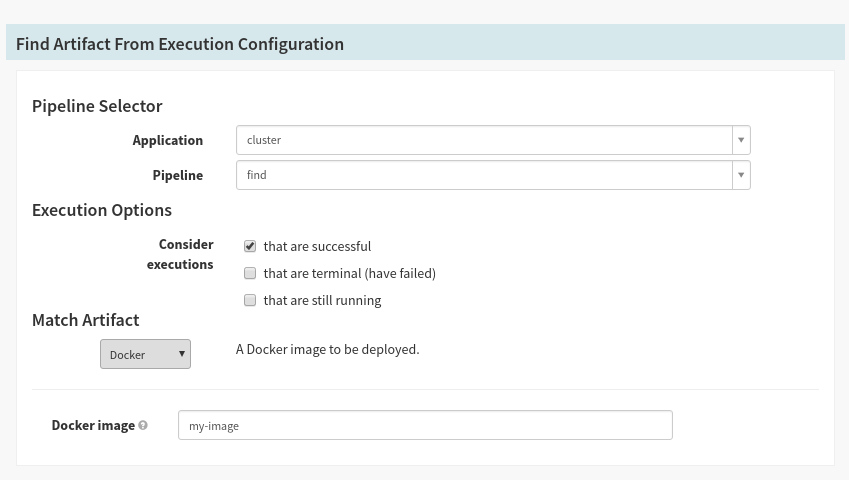
To allow you to promote artifacts between executions, you can make use of the “Find Artifact from Execution” stage.
-
All that’s required is the pipeline ID whose execution history to search, and an expected artifact to bind.
-
This will be particularly useful for canary attainment of baseline
-
Artifacts can be passed between pipelines.
-
Two cases:
-
Pipeline B is triggered by Pipeline A - Pipeline B is triggered by Pipeline A, therefore Pipeline B will have Pipeline A’s artifacts
-
Pipeline A triggers Pipeline B - Pipeline A is triggers Pipeline B, therefore Pipeline B will have Pipeline A’s artifacts
-
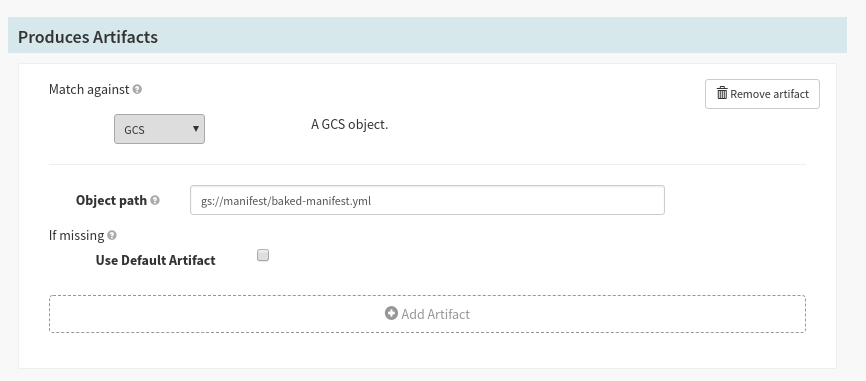
Stages can be configured to ‘Produce’ artifacts if they expose the following Stage configuration:
-
To bind artifacts injected into the stage context - If your stage emits artifacts (such as a “Deploy (Manifest)” stage) into the pipeline context, you can match against these artifacts for downstream stages to consume.
-
To artificially inject artifacts into the stage context - If you are running a stage that does not natively emit artifacts (such as the “Run Job” stage), you can use the default artifact, which always binds to the expected artifact, to be injected into the pipeline each time it is run. Keep in mind: If the matching artifact is empty, it will bind any artifact, and your default artifact will not be used.
|
Note
|
If you are configuring your stages using JSON, the expected artifacts are placed in a top-level expectedArtifacts: [] list.
|
There are various types of artifacts or you can define your own:
-
Docker Image
-
Embedded Base64
-
GCS Object
-
S3 Object
-
Git Repo
-
GitHub File
-
GitLab File
-
Bitbucket File
-
HTTP File
-
Kubernetes Object
-
Oracle Object