Because the Internet is a global network of computers each computer connected to the Internet must have a unique address. Internet addresses are in the form nnn.nnn.nnn.nnn where nnn must be a number from 0 - 255. This address is known as an IP address. (IP stands for Internet Protocol)
When data gets sent over the Internet, it is first broken up into smaller packets, which are then translated into bits. The packets get routed to their destination by various networking devices such as routers and switches. When the packets arrive at their destination, the receiving device reassembles the packets in order and can then use or display the data.
There are protocols for sending packets between devices on the same network (Ethernet), for sending packets from network to network (IP), for ensuring those packets successfully arrive in order (TCP), and for formatting data for websites and applications (HTTP). In addition to these foundational protocols, there are also protocols for routing, testing, and encryption. And there are alternatives to the protocols listed above for different types of content — for instance, streaming video often uses UDP instead of TCP.
consists of 16 bit numbers, so no of possible combinations are 2^16.
1-1023 -> reserved like 80 for http.
1024-49152 -> reserved for applications like mongodb - 27017 , sql - 1433.
remaining -> are vacant for your use.
Some Hidden Facts
1 mbps - 10^6 bits/s
1 kbps - 10^3 bits/s
1 gbps - 10^9 bits/s
LAN : small house/office for eg:- ethernets, wifi.
meaning it covers only small area not small no of computers, you can connect as many as computers but it should be in range.
MAN : across a city.
WAN : across countries for eg:- optical fibre cables.
- Sonet (synchronus optical networking)
- Frame Relay - a way to connect your lan to the wider area i.e. internet.
Modem - used to convert digital signals into analog signals.
Routers - device that routes the data packet based on their ip adresses.
- Bus Topology
- Ring Topology
- Star Topology
- Tree Topology
- Mesh Topology
stands for Open Systems Inteconnection Model.
So, There are 7 layers :
- Application Layer - implemented in software. like sending message.
- Presentation Layer - gets the data from application layer(chars, words etc.)(ASCII) and converts them into Machine Representable Binary Format(EBCDIC). so, it is only readable to the person whom the data is sent to.
- Session Layer - helps in setting up and managing the connections and it enables sending and recieving of data followed by termination of connected session.
- Transport Layer - data recieved from session layer is divided into small parts called segmentation. every segment will contain source and destination port number and a sequence number. & controls the amount of data being transported & works on error control like data, packet loss & adds a checksum in every data cell that way they can figure out recieved data is good or not. TCP - gives feedback & and provides 100% data, udp - no feedback faster than TCP & packet Loss can occur.
- Network Layer - works for transmission of the received data segments from one computer to another computer that is located in a different network. This were the router lives. ip-addressing done in network layer is known as logical addressing. Network layer assigns the sender and receiver's ip address to every segment forms an ip-packet. & also it performs routing so moving 1 data packet from source to destination. Load balancing also happens here.
- Data Link Layer - allows you to directly communicate with the computers. Physical addressing(like mac addresses) is done here. now, mac addresses of sender and receiver are assigned to data packets. frame is basically a data unit of the data link layer. mac address is a 12 digit alphanumeric number of the network interface of your computer. ur computer have multiple mac address (for eg bluetooth and wifi have different mac addresses)
- Physical Layer - transports the binary data imported from upper layers into wires and local media i.e electricity signal, light signal or radiowave signal.
for eg: a message goes in this process(1->7) then reverse(7->1) occurs to retrieve the message in your's friend device.
(TCP/IP Model & OSI Model) mostly similar but little bit difference in layers.
have 5 layers :
- Application Layer
- Transport Layer
- Network Layer
- Data Link Layer
- Physical Layer
Layer in which user interacts with it. consists of various applictions like web browsers, whatsapp etc. where -> in your devices
Application have two parts
-
client part
-
server part
-
Protocols - basically rules & regulations.
-
Client - server architecture client sends a request to server. server sends a response back to client.
what is a server? server is basically a system that controls the website you are hosting.
the collection of servers in a big company is known as data centers. its a collection of huge number of computers. it may have static ip addresses.
ping - it measures the round trip time for messages sent rom origin to destination then come back.
you can't reduce ping time because already data is travelling at speed of light in optical fibre cable.
Peer to Peer(P2P) Architecture :
various computers get connected to each other. so there is no server or large data center. advantage - you can scale up rapidly. its little bit like of decentralised. in P2P , every computer can be called as a server or client. ex- Bittorrent.
-
Repeater - A repeater operates at the physical layer. Its job is to regenerate the signal over the same network before the signal becomes too weak or corrupted so as to extend the length to which the signal can be transmitted over the same network. An important point to be noted about repeaters is that they do not amplify the signal. When the signal becomes weak, they copy the signal bit by bit and regenerate it at the original strength. It is a 2 port device.
-
Hub - A hub is basically a multiport repeater. A hub connects multiple wires coming from different branches, for example, the connector in star topology which connects different stations. Hubs cannot filter data, so data packets are sent to all connected devices. In other words, collision domain of all hosts connected through Hub remains one. Also, they do not have intelligence to find out best path for data packets which leads to inefficiencies and wastage.
Types of Hub Active Hub :- These are the hubs which have their own power supply and can clean, boost ● and relay the signal along the network. It serves both as a repeater as well as wiring center. These are used to extend maximum distance between nodes. Passive Hub :- These are the hubs which collect wiring from nodes and power supply from active hub. These hubs relay signals onto the network without cleaning and boosting them and can't be used to extend distance between nodes.
-
Bridge - A bridge operates at data link layer. A bridge is a repeater, with add on functionality of filtering content by reading the MAC addresses of source and destination. It is also used for interconnecting two LANs working on the same protocol. It has a single input and single output port, thus making it a 2 port device. Types of Bridges Transparent Bridges :- These are the bridge in which the stations are completely unaware of the bridge's existence i.e. whether or not a bridge is added or deleted from the network, reconfiguration of the stations is unnecessary. These bridges makes use of two processes i.e. bridge forwarding and bridge learning. Source Routing Bridges :- In these bridges, routing operation is performed by source ● station and the frame specifies which route to follow. The hot can discover frame by sending a specical frame called discovery frame, which spreads through the entire network using all possible paths to destination.
-
Switch - A switch is a multi port bridge with a buffer and a design that can boost its efficiency (large number of ports imply less traffic) and performance. Switch is data link layer device. Switch can perform error checking before forwarding data, that makes it very efficient as it does not forward packets that have errors and forward good packets selectively to correct port only. In other words, switch divides collision domain of hosts, but broadcast domain remains same.
-
Routers - A router is a device like a switch that routes data packets based on their IP addresses. Router is mainly a Network Layer device. Routers normally connect LANS and WANS together and have a dynamically updating routing table based on which they make decisions on routing the data packets. Router divide broadcast domains of hosts connected through it.
-
Gateway - A gateway, as the name suggests, is a passage to connect two networks together that may work upon different networking models. They basically works as the messenger agents that take data from one system, interpret it, and transfer it to another system. Gateways are also called protocol converters and can operate at any network layer. Gateways are generally more complex than switch or router.
-
Brouter - It is also known as bridging router is a device which combines features of both bridge and router. It can work either at data link layer or at network layer. Working as router, it is capable of routing packets across networks and working as bridge, it is capable of filtering local area network traffic.
- Web Protocols :
- TCP/IP :
- HTTP -> HyperText Transfer Protocol
- DHCP -> Dynamic Host Control Protocol, It Basically allocates the ip-adresses to the devices that are connected to your computer.
- FTP -> File Transfer Protocol
- SMTP -> Simple Mail Transfer Protocol (To send the emails)
- POP3/IMAP -> (To receive emails)
- SSH -> Secure Shell , if you want to login in terminal of another computer.
- VNC -> Virtual Network Computing, its for graphic control.
- Telnet -> Terminal emulation that enables the user to connect to a remote host or device. usually its over port 23.
- UDP -> stateless connection, data may be lost in this during the lifetime of the connection.
- TCP/IP :
Thread is a lighter version of process. Thread only do one single job at a time.
when you need to send messages from one system to another system, its a kind of software process. interface b/w internet and process.
IP-addresses tell which devices we are working with. Ports tell which application we are working with.
- Ephemeral Ports -> internally, it will assign itself random port numbers, if the multiple instances(like multiple windows and tabs) are running. once the process is done , it will be freed. they can exist on client side but you have to know the number on server side.
it is a client server protocol it tells us how you request data from server and how the server will send back data to the client.so this is a application layer protocol. so every application layer protocol requires some transport layer protocol. it uses TCP in transport layer. HTTP is stateless
You are telling server what to do.
- GET - requesting the data
- POST - data given by client to the server for eg - (username, password).
- PUT - puts data at a specific location,
- DELETE - delete data from the server.
when you send a request to the server. you want to know that your request is successful or not. for that status code exists.
200 -> indicates that the request has succeeded. 404 -> tells a web user that a requested page is not available. 400 -> the server cannot or will not process the request due to something that is perceived to be a client error. 500 -> server encountered an unexpected condition that prevented it from fulfilling the request.
1XX -> Informational categories code 2XX -> Success Code 3XX -> Redirection Purpose 4XX -> Client Error 5XX -> Server Error
since, HTTP is stateless, everytime you reload the webapp lose its information. But In Real Life, It still stores the data because of cookies.
- Cookie is a unique string which is stored in client's browser.
- when you first time visit a website, it will set a cookie after that whenever you make a new request, in that request header a cookie will be sent. then, the server will know that this request coming from this client and this client sent me a cookie, then the server will check for that in database then load the state.
are those created by domains other than the one the user is visiting at the time, and are mainly used for tracking and online-advertising purposes.
For sending email - SMTP for recieving email - POP3
What happens when you send a mail from gmail to hotmail?
- The email will first sent to Sender's SMTP Server -> Reciever's SMTP Server -> Reciever.
Process of downloading emails :
- The client connects to port 110 of POP server. Then, it carries out authorization, then transacts all the emails
Folders like sent, drafts are not synced when we are using POP
IMAP(Internet Message Access Protocol) :
It allows you to view you all emails in all your devices.
if delete an email in a device it will automatically deleted in all devices.
The Domain Name System (DNS) is the phonebook of the Internet. DNS translates domain names to IP addresses so browsers can load Internet resources.
for example : mail.google.com mail -> sub-domain, google->second-level domain, com -> top-level
Instead of storing everything in one database , there are multiple database for these three catagories.
- Root DNS Servers -

Root servers are DNS nameservers that operate in the root zone. These servers can directly answer queries for records stored or cached within the root zone, and they can also refer other requests to the appropriate Top Level Domain (TLD) server. The TLD servers are the DNS server group one step below root servers in the DNS hierarchy
Image with Step numbers -
.png)
the role of transport layer is to take the information from the network to the application.
.png)
- Transport layer also takes care of congestion or traffic control
- congestion control algorithms built in TCP
- The transport layer is responsible for delivering data to the appropriate application process on the host computers.
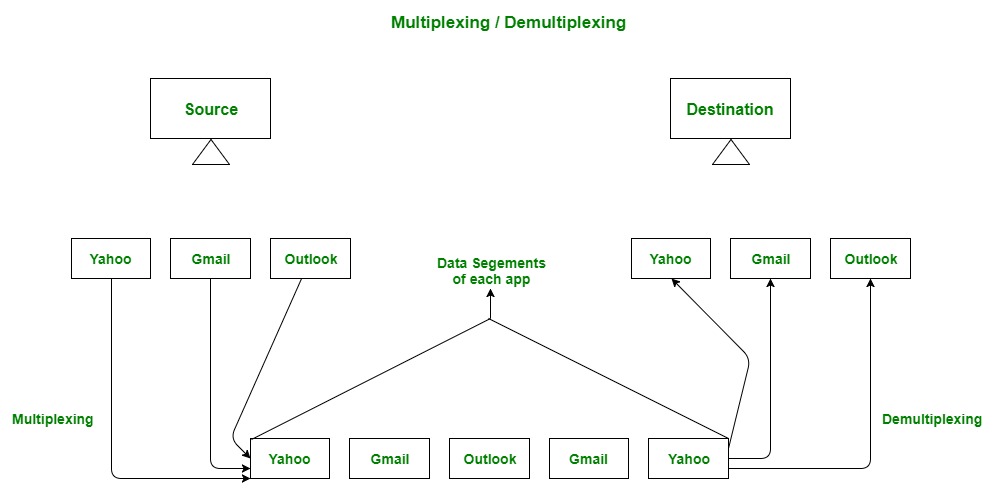
- This involves statistical multiplexing of data from different application processes, i.e. forming data segments, and adding source and destination port numbers in the header of each transport layer data segment.
- Together with the source and destination IP address, the port numbers constitute a network socket.
A checksum is a small-sized block of data derived from another block of digital data for the purpose of detecting errors that may have been introduced during its transmission or storage.
if the computed checksum for the current data input matches the stored value of a previously computed checksum, there is a very high probability the data has not been accidentally altered or corrupted.
- When a sender sends a segment to the receiver, a timeout timer starts.
- If the ACK gets received before the timer expires, then nothing happens.
- Otherwise, the segment is considered lost, and therefore, it needs to be transmitted again.
- Thus, it is resent, and the timer restarts.
- Data may or may not be delivered.
- Data may change.
- Data may not be in order.
- Connectionless Protocol
- uses Checksums. -> UDP knows data is corrupted or not but UDP doesn't do anything.
- Data Packet Contains Source Port Number & Destination Port Number & length of Datagram & CheckSums & Data obviously.
- Lot Faster
- Video Conferencing App
- DNS -> UDP Because of Speed.
.png)
- The Transmission Control Protocol provides a communication service at an intermediate level between an application program and the Internet Protocol.
- It provides host-to-host connectivity at the transport layer of the Internet model
- takes care of when data doesn't arrive
- maintains the order of data
- optimized for accurate delivery rather than timely delivery
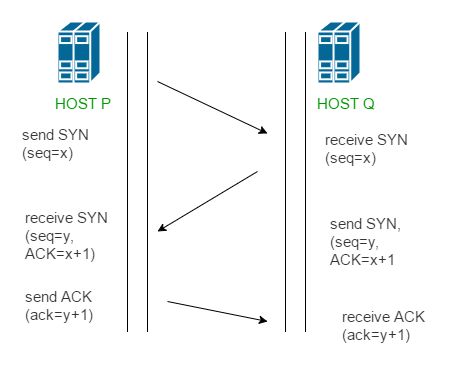
- Connection Oriented
- Error control
- Congestion Control
- Full Duplex - both users can send and recieve file simultaneously.
Transport -> segments Network -> Packets Data Link -> Frames
- Here we work with routers
.png)
In IP address : let's say - mmm.nnn.qqq.ppp The part (mmm.nnn.qqq) known as network address(Subnet ID) and (ppp) known as device address(Host ID).
- The process of creating a routing table is considered part of the control plane.
- Routers use various protocols to identify network paths, and they store these paths in routing tables.
more info required...
- 32 bits, 4-words
- 128 bits
The Hoping thing happen over our ISPs. not in our routers.
Class of IP addresses :
- A - 0.0.0.0 - 127.255.255.255
- B - 128.0.0.0 - 191.255.255.255
- C - 192.0.0.0 - 223.255.255.255
- D - 224.0.0.0 - 239.255.255.255
- E - 240.0.0.0 - 255.255.255.255
The IP address 127.0. 0.1 is called a loopback address. Packets sent to this address never reach the network but are looped through the network interface card only.
Header is of 20 bytes. contains, IPv, length, identification, flags, protocols, checksum, addresses, Time to Live(TTL) etc.
- Sometimes, hoping stucks in a loop so, after TTL reaches packet drops.
consists of 8 hexadecimal numbers.
a : a : a : a : a : a : a : a
in IPv4 : 2^32 ~ 4.3 Billion in IPv6 : 2^128 ~ 3.4 x 10^38
Cons :
- It's a new tech, so it is not backward compatile.
- Not Entire world is not shifted on IPv6.
- ISP would have to shift.
- Lot of Hardware work.
- are the device that comes between end system and router.
- Firewall
- (NAT) Network Address Translation
- Global Internet
- Your Trusted Network
Filters out IP Packets based on various rules.
- Address
- Modify Packets
- Port No.
- Flags
- Protocols
Types :
- Stateless - doesn't store cache.
- Stateful - More Effective ans stores cache.
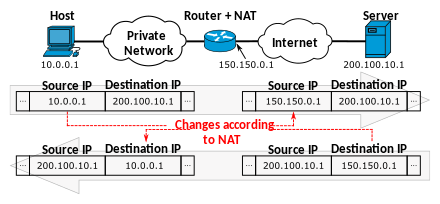
- Network address translation (NAT) is a method of mapping an IP address space into another by modifying network address information in the IP header of packets while they are in transit across a traffic routing device.
- The technique was originally used to bypass the need to assign a new address to every host when a network was moved, or when the upstream Internet service provider was replaced, but could not route the network's address space.
-
This layer is the protocol layer that transfers data between nodes on a network segment across the physical layer.
-
transfers in frame.
-
frame contains data link layer address of sender & IP address of destination.
-
whenever a new device is connected to router, it is then connected to DHCP, the DHCP will provide a IP to device.
-
every connected have a ip address as well as data link layer address.
-
before sending any data its check the ARP cache , this process is known as address resolution protocol.
-
Data link layer addresses is known as mac addresses.
Data Link Layer Functions The following are the key tasks performed at the data link layer:
-
Logical Link Control (LLC): Logical link control refers to the functions required for the establishment and control of logical links between local devices on a network. As mentioned above, this is usually considered a DLL sublayer; it provides services to the network layer above it and hides the rest of the details of the data link layer to allow different technologies to work seamlessly with the higher layers. Most local area networking technologies use the IEEE 802.2 LLC protocol.
-
Media Access Control (MAC): This refers to the procedures used by devices to control access to the network medium. Since many networks use a shared medium (such as a single network cable, or a series of cables that are electrically connected into a single virtual medium) it is necessary to have rules for managing the medium to avoid conflicts. For example. Ethernet uses the CSMA/CD method of media access control, while Token Ring uses token passing.
-
Data Framing: The data link layer is responsible for the final encapsulation of higher-level messages into frames that are sent over the network at the physical layer.
-
Addressing: The data link layer is the lowest layer in the OSI model that is concerned with addressing: labeling information with a particular destination location. Each device on a network has a unique number, usually called a hardware address or MAC address, that is used by the data link layer protocol to ensure that data intended for a specific machine gets to it properly.
-
Error Detection and Handling: The data link layer handles errors that occur at the lower levels of the network stack. For example, a cyclic redundancy check (CRC) field is often employed to allow the station receiving data to detect if it was received correctly.