
In this lab, we want you to design interaction with a speech-enabled device--something that listens and talks to you. This device can do anything but control lights (since we already did that in Lab 1). First, we want you first to storyboard what you imagine the conversational interaction to be like. Then, you will use wizarding techniques to elicit examples of what people might say, ask, or respond. We then want you to use the examples collected from at least two other people to inform the redesign of the device.
We will focus on audio as the main modality for interaction to start; these general techniques can be extended to video, haptics or other interactive mechanisms in the second part of the Lab.
As mentioned during the class, we ordered additional mini microphone for Lab 3. Also, a new part that has finally arrived is encoder! Please remember to pick them up from the TA.
As always, pull updates from the class Interactive-Lab-Hub to both your Pi and your own GitHub repo. As we discussed in the class, there are 2 ways you can do so:
**[recommended]**Option 1: On the Pi, cd to your Interactive-Lab-Hub, pull the updates from upstream (class lab-hub) and push the updates back to your own GitHub repo. You will need the personal access token for this.
pi@ixe00:~$ cd Interactive-Lab-Hub
pi@ixe00:~/Interactive-Lab-Hub $ git pull upstream Fall2021
pi@ixe00:~/Interactive-Lab-Hub $ git add .
pi@ixe00:~/Interactive-Lab-Hub $ git commit -m "get lab3 updates"
pi@ixe00:~/Interactive-Lab-Hub $ git push
Option 2: On your your own GitHub repo, create pull request to get updates from the class Interactive-Lab-Hub. After you have latest updates online, go on your Pi, cd to your Interactive-Lab-Hub and use git pull to get updates from your own GitHub repo.
In this part of lab, we are going to start peeking into the world of audio on your Pi!
We will be using a USB microphone, and the speaker on your webcamera. (Originally we intended to use the microphone on the web camera, but it does not seem to work on Linux.) In the home directory of your Pi, there is a folder called text2speech containing several shell scripts. cd to the folder and list out all the files by ls:
pi@ixe00:~/text2speech $ ls
Download        festival_demo.sh  GoogleTTS_demo.sh  pico2text_demo.sh
espeak_demo.sh  flite_demo.sh     lookdave.wav
You can run these shell files by typing ./filename, for example, typing ./espeak_demo.sh and see what happens. Take some time to look at each script and see how it works. You can see a script by typing cat filename. For instance:
pi@ixe00:~/text2speech $ cat festival_demo.sh
#from: https://elinux.org/RPi_Text_to_Speech_(Speech_Synthesis)#Festival_Text_to_Speech

echo "Just what do you think you're doing, Dave?" | festival --tts
Now, you might wonder what exactly is a .sh file? Typically, a .sh file is a shell script which you can execute in a terminal. The example files we offer here are for you to figure out the ways to play with audio on your Pi!
You can also play audio files directly with aplay filename. Try typing aplay lookdave.wav.
**Write your own shell file to use your favorite of these TTS engines to have your Pi greet you by name.** (This shell file should be saved to your own repo for this lab.)
Bonus: If this topic is very exciting to you, you can try out this new TTS system we recently learned about: https://github.com/rhasspy/larynx
Now examine the speech2text folder. We are using a speech recognition engine, Vosk, which is made by researchers at Carnegie Mellon University. Vosk is amazing because it is an offline speech recognition engine; that is, all the processing for the speech recognition is happening onboard the Raspberry Pi.
In particular, look at test_words.py and make sure you understand how the vocab is defined. Then try ./vosk_demo_mic.sh
One thing you might need to pay attention to is the audio input setting of Pi. Since you are plugging the USB cable of your webcam to your Pi at the same time to act as speaker, the default input might be set to the webcam microphone, which will not be working for recording.
**Write your own shell file that verbally asks for a numerical based input (such as a phone number, zipcode, number of pets, etc) and records the answer the respondent provides.**
Bonus Activity:
If you are really excited about Speech to Text, you can try out Mozilla DeepSpeech and voice2json There is an included dspeech demo on the Pi. If you're interested in trying it out, we suggest you create a seperarate virutal environment for it . Create a new Python virtual environment by typing the following commands.
pi@ixe00:~ $ virtualenv dspeechexercise
pi@ixe00:~ $ source dspeechexercise/bin/activate
(dspeechexercise) pi@ixe00:~ $
In Lab 1, we served a webpage with flask. In this lab, you may find it useful to serve a webpage for the controller on a remote device. Here is a simple example of a webserver.
pi@ixe00:~/Interactive-Lab-Hub/Lab 3 $ python server.py
 * Serving Flask app "server" (lazy loading)
 * Environment: production
   WARNING: This is a development server. Do not use it in a production deployment.
   Use a production WSGI server instead.
 * Debug mode: on
 * Running on http://0.0.0.0:5000/ (Press CTRL+C to quit)
 * Restarting with stat
 * Debugger is active!
 * Debugger PIN: 162-573-883
From a remote browser on the same network, check to make sure your webserver is working by going to http://<YourPiIPAddress>:5000. You should be able to see "Hello World" on the webpage.
Storyboard and/or use a Verplank diagram to design a speech-enabled device. (Stuck? Make a device that talks for dogs. If that is too stupid, find an application that is better than that.)
**Post your storyboard and diagram here.**
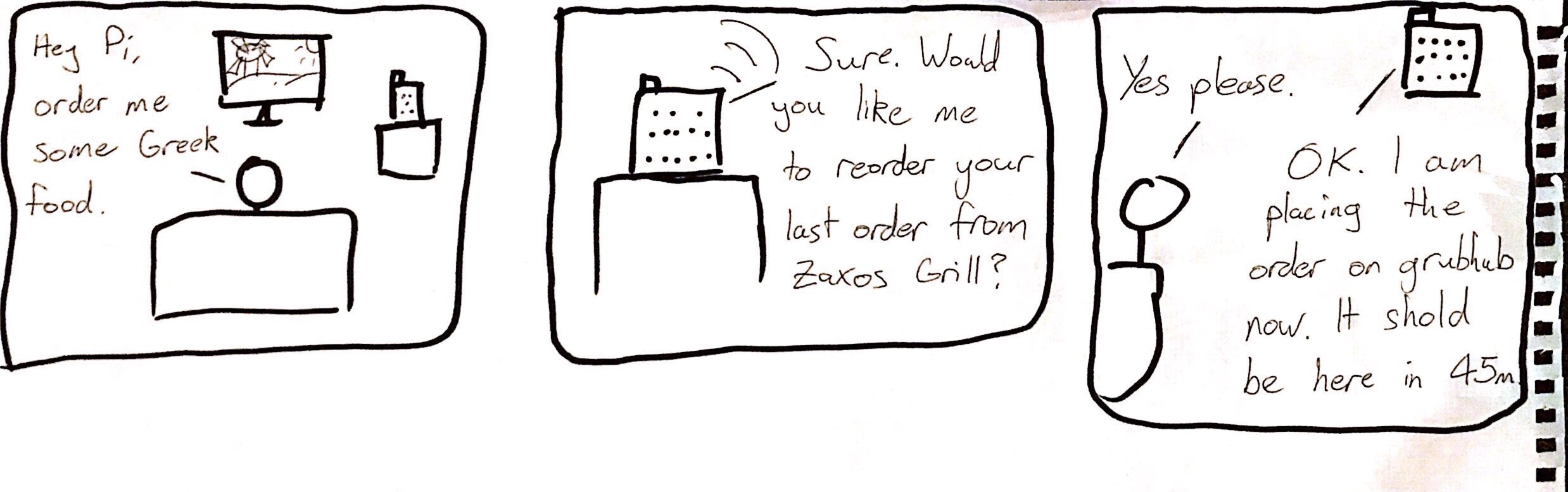
Write out what you imagine the dialogue to be. Use cards, post-its, or whatever method helps you develop alternatives or group responses.
I imagine the dialogue as follows:
Me: "Raspberry, order Greek food" Pi: "I will reorder your last order from {Greek restaurant}, is that OK? Me: "Yes"
Raspberry makes API call to Grubhub to make order
**Please describe and document your process.**
Find a partner, and without sharing the script with your partner try out the dialogue you've designed, where you (as the device designer) act as the device you are designing. Please record this interaction (for example, using Zoom's record feature).
**Describe if the dialogue seemed different than what you imagined when it was acted out, and how.**
The dialogue was different because I did not expect to be asked for extra information such as the receipt. I adapted to it with the idea that I could add this functionality.
In the demo directory, you will find an example Wizard of Oz project. In that project, you can see how audio and sensor data is streamed from the Pi to a wizard controller that runs in the browser. You may use this demo code as a template. By running the app.py script, you can see how audio and sensor data (Adafruit MPU-6050 6-DoF Accel and Gyro Sensor) is streamed from the Pi to a wizard controller that runs in the browser http://<YouPiIPAddress>:5000. You can control what the system says from the controller as well!
**Describe if the dialogue seemed different than what you imagined, or when acted out, when it was wizarded, and how.**
For Part 2, you will redesign the interaction with the speech-enabled device using the data collected, as well as feedback from part 1.
- What are concrete things that could use improvement in the design of your device? For example: wording, timing, anticipation of misunderstandings...
The device could always be more dynamic - the more able it is to adapt to different questions or phrasings the better it will perform. Increased connectivity would also make it more functional, e.g. being able to connect to it by phone to send and receive mesages directly.
- What are other modes of interaction beyond speech that you might also use to clarify how to interact?
Having a button for important functions that cannot allow for mistakes is one thing that could be added.
- Make a new storyboard, diagram and/or script based on these reflections.
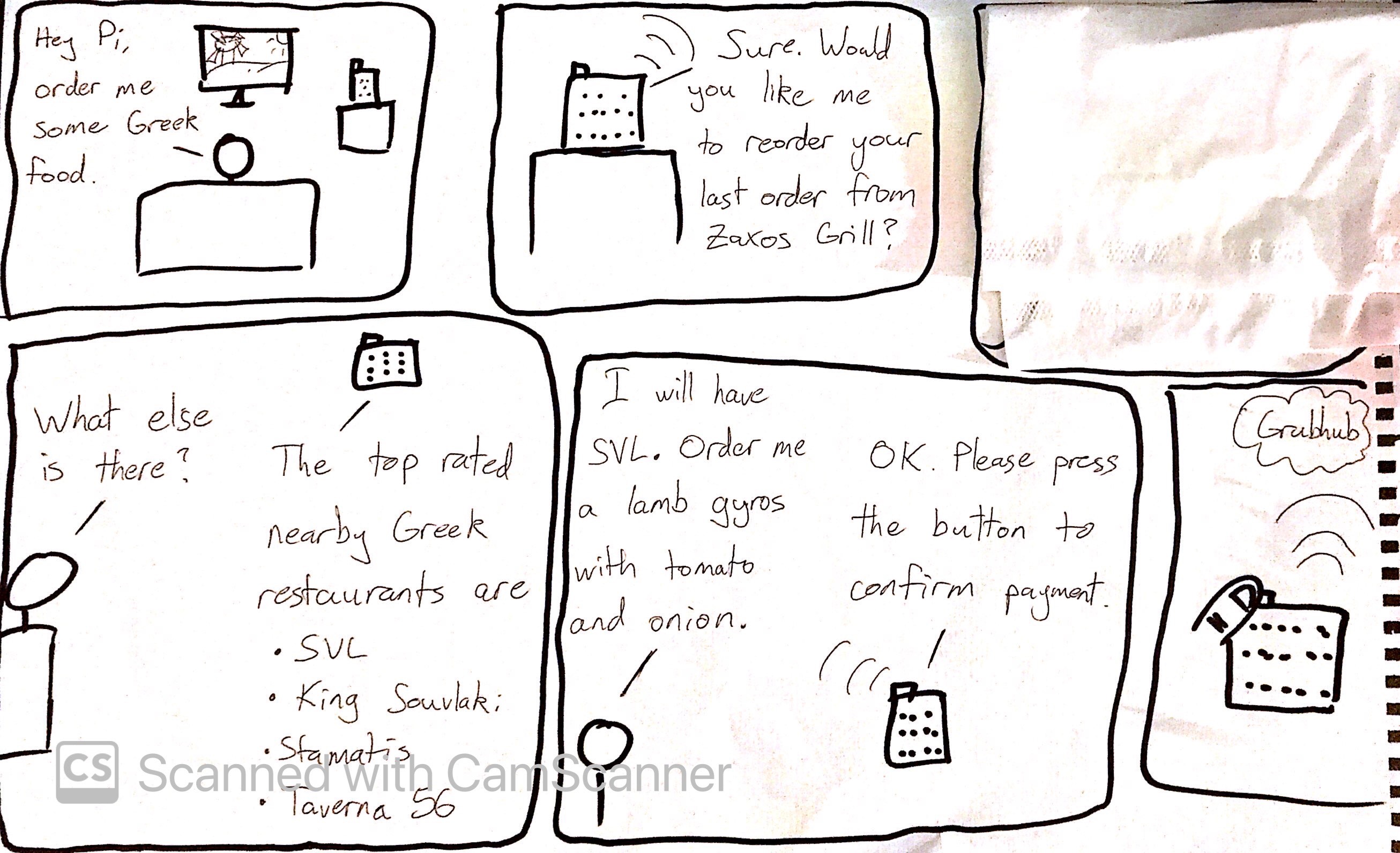
The system should:
- use the Raspberry Pi
- use one or more sensors
- require participants to speak to it.
Document how the system works
- The Raspberry is activated via a movement sensor, which turns on the microphone (Raspberry Pi starts listening).
- The user says what type of food they want (e.g. Greek, Italian, Fast Food etc.). These are stored internally as pre-defined categories.
- The Raspberry processes the speech and tries to match it to one of the pre-defined categories. If the matching fails, it asks again for clarification. If it fails a second time, it tells the user that the category cannot be found. It can behave dynamically by simply searching for the category on Grubhub to see if anything comes up.
- Once the match is made, the Raspberry lists the top restaurants in the area for that food category.
- The user can then choose one of the restaurants by saying "first" or "second" etc., or they can ask for "more options", which will prompt the Raspberry to give another list of restaurants of that category in the area, if there are any.
- Once the user has chosen a restaurant, the Raspberry offers to re-order the last order made from that restaurant, to which the user can reply "yes" or "no". If there is no order, the Raspberry can text to speech the top items from that restaurant. Alternatively, the Raspberry can send a link by Telegram to the restaurant's menu.
- The user can then make their order via speech. The Raspberry will attempt to recognize menu items via speech recognition. It will repeat what the user says for confirmation before adding it to the order. It will connect to Grubhub via API and use the users account to create the order. This is also how it can check for previous orders.
- Finally, the order can be placed by pressing a button on the Raspberry or saying a specific confirmation phrase, in order to avoid accidental orders.
- The entire order can be scrapped at any time by saying "Raspberry, cancel the order".
Include videos or screencaptures of both the system and the controller.
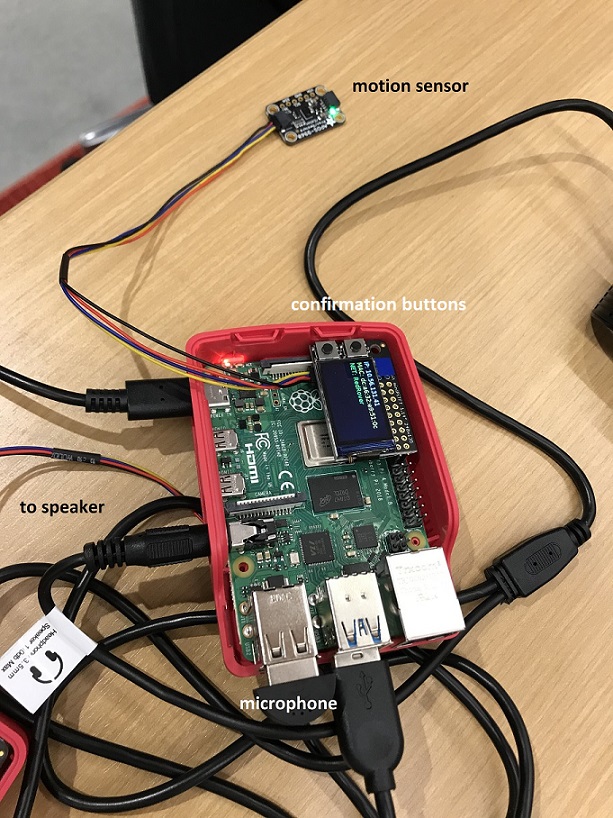
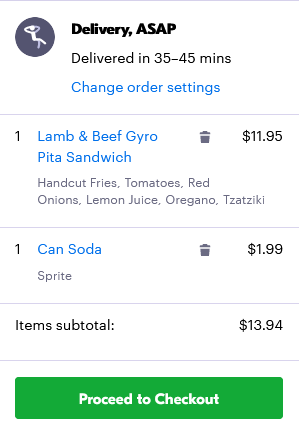
Try to get at least two people to interact with your system. (Ideally, you would inform them that there is a wizard after the interaction, but we recognize that can be hard.)
Answer the following:
What worked:
- Since Grubhub categorizes all restaurants and automatically sorts them by distance and rating, the device is good at suggesting restaurants by taking advantage of Grubhub's algorithms.
- Thanks to how people interact with other devices such as Amazon Alexa or Siri, most people instinctively interact with the device.
- All the text to speech components of the interaction worked well.
What didn't work:
- The device is not set up to customize the order beyond adding basic food items. It also cannot add comments to the order which the user may want to do.
- The system requires internet connectivity to make the API calls to Grubhub, so interruptions in the connection can cause problems.
What worked:
- The activation of the device works well because it does not rely on speech recognition to start.
- The confirmation works well too, as it relies on a button rather or a specific phrase, so there is less likelihood of error.
- Selecting the restaurant works well, as the Raspberry only has to detect a spoken number.
What didn't work:
- The speech to text part of the device is the trickiest, in particular when trying to tell the Raspberry which menu items you want.
- Since the Raspberry Pi does not have AI-optimized hardware (e.g. TPU) nor is connected to an advanced speech recognition system (e.g. Amazon Transcribe), the accuracy while understanding the user's speech leaves a lot of room for improvement.
What lessons can you take away from the WoZ interactions for designing a more autonomous version of the system?
- The most important thing for a device like this is for it to be dynamic and adaptable. People can give instructions in many different ways, and the device can run into unexpected errors such as the restaurant closing mid-order. Making the device more autonomous would require it to be able to handle such edge cases.
- People are sometimes indecisive when it comes to ordering food, so a better system could perhaps make suggestions rather than just ask for input.
How could you use your system to create a dataset of interaction? What other sensing modalities would make sense to capture?
The system could store past orders as favorites that could be more easily selected and executed as orders. The system could also remember which restaurants were ordered from in the past, so when a type of cuisine is specified, these restaurants are at the top of the list of suggestions.