Name
Active Tab Emoji Focus
Description
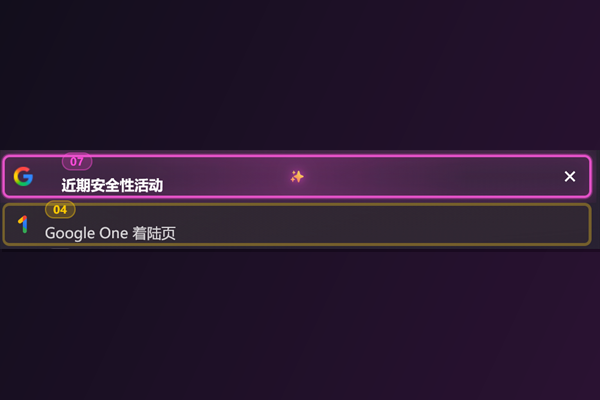
Highlight the active tab with a centered emoji marker and stronger visual focus.
Homepage
https://github.com/constansino/zen-active-tab-emoji-focus
Image
https://raw.githubusercontent.com/constansino/zen-active-tab-emoji-focus/master/image.png
Type
Theme Styles
:root {
  --active-tab-emoji-focus-marker: var(
    --mod-active_tab_emoji_focus-active_marker,
    "✨"
  );
  --active-tab-emoji-focus-marker-size: calc(
    var(--mod-active_tab_emoji_focus-marker_size, 11) * 1px
  );
  --active-tab-emoji-focus-inactive-opacity: calc(
    var(--mod-active_tab_emoji_focus-inactive_opacity, 78) / 100
  );
  --active-tab-emoji-focus-border-width: calc(
    var(--mod-active_tab_emoji_focus-border_width, 2) * 1px
  );
}

#tabbrowser-tabs .tabbrowser-tab {
  --active-tab-emoji-focus-accent: var(
    --identity-icon-color,
    color-mix(in srgb, var(--zen-primary-color, #62c6ff) 75%, white 25%)
  );
}

#tabbrowser-tabs .tabbrowser-tab > .tab-stack > .tab-background {
  transition:
    border-color 180ms ease,
    box-shadow 180ms ease,
    opacity 180ms ease,
    transform 180ms ease,
    background-color 180ms ease !important;
}

#tabbrowser-tabs .tabbrowser-tab:not(:is([selected], [visuallyselected], [multiselected]))
  > .tab-stack
  > .tab-background {
  opacity: var(--active-tab-emoji-focus-inactive-opacity) !important;
  filter: saturate(0.82) brightness(0.94) !important;
}

#tabbrowser-tabs .tabbrowser-tab:is([selected], [visuallyselected], [multiselected])
  > .tab-stack
  > .tab-background {
  border: var(--active-tab-emoji-focus-border-width) solid
    color-mix(in srgb, var(--active-tab-emoji-focus-accent) 92%, white 8%) !important;
  background:
    radial-gradient(
      circle at 50% 52%,
      color-mix(in srgb, var(--active-tab-emoji-focus-accent) 18%, transparent)
        0%,
      transparent 58%
    ),
    color-mix(in srgb, var(--active-tab-emoji-focus-accent) 11%, transparent) !important;
  box-shadow:
    0 0 0 1px
      color-mix(in srgb, var(--active-tab-emoji-focus-accent) 35%, transparent),
    0 0 20px
      color-mix(in srgb, var(--active-tab-emoji-focus-accent) 34%, transparent),
    inset 0 0 16px
      color-mix(in srgb, var(--active-tab-emoji-focus-accent) 12%, transparent) !important;
}

#tabbrowser-tabs .tabbrowser-tab:is([selected], [visuallyselected], [multiselected])
  > .tab-stack
  > .tab-content {
  position: relative !important;
}

#tabbrowser-tabs
  .tabbrowser-tab:is([selected], [visuallyselected], [multiselected]):not([pinned])
  .tab-label-container {
  padding-inline: 14px !important;
}

#tabbrowser-tabs
  .tabbrowser-tab:is([selected], [visuallyselected], [multiselected]):not([pinned])
  > .tab-stack
  > .tab-content::after {
  content: var(--active-tab-emoji-focus-marker);
  position: absolute;
  left: 50%;
  top: 50%;
  transform: translate(-50%, -52%);
  font-size: var(--active-tab-emoji-focus-marker-size);
  line-height: 1;
  pointer-events: none;
  color: color-mix(in srgb, var(--active-tab-emoji-focus-accent) 76%, white 24%);
  text-shadow:
    0 0 6px color-mix(in srgb, var(--active-tab-emoji-focus-accent) 60%, transparent),
    0 0 12px color-mix(in srgb, var(--active-tab-emoji-focus-accent) 45%, transparent);
  opacity: 0.95;
  z-index: 3;
}

#tabbrowser-tabs .tabbrowser-tab:is([selected], [visuallyselected], [multiselected]) .tab-label {
  font-weight: 650 !important;
  letter-spacing: 0.01em !important;
}
Readme
# Active Tab Emoji Focus for Zen Browser
Make the current tab obvious at a glance.
This mod adds a centered emoji marker, a stronger border, and glow to the active tab while slightly dimming inactive tabs.
## Features
- Center emoji marker on the active tab.
- Accent color follows each tab's container color (`--identity-icon-color`).
- Stronger active border and glow.
- Subtle dimming for inactive tabs.
- User-customizable options in Zen Mod preferences.
## Preferences
- `mod.active_tab_emoji_focus.active_marker`
Example: `✨`, `🔥`, `✅`, `🧠`
- `mod.active_tab_emoji_focus.marker_size`
Number in px, example: `11`, `13`, `16`
- `mod.active_tab_emoji_focus.inactive_opacity`
Number from `0` to `100`
- `mod.active_tab_emoji_focus.border_width`
Number in px, example: `2`, `3`
## Manual Install
1. Open your Zen profile folder.
2. Open `chrome/` (create it if missing).
3. Copy content from `chrome.manual.css` into `userChrome.css`.
4. Ensure `toolkit.legacyUserProfileCustomizations.stylesheets=true`.
5. Restart Zen Browser completely.
## Files for Zen Theme Store Submission
- `chrome.css`
- `preferences.json`
- `README.md`
- `image.png` (`600x400` PNG)
Preferences
[
  {
    "property": "mod.active_tab_emoji_focus.active_marker",
    "label": "Emoji marker shown at active tab center",
    "type": "string",
    "defaultValue": "✨"
  },
  {
    "property": "mod.active_tab_emoji_focus.marker_size",
    "label": "Active marker size in px (number only)",
    "type": "string",
    "defaultValue": "11"
  },
  {
    "property": "mod.active_tab_emoji_focus.inactive_opacity",
    "label": "Inactive tab opacity 0-100 (number only)",
    "type": "string",
    "defaultValue": "78"
  },
  {
    "property": "mod.active_tab_emoji_focus.border_width",
    "label": "Active border width in px (number only)",
    "type": "string",
    "defaultValue": "2"
  }
]
Name
Active Tab Emoji Focus
Description
Highlight the active tab with a centered emoji marker and stronger visual focus.
Homepage
https://github.com/constansino/zen-active-tab-emoji-focus
Image
https://raw.githubusercontent.com/constansino/zen-active-tab-emoji-focus/master/image.png
Type
Theme Styles
Readme
Preferences
[ { "property": "mod.active_tab_emoji_focus.active_marker", "label": "Emoji marker shown at active tab center", "type": "string", "defaultValue": "✨" }, { "property": "mod.active_tab_emoji_focus.marker_size", "label": "Active marker size in px (number only)", "type": "string", "defaultValue": "11" }, { "property": "mod.active_tab_emoji_focus.inactive_opacity", "label": "Inactive tab opacity 0-100 (number only)", "type": "string", "defaultValue": "78" }, { "property": "mod.active_tab_emoji_focus.border_width", "label": "Active border width in px (number only)", "type": "string", "defaultValue": "2" } ]