google colab tutorial inprogress
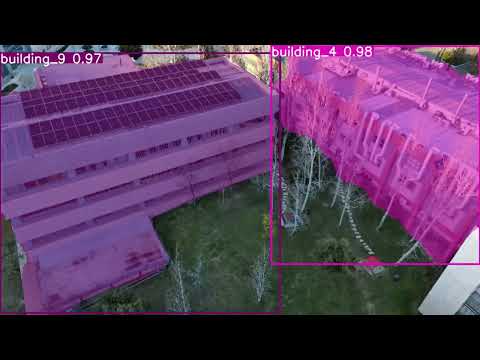
This repository contains scripts for preparing, augmenting, and training image datasets for YOLOv11 segmentation tasks. The workflow is as follows:
- Download Videos: Use
script.pyto download videos from YouTube. - Label Images: Label the images in the
frames/folder using LabelMe. - Augment Dataset: Use the augmentation scripts in the
augmentations/directory to expand your dataset. - Convert Annotations: Run
prepare.pyto convert JSON annotations to YOLO-compatible TXT files. - Copy Matching Images: Use
copy-matching-png.pyto copy images that match the generated TXT label files. - Train Model: Use
train-kfold.pyto train the model using k-fold cross-validation. - Predict: Use
predict.pyto run predictions on new videos.
- prepare.py: Converts JSON annotations from the
frames/directory into YOLOv11 segmentation format, saving the labels indataset/labels/. - copy-matching-png.py: Copies matching PNG files based on JSON annotations.
- copy-frames.py: Copies frame data for further processing.
- script.py: Downloads videos from YouTube.
- augmentations/: Contains scripts for data augmentation:
main.py: Main augmentation script.augmentations.py: Defines augmentation functions.utils.py: Utility functions for augmentation.
- frames/: Contains JSON files with frame annotations.
- runs/: Contains training and prediction outputs:
segment/: Outputs from segmentation training.kfold/: Outputs from k-fold cross-validation training.
- Python 3.x
- Required Python packages (install via
pip install -r requirements.txt):- json
- os
- cv2
- torch
- ultralytics
- yt_dlp
- tqdm
- yaml
- sklearn
-
Download Videos:
- Use
script.pyto download videos from YouTube.
- Use
-
Label Images:
- Label the images in the
frames/folder using LabelMe.
- Label the images in the
-
Augment Dataset:
- Navigate to the
augmentations/directory. - Run the main augmentation script:
python main.py
- Navigate to the
-
Convert Annotations:
- Run
prepare.pyto convert JSON annotations to YOLO format:python prepare.py
- The converted labels will be saved in
dataset/labels/.
- Run
-
Copy Matching Images:
- Use
copy-matching-png.pyto copy PNG files matching your JSON annotations:python copy-matching-png.py
- Use
-
Train Model:
- Use
train-kfold.pyto train the model using k-fold cross-validation:python train-kfold.py
- Use
-
Predict:
- Use
predict.pyto run predictions on new videos:python predict.py
- Use
The prepare.py script uses a predefined class mapping to convert class names to numeric IDs. Modify the class_map dictionary in prepare.py if your classes differ.
This project is licensed under the MIT License - see the LICENSE file for details.
Contributions are welcome! Please open an issue or submit a pull request for any improvements or bug fixes.