GPU-powered posture analysis and injury risk scoring using your webcam, built with YOLOv8-Pose + FastAPI.




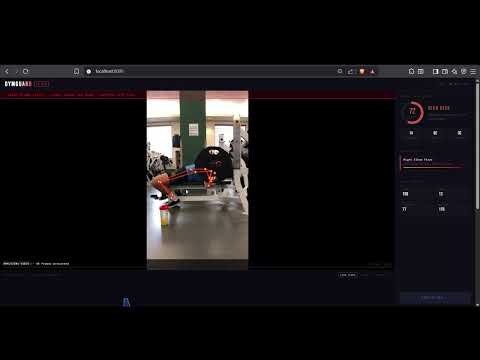
Deadlift Analysis — Multi Person Tracking
Squat Analysis — High Risk Detection
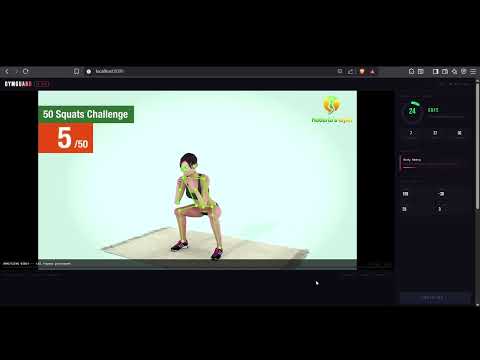
GymGuard watches your workout through your webcam in real time, tracks 17 body keypoints using YOLOv8-Pose on your GPU, and scores your injury risk from 0 to 100 based on your joint angles and posture. It detects bad form before it becomes an injury.
- Real-time pose estimation — 17 body keypoints tracked at 20+ FPS on NVIDIA GPU
- Exercise auto-detection — ML classifier trained on self-recorded data, 98% accuracy across 7 exercises
- Injury risk scoring — 0 to 100 risk score updated live every frame
- Exercise-specific form analysis — dedicated injury rules per exercise
- Voice alerts — speaks out loud when form breaks, no libraries, native Web Speech API
- Multi-person tracking — always locks onto the largest person in frame (main subject)
- Video upload mode — upload a recorded workout video for full analysis
- Session history chart — 60 second scrolling risk graph with exercise color coding
- CSV export — download your session data
- Hardware adaptive — NVIDIA GPU for best performance, falls back to CPU automatically
| Exercise | What It Checks |
|---|---|
| Squat | Knee valgus, excessive forward lean |
| Deadlift | Spine rounding, bar drift |
| Bench Press | Elbow flare, wrist alignment |
| Lunge | Knee over toe, torso lean |
| Bicep Curl | Body swing / cheat reps |
| Overhead Press | Lumbar hyperextension |
| Standing | General posture, forward head posture |
| Score | Level | Action |
|---|---|---|
| 0 - 29 | SAFE | Good form, keep going |
| 30 - 64 | WARNING | Deviations detected, reduce load |
| 65 - 100 | HIGH RISK | Stop and correct immediately |
GymGuard speaks out loud when it detects form issues so you don't have to look at the screen mid-workout.
| Risk Level | What It Says |
|---|---|
| WARNING (30-64) | "Check your form. [Issue name]" |
| HIGH RISK (65+) | "Warning. [Issue name]. [Full message]" |
| SAFE | Silent |
- Built using the browser's native Web Speech API — no external libraries or API keys needed
- 5 second cooldown between alerts so it doesn't repeat every frame
- Works in Chrome, Edge, and Firefox
| Technology | Role |
|---|---|
| YOLOv8-Pose (Ultralytics) | Real-time 17 point body keypoint detection |
| PyTorch + CUDA | GPU inference on NVIDIA hardware |
| scikit-learn MLPClassifier | Exercise classification neural network |
| OpenCV | Webcam capture and skeleton drawing |
| FastAPI | Backend API and WebSocket server |
| WebSockets | Real-time frame streaming to browser |
| Uvicorn | ASGI server |
| NumPy | Joint angle vector math |
| Base64 | Frame encoding for WebSocket transport |
| Canvas API | Session history chart rendering |
| Web Speech API | Voice alerts |
| localStorage | Session persistence across page refreshes |
| Hardware | FPS | Notes |
|---|---|---|
| NVIDIA RTX 3050+ | 20-25 FPS | Recommended |
| NVIDIA GTX 1060+ | 15-20 FPS | Good |
| CPU only | 5-8 FPS | Works, not smooth |
| AMD GPU | 5-8 FPS | Falls back to CPU |
| Intel integrated | 3-5 FPS | Usable |
Swap the model in pose/detector.py based on your hardware:
| Model | Speed | Accuracy | Best For |
|---|---|---|---|
| yolov8n-pose.pt | Fastest | Good | CPU / weak GPU |
| yolov8s-pose.pt | Fast | Better | GTX 1060 class |
| yolov8m-pose.pt | Balanced | Great | RTX 3050 (default) |
| yolov8l-pose.pt | Slow | Best | RTX 3080+ |
| yolov8x-pose.pt | Slowest | Maximum | RTX 4090 |
Change this line in pose/detector.py:
model = YOLO("yolov8m-pose.pt") # swap model here- Python 3.11+
- NVIDIA GPU with CUDA support (recommended)
- Webcam
git clone https://github.com/yourusername/gymguard.git
cd gymguardpython -m venv venv
# Windows
venv\Scripts\activate
# Linux / Mac
source venv/bin/activatepip install torch torchvision --index-url https://download.pytorch.org/whl/cu121Verify GPU:
python -c "import torch; print(torch.cuda.is_available(), torch.cuda.get_device_name(0))"pip install -r requirements.txtpython main.pyDo NOT open
static/index.htmldirectly. Always go throughhttp://localhost:8000.
On first run YOLOv8 will automatically download yolov8m-pose.pt (~50MB).
gymguard/
│
├── main.py                       # FastAPI app + WebSocket + video endpoint
├── requirements.txt
├── .gitignore
├── README.md
│
├── static/
│   ├── index.html                # Frontend dashboard
│   ├── css/
│   │   └── style.css
│   └── js/
│       ├── websocket.js          # Connection, webcam, video upload
│       ├── ui.js                 # Gauge, issues, angles, voice alerts
│       └── chart.js              # History chart
│
├── pose/
│   ├── detector.py               # YOLOv8 inference + person tracking
│   ├── drawing.py                # Skeleton overlay
│   ├── utils.py                  # Angle math, keypoint helpers
│   └── analyzers/
│       ├── base.py               # Exercise detection + orchestration
│       ├── squat.py
│       ├── deadlift.py
│       ├── bench.py
│       ├── lunge.py
│       ├── curl.py
│       └── overhead.py
│
├── tools/
│   ├── collect_data.py           # Webcam data collector
│   ├── extract_from_videos.py    # Bulk keypoint extractor
│   └── train_classifier.py      # Train exercise classifier
│
├── models/
│   └── .gitkeep                  # exercise_classifier.pkl goes here after training
│
└── data/
    └── .gitkeep                  # keypoints.csv goes here after extraction
The exercise classifier is trained on your own recorded data for best accuracy.
Record 1-2 minutes of each exercise from a side view and place in:
data/videos/squat/
data/videos/deadlift/
data/videos/bench/
data/videos/lunge/
data/videos/curl/
data/videos/overhead/
data/videos/standing/
python tools/extract_from_videos.pypython tools/train_classifier.pypython main.pyTerminal will show [INFO] Exercise classifier loaded confirming the model is active.
Webcam / Video File
        |
        v
YOLOv8m-Pose (NVIDIA GPU)
        |
  17 body keypoints
        |
        v
Largest person selected (multi-person tracking)
        |
        v
Normalize to 34 numbers (x,y per keypoint)
        |
        v
ML Classifier (MLPClassifier)
        |
  Exercise identified (98% accuracy)
        |
        v
Exercise-specific posture analyzer
        |
  Joint angles calculated
  Form issues detected
        |
        v
Risk Score 0-100
        |
        v
FastAPI WebSocket
        |
        v
Browser Dashboard
  - Live skeleton overlay
  - Risk gauge
  - Voice alert
  - Issues panel
  - History chart
- Rep counter per exercise
- Manual exercise selector dropdown
- Session history dashboard page
- Multi-platform GPU support (AMD ROCm, Intel OpenVINO)
- ONNX model export for cross-platform inference
- Mobile responsive layout
- PDF session report export
Pull requests welcome. To add a new exercise:
- Create
pose/analyzers/yourexercise.py - Follow the same pattern as existing analyzers
- Wire it into
pose/analyzers/base.py
MIT
Built by Somya and team
If this helped you, give it a star ⭐