
Applicable to PalDefender archive updates within palserver-gui.
Warning
Although this update program has undergone basic operational testing,
But unexpected situations may arise.
Please be sure before making any file changes or file moves,
Back up server archives,
Avoid unexpected situations.
English | 繁體中文
This program is to prevent incorrect updates,
Lock the updated folder,
Crawl the latest archives and replace the existing ones.
The code is closed source and we dont have any plans to release it.
I can be found in palserver-GUI Discord.
This README is suitable for version:
GUI PalDefender up v1.3.3
- Check whether the file path is correct.
- Check if the version is latest.
- Download the latest version of the archive.
- Output work log.
- Supports optional instances.
- No need to go to the server settings of the palserver-GUI to click Update.
- Update multiple servers at once.
- Tools language selection.
- Output settings file.
- Delete old file.
- Forced update of files.
- Clear log
- Clear GUI Cache
- Announcement project.
- New version tips.
- ?????
GUI PalDefender up.exe introduce
├── System Settings
│   ├── Select GUI path
│   ├── Select instances path
│   └── Language
├── Check Updates
├── About This Program
│   └── Version, Introduction and Announcement
├── Clear Log
├── Clear GUI Cache
└── Exit
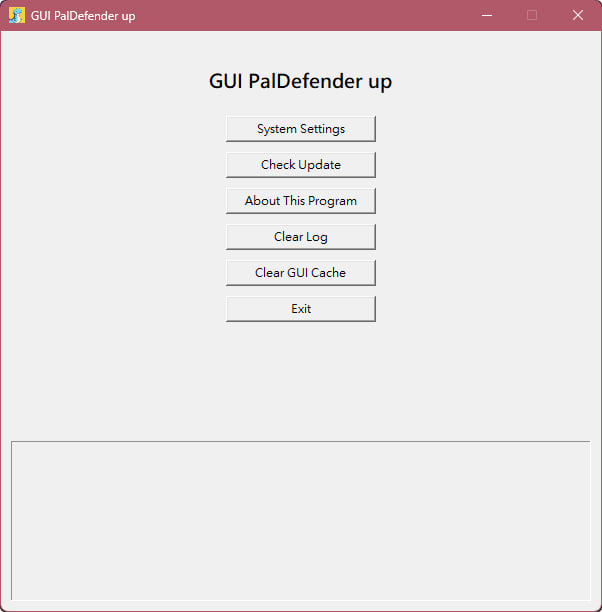
- Download the latest release at GUI-PalDefender-up
- Put the program anywhere.
- Execute
GUI PalDefender up.exe(Language settings will appear for the first execution). - Click
Check Updatesto update (you need to go toSystem Settingsfor the first time to complete the path settings).System Setting Description Select GUI path: Please select palserver-gui's shortcut or execution file (that is, the file started by palserver-gui). Select instances path: Please click Use Default Path or select your customized path (usually using a preset) After the settings are completed, please press Save settings to save the settings. If you don't click on Save settings, the settings will not be stored.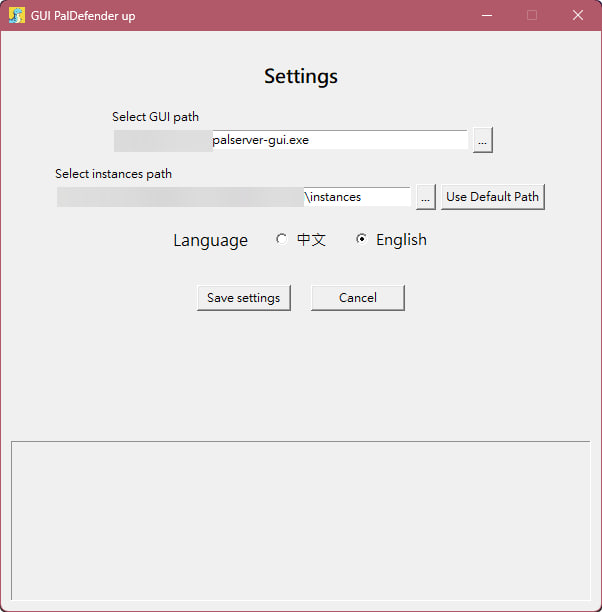
- The update results will be displayed below
GUI PalDefender up.exe(execution is fast and usually completed in seconds). - After starting the server
Check whether theStarting PalDefender Anti Cheatdisplayed aboveCMDis already the latest version.
- After pressing the update of Palguard, PalDefender has not been updated to the latest version.
- Maybe PalDefender has not been updated yet,
Please go to PalDefender to see if there is a version update. - There may be a problem in the GUI-PalDefender-up,
Please check the prompts belowGUI PalDefender up.exeafter the update. - The PalDefender file may not be covered normally(
Including Beta version),
Right-clickCheck Updatesto force an update.
- Maybe PalDefender has not been updated yet,