Conversation


…scaped and then rendered


|
Awesome PR @MegaLoler! Your PR content (description etc) was really helpful to understand the fix and the video was a great touch to show the PoF, and I'll let the Sheriffs (reviewers) comment on your specific fix. Feedback:
|

|
Thank you so much for your feedback! About the
Oh yeah, I realize that's confusing! That's right though, my huntr account is using this account here, @MegaLoler. I'll change my git client settings so this'll be less confusing in the future! Thank you again for your feedback! ^_^ One other thing: do I need to set the draft as ready for review before the reviewers review the fix? |

Normally, it's up to the maintainer, but we recommend to not commit build files and to let the maintainer re-generate them with your included fix, as this is often executed during CI/CD.
Setting it to review was perfect, I'm sure the sheriffs will get to it once we pass the holiday period. Have a good one! 🎄 |

 Mik317
left a comment
Mik317
left a comment
Mik317
left a comment
There was a problem hiding this comment.
Hi @MegaLoler 😄
sorry for the late reply (I lost this PR in the backlog 😢 ) and thanks for the fix!
I downloaded and checked your patch but I still get a XSS when moving the item (I didn't use React, but the browser version)
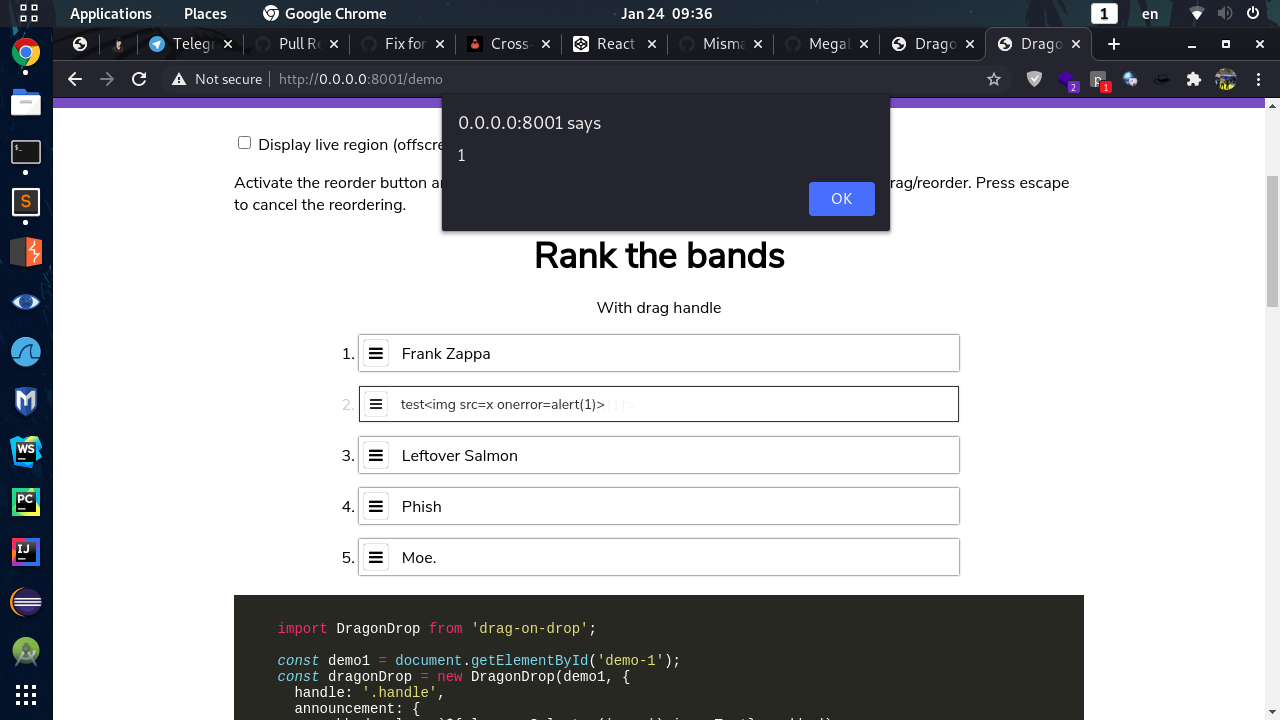
This was the input name:
<span id="band-text-2">test<img src=x onerror=alert(1)></span>Can you give a look and tell me if you get the same of it's my fault please?
Cheers,
Mik

|
👋 Hello, @schne324 - @MegaLoler has opened a PR to us with a fix for a potential vulnerability in your repository. To view the vulnerability, please refer to the bounty URL in the first comment, above. Ultimately, you get to decide if the fix is 👍 or 👎. If you are happy with the fix, please write a new comment ( If you have any questions or need support, come and join us on our community Discord! @schne324 & @MegaLoler - thank you for your efforts in securing the world’s open source code! 🎉 |
You're right! It looks like it's not quite as fixed as I thought! I'll work on it! XD |

|
@Mik317 It looks like it was an issue particular to the demo where the innerText was being displayed as innerHTML in an invisible div! I pushed a fix for the demo. Thanks for checking! All tests on bug-2021-01-25_13.44.17.mp4 |
5 participants


Since I'm totally new to doing this stuff, I'm submitting a draft PR for feedback! Thank you for your help!!
📊 Metadata *
Please enter the direct URL for this bounty on huntr.dev. This is compulsory and will help us process your bounty submission quicker.
Bounty URL: https://www.huntr.dev/bounties/1-npm-drag-on-drop/
⚙️ Description *
Describe your fix clearly and concisely - imagine you are describing it to a non-technical friend.
Usually, when an HTML element contains other HTML code, that HTML gets rendered. However, if you escape that code, it doesn't get rendered as HTML and instead it gets rendered as a literal string, allowing you to see what the code is in the browser, without it actually doing anything. From JavaScript, you can access the raw contents of the element using the
.innerHTMLattribute, which returns string with the escaped code as it is written in the text editor. You can also access contents as pure text using the.innerTextattribute. So if the contents of the element contains an piece of code like this:<b>hello!</b>, it will show up in the browser as this:<b>hello!</b>In JavaScript, if you doelement.innerHTMLyou will get the raw string:"<b>hello!</b>", and if you doelement.innerTextyou will get the string as it shows up:"<b>hello!</b>"Here's the issue: what happens if you grab the
innerText(giving you "<b>hello!</b>") and then set theinnerHTMLto this value? Well, since you are setting unescaped HTML code to the HTML, it's going to actually do something now! In this case, the<b>tag will make a bold string saying "hello!" appear in the browser.The problem is that this means whatever escaped HTML code is inside the element, which might be from the user and hence dangerous, will become unescaped and active. So the Fix then is to grab the
innerHTML, which doesn't unescape the HTML, before setting theinnerHTMLback to that value.💻 Technical Description *
Describe in-depth, the technical implementation of the proposed security fix. Imagine you are describing it to a NASA engineer.
Line 7977 in
dist/dragon-drop.jssets theinnerHTMLof an element to a value that originates from line 459, which was grabbing theinnerTextof the draggable element. If the draggable element contains escaped HTML code, then reading theinnerTextunescapes that code, and if that is then set as theinnerHTMLof something else, then that previously safe HTML becomes active and dangerous. So I changed theinnerTexttoinnerHTML.🐛 Proof of Concept (PoC) *
Provide the vulnerability exploit to show the security issue you're fixing.
https://codepen.io/schne324/pen/dZOGeG
Replace on line 32
Item ${i + 1}with<img src=x onerror=alert(1)>. Then drag one of the items, and the alert will be displayed.🔥 Proof of Fix (PoF) *
Replay the vulnerability exploit to show the successful fix and mitigation of the vulnerability.
vuln-2020-12-22_21.26.33.mp4
👍 User Acceptance Testing (UAT)
Run a unit test or a legitimate use case to prove that your fix does not introduce breaking changes.
npm run testpasses all tests.🔗 Relates to...
Provide the URL of the PR for the disclosure that this fix relates to.
418sec/huntr#1366