PlatformIO IDE
Even thou you can use PlatformIO Core form the command line PlatformIO provides integrations with two Open Source IDE line Atom and Visual Studio Code.
- Download and install official GitHub's Atom text editor, PlatformIO IDE is built on top of it
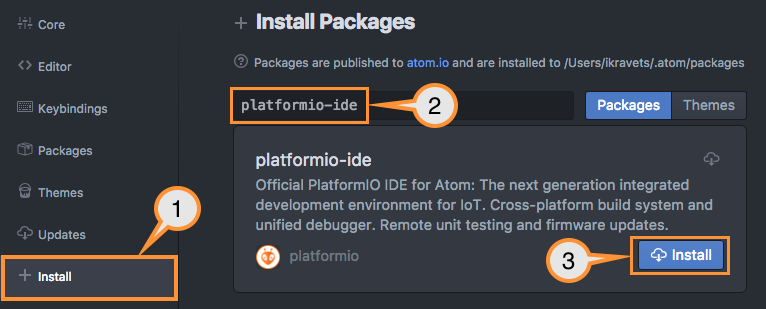
- Open Atom Package Manager
- Windows, Menu: File > Settings > Install
- Mac, Menu: Atom > Preferences > Install
- Linux, Menu: Edit > Preferences > Install
- Search for official platformio-ide package
- Install PlatformIO IDE.
- Download and install official Microsoft's Visual Studio Code, PlatformIO IDE is built on top of it Open VSCode Extension Manager
- Search for official
platformio-ideextension - Install PlatformIO IDE.

Head over to the PlatformIO IDE site to know more about these IDEs and other integrations with popular IDEs like Eclipse, Sublime, Netbeans, CodeAnywhere, Cloud9,...