
Android preference which allow users to change a ranged integer setting through a SeekBar, and store the value as int.
It supports minimum and maximum values (positive or null), and steps.
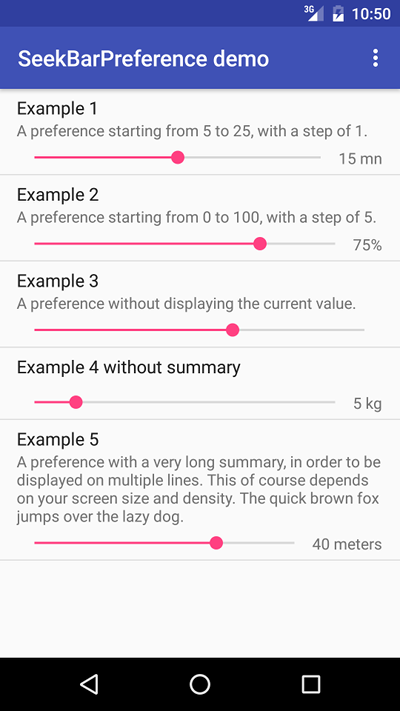
- Be sure
jcenter()is specified as a repository in your project'sbuild.gradle:
repositories {
    jcenter()
}
- Add
compile 'org.anasthase:android-seekbar-preference:1.2'to the module'sbuild.gradleunder thedependenciessection:
dependencies {
    {...}
    compile 'org.anasthase:android-seekbar-preference:1.2'
    {...}
}
Add xmlns:app="http://schemas.android.com/apk/res-auto" along with the xmlns:android, then add the following:
<org.anasthase.androidseekbarpreference.SeekBarPreference
    android:defaultValue="15"
    android:key="PREFERENCE_KEY"
    android:summary="@string/PreferenceSummary"
    android:title="@string/PreferenceTitle"
    app:format="@string/PreferenceFormat"
    app:maxValue="50"
    app:minValue="5"
    app:stepValue="5" />
Where:
minValue: The minimum value for the setting.maxValue: The maximum value for the setting.stepValue: The step value for for the setting.format: The formatting string of the current value. If specified, must be a valid format string, as expected byString.format(), otherwise only the value will be displayed. Ifnull, the current value will not be displayed.displayDividerValue: A divider in order to display the value as a float value. If this is used,formatmust handle float values, like%.2f.
Be aware of the following edge cases:
- If
minValueis lesser than 0, it will be set to 0 - If
maxValueis lesser than or equal tominValue, it will be set tominValue + 1 - If
defaultValueis lesser than (respectively greater than)minValue(respectivelymaxValue), it will be set tominValue(respectivelymaxValue) - If the current stored preference value if lesser than (respectively greater than)
minValue(respectivelymaxValue), it will be displayed asminValue(respectivelymaxValue)
SeekBarPreference store the setting value as int. Therefore, SharedPreferences's getInt() method must be used to retrieve setting value, and SharedPreferences.Editor's putInt() method must be used to set setting value.
As for any Android Preference, title and summary can be accessed through their accessors. All other parameters (minimum value, maximum value, current value, step value, format string) also have dedicated accessors.
An SeekBar.OnSeekBarChangeListener listener can also be registered through the setOnSeekBarChangeListener() method to monitor SeekBar events.