Combined hardware + firmware + host tooling for a compact dual‑ADC I/Q capture platform.
High-rate continuous streaming of interleaved dual ADC (I/Q) samples over USB Full‑Speed (FS) using only the built‑in CDC class on an STM32F103C8 ("Blue Pill" style) board. Companion Python host tools provide live visualization, FIFO bridging, raw capture, diagnostics, and throughput benchmarking.
Status: Actively optimized. Current configured complex sample rate target: 210.5 k I/Q samples/sec (
IQ_SAMPLE_RATE_HZ= 210526) with sustained USB payload throughput >500 KiB/s. Timer PSC/ARR are selected at runtime by a search routine for the closest achievable rate; observed effective rate can be within a small delta of the target. ADC sampling time was reduced (nowADC_SAMPLETIME_28CYCLES_5) to reach this rate while maintaining conversion stability.
Origin / Intended Use: Initially developed as a lightweight streaming engine for the PhaseLoom project, but fully usable with any dual (I/Q) analog front end producing baseband signals on two STM32F1 ADC channels. Note: Phaseloom should be modified for best performance. Replace 22kOhm feedback caps with matched 47kOhm resistors and replace the output stage 50 ohms with 0 ohm.
https://www.youtube.com/watch?v=UEAtSE1PV44
A 4‑layer purple PCB (Blue Pill footprint inspired) integrating two SMA input ports and on‑board ~100 kHz low‑pass filtering (~210 kHz complex baseband bandwidth). Designed around the STM32F103C8 in dual regular simultaneous ADC mode (ADC1 + ADC2) to stream interleaved I/Q samples over USB Full-Speed.
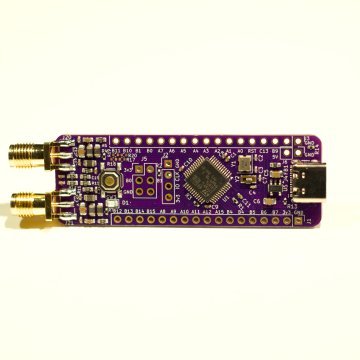
- MCU: STM32F103C8 (72 MHz) LQFP‑48
- Dual simultaneous ADC (12‑bit each) packed into 32‑bit words (I lower 12 bits, Q upper 12 bits)
- 2 × edge‑mount SMA (J20 = I_IN, J21 = Q_IN)
- Integrated passive input filtering (inductor + capacitor network targeting ~100 kHz LPF per channel)
- USB‑C connector (USB2.0 FS, CDC class currently; raw/bulk class option planned)
- On‑board 8 MHz + 32.768 kHz crystals for stable system and RTC timing
- Ferrite bead + local bulk/decoupling for cleaner ADC rails
- Unused GPIOs forced to analog mode early for noise reduction (see
Quiet_Unused_Pinsinmain.c) - Headers for expansion / SWD / boot configuration
All fabrication outputs live in hardware/PhaseLatchMini/production:
PhaseLatchMini.zip– Gerber/drill bundle ready for PCB fabbom.csv– Bill of Materials (with LCSC part numbers for quick JLCPCB sourcing)designators.csv– Component reference listpositions.csv– Pick‑and‑place XY + rotation for SMT assemblynetlist.ipc– IPC netlist export
Direct link (relative): hardware/PhaseLatchMini/production/PhaseLatchMini.zip
Representative components (from bom.csv):
- Decoupling: multiple 100 nF 0402 caps (C307331) near MCU and filter sections
- Filter / bulk caps: 22 nF, 220 nF, 470 nF mix shaping input response
- Inductors: six 10 µH (0805) parts forming LC sections for each channel’s low‑pass filtering / supply isolation
- USB-C receptacle: 16‑pin (HCTL HC-TYPE-C-16P-01A) with 5k1 CC resistors for proper orientation detection
- Ferrite bead (FB1) for USB / supply noise suppression
- Voltage regulator: MIC5504-3.3 (SOT‑23‑5) providing clean 3V3
- Crystals: 8 MHz main, 32.768 kHz low‑speed (RTC / optional precise timing)
- SMA edge connectors: matched pair for I and Q inputs
- Clean flux residues near high‑impedance analog nodes (C1/C8 cluster) to keep leakage low.
- If performing hand assembly, solder the SMA edge connectors first to anchor board alignment, then USB, then fine‑pitch MCU.
Current passive network targets ~100 kHz corner. For alternative bandwidths:
- Raise corner: decrease shunt capacitance (e.g., swap 470 nF → 220 nF or 22 nF depending on desired slope) or reduce inductance value.
- Lower corner: increase shunt capacitance or employ higher inductance (space permitting). Recalculate fc ≈ 1/(2π√(L·C_eq)).
- Mitigate source‑resistor induced tilt: include its resistance in design equations; keep initial shunt capacitors modest (≤10 nF) if a 50 Ω series is retained upstream.
- Dual ADC synchronous sampling packed as 32-bit little-endian words (I 12-bit + Q 12-bit inside two 16-bit lanes)
- Target sample rate
IQ_SAMPLE_RATE_HZ(currently 210526) with dynamic TIM3 prescaler/period search (seetimer_trigger_init()iniq_adc.c) - ADC sampling time set to
ADC_SAMPLETIME_28CYCLES_5for higher throughput (previous higher value limited rate) - Circular DMA with half / full transfer interrupts
- Lock-free ring queue feeding USB transmit path
- ISR burst chaining (current chain limit 16 packets per IN completion) to minimize USB idle gaps
- Immediate DMA IRQ packet scheduling ("kick") to prime first packet of each half-buffer
- Optional diagnostic/stat packets suppressed in throughput builds
- Host tools for diagnostics, throughput, raw capture, FIFO bridging, live view
- Edit
Inc/iq_adc.hand set#define IQ_SAMPLE_RATE_HZ <desired_rate>(I/Q pairs per second). - Ensure the new rate is feasible: TIM3 must be able to realize it given 16-bit ARR and prescaler; the search code picks the closest achievable value.
- If pushing higher rates:
- Consider reducing ADC sampling time (
ADC_SAMPLETIME_x) further, but watch noise/performance. - Monitor USB throughput counters (
FEEDcommand) for increased busy skips.
- Consider reducing ADC sampling time (
- Rebuild and flash. Optionally measure actual achieved rate by counting
iq_dma_half_count+iq_dma_full_countover a timed host interval.
- After START, issue the
Acommand periodically; note increments of half/full counts. - Effective samples/sec ≈ ((delta_half + delta_full) * half_buffer_samples) / time_interval.
- Or capture a known duration with
host_test.pyand compute rows * rate.
platformio.ini              # Build environments & macro flags
src/                        # Firmware sources (USB, ADC, main logic)
Inc/ / include/             # Public headers
host_*.py                   # Python host utilities
lib/ test/                  # (Placeholders / future use)
Key firmware files:
src/main.c– System init, main loop USB feeder (fallback scheduling & instrumentation)src/iq_adc.c/Inc/iq_adc.h– ADC+DMA+Timer configuration, DMA IRQ scheduling kicksrc/usbd_conf.c– Low-level USB callbacks, DataIn burst chaining logicsrc/usbd_cdc_if.c– CDC interface, command parser (A/F/STATS) & data write APIsrc/usbd_raw.c(future / optional) – Raw class scaffolding (if transitioning from CDC for additional margin)
Host scripts (root directory):
host_diagnostics.py– Passive capture, STATS delta decode, periodic monitor, USB descriptor infohost_throughput.py– PyUSB bulk endpoint benchmark (raw vendor class / future); shows packet statshost_raw_capture.py– Robust raw USB (PyUSB or CDC) capture with quiet mode & BrokenPipe safetyhost_iq_fifo.py– Serial CDC → named FIFO adapter (u8 or cf32) for GQRX / GNU Radiohost_iq_live.py– Terminal live IQ stats + sparklines / averageshost_test.py– Simple START/STOP based capture, optional float32 output & basic statshost_probe.py– (Currently empty placeholder for future probing utilities)
Prerequisites:
- VS Code + PlatformIO extension (or
pioCLI)
Clone & open project, then build one of the defined environments:
If you're new to PlatformIO, these are the minimal steps to get a firmware onto the board.
- Install the "PlatformIO IDE" extension in VS Code.
- Open this project folder (where
platformio.iniresides). - Bottom status bar: pick the desired environment (e.g.
adc). - Click the checkmark (Build). Wait for success.
- Connect the board via USB (ensure it enumerates) and press the right arrow (Upload). If first flash fails, press/hold BOOT (if available) or use a serial/USB boot jumper sequence depending on your Blue Pill variant.
- Use the plug icon (Monitor) or run a host script to interact.
Install PlatformIO Core (Python 3.11+ recommended):
pip install --upgrade platformioFrom the project root:
# List environments defined in platformio.ini
pio run --list-targets

# Build the adc environment
pio run -e adc

# Upload (adjust -e if choosing another env)
pio run -e adc -t upload

# Open a serial monitor (Ctrl+C to exit)
pio device monitor -b 115200
If you see permission errors on macOS/Linux, you may need to adjust USB device permissions or add your user to the appropriate group (e.g. dialout on some Linux distros).
- Some Blue Pill clones require setting/removing BOOT0 jumpers for the built-in ROM bootloader; after initial flash with a USB‑TTL adapter or ST-Link, subsequent USB CDC updates normally proceed automatically.
- For ST-Link users, ensure drivers and udev rules (Linux) are installed.
- If the device does not reset into the new firmware, press the hardware RESET button.
On macOS you'll typically see /dev/tty.usbmodem*. On Linux, it may appear as /dev/ttyACM0. Use pio device list to enumerate.
Environments (see platformio.ini):
env:baseline– Minimal USB baseline with reduced diagnostics (throughput focus pattern)env:diag– Heavier diagnostics enabled (ASCII stat chatter)env:adc– Active dual-ADC streaming (ENABLE_IQ + throughput suppressions)env:adc_smoke– Lower-intensity validation (extra ADC status prints)
Typical flow (using env:adc):
- Select
adcenvironment in PlatformIO - Build (should report flash usage ~30%, RAM ~55%)
- Upload (DFU/serial depending on board configuration)
- Open a serial monitor or run a host script (e.g.
python host_test.py --progress)
If enumeration stalls: power cycle board or press reset. Heartbeat LED indicates main loop alive; rapid fallback pattern indicates SysTick/USB early issues.
Send as ASCII (line ending flexible, CR/LF accepted):
START– Begin IQ streaming (if not already running)STOP– Halt streaming (host_test.py sends on exit)A– PrintADCSTATline with ADC & DMA countersF– PrintFEEDline (USB feeder instrumentation)STATS– Legacy status snapshot (may be suppressed in throughput builds)
Each IQ sample pair is one 32-bit little-endian word composed of two 16‑bit containers produced by the STM32F1 dual regular simultaneous ADC mode:
Bits  0..11  : I (ADC1 12-bit result, right-aligned)
Bits 12..15  : Unused (always 0)  <-- upper 4 bits of lower 16-bit half-word
Bits 16..27  : Q (ADC2 12-bit result, right-aligned)
Bits 28..31  : Unused (always 0)  <-- upper 4 bits of upper 16-bit half-word
So effectively:
uint16_t I_lane = word & 0xFFFF;          // lower half-word
uint16_t Q_lane = (word >> 16) & 0xFFFF;  // upper half-word
uint16_t I_raw12 = I_lane & 0x0FFF;       // mask to 12 bits
uint16_t Q_raw12 = Q_lane & 0x0FFF;
The current host_test.py treats each 16-bit lane as a full-range unsigned sample and subtracts 32768. That overstates magnitude and uses the high (always zero) 4 bits. For correct 12‑bit centered scaling use:
float I = ((int)I_raw12 - 2048) / 2048.0f;   // ≈ [-1.0, +1.0)
float Q = ((int)Q_raw12 - 2048) / 2048.0f;
If you need signed 16-bit containers for downstream tooling, you can expand by left-shifting 4 (to occupy high bits) or replicate into 16-bit signed with:
int16_t I_s16 = ((int16_t)(I_raw12 ^ 0x800) - 0x800) << 4; // optional dynamic range padding
But most host paths should just mask & center at 2048.
- Timer configuration is dynamic:
timer_trigger_init()iterates prescaler values to find an ARR producing a rate closest toIQ_SAMPLE_RATE_HZ. - Current target: 210526 samples/sec (complex pairs). Achieved rate is printed only via manual inspection (no direct text output yet); you can instrument
(best_rate)variable in debugger if needed. - ADC sampling time currently
ADC_SAMPLETIME_28CYCLES_5; lowering further increases throughput but may degrade SNR and settling for higher source impedances.
Potential Adjustments:
- Increase
IQ_SAMPLE_RATE_HZ(watch USB bandwidth & chain limit utilization). - Change ADC sampling time for performance vs accuracy trade-off.
- Raise
chain_limit(inusbd_conf.c) beyond 16 if the queue frequently stalls with residual samples and main loop fallback is minimal.
- Chain limit now 16 (see
usbd_conf.c); README previously referenced 12—updated. - DMA IRQ kick ensures first packet of each half-buffer is scheduled promptly.
- Remaining headroom: adopt packed 3-byte I12|Q12 mode (roadmap) or vendor RAW class for further rate increases.
Example FEED output (command F):
FEED loop=12345 isr=67890 busy=12 chain_max=11
Where:
loop– Packets scheduled from main loop (fallback)isr– Packets scheduled from ISR path (burst + DMA kick)busy– Attempts skipped because endpoint currently activechain_max– Highest contiguous packets chained in a single IN completion
ADCSTAT example (A):
ADCSTAT half=1024 full=1024 drops=0
(Exact field names may vary—check live output.)
Use host_diagnostics.py stats for legacy STAT delta interpretation, if enabled in build.
| Script | Purpose |
|---|---|
host_test.py |
Simple START capture, optional float32 output, stats, graceful Ctrl+C |
host_iq_live.py |
Real-time terminal IQ level display, window averages, sparkline |
host_iq_fifo.py |
Serial → FIFO converter (u8 or cf32) for GQRX / fifo consumers |
host_raw_capture.py |
Raw byte dump with quiet & BrokenPipe-safe pipeline support |
host_diagnostics.py |
STATS deltas, passive capture, USB descriptor info |
host_throughput.py |
High-rate PyUSB bulk benchmark (raw class future) |
host_probe.py |
Placeholder for future probing tools |
- Set GQRX sample rate to match
IQ_SAMPLE_RATE_HZ(e.g. 210526) or the nearest supported value.
- Run FIFO bridge:
python3 host_iq_fifo.py --fifo /tmp/iq_cf32.iq - In GQRX, set input to "UDP / File" or external source capable of reading named FIFO (Linux/macOS). Point to
/tmp/iq_cf32.fifowith sample rate =210526. - Adjust gain/AGC in GQRX; confirm spectrum updates.
python host_iq_live.py --port /dev/tty.usbmodemXYZ --window 512 --spark --interval 0.2
Shows min/max, window & running averages, and a small ASCII sparkline.
python host_raw_capture.py --out stream.bin --secs 5 --quiet
Then post-process with custom scripts or convert to complex floats.
Quick rate check (CDC path):
python host_test.py --seconds 3 --progress
Or FEED counters before & after a timed interval to estimate packet dispatch accumulation.
PyUSB high-rate test (when using/adding raw vendor class):
python host_throughput.py --seconds 5 --progress
Interpretation updates:
- Bytes/sec ÷ 4 = complex samples/sec (current raw 32-bit mode).
- For future 3-byte packed mode bytes/sec ÷ 3 will apply.
| Symptom | Suggestions |
|---|---|
No /dev/tty.usbmodem* device |
Replug USB, check cable, ensure board enumerates (dmesg / system log) |
| Streaming stalls after START | Check FEED counters (isr incrementing?). Confirm no flood of diagnostics enabled. |
| Throughput lower than expected | Ensure running env:adc (not diag), verify chain_max near limit, reduce host-side latency (no heavy printing) |
| Mis-scaled IQ values | Mask to 12 bits (0x0FFF) before centering; ensure not interpreting high unused bits |
| Broken pipe in pipeline capture | Use host_raw_capture.py --quiet (handles SIGPIPE and flush safety) |
- Maintain or push beyond 210 kS/s (USB packing & endpoint tuning)
- Optional tighter 24-bit (3-byte) packing (I12|Q12) – reduces bandwidth ~25%
- Vendor RAW class endpoint for marginal gains over CDC ACM
- Lightweight CRC / sequence tags for host-side drop detection
- Optional AGC / scaling in firmware (convert to centered 16-bit signed)
- Continuous integration tests for host scripts
- IQ gain/phase auto-calibration
- Expanded PhaseLatch Mini variants (higher‑resolution MCUs, external HS USB)
(Choose and add a SPDX license header & file as appropriate, e.g. MIT or Apache-2.0.)
Developed as an incremental exploration of practical FS USB throughput & latency reduction techniques on resource-constrained MCUs while streaming synchronous dual-ADC data.
Contributions / suggestions welcome.
- The
hardware/production/folder includes all needed files.
This project is kindly sponsored by JLCPCB. They offer cheap, professional looking PCBs and super fast delivery.
Step 1: Get the gerber file zip package from the /hardware folder
Step 2: Upload to JLCPCB https://jlcpcb.com/?from=Anders_N

Step 3: Pick your color, surface finish and order.


You can use these affiliate links to get a board for $2 and also get $54 worth of New User Coupons at: https://jlcpcb.com/?from=Anders_N
And in case you also want to order a 3D-printed case you can use this link. How to Get a $7 3D Printing Coupon: https://3d.jlcpcb.com/?from=Anders3DP