✨ NEW "Magic" module - allows to control efficient and easy sessions! #42
✨ NEW "Magic" module - allows to control efficient and easy sessions! #42AndreMiras merged 1 commit intoAndreMiras:developfrom
Conversation


 AndreMiras
left a comment
AndreMiras
left a comment
AndreMiras
left a comment
There was a problem hiding this comment.
Yeah I know it's WIP, but I couldn't help it.
Looking good already!
Made some early comments 😃
setup.py
Outdated
| 'comtypes', 'enum34;python_version<"3.4"', 'psutil', 'future'] | ||
| setup(name='pycaw', | ||
| version='20190904', | ||
| version='20210501', |
There was a problem hiding this comment.
Ouch I haven't released for all this time!
I would not bump this as part as the PR.
And that's a good reminder for me to make a release soon actually 😅
There was a problem hiding this comment.
haha 😂
yeah of course- with all these brand new features 🤩
by the way: do you think we could just drop the python2 support?
I see a lot of big packages doing that... wouldn't it be time for that?
There was a problem hiding this comment.
Yeah I've been wondering for Python 2 so I'm glad you ask.
Python 2 officially retired January last year I think https://pythonclock.org/
I think we can release this version to be the last to support Python 2 and then drop it straight after that.
There was a problem hiding this comment.
hmmm does this mean ALL the new features need to be py2 compatible 😅
There was a problem hiding this comment.
That's a good question, but new examples are already not Python2 compatible right?
I'll try to release this week or weekend, hold your horses 😄
There was a problem hiding this comment.
Honestly i have no clue what works in Python 2 or not 😇 (I have never used it ^^)
... besides the obvious like print() and f strings.
So i guess its not quite 100% compatible...
I would be in for #team_lazy and drop the py2 support now 😂 its 2021!
We could leave the legacy release on github or something...

 TurboAnonym
left a comment
TurboAnonym
left a comment
TurboAnonym
left a comment
There was a problem hiding this comment.
Thank you (really!) for all the feedback!
It helps a lot improving my coding ^^
setup.py
Outdated
| 'comtypes', 'enum34;python_version<"3.4"', 'psutil', 'future'] | ||
| setup(name='pycaw', | ||
| version='20190904', | ||
| version='20210501', |
There was a problem hiding this comment.
haha 😂
yeah of course- with all these brand new features 🤩
by the way: do you think we could just drop the python2 support?
I see a lot of big packages doing that... wouldn't it be time for that?
 TurboAnonym
changed the title
TurboAnonym
force-pushed
the
develop
branch
3 times, most recently
from
TurboAnonym
changed the title
TurboAnonym
force-pushed
the
develop
branch
3 times, most recently
from
d218a7a to
da58f0c
Compare

|
I split the functionality into a new module named magic 😇 This is a simple example: import pycaw.magic !The new Magic module allows to easy access and control the sessions of apps without headache! example for MagicApp the pycaw session mixer is implemeted via the MagicSession |
AndreMiras
left a comment
AndreMiras
left a comment
There was a problem hiding this comment.
Just gave it a first quick look even though it's WIP.
But maybe the magic module should come in another PR as current changes are big enough and already provide value.
What do you think?
| @@ -0,0 +1,563 @@ | |||
| """ | |||
There was a problem hiding this comment.
I'm sure you will write unit tests for this new module, right? 😅 🙏
There was a problem hiding this comment.
hmm i started writing an example... that should do the trick in general right? ... of course not with msedge ... but similar
|
"But maybe the magic module should come in another PR as current changes are big enough and already provide value. its more like in reverse ... the initial idea for the pull was to create a pycaw-app-mixer but now it depends on the magic module... so i guess i will drop the pycaw-app-mixer for now and this pull will be for the magic module. I am contributing so much because i was searching for something like the magic module. My total goal is for the magic module to support: for now:
later:
... and this all easily without (much) knowledge about: com (sta, mta) windows audio sessions and the callbacks and interfaces and so on. |
TurboAnonym
changed the title
|
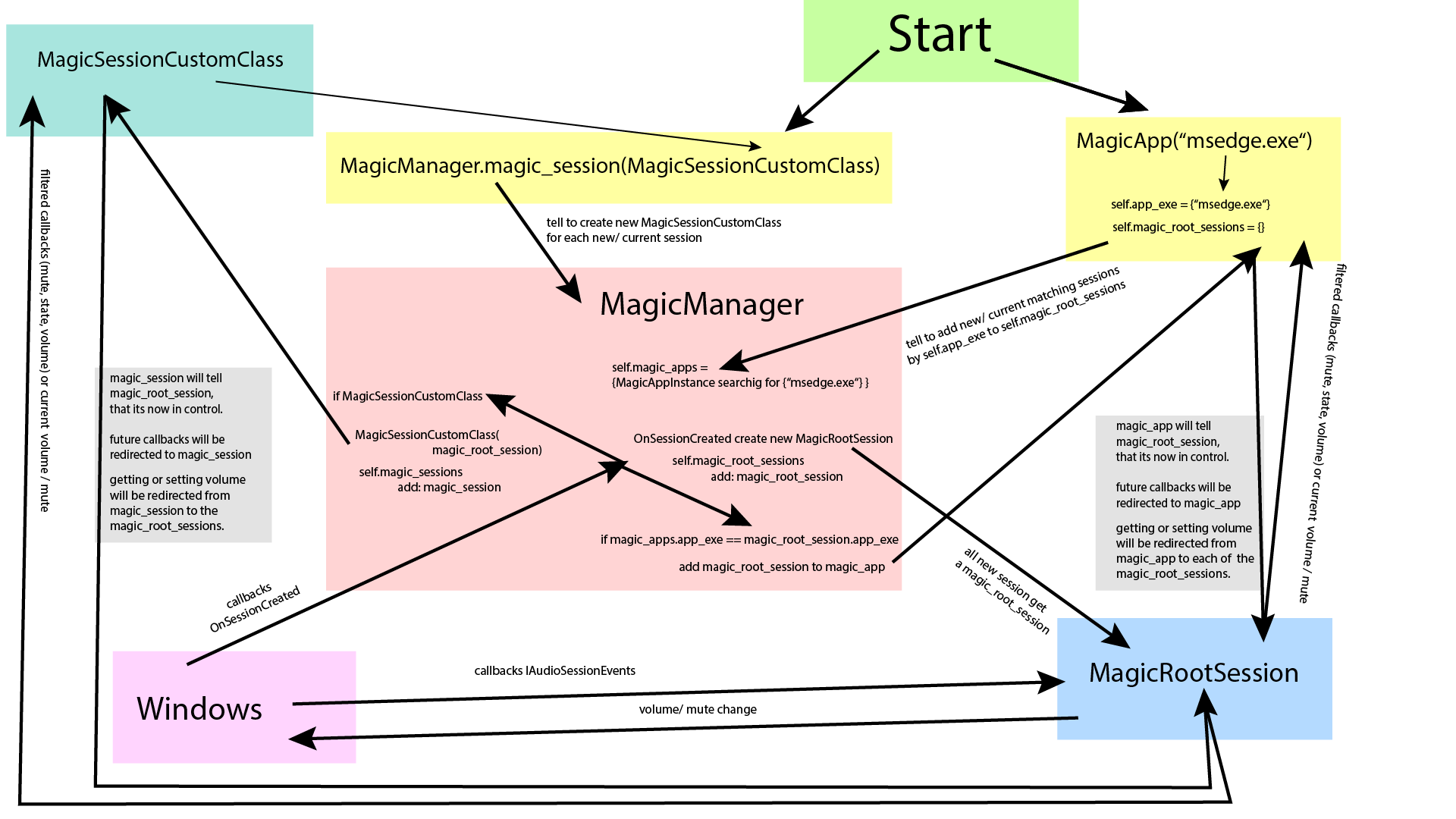
@AndreMiras can you please give me your opinion on the TODOS in the code? ;) Heres a simplified sketch - how the magic module works.
high resolution as pdf: |
AndreMiras
left a comment
AndreMiras
left a comment
There was a problem hiding this comment.
Nice work, it looks pretty good.
I hope you don't mind I made few more comments.
Also I'd rather have the CI pass green before merging anything
TurboAnonym
force-pushed
the
develop
branch
4 times, most recently
from
221b4ec to
1296f8e
Compare
There is now only one big problem left.... And I cant really solve it - I bypassed it.it has to do with all the The problem is: How to really "remove" an expired session.When a session makes the callback OnStateChanged with AudioSessionState.Expired it should be ideally removed afterwards, so no ressources get wasted. But I could only implement the first step: to session.unregister_notification() I then tried to remove any references to the _MagicRootSession which would result in releasing connected COMObjects like ._ctl2 (the <POINTER(IAudioSessionControl2)/>). From my still little understanding of COM, it has to do with keeping references and dont release them during a callback. As it is stated in https://docs.microsoft.com/en-us/windows/win32/api/audiopolicy/nn-audiopolicy-iaudiosessionevents:
more lecture here ... bypass with a trash:My idea was to implement a "trash" solution and keep in here references to deleted magic_root_sessions. So in the current state the trash gets only emptied when the script is closed or when the user calls explicitly MagicManager.empty_trash() I dont think that this is ideal. But it works. (even with 150 trashed sessions) More details:You can easily deactivate my "trash" solution by commenting: Note: close a session -> start a session -> deadlock When using MagicApp mode or MagicManager.activate_magic() (without MagicSession) close a session -> deadlock |
AndreMiras
left a comment
AndreMiras
left a comment
There was a problem hiding this comment.
Left one last minor comment even though I think it looks good enough for a merge.
And also another thing that's important to me is to have at least some basic tests for the magic.py module. Since this is now part of the library I think it should be tested, specially since it has quite some logic.
I understand it's not an easy one, so I'm happy to help in that and also do it in a follow up PR.
But I wouldn't usually merge code with that amount of logic and no unit tests

Magic:
------
The new Magic module allows to easily access and control the sessions of apps without headache!

example for MagicApp
---

import time
from pycaw.magic import MagicApp

def changed(volume):
    print("callback: ", volume)

m = MagicApp({"msedge.exe", "app.exe"}, volume_callback=changed)

while m.state is None:
    print(f"Not present: {m}")
    time.sleep(2)

print(f"App session: {str(m.state)}")

print(m.mute)
print(m.volume)

m.volume = 0.6
time.sleep(3)
m.mute = True

print(m.mute)
print(m.volume)

---
|
Nice ;) I added with this push 'advanced_volume_callbacks', cleaned up some code comments and renamed some internal variables. If you find something feel free to leave a comment ;) See you in the next PR for unit testing. |
|
One last thing: i want to create a new issue regarding #42 (comment) |
AndreMiras
left a comment
AndreMiras
left a comment
There was a problem hiding this comment.
Thanks for the hard work and thanks for addressing all the comment.
I still have hope for unit tests in some (near?) future

|
😉 |

|
First off, want to say thank you very much for this addition, its a huge help! I do see its possible to get any potential application volumes, I was wondering if it is possible to get a callback on the default audio cable set inside of windows as well, so when the default audio levels change or mute I can know. |
|
Also I've taken notice that MagicManager.MagicSession doesnt appear to be capturing all the proper processes? Is there some way for me to add a new session? |
3 participants


old idea:
the setup will create an executable linking to pycaw.tools.app_mixer.
you can launch this mixer by using pycaw-app-mixer or pip -m pycaw.tools.app_mixer
this tool allows to change the volume and view changes to sessions.
This is what I was talking about ;)