Code. Deploy. Inspect. All in One Matrix.


Slot Matrix is a powerful Visual Studio Code extension designed for smart contract developers and auditors. It provides a seamless and visual interface for testing, inspecting, and understanding Ethereum contracts—right from your IDE. With version 0.2.0, Slot Matrix delivers its first stable release, bringing robust compatibility with both Foundry and Hardhat, a Remix-like experience, and enhanced debugging tools.
See Slot Matrix in action:
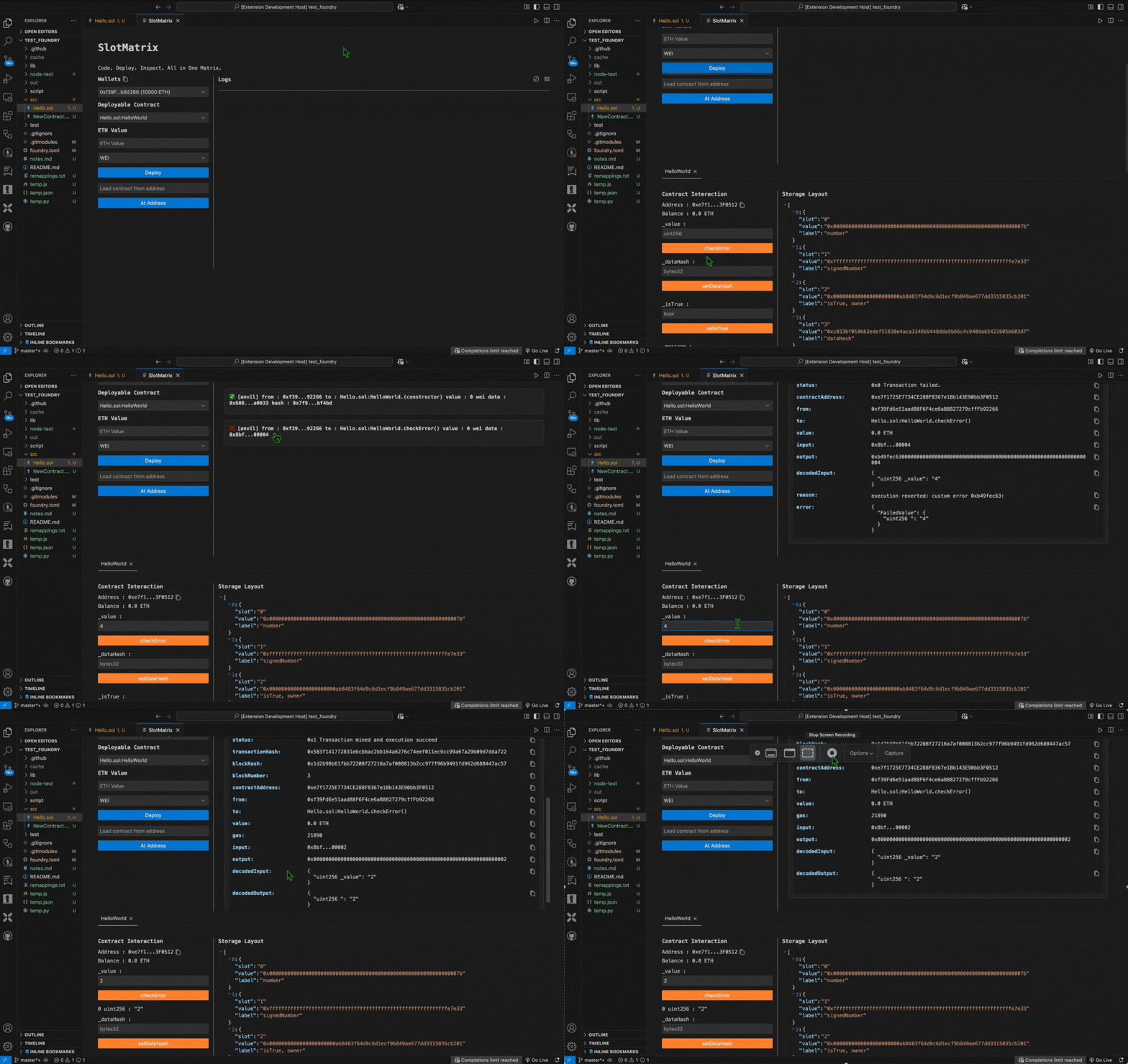
- 🧪 Interact with smart contracts using a clean, Remix-like UI integrated into VS Code.
- 🧠 Storage Layout Visualization: View contract storage layouts in JSON format for easy inspection.
- ⚙️ Foundry & Hardhat Compatibility: Seamlessly works with both Foundry and Hardhat-based projects.
- 💾 Complete Terminal Abstraction: Manage your workflow without leaving VS Code—no terminal required.
- 📜 Well-Formatted Log Data: Debug efficiently with clear, structured log outputs.
- 🚀 Automated Build Workflow: Automatically runs
forge cleanandforge build --extra-output storageLayoutor equivalent Hardhat commands on file save.
To use Slot Matrix, ensure you have:
- Visual Studio Code
v1.85.0or higher. - Foundry installed with
forgeandanvilaccessible from your terminal. - Hardhat installed for Hardhat-based projects (optional).
- A valid Foundry-compatible or Hardhat-compatible project structure (Solidity files in
srcfor Foundry orcontractsfor Hardhat).
Run the following commands to install Foundry:
curl -L https://foundry.paradigm.xyz | bash
foundryup
Note for Windows Users: Run the above commands using Git Bash or Windows Subsystem for Linux (WSL).
Follow these steps to install the Slot Matrix extension in Visual Studio Code:
-
Install via Visual Studio Code Marketplace:
- Open Visual Studio Code.
- Go to the Extensions view by clicking the Extensions icon in the Activity Bar on the side or pressing
Cmd+Shift+X(orCtrl+Shift+Xon Windows). - Search for Slot Matrix in the Extensions Marketplace.
- Click Install on the "Slot Matrix" extension by Anmol Dhiman.
-
Install via VSIX File (Alternative):
- Download the
.vsixfile for Slot Matrix version 0.2.0 from the GitHub Releases page or another trusted source provided by the developer. - In Visual Studio Code, open the Command Palette with
Cmd+Shift+P(orCtrl+Shift+Pon Windows). - Type and select Extensions: Install from VSIX.
- Browse to the downloaded
.vsixfile and select it to install.
- Download the
-
Verify Installation:
- After installation, open the Command Palette (
Cmd+Shift+PorCtrl+Shift+P) and typeSlotMatrix. - Ensure commands like
SlotMatrix: WelcomeandSlotMatrix: Startappear in the list.
- After installation, open the Command Palette (
Note: If you encounter issues during installation, ensure Visual Studio Code is version 1.85.0 or higher and check the Support & Contact section for help.
Slot Matrix simplifies your smart contract development workflow. Below is a table of available commands:
| Command | Description |
|---|---|
SlotMatrix: Welcome |
Opens the Slot Matrix welcome page. |
SlotMatrix: Start |
Launches the Slot Matrix dashboard. |
SlotMatrix: Save Contracts (Cmd/Ctrl + Shift + S) |
Triggers forge clean and forge build --extra-output storageLayout (or equivalent Hardhat commands) in the background. |
To access commands:
- Press
Cmd+Shift+P(orCtrl+Shift+Pon Windows) and search forSlotMatrix.
- Prototyping: Rapidly interact with and test smart contracts within VS Code.
- Debugging: Inspect storage layouts and debug proxy patterns with ease.
- Auditing: Visualize contract storage and log data for thorough analysis.
- Development: Streamline Foundry and Hardhat workflows with automated builds and terminal abstraction.
We welcome contributions, suggestions, and bug reports!
- 🐞 Report Issues
- 🌱 Submit a PR to improve the extension
- ⭐ Star the GitHub repo if you find this useful!
Need help or want to connect?
- 🗂 GitHub Issues
- 🐦 @sherlockvarm on X
This project is licensed under the MIT License. See LICENSE for details.
Built with ❤️ by Anmol Dhiman