A full-featured Twitter clone built with Django. Users can sign up, create posts ("Twits"), like and comment on others' posts, and manage their profiles -- all styled with Bootstrap 5.
Note
This repo only has a single commit because the project was originally developed as a final project for a class, hosted on a private GitHub organization. This is a clean copy brought over to my personal GitHub.
Tweeter is a social media web app inspired by Twitter. It's built entirely with Django class-based views and follows a two-app architecture:
- accounts - Handles user registration, authentication, and profile management using a custom user model that extends Django's
AbstractUser. - tweeter - The core social functionality: creating/editing/deleting Twits, commenting, and liking.
Users land on a home page and are prompted to sign up or log in. Once authenticated, they can browse a dashboard feed of all Twits (newest first), create their own Twits with text and optional image URLs, like/unlike posts via AJAX, and leave comments. Each user has a private profile they can edit and a public profile page that displays all of their Twits.
- Authentication is handled through Django's built-in auth system with custom sign-up and profile forms rendered using crispy-forms. Password reset works via SMTP email.
- Twits are created, updated, and deleted through class-based views (
CreateView,UpdateView,DeleteView). Edit and delete actions are restricted to the Twit's author usingUserPassesTestMixin. - Comments use a compound view pattern --
TwitDetailViewdispatches GET requests to render the Twit with its comments, and POST requests to handle comment form submissions. - Likes are implemented as a
ManyToManyFieldon the Twit model. The like button sends an AJAX GET request (via jQuery) to a toggle endpoint, which adds or removes the user from the relationship and returns JSON. The UI updates the button style, icon, and count without a page reload. - Profiles come in two flavors:
ProfileDetailViewshows the logged-in user their own info, whilePublicProfileViewdisplays any user's profile along with all their Twits in reverse chronological order.
- User Authentication - Sign up, login, password change and reset via email
- Custom User Model - Extended with date of birth and profile details
- Twits - Create, edit, and delete posts with text and image URLs
- Likes - Like/unlike Twits with AJAX (no page reload)
- Comments - Add comments on any Twit (140 character limit)
- Profiles - Private profile editing and public profile pages showing a user's Twits
- Dashboard - Feed of all Twits, newest first
- Authorization - Only Twit authors can edit or delete their own posts
-
Project Initialization
- Created Django project (
django_project/) and two apps:accounts/andtweeter/ - Configured
settings.pywith custom user model, crispy-forms, and Bootstrap 5 template pack - Set up root URL routing in
django_project/urls.py
- Created Django project (
-
Custom User Model
- Defined
CustomUserinaccounts/models.py, extendingAbstractUserwith adate_of_birthDateField - Created
CustomUserCreationFormandCustomUserChangeForminaccounts/forms.py - Registered the custom model in
accounts/admin.pywithCustomUserAdmin
- Defined
-
Database Models
- Defined
Twitmodel intweeter/models.pywithauthor(ForeignKey),body(TextField),image_url(URLField),likes(ManyToManyField), andcreated/updatedtimestamps - Defined
Commentmodel withtwit(ForeignKey to Twit),author(ForeignKey to CustomUser), and a 140-characterbody - Added
__str__(),get_absolute_url(), andget_like_url()methods to models
- Defined
-
User Authentication
- Built
SignUpView(CreateView) inaccounts/views.pywith the custom creation form - Created
signup.htmlandlogin.htmltemplates with crispy-form rendering - Configured
LOGIN_REDIRECT_URLandLOGOUT_REDIRECT_URLinsettings.py
- Built
-
Password Management
- Integrated Django's built-in password change and reset views via
django.contrib.auth.urls - Created templates:
password_change_form.html,password_change_done.html,password_reset_form.html,password_reset_done.html,password_reset_confirm.html,password_reset_complete.html - Configured SMTP email backend in
settings.pyfor sending reset emails
- Integrated Django's built-in password change and reset views via
-
Twit CRUD
- Built
TwitListView(ListView) andTwitCreateView(CreateView) intweeter/views.py, auto-assigningrequest.useras author viaform_valid() - Built
TwitUpdateView(UpdateView) andTwitDeleteView(DeleteView) withUserPassesTestMixinto restrict actions to the Twit's author - Created templates:
twit_list.html,twit_create.html,twit_update.html,twit_delete.html - Wired up URL patterns in
tweeter/urls.py(/twits/,/twits/new/,/twits/<pk>/edit/,/twits/<pk>/delete/)
- Built
-
Comment System
- Created
CommentForm(ModelForm) intweeter/forms.pywith a singlebodyfield - Built a compound
TwitDetailViewintweeter/views.pythat dispatches GET toCommentGetView(DetailView) and POST toCommentPostView(FormView + SingleObjectMixin) CommentPostView.form_valid()usescommit=Falseto attach thetwitandauthorbefore saving- Created
twit_detail.htmlto display the Twit, its comments, and the comment form
- Created
-
Like System with AJAX
- Added
TwitLikeViewintweeter/views.py— a toggle endpoint that adds/removes the user from the Twit'slikesManyToMany field and returns{"success": true}as JSON - Wrote
static/js/base.jswith jQuery click handler on.like_buttonelements that sends an AJAX GET request, then updates the button style, icon, and like count without a page reload
- Added
-
User Profiles
- Built
ProfileDetailView(DetailView) andProfileUpdateView(UpdateView) inaccounts/views.pyfor viewing/editing the logged-in user's own profile - Built
PublicProfileView(DetailView) with overriddenget_context_data()to include all of a user's Twits in reverse chronological order - Created
profile_detail.html,profile_update.html, andpublic_profile.htmltemplates - Added URL patterns in
accounts/urls.py(/profile/,/profile/update/,/public_profile/<pk>/)
- Built
-
Automated Tests
- Wrote
ProfilePageTestsandSignupPageTestsinaccounts/tests.pycovering profile access, redirects for unauthenticated users, sign-up with all custom fields - Wrote
TwitTestsintweeter/tests.pycovering model creation,__str__output, comment relationships, like toggling, list/detail view rendering, comment posting, and 403 responses on unauthorized edit/delete
- Wrote
-
Deployment Prep
- Configured WhiteNoise middleware and
CompressedManifestStaticFilesStorageinsettings.pyfor production static file serving - Added
Procfile(Gunicorn),runtime.txt(Python 3.13), and environment variable config viapython-dotenv - Set
ALLOWED_HOSTSfor both localhost and production
- Configured WhiteNoise middleware and
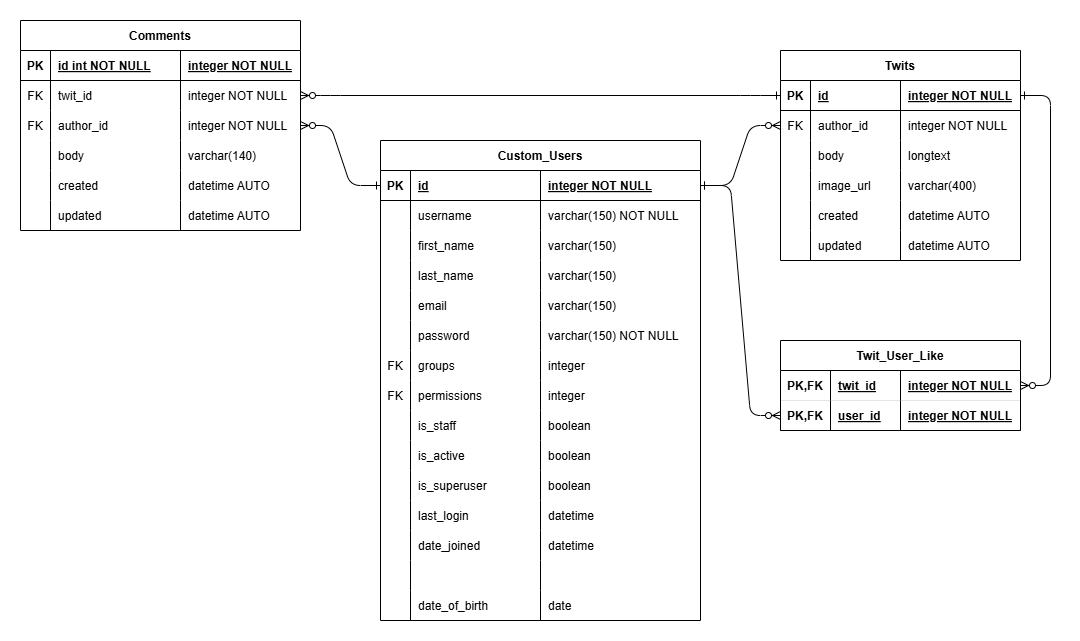
- CustomUser - Extends
AbstractUserwith an optionaldate_of_birthfield. - Twit - A post with
body, optionalimage_url, timestamps, anauthorforeign key, and alikesmany-to-many relationship to users. - Comment - Linked to a Twit and an author, with a 140-character
bodyand timestamps.
Tweeter/
├── accounts/          # Custom user model, auth views, profile views
├── tweeter/           # Twit/Comment models, CRUD views, like endpoint
├── django_project/    # Settings, root URL config, WSGI/ASGI
├── templates/         # All HTML templates (base, home, twits, profiles, auth)
├── static/js/         # AJAX like functionality (jQuery)
├── manage.py
├── requirements.txt
└── Procfile           # Gunicorn config for deployment
- Python 3.13
- Django 4.2
- Bootstrap 5 (via django-crispy-forms)
- jQuery (AJAX like functionality)
- WhiteNoise (static file serving)
- SQLite (default) / PostgreSQL (production)
- Gunicorn (WSGI server)
-
Clone the repository:
git clone https://github.com/ArriZa-Wi/Tweeter_Twitter_Clone.git cd Tweeter_Twitter_Clone -
Create a virtual environment and install dependencies:
python -m venv .venv
source .venv/bin/activate  # On Windows: .venv\Scripts\activate
pip install -r requirements.txt
-
Create a
.envfile (see.env.examplefor reference):DEBUG=True SECRET_KEY=your-secret-key-here DATABASE_URL=sqlite:///db.sqlite3 -
Run migrations and start the server:
python manage.py migrate
python manage.py runserver
-
Visit
http://127.0.0.1:8000/and create an account to get started.
python manage.py testTests cover user profile access, sign-up with custom fields, Twit CRUD operations, comment posting, like/unlike toggling, and permission enforcement (403 on unauthorized edit/delete).