






Analyze your writing quality and get actionable feedback to improve clarity, voice, and engagement.
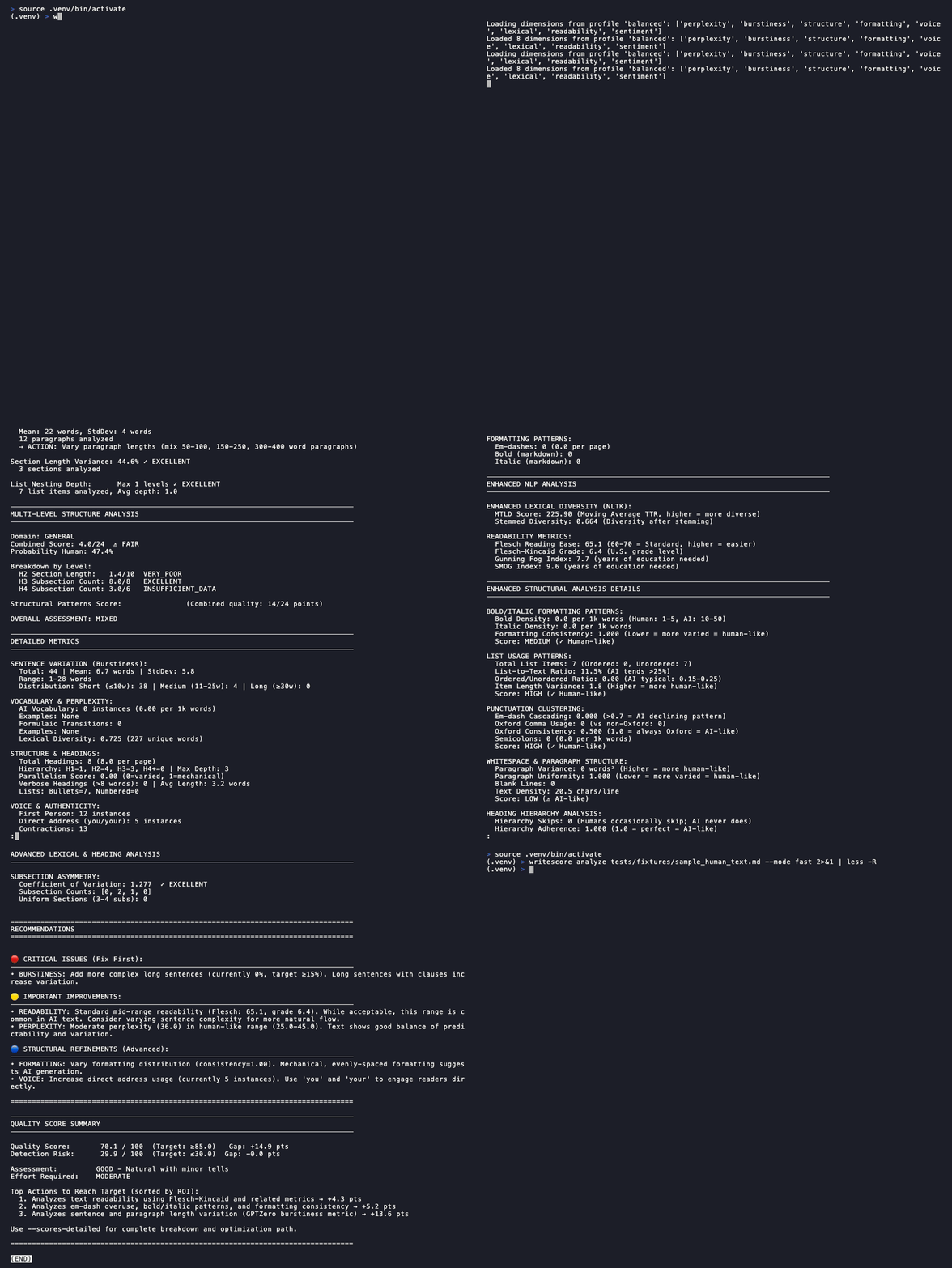
uv sync
uv run python -m spacy download en_core_web_sm
uv run writescore analyze README.md
That's it! You'll see a detailed analysis with scores and improvement suggestions.
| Resource | Minimum | Recommended |
|---|---|---|
| Python | 3.9 | 3.11+ |
| RAM | 4 GB | 8 GB |
| Disk | 2 GB | 3 GB |
Note: First run downloads transformer models (~500MB) and spaCy model (~50MB). Subsequent runs use cached models.
Quickest path: Install Just, then run just setup. See all options below.
| Option | Local Install | CLI/IDE | Docker Required | Use WriteScore | Contribute |
|---|---|---|---|---|---|
| ✓ Docker | No | CLI | Yes | Instructions | N/A |
| ✓ pipx | No | CLI | No | Instructions | N/A |
| ✓ Homebrew | No | CLI | No | Instructions | N/A |
| ✓ Standalone | No | CLI | No | Instructions | N/A |
| Native (Just) | Yes | CLI | No | just install |
just setup |
| Native (Just) | Yes | IDE | No | just install, open in any IDE |
just setup, open in any IDE |
| Native (Manual) | Yes | CLI | No | Instructions | Instructions |
| Native (Manual) | Yes | IDE | No | Instructions, open in any IDE | Instructions, open in any IDE |
| Devcontainer | No | CLI | Yes | Instructions | Instructions |
| Devcontainer | No | IDE | Yes | VS Code → "Reopen in Container" | Same |
| Codespaces | No | CLI | No | Instructions | Instructions |
| Codespaces | No | IDE | No | GitHub → Code → Create codespace | Same |
After setup, run just test (or uv run pytest for manual installs) to verify.
| OS | Command |
|---|---|
| Windows | winget install Casey.Just (or choco install just / scoop install just) |
| macOS | brew install just |
| Ubuntu/Debian | sudo apt install just |
| Fedora | sudo dnf install just |
| Arch Linux | sudo pacman -S just |
| Via Cargo | cargo install just |
| Via Conda | conda install -c conda-forge just |
Windows users: All
justcommands work in PowerShell and CMD. With uv, useuv runprefix instead of activating the venv.
Run WriteScore without any local installation using Docker. Models are pre-downloaded in the image.
# Analyze a file in current directory
docker run --rm -v "$(pwd):/work" -w /work ghcr.io/bohica-labs/writescore:latest analyze document.md

# With GPU support (NVIDIA)
docker run --rm --gpus all -v "$(pwd):/work" -w /work ghcr.io/bohica-labs/writescore:latest analyze document.md
Optional: Install wrapper script for native-like usage:
# Download and install
sudo curl -fsSL https://raw.githubusercontent.com/BOHICA-LABS/writescore/main/scripts/writescore-docker \
  -o /usr/local/bin/writescore
sudo chmod +x /usr/local/bin/writescore

# Now use like a native command
writescore analyze document.md
The wrapper auto-detects GPU (NVIDIA/AMD) and mounts files appropriately.
Install WriteScore in an isolated environment using pipx. No virtual environment management required.
# Install pipx if you don't have it
# macOS: brew install pipx && pipx ensurepath
# Linux: python3 -m pip install --user pipx && pipx ensurepath

# Install WriteScore
pipx install writescore

# Use immediately (spaCy model auto-downloads on first run)
writescore analyze document.md
Note: First run downloads spaCy model (~50MB) and transformer models (~500MB). Subsequent runs are faster.
Install WriteScore on macOS or Linux using Homebrew:
# Add the tap and install
brew tap bohica-labs/writescore
brew install writescore

# Or install directly
brew install bohica-labs/writescore/writescore

# Use immediately
writescore analyze document.md
The formula installs all dependencies including the spaCy language model.
Download a pre-built executable from GitHub Releases - no Python installation required.
| Platform | Filename |
|---|---|
| Linux (x64) | writescore-linux-amd64 |
| macOS (Intel) | writescore-darwin-amd64 |
| macOS (Apple Silicon) | writescore-darwin-arm64 |
| Windows (x64) | writescore-windows-amd64.exe |
# Linux/macOS example
curl -LO https://github.com/BOHICA-LABS/writescore/releases/latest/download/writescore-linux-amd64
chmod +x writescore-linux-amd64
./writescore-linux-amd64 analyze document.md

# Move to PATH for easier access
sudo mv writescore-linux-amd64 /usr/local/bin/writescore
writescore analyze document.md
Note: Standalone executables are self-contained (~500MB) and include all models.
For users who prefer not to install Just. Requires uv.
Use WriteScore:
uv sync
uv run python -m spacy download en_core_web_sm
Contribute:
uv sync --extra dev
uv run python -m spacy download en_core_web_sm
uv run pre-commit install
uv run pre-commit install --hook-type commit-msgdevcontainer up --workspace-folder "$(pwd)" && \
devcontainer exec --workspace-folder "$(pwd)" just installFor contributors, replace just install with just dev.
gh codespace create -r BOHICA-LABS/writescore && \
gh codespace ssh
Then run just install (users) or just setup (contributors).
| Command | Description |
|---|---|
just |
List available commands |
just install |
Install package with all dependencies |
just setup |
Full dev setup (install + pre-commit hooks) |
just test |
Run fast tests (excludes slow markers) |
just test-all |
Run all tests including slow ones |
just test-cov |
Run tests with coverage report |
just lint |
Check code with ruff |
just lint-fix |
Auto-fix linting and format code |
just typecheck |
Run mypy type checking |
just check |
Run all checks (lint + typecheck) |
just clean |
Remove build artifacts and caches |
The Problem: Most writing feedback is vague ("needs improvement") or focuses only on grammar. Writers need specific, actionable guidance on what makes their writing feel mechanical, formulaic, or disengaging.
The Solution: WriteScore analyzes 17 linguistic dimensions to identify specific patterns that weaken writing quality, then provides actionable recommendations to improve clarity, voice, and reader engagement.
Key Differentiators:
- Actionable feedback — Know exactly what to fix with specific recommendations
- Multi-dimensional analysis — Examines vocabulary diversity, sentence variety, voice, structure, and more
- Quality-focused — Treats writing improvement as the goal, regardless of how content was created
- Transparent scoring — See how each dimension contributes to your overall score
When to use WriteScore:
- Improving drafts before publishing or submission
- Identifying mechanical or formulaic patterns in your writing
- Getting objective feedback on writing quality
- Polishing content for better reader engagement
What WriteScore is NOT:
- Not an AI detection tool — it analyzes writing quality, not authorship
- Not a grammar checker — use dedicated tools for spelling/grammar
- Not a plagiarism detector — use academic integrity tools for that
- Comprehensive Scoring — Overall quality score with per-dimension breakdown
- 17 Analysis Dimensions — Vocabulary, sentence variety, voice, structure, readability, and more
- Content Type Presets — Optimized analysis for academic, technical, creative, and 10 other content types
- Multiple Modes — Fast checks to comprehensive analysis
- Actionable Insights — Specific recommendations ranked by impact
- Batch Processing — Analyze entire directories
- Score History — Track improvements over time
- Configurable — YAML-based configuration with layered overrides
# Basic analysis
writescore analyze document.md

# Detailed findings with recommendations
writescore analyze document.md --detailed

# Show detailed scores breakdown
writescore analyze document.md --show-scores

# Fast mode for quick checks
writescore analyze document.md --mode fast

# Full analysis for final review
writescore analyze document.md --mode full

# Analyze with content type (adjusts weights/thresholds)
writescore analyze document.md --content-type academic
writescore analyze document.md --content-type technical_book
writescore analyze document.md --content-type creative_fiction

# Batch process a directory
writescore analyze --batch docs/

# Validate your configuration
writescore validate-config --verbose| Mode | Speed | Best For |
|---|---|---|
| fast | Fastest | Quick checks, CI/CD |
| adaptive | Balanced | Default, most documents |
| sampling | Medium | Large documents |
| full | Slowest | Final review, maximum accuracy |
See the Analysis Modes Guide for details.
Optimize analysis for your document type with --content-type:
| Content Type | Description |
|---|---|
academic |
Research papers, scholarly articles |
technical_book |
Technical books, accessible yet thorough |
technical_docs |
API docs, technical documentation |
blog |
Blog posts, articles |
creative |
Creative writing, general |
creative_fiction |
Fiction, stories |
professional_bio |
LinkedIn profiles, professional bios |
personal_statement |
Application essays, personal statements |
business |
Business documents, reports |
news |
News articles, journalism |
marketing |
Marketing copy, promotional content |
social_media |
Social posts, casual content |
general |
Default settings |
Each content type adjusts dimension weights and thresholds for more accurate analysis.
WriteScore uses YAML configuration files for customization without code changes.
config/
├── base.yaml           # Default configuration (do not edit)
├── local.yaml          # Your overrides (git-ignored)
├── local.yaml.example  # Template for local.yaml
└── schema/             # JSON schema for validation
Create config/local.yaml to override defaults:
# Adjust dimension weights
dimensions:
  formatting:
    weight: 15.0  # Increase em-dash detection importance

# Adjust scoring thresholds
scoring:
  thresholds:
ai_likely: 35 # More strict AI detectionOverride any setting via environment variables:
export WRITESCORE_DIMENSIONS_FORMATTING_WEIGHT=15
export WRITESCORE_SCORING_THRESHOLDS_AI_LIKELY=35writescore validate-config --verboseSee the Configuration System Guide for details.
This is normal. First analysis downloads transformer models (~500MB) and caches them. Subsequent runs are much faster.
Quick fix: Use --mode fast for lower memory usage:
writescore analyze document.md --mode fastOn macOS Apple Silicon, if you see MPS memory errors:
export PYTORCH_MPS_HIGH_WATERMARK_RATIO=0.0
writescore analyze document.mdQuick fix: Use uv run prefix or activate the venv: source .venv/bin/activate
Diagnostic table:
| Where did you install? | Current terminal | Fix |
|---|---|---|
uv (.venv/) |
Not using uv run |
Prefix with uv run or activate venv |
| Devcontainer | Native terminal | Run inside container or install natively |
| Codespaces | Local terminal | Install natively |
| Unknown | — | Run diagnostic commands below |
Diagnostic commands:
# Check if writescore is anywhere in PATH
which writescore

# Check if installed in current venv
uv pip show writescore

# Check common venv locations
ls -la .venv/bin/writescore 2>/dev/null || echo "Not in .venv"
Common fixes:
# Use uv run prefix
uv run writescore analyze README.md

# Or activate venv directly
source .venv/bin/activate  # Windows: .venv\Scripts\activate
writescore analyze README.md

# Run inside devcontainer (if installed there)
devcontainer exec --workspace-folder "$(pwd)" writescore analyze README.md

# Or reinstall natively
just install # or: uv sync && uv run python -m spacy download en_core_web_smpython -m spacy download en_core_web_smIf you see LookupError mentioning NLTK data:
python -c "import nltk; nltk.download('punkt'); nltk.download('averaged_perceptron_tagger')"| Document | Description |
|---|---|
| Architecture | System design, components, patterns |
| Configuration System | YAML config, content types, customization |
| Analysis Modes Guide | Mode comparison and usage |
| Development History | Project evolution and roadmap |
| Migration Guide | Upgrading from AI Pattern Analyzer |
| Changelog | Version history |
We welcome contributions! See CONTRIBUTING.md for guidelines.
Quick links:
- Label taxonomy — How we categorize issues and PRs
- Secret scanning setup — Required before your first commit
- Code of Conduct — Community guidelines
The README demo GIF is generated using VHS. To regenerate after feature changes:
# Install VHS (macOS)
brew install vhs

# Generate new demo
vhs docs/assets/demo.tape
The tape file is at docs/assets/demo.tape. Edit it to change the demo script.
MIT License - see LICENSE for details.