Simple personal server for collecting URLs you want to process later.
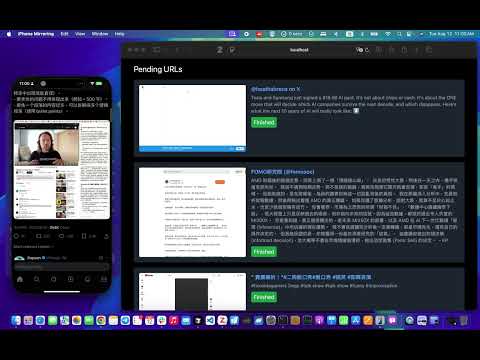
- Receive URLs via HTTP and store them in a last-in-first-out queue.
- Frontend shows previews of each URL with a Finished button to remove it.
- Uses TailwindCSS with a dark theme.
- Can be exposed to the internet through ngrok so you can share from your phone or computer.
- Install dependencies:
npm install
- Start the server:
The server listens on port 3000 by default.
node server.js
- (Optional) Expose the server to the internet with ngrok:
Use the HTTPS URL provided by ngrok for external access.
ngrok http 3000
GET /api/urls– list all stored URLs.POST /api/urls– add a URL. Accepts JSON{ "url": "https://example.com" }or form data.DELETE /api/urls/:id– remove a URL by its id.GET /add?url=...– quick endpoint for adding a URL via query string.
Create a Shortcut that sends a POST request to your ngrok URL:
1. Receive URLs input from Share Sheet (information button; Show in Share Sheet)
2. Get contents of https://YOUR-NGROK-ID.ngrok-free.app/api/urls
   - Method: POST
   - Request Body: JSON
   - Text: url = (Shortcut Input)

Now you can share a link from Safari or any app to this Shortcut and it will appear in the web UI.
URLs are stored in data.json in the project directory. It is ignored by git so your browsing list stays private.