



HEMnet predicts regions of cancer cells from standard Haematoxylin and Eosin (H&E) stained tumour tissue sections. It leverages molecular labelling - rather than time-consuming and variable pathologist annotations - to annotate H&E images used to train a neural network to predict cancer cells from H&E images alone. We trained HEMnet to predict colon cancer (try it out in our Colab notebook), however, you can train HEMnet to predict other cancers where you have molecular staining for a cancer marker available.
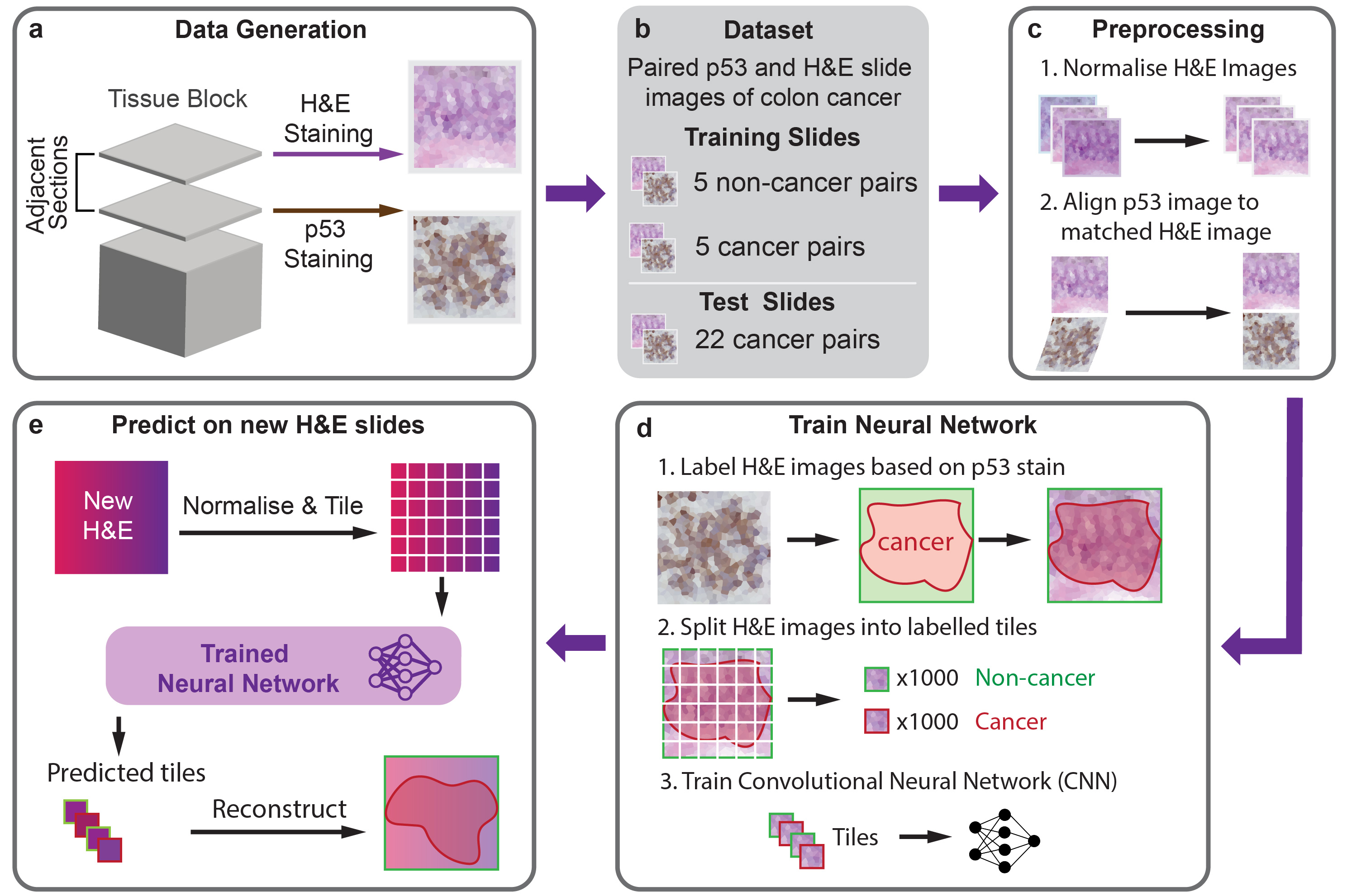
The easiest way to apply HEMnet is to use predict H&E images with our pretrained model for colorectal cancer using our google colab notebook. By default it downloads a slide from TCGA, however, you can also upload your own slide(s) in an .svs format.
To train new models with HEMnet or predict on H&E images on your own machine, we recommend installing the HEMnet environment.
We recommend running HEMnet from our docker image for the simplest and most reliable setup. Alternatively, if you wish to setup a conda environment, we provide an environment.yml file.
You can download the docker image and run the docker container using the following commands:
```
docker pull andrewsu1/hemnet
docker run -it andrewsu1/hemnet
```
The docker image contains a conda environment from which you can run HEMnet.
Install Openslide (this is necessary to open whole slide images) - download it here
Create a conda environment from the environment.yml file
conda env create -f environment.yml
conda activate HEMnet
Name slides in the format: slide_id_TP53 for TP53 slides and slide_id_HandE for H&E slides
The TP53 and HandE suffix is used by HEMnet to identify the stain used.
a. Generate train dataset
python HEMnet_train_dataset.py -b /path/to/base/directory -s relative/path/to/slides -o relative/path/to/output/directory -t relative/path/to/template_slide.svs -v
b. Generate test dataset
python HEMnet_test_dataset.py -b /path/to/base/directory -s /relative/path/to/slides -o /relative/path/to/output/directory -t relative/path/to/template_slide -m tile_mag -a align_mag -c cancer_thresh -n non_cancer_thresh
Other parameters:
-tis the relative path to the template slide from which all other slides will be normalised against. The template slide should be the same for each step.-mis the tile magnification. e.g. if the input is10then the tiles will be output at 10x-ais the align magnification. Paired TP53 and H&E slides will be registered at this magnification. To reduce computation time we recommend this be less than the tile magnification - a five times downscale generally works well.-ccancer threshold to apply to the DAB channel. DAB intensities less than this threshold indicate cancer.-nnon-cancer threshold to apply to the DAB channel. DAB intensities greater than this threshold indicate no cancer.
a. Training model
python train.py -b /path/to/base/directory -t relative/path/to/training_tile_directory -l relative/path/to/validation_tile_directory -o /relative/path/to/output/directory -m cnn_base -g num_gpus -e epochs -a batch_size -s -w -f -v
Other parameters:
-mis CNN base model. eg.resnet50,vgg16,vgg19,inception_v3andxception.-gis number of GPUs for training.-eis training epochs. Default is100epochs.-ais batch size. Default is32-sis option to save the trained model weights.-wis option to used transfer learning. Model will used pre-trained weights from ImageNet at the initial stage.-fis fine-tuning option. Model will re-train CNN base.
b. Test model prediction
python test.py -b /path/to/base/directory -t relative/path/to/test_tile_directory -o /relative/path/to/output/directory -w model_weights -m cnn_base -g num_gpus -v
Other parameters:
-wis path to trained model. eg.trained_model.h5.-mis CNN base model (same to training step).-gis number of GPUs for prediction.
c. Evaluate model performance and visualise model prediction
python visualisation.py -b /path/to/base/directory -t /relative/path/to/training_output_directory -p /relative/path/to/test_output_directory -o /relative/path/to/output/directory -i sample
Other parameters:
-tis path to training outputs.-pis path to test outputs.-iis name of Whole Slide Image for visualisation.
python HEMnet_inference.py -s '/path/to/new/HE/Slides/' -o '/path/to/output/directory/' -t '/path/to/template/slide/' -nn '/path/to/trained/model/' -v
Images used for training HEMnet can be downloaded from: https://dna-discovery.stanford.edu/publicmaterial/web-resources/HEMnet/images/
Su, A., Lee, H., Tan, X. et al. A deep learning model for molecular label transfer that enables cancer cell identification from histopathology images. npj Precis. Onc. 6, 14 (2022). https://doi.org/10.1038/s41698-022-00252-0
Please contact Dr Quan Nguyen (quan.nguyen@uq.edu.au), Dr. HoJoon Lee (hojoon@stanford.edu), Andrew Su (a.su@uqconnect.edu.au), and Xiao Tan (xiao.tan@uqconnect.edu.au) for issues, suggestions, and we are very welcome to collaboration opportunities.