
Explore how ContosoTravelAgency leverage Azure Durable Functions and Semantic Kernel to build sophisticated Multi-Agent workflows.



Durable Multi Agents is an attempt to make use of Azure Durable Functions with Semantic Kernel to build Multi-Agents workflows.
Disclaimer: Realtime Agent only works in local environment, will be updated soon to work in live URL
Update config.json under .azure folder to point swedencentral for realtimeapilocation as it is not widely available
"infra":
  {
    "parameters":
      {
        "openAILocation": "westus",
        "realtimeOpenAILocation": "swedencentral"
      }
  }


- Proposed solution have implemented different patterns with Multi-Agents , some of them are
- Fan-Out/ Fan-in
- Function Chaining
- NL2SQL is built on top of Semantic layer with the help of Azure Cosmos DB
- Vectorization is done on top of sematic layer to handle similarity based queries
- High scalability of each agents
- Managed Idenitty connectivity to Azure OpenAI and Azure Cosmos DB services
- Provided seed data project for you to get started
- Switch between Custom/SingleAI/AutoGen based Multi-Agents on the fly.
- Monitoring agent's responses in the side pane of the application
- Distributed tracing support
- Install the Azure Developer CLI
- Install the Azure Functions Core Tools
- Install Powershell (dotnet tool update --global PowerShell)
The easiest way to deploy this app is using the Azure Developer CLI.
- Open a new terminal and do the following from root folder:
azd up- [Optional] Once the deployment is complete, make sure to update the settings with postmark server token in the Azure Portal. This is to ensure the email notifications are sent properly.
- [Optional] If you want to switch to a different user, update the settings in the Azure Portal with the new userId.
- [optional] If you want to connect with Microsoft Data fabric , follow this blog for instructions to setup.
IMPORTANT
For existing users of ContosoTravelAgency:
Make sure to addHARD_RELOADin the.envfile under the.azurefolder to clear existing tables and rewrite with new data.
Add the local.settings.json in the Azure Durable Function project, with the below details
{
  "IsEncrypted": false,
  "Values": {
    "AzureWebJobsStorage": "UseDevelopmentStorage=true",
    "FUNCTIONS_WORKER_RUNTIME": "dotnet-isolated",
    "APPINSIGHTS_INSTRUMENTATIONKEY": "Your_InstrumentationKey_Here",
    "APPLICATIONINSIGHTS_CONNECTION_STRING": "Your_ConnectionString_Here",
    "CosmosDBAccountEndpoint": "Your_CosmosDBAccountEndpoint_Here",
    "SubscriptionId": "Your_SubscriptionId_Here",
    "ResourceGroup": "Your_ResourceGroup_Here",
    "DatabaseAccount": "Your_DatabaseAccount_Here",
    "DatabaseId": "Your_DatabaseId_Here",
    "TenantId": "Your_TenantId_Here",
    "PostmarkServerToken": "Your_PostmarkServerToken_Here",
    "cosmosDB__clientSecret": "Your_ClientSecret_Here",
    "cosmosDB__tenantId": "Your_TenantId_Here",
    "cosmosDB__clientId": "Your_ClientId_Here",
    "cosmosDB__accountEndpoint": "Your_CosmosDBAccountEndpoint_Here",
    "OpenAIEndpoint": "Your_OpenAI_Endpoint",
    "OpenAIChatCompletionDeploymentName": "Your_OpenAI_ChatCompletion_Deployment_Name",
    "OpenAITextEmbeddingGenerationDeploymentName": "Your_OpenAI_TextEmbedding_Deployment_Name",
    "RedisConnectionString":"Your_Redis_Conn_string"
  }
}- To get the
APPINSIGHTS_INSTRUMENTATIONKEYandAPPLICATIONINSIGHTS_CONNECTION_STRINGyou need to create an Application Insights in Azure and get the key from there - To get the
CosmosDBAccountEndpointyou need to create an Azure Cosmos DB account and get the endpoint from there - To get the
SubscriptionId,ResourceGroup,DatabaseAccount,DatabaseId,TenantId, you need to get the details from Azure Portal - To get the
PostmarkServerTokenandFromMailAddressyou need to create an account in Postmark and get the token from there. FromMailAddress should be based on the domain you have registered in Postmark - To get the
cosmosDB__clientSecret,cosmosDB__tenantId,cosmosDB__clientId,cosmosDB__accountEndpointyou need to create an Azure AD application and assign it with built-in Cosmos DB Data contributor role. - To get the
OpenAIEndpoint,OpenAIChatCompletionDeploymentName,OpenAITextEmbeddingGenerationDeploymentNameyou need to create an Azure OpenAI service and create deployments for Chat Completion and Text Embedding Generation - Once you have all the details updated in the
local.settings.jsonyou can run the project
- Go to Azure Portal
- Search for Azure OpenAI Services
- Select Access Control (IAM)
- Click on Add Role Assignment
- Select the role as Cognitive Services OpenAI Contributor
- Select the managed identity you have created for the Azure Functions, if running locally make sure the logged in user has the required permissions
- Go to Azure Portal
- Open Azure Cloud Shell
- Run the below command to assign Cosmos DB data Contributor role
az cosmosdb sql role assignment create --resource-group $resourceGroupName --account-name $cosmosName --role-definition-id "00000000-0000-0000-0000-000000000002" --principal-id "<your-principal-id>" --scope "/"
- Replace the
principal-idwith the managed identity id you have created for the Azure Functions or the Azure AD application's ObjectId if running locally.
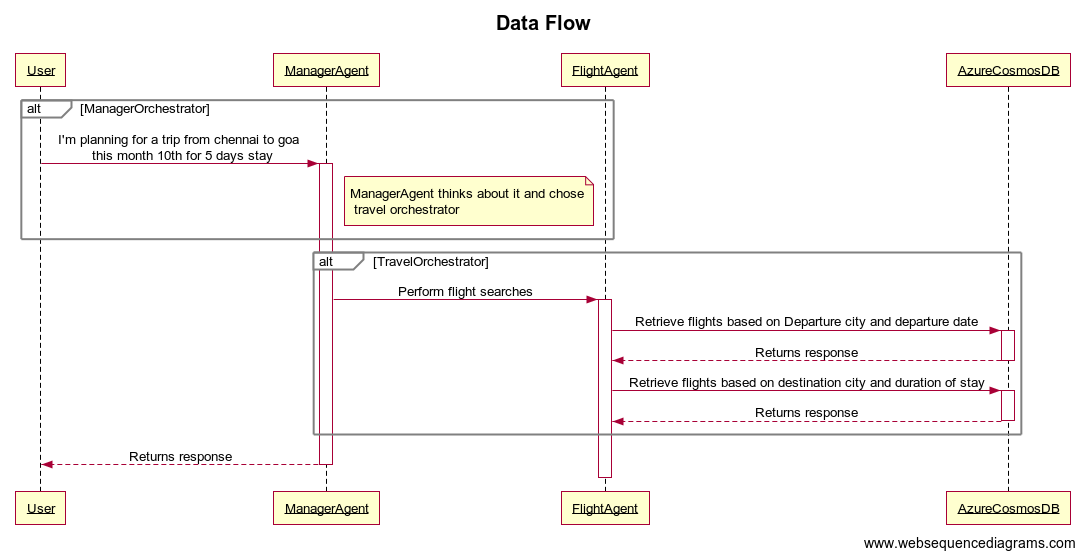
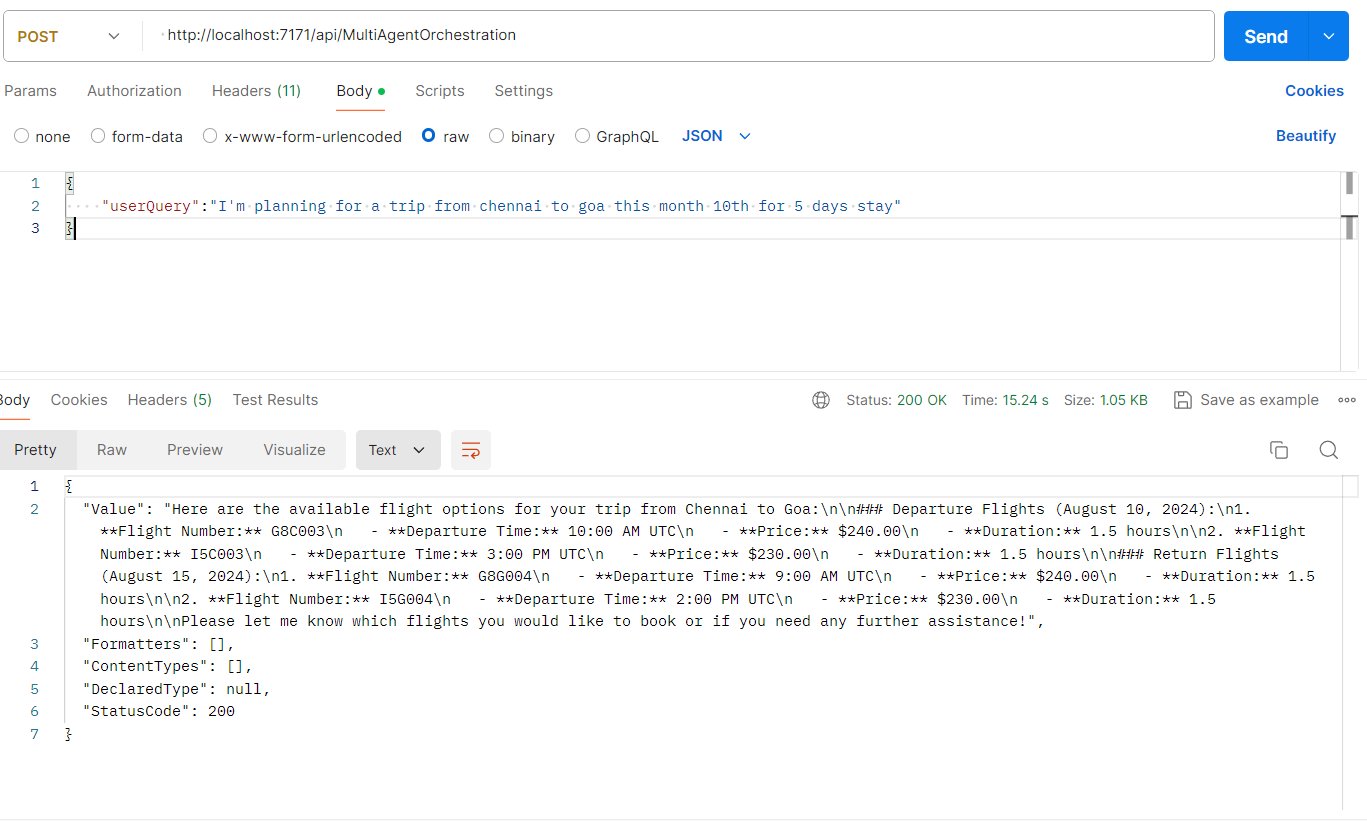
- The user initiates a request to the ManagerAgent, stating, "I'm planning for a trip from Chennai to Goa this month on the 10th for a 5-day stay."
- The ManagerAgent receives the request and decides to delegate the task to the travel orchestrator.
- The travel orchestrator activates and takes charge of the request.
- The travel orchestrator instructs the FlightAgent to perform flight searches.
- The FlightAgent sends a query to Azure Cosmos DB to retrieve flights based on the departure city (Chennai) and the departure date (10th of the month).
- Azure Cosmos DB processes the query and returns the relevant flight information to the FlightAgent.
- The FlightAgent sends another query to Azure Cosmos DB to retrieve flights based on the destination city (Goa) and the duration of the stay (5 days).
- Azure Cosmos DB processes the query and returns the relevant flight information to the FlightAgent.
- The FlightAgent consolidates the flight information and sends it back to the travel orchestrator.
- The travel orchestrator returns the final flight search results to the ManagerAgent.
- The ManagerAgent sends the final response back to the user.
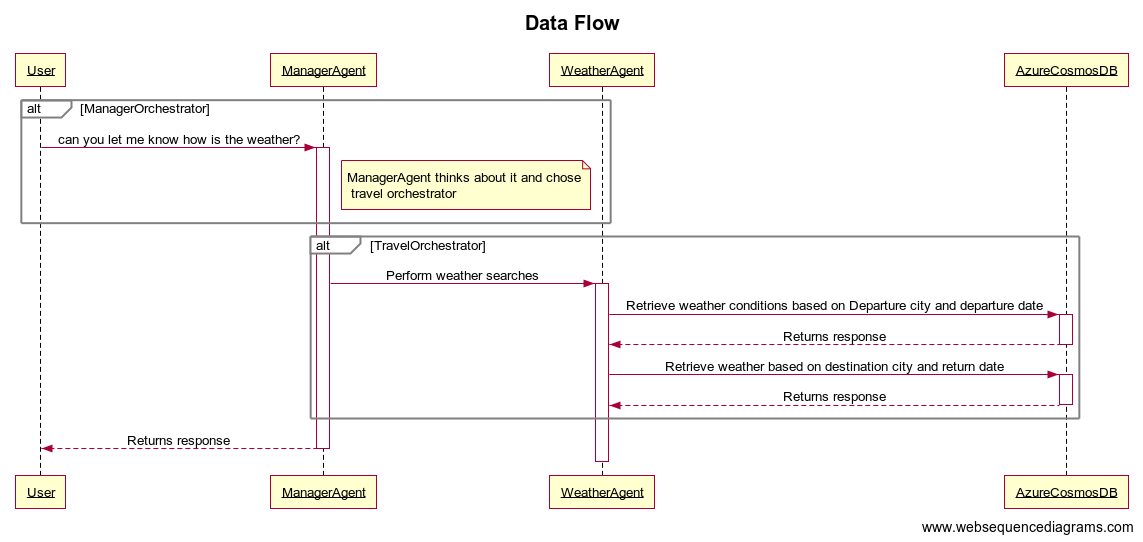
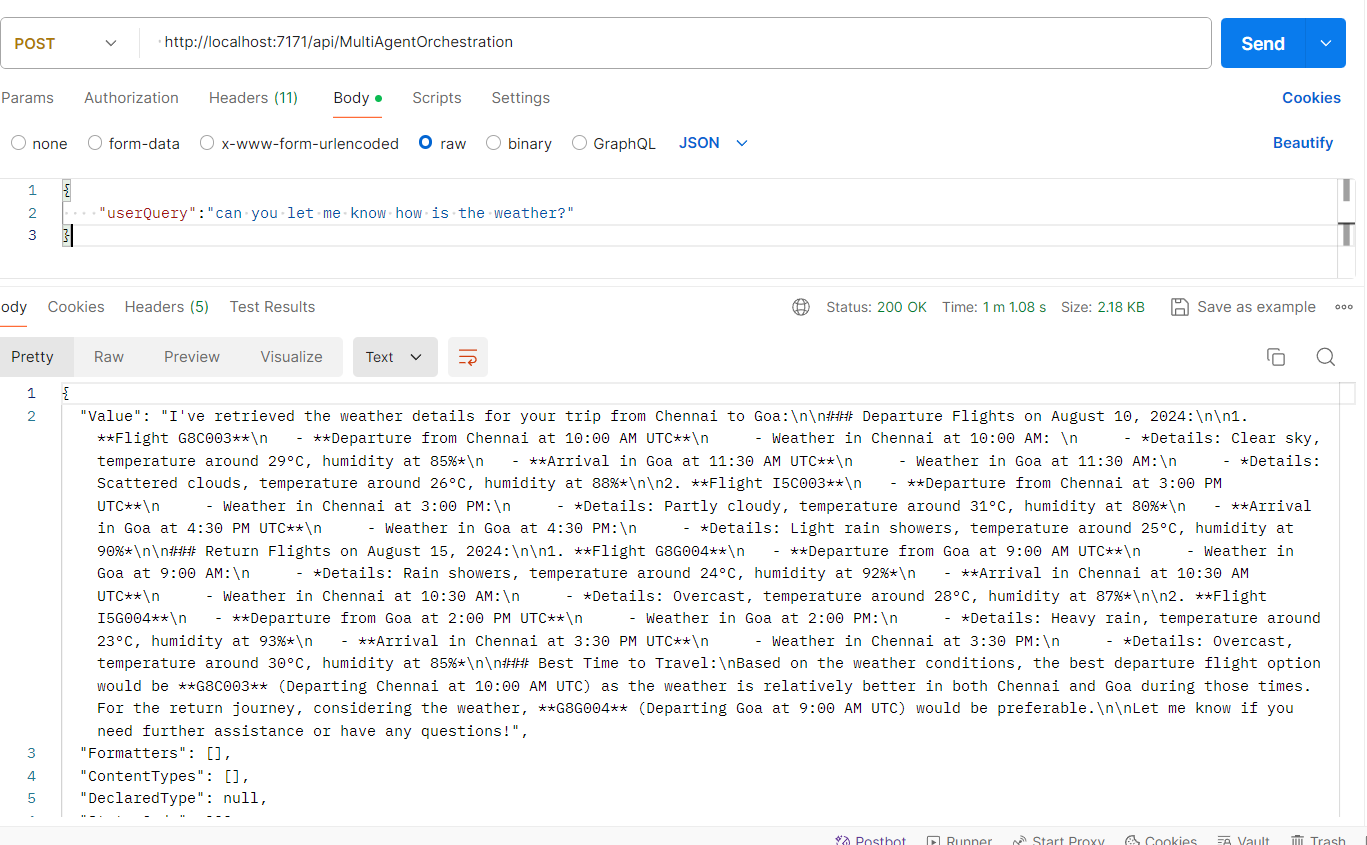
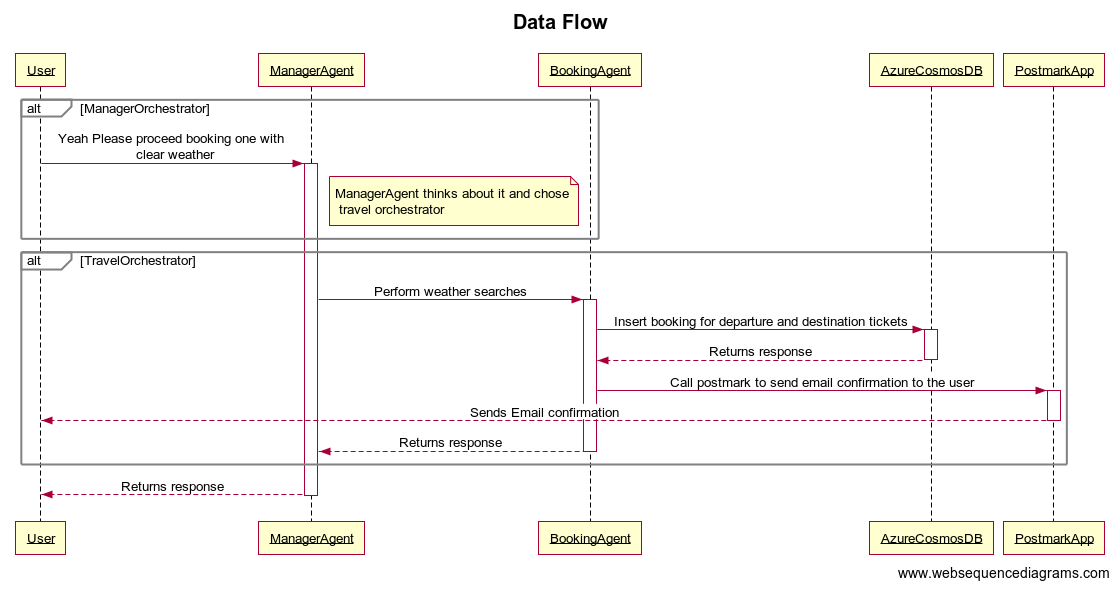
- The user initiates a request to the ManagerAgent, asking, "Can you let me know how is the weather?"
- The ManagerAgent receives the request and decides to delegate the task to the travel orchestrator.
- The travel orchestrator activates and takes charge of the request.
- The travel orchestrator instructs the WeatherAgent to perform weather searches.
- The WeatherAgent sends a query to Azure Cosmos DB to retrieve weather conditions based on the departure city and the departure date.
- Azure Cosmos DB processes the query and returns the relevant weather information to the WeatherAgent.
- The WeatherAgent sends another query to Azure Cosmos DB to retrieve weather conditions based on the destination city and the return date.
- Azure Cosmos DB processes the query and returns the relevant weather information to the WeatherAgent.
- The WeatherAgent consolidates the weather information and sends it back to the travel orchestrator.
- The travel orchestrator returns the final weather search results to the ManagerAgent.
- The ManagerAgent sends the final response back to the user.
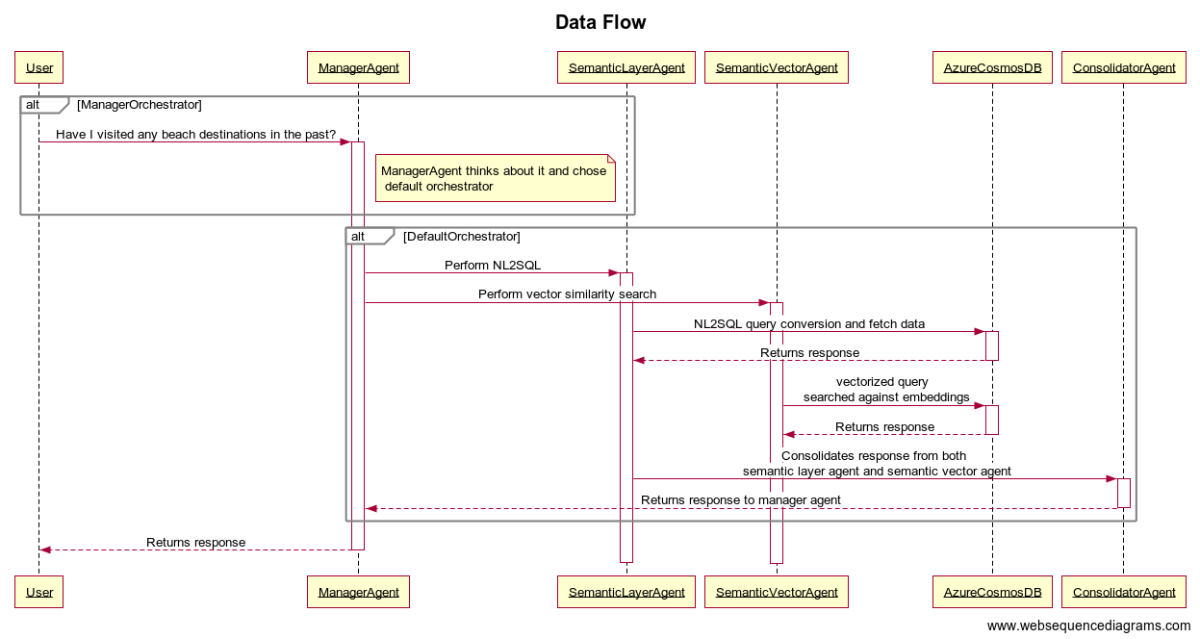
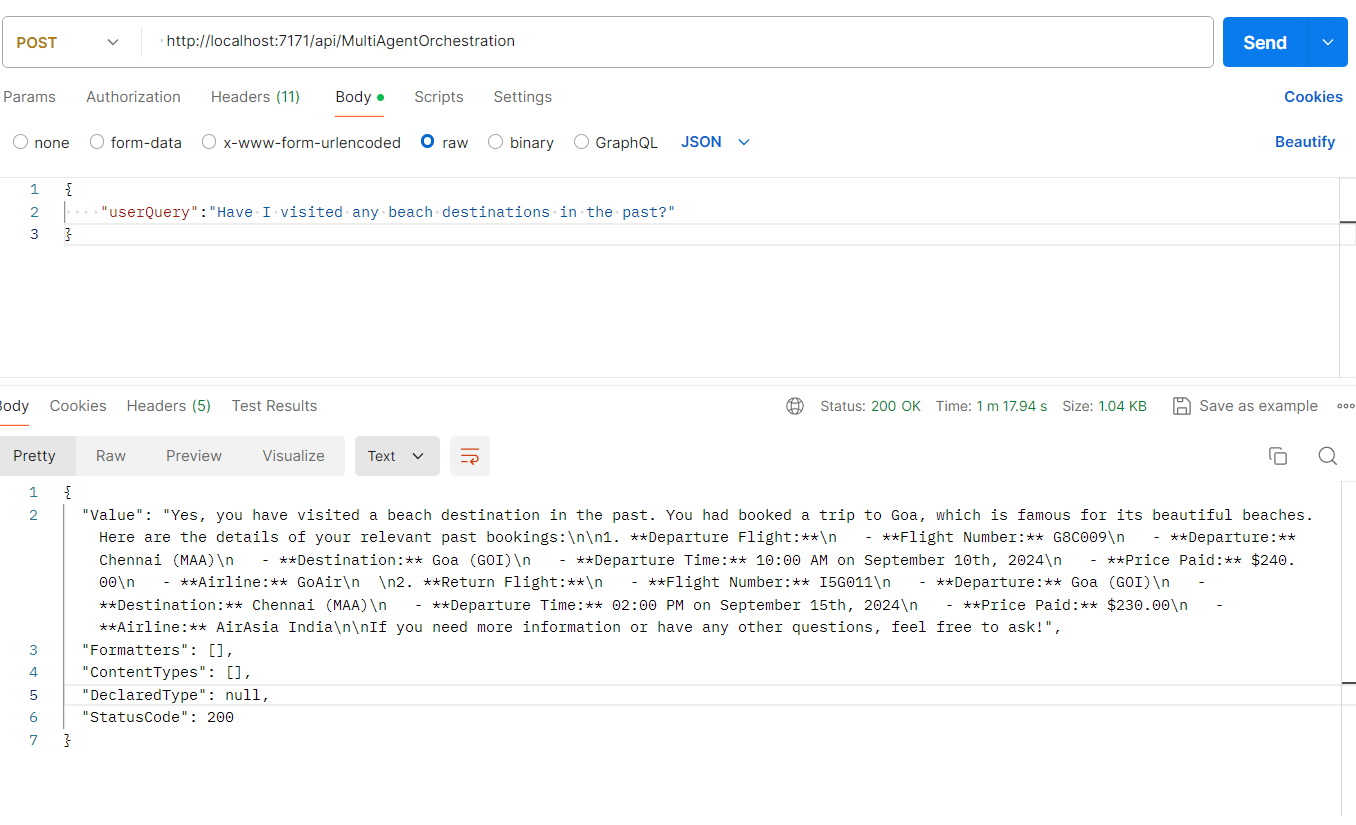
User query : "Have I visited any beach destinations in the past?"
- The user initiates a request to the ManagerAgent, asking, "Have I visited any beach destinations in the past?"
- The ManagerAgent receives the user’s request and decides to delegate the task to the default orchestrator.
- The ManagerAgent activates the Default Orchestrator to handle the request.
- The Default Orchestrator instructs the SemanticLayerAgent to perform a Natural Language to SQL (NL2SQL) conversion and fetch the relevant data.
- The SemanticLayerAgent processes the NL2SQL query conversion and sends a query to Azure Cosmos DB.
- Azure Cosmos DB processes the SQL query and returns the requested data to the SemanticLayerAgent.
- Simultaneously, the Default Orchestrator instructs the SemanticVectorAgent to perform a vector similarity search.
- The SemanticVectorAgent creates a vectorized query and sends it to Azure Cosmos DB for searching against embeddings.
- Azure Cosmos DB processes the vectorized query and returns the relevant data to the SemanticVectorAgent.
- The SemanticLayerAgent and SemanticVectorAgent both send their responses to the ConsolidatorAgent.
- The ConsolidatorAgent combines the responses from both agents to form a cohesive response.
- The ConsolidatorAgent returns the consolidated response to the ManagerAgent.
- The ManagerAgent sends the final response back to the user.
https://travelagency.iamdivakarkumar.com/
Leave a ⭐ if you like this project
