| Technology | Purpose | Ref |
|---|---|---|
| React Hooks | UI | https://reactjs.org/docs/hooks-intro.html |
| Material-UI | UI | https://material-ui.com/ |
| Express JS | Node Server | https://expressjs.com/en/5x/api.html |
| Mongo DB | Platform Metadata Database | https://docs.mongodb.com/ |
| Statex | UI State Management Library | https://cloudioinc.github.io/statex/ |
- esbenp.prettier-vscode
- tyriar.sort-lines
- dbaeumer.vscode-eslint
git clone https://github.com/CloudIOInc/cloudio-saas.git
cd cloudio-saasDownload and install docker desktop of your OS https://www.docker.com/products/docker-desktop
Start the MongoDB on Docker
cd docker
./start-docker.shUpdate server/src/config/config.ts to point DB_URL to 'mongodb://root:example@localhost:27017';
Environment Variables Setup
Update server/src/config/config.ts if needed
Code Editing
cd server
code .
yarn install
Start the server in development mode w/ Webpack HMR
yarn startStart the server in development mode w/ ts-node (To Debug from VSCode)
Create a new Javascript debug Termial as shown below before running yarn start:tsnd
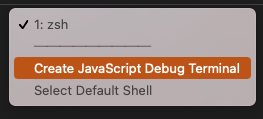
yarn start:tsndUpdate BASE_URL in client/src/config/config.ts to point to http://localhost:3080/v1/ if you are also making changes to the server-side code
cd client
code .
yarn install
yarn start
4. Running the test scripts
yarn watch-test