Skip to content

Ability to change width and orientation#21

Open
PIYUSH956 wants to merge 6 commits intoContriHUB:mainfrom
PIYUSH956:patch
Open

Ability to change width and orientation#21
PIYUSH956 wants to merge 6 commits intoContriHUB:mainfrom
PIYUSH956:patch

Conversation

@PIYUSH956
Copy link

@PIYUSH956 PIYUSH956 commented Oct 3, 2022

I added the feature to change width and orientation of text
Fixed issue #10

@dev-lovedeep
Copy link
Contributor

currently, your implementation changes the orientation of both texts together.

what I am suggesting is :
In UI you have only one input box, alongside it the option to set the width (not the font size) and rotation(like you have currently), and when the user hits enter the text is put on the image with the required width and rotation

@PIYUSH956
Copy link
Author

Sir increasing width did not give any effect to text! because it is heading

@PIYUSH956
Copy link
Author

Also can I remove the second input box?

@PIYUSH956
Copy link
Author

Can you please elaborate on what effect you want to see by changing the width?

@PIYUSH956
Copy link
Author

I changed the rotation of both the text and the user will now rotate both the text, but I did not understand the increasing width.

@dev-lovedeep
Copy link
Contributor

Can you please elaborate on what effect you want to see by changing the width?
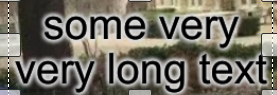
image

in the picture I have attached, see how the big text moved to the next line because of the limited width

@dev-lovedeep
Copy link
Contributor

Also can I remove the second input box?

this is more related to issue #8 , see that issue and try to relate that we don't want only top text and bottom text; we want a general implementation to add multiple texts and then the width and rotation of each text

@dev-lovedeep
Copy link
Contributor

if still not clear, dm me on ms teams

@PIYUSH956
Copy link
Author

ase elaborate on what effect yo

Can you please elaborate on what effect you want to see by changing the width?
image

in the picture I have attached, see how the big text moved to the next line because of the limited width

Increasing word automatically bring the text to new line

@dev-lovedeep
Copy link
Contributor

dev-lovedeep commented Oct 4, 2022

Increasing word automatically bring the text to new line

you are right, but let's say I want to put two text side by side. In that case, I need to control the width

@dev-lovedeep
Copy link
Contributor

@PIYUSH956 are you working on this issue?

Copy link
Contributor

@dev-lovedeep dev-lovedeep left a comment

Choose a reason for hiding this comment

The reason will be displayed to describe this comment to others. Learn more.

accuracy can be improved

Sign up for free to join this conversation on GitHub. Already have an account? Sign in to comment

Projects

None yet

Development

Successfully merging this pull request may close these issues.

2 participants