
BetterVR is a VR mod/hook that adds a PC-VR mode for BotW using the Wii U emulator called Cemu.
It currently supports the following features:
- Fully stereo-rendered with 6DOF. No alternated eye rendering is used.
- Full hands and arms support. You can deck yourself out in all the fanciest clothes.
- Wield weapons, torches and bokoblin arms into combat.
- Gestures to equip and throw weapons.
- Use motion controls to interact with the world to solve puzzles or start fires.
- Large mod compatibility. BetterVR only modifies the code and no game data. Most other mods should be compatible.
- Optional third-person mode.
The app currently utilizes OpenXR, which is supported on all the major headsets (Valve Index, HTC Vive, Oculus Rift, Meta Quest, Windows Mixed Reality etc.). However, controller bindings are currently only provided for Oculus Touch controllers. While more integrated solutions are being found out, there's probably ways to setup OpenXR mappings through SteamVR or other applications.
-
A gaming PC with a CPU that is good at single-threaded workloads (a recent Intel i5 or Ryzen 5 are recommended at least)! The GPU matters a bit, but the CPU is the bottleneck here.
-
A legal copy of BotW for the Wii U.
-
Windows OS. It doesn't work under Linux (even with Wine/Proton) for now.
-
A properly set up Cemu emulator that's able to run at 60FPS or higher. See this guide for more info.
- Before reporting issues, make sure that you have a WORKING version of the game that can go in-game on your PC before you install this mod!
-
A recent Cemu version. Only Cemu 2.6 is tested to work.
- Stamina wheel is difficult to see after any sorts of camera rotation.
- There's a very small chance that the screen stays black after exiting any menus, which requires restarting the game to continue.
- Bow Aiming is done via a crosshair on the VR headset. Bow support might be added at some point.
- No roomscale support. You can freely move around your room, but enemies and physics will use your center point.
- Magnesis & Stasis aim is off-center at far distances. Point your gaze to the right of the object to highlight it.
- Climbing ladders require jumping up the ladder to go up and you have to look at the ladder.
- You can get stuck behind ladders sometimes, especially when you stop moving at the very top of the ladder while climbing down. So keep moving at the start!
- Bombs, barrels etc. are thrown at a weird angle.
- It'll lack some comfort options for now, like a left-handed mode or snap turning. These will be added later.
Tip
Meta/Oculus Link has terrible frame interpolation that will make game appear to run much worse while also making the grass and arms glitchy, even while using a cable. Its HIGHLY recommended to use ALVR (free, both wired and wireless), Virtual Desktop (paid, wireless) or Steam Link (free, wireless) instead for Meta Quest headsets.
-
Download the latest release of the mod from the Releases page.
-
Extract the contents of the downloaded
.zipfile into the same folder where yourCemu.exeis stored. There should now be at least .dll, .json and multiple .bat files in the same folder as yourCemu.exe. -
Open Cemu normally through the
Cemu.exe(not the .bat file!).- Cemu's window title should state Cemu 2.6 or newer. Any older version isn't supported.
- The game should say V208 inside the update column in Cemu's game list. Otherwise it's outdated/not updated, and won't work.
- Under
Debug, disableAccurate Barriers (Vulkan)for more performance. - Go to
Options->General Settings, and then under theGraphicstab make sure that you're using Vulkan, that the right GPU is selected and that VSync is turned off.
If all that is true, continue to the next step by closing the settings window and then Cemu entirely. Otherwise, fix those issues before continuing.
-
Double-click on
BetterVR LAUNCH CEMU IN VR.batto start Cemu. This'll install the graphic pack automatically to the right folder. -
Go to
Options->Graphic packs->The Legend of Zelda: Breath of the Wildand make sure that the graphic pack namedBetterVRis enabled. You'll also want to enable the FPS++ graphic pack under the Mods category, or else the game will crash!
While you're inside the graphic packs menu, make sure that you've clicked on the Download Community Graphic Packs button to update your graphic packs!
You can't change the BetterVR options while you're in-game. -
For an enjoyable experience you should change some other graphic packs in this same window too:
Graphicsgraphic pack: Use any (non-ultrawide!) resolution of 1440p (2k) or higher for clarity. Also change anti-aliasing to Nvidia FXAA. Make sure that you don't use a resolution under 1280x720, or else the game will never show up!FPS++graphic pack: Change the FPS limit to at least 120FPS or 144FPS. The OpenXR headset will dictate the framerate anyway.Enhancements: graphic pack: Change anisotropic filtering to 16x and use your preferred preset.- Any other settings like shadows, draw distance etc. You can always play around with this to see what the performance hit is.
-
Close the settings and start the game like normal from Cemu's game list. You can now put on your VR headset and if installed correctly it should now work!
From now on you can play the game in VR by just starting the BetterVR LAUNCH CEMU IN VR.bat file.
If you want to undo the installation (temporarily) to play the game without VR, use the BetterVR UNINSTALL.bat file.
You can just use the BetterVR LAUNCH CEMU IN VR.bat file to reinstall and start the VR mod again.
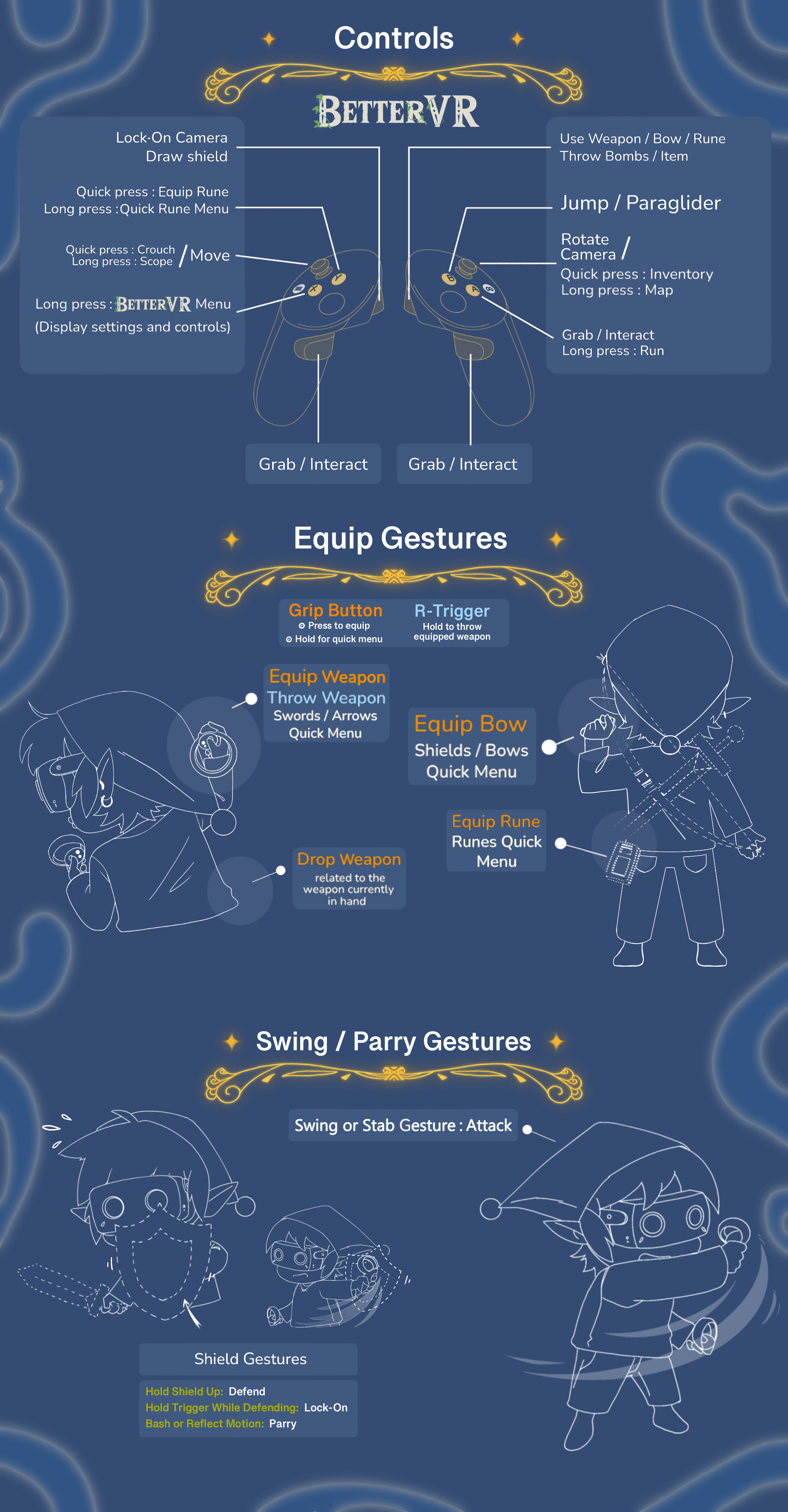
You can now view the controls in-game now by opening the BetterVR menu by holding the X button on your left VR controller. With Valve Index Controllers you can use the A button. For Xbox/Playstation etc. controllers, long press the Start button and use the mouse for changing settings.
You can find the controller image here (click to enlarge):
This mod ships with no game files, so you might ask how it works.
The game starts with the BetterVR Vulkan layer enabled. The Vulkan layer, which comes in the form of the .DLL file, is then able to intercept the Vulkan commands that Cemu submits so that we can get the final frame to render to the VR headset and draw the debugging tools.
A technical hurdle here was that due to OpenXR frameworks not being designed to be instantiated inside something that is intercepting Vulkan commands, this mod utilizes Vulkan <-> D3D12 interop to pipe the rendered output from Vulkan to a D3D12 application that's just used for rendering the captured image to the VR headset. That way the OpenXR framework is just interacting with root-level rendering handles, instead of what'd occur in the Vulkan hook.
Using an external DLL originally made a lot of sense when Cemu wasn't open-sourced (though it also makes it slightly less tied to a specific emulator or version of Cemu, and prevents a VR specific version of Cemu that'll quickly become outdated). In hindsight, it probably would've saved a lot of time spent trying to get the mod to work without using D3D12.
However, while drawing the game's rendered output to the VR headset is one thing, getting a native game to render a 3D image is a whole other thing. For that, the mod has a bunch of PowerPC assembly patches (the Wii U has a PowerPC CPU) to modify the game's code. For example, an important patch is to make it so that the game renders two frames before updating all of the game's systems and objects that are on-screen. Then, among many other patches, you'll also find patches that change the camera or player model positions each frame, or trigger an attack.
Usually the assembly code will call into the C++ code if it wants to do complicated algebra to specify where the camera or Link's hands should be for example. And some assembly patches use a clearing instruction for the Wii U's GPU which, after being translated, will signal the Vulkan hook to send the almost-finished final game image to the D3D12 code where it can present it inside the VR headset.
Additionally, since combat is a large part of the original game, there's also a new swing and stab detection system that allows the player to cut trees and enemies down when they execute proper swings and stabbing motions. This prevents a situation where weapon hitboxes are abused to instantly stagger an enemy. There's plans for an even deeper integration, but as of today that's about it. This is fully optional since the mod still features an attack button, but the latter will offer a lot more immersion.
Understanding how the game works, finding and patching the exact parts inside the game's executable is by far the most difficult part and it took thousands of hours of reverse-engineering. Its without a doubt the most time consuming task of this VR mod, especially since this game uses a custom C++ engine of which is not much known about other then the good work of the (largely unfinished, but still very helpful) decompilation project.
If you want to know more about the technical details, feel free to ask in the BetterVR related channels in the Flat2VR Discord server. There's enough that was skipped over or left out in this explanation.
-
Install the latest Vulkan SDK from https://vulkan.lunarg.com/sdk/home#windows and make sure that VULKAN_SDK was added to your environment variables.
-
Install vcpkg (make sure to run the bootstrap and install commands it mentions) and use the following command to install the required dependencies:
vcpkg install openxr-loader:x64-windows-static-md glm:x64-windows-static-md vulkan-headers:x64-windows-static-md imgui:x64-windows-static-md -
Change the CMakeUserPresets.json file to contain the directory where you've stored vcpkg. Its currently hardcoded. If you want to use Meta XR Simulator (which is quite helpful during debugging), you should change its path now too. Meta XR Simulator doesn't work unless you edit the
[install folder]/config/sim_core_configuration.jsonfile from"disable_interop": false,to"disable_interop": true,. -
[Optional] Download and extract a new Cemu installation to the Cemu folder that's included. This step is technically not required, but it's the default install location and makes debugging much easier.
-
Use Clion or Visual Studio to open the CMake project. Make sure that it's compiling a x64 build.
-
If you want to use it outside visual studio, you can go to the
/[cmake-output-folder]/bin/folder for the BetterVR_Layer.dll. TheBetterVR_Layer.jsonandLaunch_BetterVR.batcan be found in the resources folder. Then you can launch Cemu with the hook using the Launch_BetterVR.bat file to start Cemu with the hook.
Crementif: Main Developer
Acudofy: Sword & stab analysis system
Holydh: Developed the input systems
leoetlino: For the BotW Decomp project, which was very useful
Exzap: Technical support and optimization help
Mako Marci: Edited the trailer, made the logo and controller guide
Tim, Mako Marci, Solarwolf07, Elliott Tate & Derra: Helped with testing, recording, feedback and support
This project is licensed under the MIT license. BetterVR also uses the following libraries: