ComfyUI custom node to run GLM-OCR locally. Loads the model straight from your ComfyUI models folder — no Ollama, no API calls.
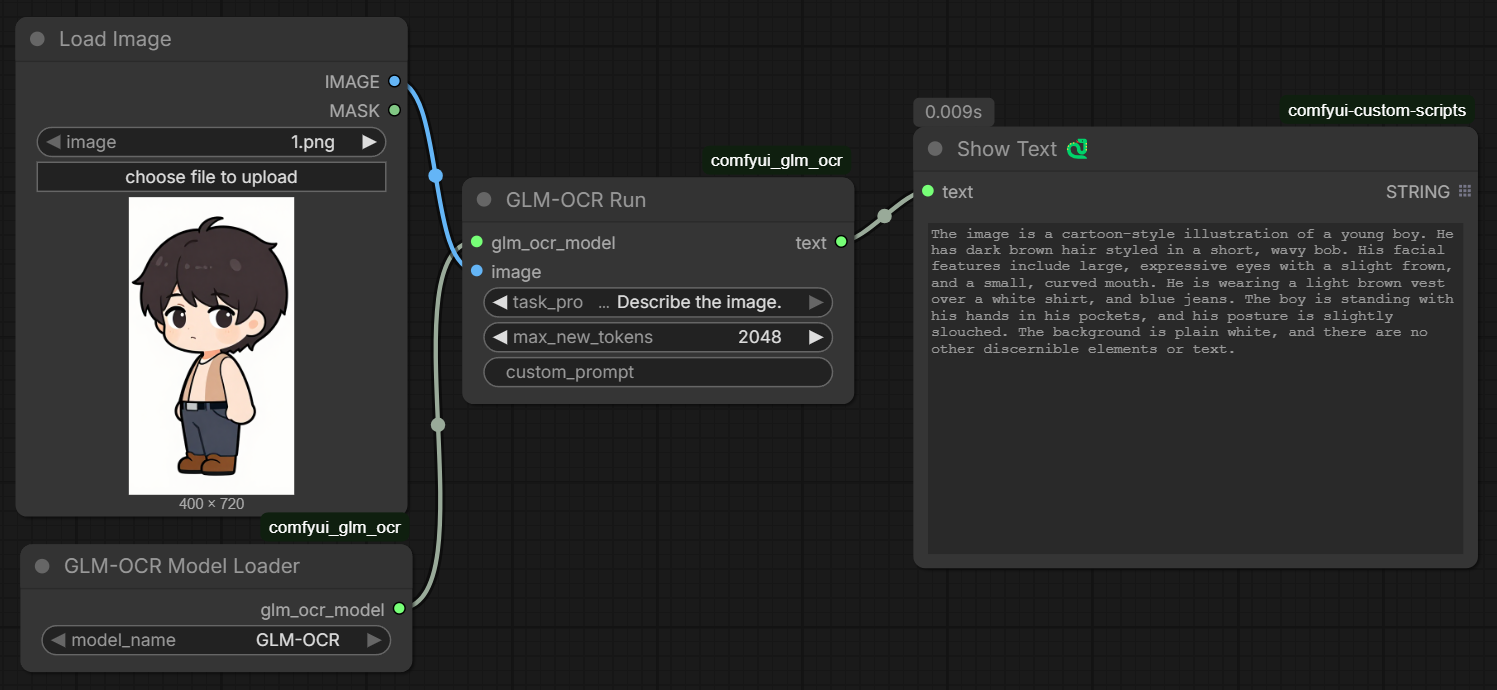
GLM-OCR is a 0.9B vision-language model built for document understanding. You give it an image and a task prompt, it gives you text back. Works well on:
- Scanned documents and photos of text
- Tables (outputs markdown)
- Math formulas (outputs LaTeX)
- General image description
Scans every checkpoint directory ComfyUI knows about (including paths from extra_model_paths.yaml) and lists any subfolder that contains a config.json. Select your model from the dropdown — no hardcoded paths.
Takes the loaded model + an image and runs inference.
| Input | Description |
|---|---|
glm_ocr_model |
from the loader node |
image |
any ComfyUI IMAGE |
task_prompt |
preset task — see table below |
max_new_tokens |
max output length (default 2048) |
custom_prompt |
leave empty to use task_prompt, or type anything |
| Task Prompt | Use |
|---|---|
Text Recognition: |
extract all text from the image |
Formula Recognition: |
extract math as LaTeX |
Table Recognition: |
extract tables as markdown |
Describe the image. |
general description |
Output is a STRING — connect it to ShowText or any other text node.
Clone into your ComfyUI/custom_nodes/ folder:
cd ComfyUI/custom_nodes
git clone https://github.com/Dangocan/comfyui_glm_ocr
Or use ComfyUI Manager → Install via Git URL → paste the repo URL.
Put the model in any checkpoint directory ComfyUI knows about. Example:
ComfyUI/models/checkpoints/GLM-OCR/
The folder needs to contain config.json, model.safetensors, and the tokenizer files. Download with:
huggingface-cli download zai-org/GLM-OCR --local-dir ComfyUI/models/checkpoints/GLM-OCROr download manually from https://huggingface.co/zai-org/GLM-OCR/tree/main
GLM-OCR requires transformers >= 5.3.0. Run this to check:
python -c "import transformers; print(transformers.__version__)"If it's below 5.3.0 or you get an error about glm_ocr architecture not being recognized, install from source:
pip install git+https://github.com/huggingface/transformers.gitThe nodes show up under the GLM-OCR category.
If your models are on a separate drive, add it to extra_model_paths.yaml in your ComfyUI root:
comfyui:
    base_path: D:/MyModels/
    checkpoints: checkpoints/
The loader node picks up any registered checkpoint path automatically.
- ComfyUI
- Python 3.10+
- PyTorch (CUDA recommended)
transformers >= 5.3.0(install from git — see above)Pillow
zai-org/GLM-OCR — https://huggingface.co/zai-org/GLM-OCR
MIT License