Exercise Dom by Raul Valencia #2
Conversation


| @@ -0,0 +1,65 @@ | |||
| let form = document.querySelector('form'); | |||
There was a problem hiding this comment.
You can use classes. e.g: .contact-form to reuse code.
| nameCondition.classList.add('required'); | ||
| return ""; | ||
| } else { | ||
| nameCondition.classList.remove("required"); |
There was a problem hiding this comment.
Use ' instead of " to keep the standard.
| } | ||
|
|
||
| function validEmail(){ | ||
| if (/^\w+([\.-]?\w+)*@\w+([\.-]?\w+)*(\.\w{2,3})+$/.test(Email.value)) { |
There was a problem hiding this comment.
you can save the RegEx in a const. It can be at the top of the code.
const EMAIL_REGEX = /^\w+([\.-]?\w+)*@\w+([\.-]?\w+)*(\.\w{2,3})+$/
| console.log(`${Email.id}: You have entered an invalid email address`) | ||
| alert("You have entered an invalid email address!"); |
There was a problem hiding this comment.
you are mixing ' with ".
| } | ||
|
|
||
| function validNumber(){ | ||
| if (/\d+$/.test(Phone.value)) { |
There was a problem hiding this comment.
you can save the RegEx in a const. It can be at the top of the code.
const PHONE_REGEX = /\d+$/
| function structureIf(nameCondition){ | ||
| if (nameCondition.value == '') { | ||
| console.log(`${nameCondition.id}: It's need value`); | ||
| nameCondition.classList.add('required'); |
There was a problem hiding this comment.
You can save the class name in a const.
const REQUIRED_CLASS = 'required';
There was a problem hiding this comment.
I would name it const ERROR_CLASS = 'error';.
Because I can enter a value, but with the wrong format. So it would be a format problem and not a required problem.
|
|
||
| function validEmail(){ | ||
| if (/^\w+([\.-]?\w+)*@\w+([\.-]?\w+)*(\.\w{2,3})+$/.test(Email.value)) { | ||
| Email.classList.remove("required"); |
There was a problem hiding this comment.
Here you can use the const. REQUIRED_CLASS.
 juancho11gm
left a comment
juancho11gm
left a comment
juancho11gm
left a comment
There was a problem hiding this comment.
Hi Raúl, please see the comments and send the changes.
| Email.classList.remove("required"); | ||
| return Email.value; | ||
| } else { | ||
| Email.classList.add("required"); |
There was a problem hiding this comment.
Here you can use the const. REQUIRED_CLASS.
| } | ||
|
|
||
| function validCheckbox2(array){ | ||
| let check = ""; |
There was a problem hiding this comment.
you are mixing ' with ".
|
|
||
| function validCheckbox2(array){ | ||
| let check = ""; | ||
| if (array[0].checked == false && array[1].checked == false && array[2].checked == false && array[3].checked == false) { |
There was a problem hiding this comment.
You can find an easier way to validate it
There was a problem hiding this comment.
Imagine that you have more checkboxes. Would you do it in the same way?
| checkbox_id.classList.remove("required"); | ||
| for (let index = 0; index < array.length; index++) { | ||
| if (array[index].checked == true) { | ||
| check += array[index].value+ ". "; |
There was a problem hiding this comment.
if you want to concat strings use template literals. I think that t's better to return the array with the checked values.
| @@ -0,0 +1,3 @@ | |||
| .required{ | |||
There was a problem hiding this comment.
| .required{ | |
| .required { |
| function structureIf(nameCondition){ | ||
| if (nameCondition.value == '') { | ||
| console.log(`${nameCondition.id}: It's need value`); | ||
| nameCondition.classList.add('required'); |
There was a problem hiding this comment.
I would name it const ERROR_CLASS = 'error';.
Because I can enter a value, but with the wrong format. So it would be a format problem and not a required problem.
| <p id="print_name">Name:</p> | ||
| <p id="print_email">Email:</p> | ||
| <p id="print_number">Number:</p> | ||
| <p id="print_checkbox">Checkbox:</p> |
There was a problem hiding this comment.
It's not wrong. If you want to create it from js file you can use document.createElement.
| let form = document.querySelector('form'); | ||
|
|
||
| function structureIf(nameCondition){ | ||
| if (nameCondition.value == '') { |
There was a problem hiding this comment.
| if (nameCondition.value == '') { | |
| if (nameCondition.value === '') { |
|
|
||
| function structureIf(nameCondition){ | ||
| if (nameCondition.value == '') { | ||
| console.log(`${nameCondition.id}: It's need value`); |
| <div> | ||
| <textarea name="text" id="textArea" cols="50" rows="10"></textarea> | ||
| </div> | ||
| <button id="Button_submit">Send message</button> |
There was a problem hiding this comment.
| <button id="Button_submit">Send message</button> | |
| <button id="submit-button">Send message</button> |

|
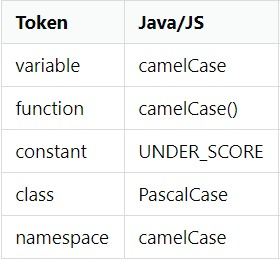
Tip: follow this convention. |


Exercise dom