This is a collaborative project from students of the Ironhack Data Analytics Bootcamp:
Felipe: https://www.linkedin.com/in/felipedeavilagranja/
Guilherme: https://www.linkedin.com/in/guilherme-torres-pereira/
Joanita: https://www.linkedin.com/in/joanita-duarte-mateus/
Web scraping, web harvesting, or web data extraction is data scraping used for extracting data from websites. The web scraping software may directly access the World Wide Web using the Hypertext Transfer Protocol or a web browser. While web scraping can be done manually by a software user, the term typically refers to automated processes implemented using a bot or web crawler. It is a form of copying in which specific data is gathered and copied from the web, typically into a central local database or spreadsheet, for later retrieval or analysis.
The Data Thieves project consist in harvesting data from various websites to build a product. The product that was build in this project was a price comparing across supermarkets. The target for our project was baby products. We know that being a parent is hard. Between changing diapers and waking up at 4 AM somebody needs to go shopping for baby products. And preferably we want the best prices. So, for that, what you would usually do is look-up websites for the lowest prices. Our automatization does that for you, and also ranks the best prices that it found.
This project was done for Lisbon/Portuguese users. The language in the app is portuguese.
- Either fork or clone the repository.
- Download the requirements that are expressed at: Project-Data-Thieves-Web-Scrapping/requirements.txt.txt
- Open the notebook: Project-Data-Thieves-Web-Scrapping/project final.ipynb
- Run the code, including the final cell that has the engine: execute()
- Insert name of the product that you look for
- If you want to do a new search digit "Sim" and then you are able to insert a new product.
The web-scrapping was done with HTML scrapping of supermarkets, with the help of the BS4 package.
The supermarkets scrapped where: Lidl, Continente and Auchan
This is a example of a scrapping function used:
def lidl_funct():
    url = 'https://www.lidl.pt/c/produtos-lupilu/c471' # the url for the lidl baby products
    k = requests.get(url).text # the response

    soup = BeautifulSoup(k,'html.parser') # use the beautifulsoup to parse the html
    price_list_raw = soup.find_all(attrs ={'class':'pricebox__price'}) # get the raw list of the prices

    price_list = [] # the clean list of prices

    for element in price_list_raw:
        price_list.append(float((element.text).replace('\n','').strip())) # for loop to clean each item in the raw list


    soup = BeautifulSoup(k,'html.parser') # use beautifulsoup to parse the html
    name_list_raw = soup.find_all('h3', attrs= { 'class:','product__title'}) # the raw list of items names

    name_list = [] # the clean list of prices

    for element in name_list_raw:
        name_list.append((element.text).replace('\n','').strip()) # the for loop for cleaning each item in the raw list

    new_dict = {
        'produtos': name_list,
        'preços': price_list,
        'supermercado': 'lidl'
    } # the dict that is going to get changed into a dataframe

return pd.DataFrame(new_dict) # the return with a dataframeThe product searches the best prices for baby products. The user interface is really raw and needs much improvements. Ideally you would have a Flask app to do your searches.
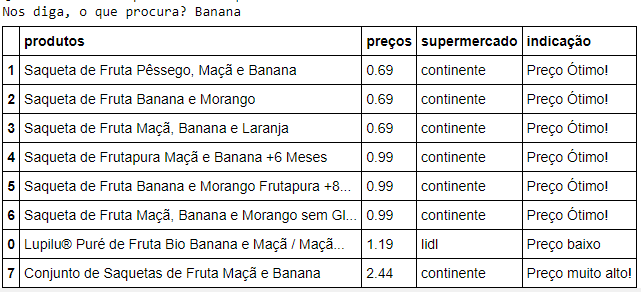
But for now, the product consist on this table, for example when you search for "Banana":