
Persistent project memory for AI coding agents — isolated workspaces, visual dashboard, team collaboration.



MemClaw · Install · Install Guide · Get API Key · Why MemClaw?
AI coding agents forget everything between sessions. When you juggle multiple projects, things get worse — Client A's context bleeds into Client B's conversation, and you waste time re-explaining project details every time you start a new chat.
MemClaw fixes this. It gives your AI agent a persistent, project-isolated memory system with a web dashboard so you can actually see and manage what your agent remembers.
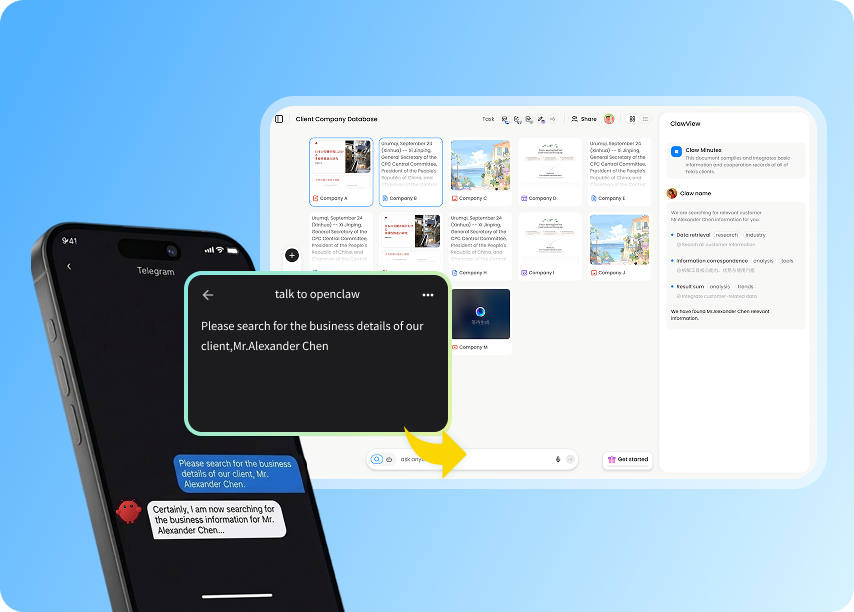
Unlike general-purpose AI memory tools, MemClaw is designed specifically for project-level isolation:
| Feature | MemClaw | General memory tools |
|---|---|---|
| Project isolation | Each project gets its own workspace — zero context bleed | Memory is shared across all conversations |
| Visual dashboard | Web UI to review, edit, and manage agent memory | Memory is invisible — you can't see what the agent remembers |
| Team collaboration | Invite teammates to shared project workspaces | Single-user only |
| Structured memory | Tasks, artifacts, and a living project README | Flat key-value or vector store |
| Free to use | Core features are free | Often requires paid plans |
- Workspaces — one project = one workspace, identified by name. Client A's context never touches Client B's.
- Artifacts — save research reports, documents, URLs, and files to the workspace.
- README memory — agent maintains a structured project README: background, user preferences, current progress.
- Query — retrieve workspace contents by browsing or semantic search.
- Cross-session — load any workspace and pick up exactly where things left off.
- Web dashboard — open the MemClaw dashboard to view and manage all your project memories.
Track 6 clients simultaneously. Each client gets their own workspace with pricing history, requirements, and communication notes. Switch between clients without context contamination.
Three repos, three workspaces. Your AI agent remembers each project's architecture, constraints, and TODO list independently. No more re-explaining your tech stack.
Accumulate papers, insights, and notes into project-specific knowledge bases. Your AI agent builds structured knowledge over time instead of losing it in chat history.
Get your API key from felo.ai, then set it:
export FELO_API_KEY="your-api-key-here" # Linux/macOS
$env:FELO_API_KEY="your-api-key-here"   # Windows (PowerShell)
The key can also be persisted in ~/.memclaw/env.
# Add the marketplace
/plugin marketplace add Felo-Inc/memclaw

# Install the skill
/plugin install memclaw@memclawbash <(curl -s https://raw.githubusercontent.com/Felo-Inc/memclaw/main/scripts/openclaw-install.sh)git clone https://github.com/Felo-Inc/memclaw.git
# Copy the skill folder to your AI agent's skills directory
# Claude Code: ~/.claude/skills/
# Gemini CLI: ~/.gemini/skills/
# Codex: ~/.codex/skills/
cp -r memclaw/memclaw ~/.claude/skills/Just talk to the agent naturally:
Create a workspace called Client Acme
Load the Acme workspace
What's in my workspace?
Save that report to the workspace
The agent handles task tracking, artifact saving, and README updates automatically — no extra commands needed.
| Concept | Description |
|---|---|
| Workspace | One project = one persistent knowledge base |
| Registry | ~/.memclaw/workspaces.json, maps project names to workspace IDs |
| README | Agent's memory of the project — background, preferences, progress |
| Artifacts | Key outputs saved to the workspace (reports, docs, URLs, files) |
We welcome contributions! See CONTRIBUTING.md for guidelines.
Whether it's a bug fix, feature request, or documentation improvement — all contributions help make MemClaw better for everyone.
- Website: MemClaw — official site
- Install Guide: MemClaw Install Guide
- Bug Reports: GitHub Issues
- Discussions: GitHub Discussions
MIT — see LICENSE for details.