
Tapir is a management system for community supported agriculture. It is currently used productively by several organizations, including WirGarten Lüneburg eG, Möllers Morgen, Gemüsekollektiv Hebenshausen e.V., and more.
Its features include:
- Member & membership management including cooperative shares
- Contract management: yearly commitment, weekly deliveries, solidarity contributions, renewal...
- Communication with the members with customizable automated mails
- Delivery locations and capacity management
- And more
It is developed by Théo for FoodCoopX.
The backend code is written with Python and Django, the frontend code is a mix of Django templates and React.
Don't hesitate to contact us if you are interested in using or contributing to Tapir.
Use docker to quickly get a development server running on your machine. Run the following commands:
docker compose up -d
# Create tables
docker compose exec web poetry run python manage.py migrate
# Define the configuration parameters
docker compose exec web poetry run python manage.py parameter_definitions
# Generate test data
docker compose exec web poetry run python manage.py populate --reset_all
You should now have a local instance accessible at http://localhost:8000/.
You can log in as admin with username roberto.cortes@example.com and password roberto.cortes.
You can log in as any user using the same pattern: [name]@example.come as username and [name] as password
Tests are run with pytest:
docker compose exec web poetry run pytest --reuse-db -n autoIf you run into troubles while running the tests, try running them without --reuse-db -n auto.
You can run unit tests outside the Docker container with just by simple running pytest,
assuming you have the poetry environment installed and activated. That should be a bit faster.
Integration tests must be run from inside Docker.
User authentication is handled by keycloak through django-allauth.
During integration tests, this connection is mocked via tapir.wirgarten.tests.test_utils.mock_keycloak, called in TapirIntegrationTest.
The mocking happen during setUp and setUpTestData happens before setUp, that means we can't create users inside setUpTestData.
Python files are formatted with Black.
JavaScript and React files are formatted with Prettier.
Django template files are formatted with DjHTML
API Requests made from the React frontend use API clients. Here are the steps to get updated API clients:
- Annotate your API view with Spectacular (search for
@extend_schema(for examples) - Generate the API schema file with
python ./manage.py spectacular --file schema.yml - Generate the TypeScript API clients using OpenAPI Generator with
./scripts/generate_api_clients.sh
There are help scripts in the /scripts folder. You can do a full update with the following command:
docker compose exec web ./scripts/generate_api_schema.sh && docker compose exec vite ./scripts/generate_api_clients.shModels should inherit from tapir.core.models.TapirModel:
- It uses nanoid instead of integer IDs, that makes sure we never use an ID from a model when getting another model, for example in tests.
- It has
created_atandupdated_atfields that help unterstand the state of production databases.
As much as possible, model classes should contain only their own fields. Helper methods are OK if they only reference the fields of the given object.
Many functions, especially service functions, take a cache parameter which is a normal python dictionary.
The goal of this cache is to avoid redundant database requests within one http request: in most of our views, DB requests are the most time-consuming part.
The cache dictionary should be created at the origin point: for example in the view's __init__ function or the first lines or the command.
Since this cache only lives for the duration of the request, in most cases it is not necessary to invalidate it. If you do need to invalidate, look at tapir.utils.services.tapir_cache_manager.TapirCacheManager
Some functions have the cache parameter optional. This is only because they are called in legacy code, all new functions should have the cache parameter required if possible.
For examples, see usages of tapir.utils.services.tapir_cache.TapirCache.
Most of the business logic code should be in service classes. You can find examples in tapir/*/services/.
Use conventional commits for your commit messages. When applicable, add the ID of the related GitHub issue in the commit message.
Everything that is under tapir/wirgarten should be considered legacy code. It doesn't respect the conventions above. If you need to change anything in there, consider rewriting the part that you are changing and moving it to one of the other apps.
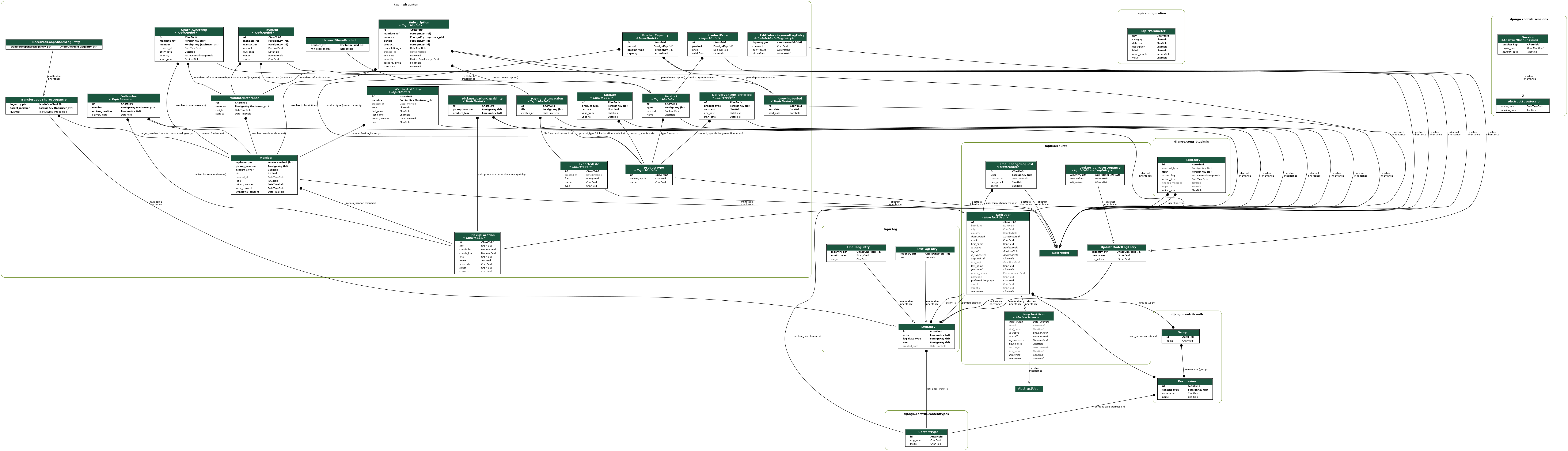
If this graph is outdated, you can re-generate it with:
docker compose exec web sh -c "apt update && apt install -y graphviz graphviz-dev && poetry run pip install pygraphviz && poetry run python manage.py graph_models -a -g -o models.png"This Tapir started as a fork of another project: Tapir for cooperative supermarkets. They are now completely separate but have kept the same name. Sorry for the confusion!