7 Tips&Tools
There are two methods to obtain the position of a point. You can use, while being in a rover, the “save_point” function to get a file in PointsFiles, having the coordinates of your point. If you want to change the initial configuration, you can do so by clicking “save_options”, where you can change the number of points you want over a certain lap of time, chosen by you too. You can also get a file having each point calculated by the Touchscreen. To do so, you must change the Configuration files, like described in the fifth part. You should change the out type, replacing it by file, the path, where you can choose whatever you want, and the format.
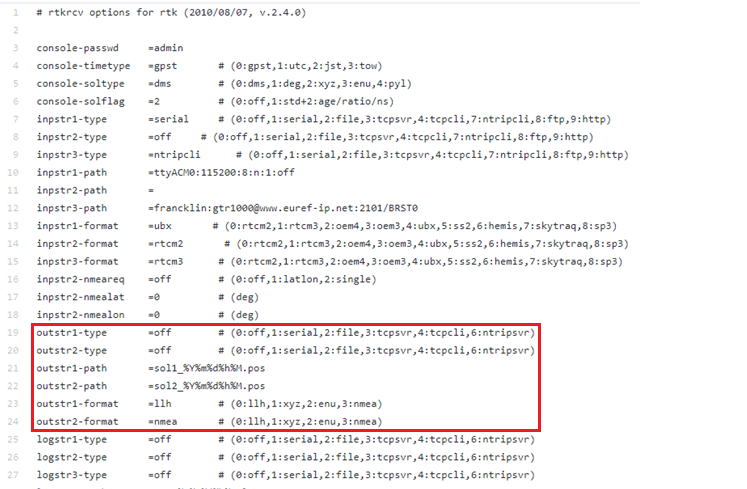
If you want to change the configuration on the field, you should bring a mouse and a keyboard.
The Single mode can be used for a brief time acquisition, if you don’t have the time to let the receptor more than ten second by point, for example while doing a lot of locations at once. Given that this method has no correction applied it is the less exact, bearing 2m in its North exactitude, 1m in its East and 3m in its Altitude. You can use a Single to makes a lot of points on an area, or just to make a rapid point.
When you have the time to let your receptor in a place, use the SBAS mode. It is twice more exact than the Single mode, having 1m in its North coordinates and 0.5m in its East. Unfortunately, it keeps the 3m in Altitude. However, you should let your receptor saving point for a long time to use their average, because each individual point has the same precision as a single. The SBAS method can be used to have a more precise point than the Single, but you will have to do a bit of calculations after the measure.
The PPP Static is used with an internet connection. You can plug in an ethernet cable or a WIFI USB key to do so. You can choose the base linked with the receptor by using your Ntrip account. We recommend that you use the nearest base to obtain better results. We’ve got some problems with the internet connection; therefore, we don’t have the exact precision. However, the standard deviation become low after letting the receptor run for two or three minutes, meaning that it stabilizes itself over a certain point, but the precision of this point is yet to determine. If you have an internet connection, you can use PPP Static, and by letting him run three minutes on a point, you can just save a point to not surcharge your data.
The DGPS need a base and a receptor to function, each having their own antennas. If not, it will operate as a Single. It can be used even under a cover, because it takes its correction from the base. It has a North exactitude of 1m, an East exactitude of 0.5m and an Altitude exactitude of 1.5m. Therefore, the DGPS method is good when you have a lot of cover.
The RTK Static can be used by having a receptor and an antenna. Its precision depends on the range between the receptor and the base. The closer you are, the more precise you will be. Therefore, its precision varies between 0.3m in East and North to 1m, with an Altitude precision of 1.5m. If you are under a cover, it would be better to use DGPS, or to save your position for a long time to get the global average. You can use this method when you want to have distant point in your canvas.
The RTK Kinematic has the same pros and cons than the RTK Static, but it is normally used while locating a moving point. It can be used with a drone for example. Its exactitude is less than 1m in East and North, but its Altitude is of 3 meters. If you want to have a trajectory, use the RTK Kinematic method.
Here is a sum up of all configurations with its standard deviation, for more information about how we get these results check the part Result and process

In order to have the best measures here is some advice that we used during our project :
- Check the configurations you’ll be using with a mouse and keyboard before moving out. This way you’ll have nothing to do but press the screen.
- When using a receptor, try to have it in horizontal position and centered on the point.