This project has been created as part of the 42 curriculum by frrenaux and npillet.
The goal of this project is to generate a maze. It will contain an entry and an exit between which there must be at least one valid path. In the file config.txt, the size of the maze as well as the coordinates for the entry and the exit and whether only one path or multiple can be found linking the entry and the exit.
After generating the maze, an output file is created. It contains the maze generated, the coordinates of the entry and the exit and the shortest path from entry to exit using N, S, E, W for North, South, East and West.
For the bonuses, an animation for the apparition of the maze and another for the path and a second algorithm to generate the maze were made. You can switch between the two of them in the menu below the maze. And finally, a game mode was created.
Here are the Makefile commands:
# install the necessary dependencies in a .venv folder
make install

# executes the program
make run

# runs the main script in debug mode using pdb
make debug

# removes any unnecessary files from the folders
make clean

# verifies the norm is correctly applied in the files
make lint

# verifies the norm more strictly
make lint-strict
For make lint and make lint-strict, if it comes across an issue, the commands will send back said issue. Otherwise, nothing will be sent back to the terminal.
It is also possible to execute this program using this command at the root of the folder:
python3 a_maze_ing.py config.txt| KEY | Description | Example |
|---|---|---|
| WIDTH | Define the maze width | WIDTH=20 |
| HEIGHT | Define the maze height | HEIGHT=15 |
| ENTRY | Define the entry's coordinates (x,y) | ENTRY=0,0 |
| EXIT | Define the exit's coordinates (x,y) | EXIT=19,14 |
| OUTPUT_FILE | Define the output file's name | OUTPUT_FILE=maze.txt |
| PERFECT | Define if the maze has only one way out or more (True for yes, False for no) | PERFECT=True |
-
Explanation:
- DFS Algorithm:
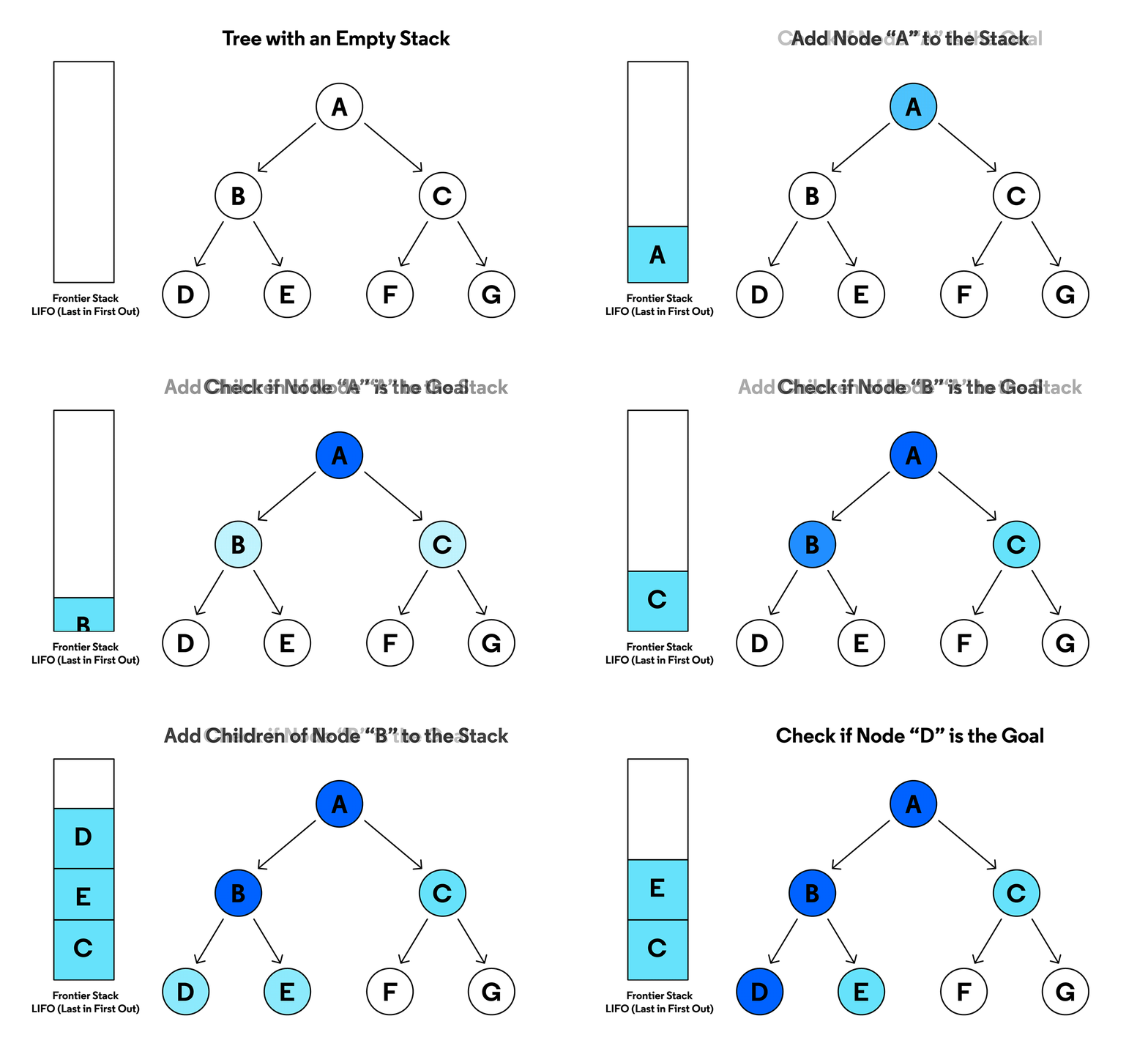
The Depth-First Search (DFS) Algorithm is a well-known algorithm mainly used in scenarios such as pathfinding, solving puzzles or detecting cycles.
The algorithm will start at the root, in the case of our maze it's the entry, and explores every branch until it reaches a leaf. It will then backtrack to the last intersection and explore the other branch. It continues like so until every branch are explored.
- Hunt-and-Kill Algorithm:
The Hunt-and-Kill Algorithm is a maze generating algorithm.
This algorithm will start at a given location, here the entry, and will start randomly carve passages to unvisited neighbors until the cell it's in doesn't have unvisited neighbors.
It will then start "hunting" for an unvisited cell adjacent to one that was visited. When found, the unvisited cell will be defined as the new starting point and will carve randomly any unvisited cell until there are no unvisited cells.
It then repeats the process until every cell are visited.
-
The reason(s) why we chose it: The DFS algorithm was the first found and therefore applied. The Hunt-and-Kill algorithm on the other hand seemed fun to do.

In order to build the package, you need to execute this command:
python3 -m build

or

make build
To then install and use files inside the package, this series of commands will be executed.
python3 -m venv my_env

source my_env/bin/activate

pip install mazegen-1.0.0-py3-none-any.whl
You will need a config.txt file to have a working code. It is given below:
WIDTH=15
HEIGHT=15
ENTRY=0,0
EXIT=14,14
OUTPUT_FILE=output.txt
PERFECT=True
Then create a main.py file and copy and paste this:
from maze.config import config_method, MyBaseConfig
from maze.dfs import DfsLab
from maze.resolved_lab import resolve_lab
from maze.display import display, clear_screen


if __name__ == "__main__":
	conf = config_method()
	lab = DfsLab(conf[0])
	lab.maze_creator()
	path = resolve_lab(lab)
	lab.output_maze(path)
Finally, to generate a maze, use this command:
python3 main.py-
Roles of each team member:
-
frrenaux:
- Parsing
- DFS algorithm
- Hunt-and-Kill algorithm
- Maze output
-
npillet:
- Makefile
- User menu
- Play mode
- README.md
-
-
Original planning and how it evolved:
DFS algorithm implemented in recursive but now in iterative because there is a limitation in the number of calls possible. Before the Hunt-and-Kill algorithm, the Blobby algorithm was considered because it looked fun to do. After a few days of trying to make it work, the latter was abandoned in favour of the first.
- What worked well and what could be improved:
The repartition of the different tasks was done flawlessly, no difficulties were met on that front. For frrenaux, he discovered the vast possibilities that come with using git. He recognises a lack of knowledge on that front. For npillet, the usage of the git tool is not mastered and needs work to improve.
The dependencies we used, other than the mandatory ones, are:
- Pydantic: to check the config.txt file
- Arcade: for the play mode
Two algorithms were created for the maze generation, DFS (the main algorithm) and Hunt-and-Kill. The explanations are above this section. There is a feature in the user menu to change the generating algorithm.
The play mode is also a feature in this menu. By selecting it, a new window opens where the user incarnates a slime who needs to escape the maze previously generated in the terminal.
In the far left corner, a timer is present and times the escape of the player.
The entirety of this mode was created using the arcade library.
- https://www.codecademy.com/article/depth-first-search-dfs-algorithm
- https://weblog.jamisbuck.org/2011/1/24/maze-generation-hunt-and-kill-algorithm
- https://jobbinge.in/menu-driven-programs-in-python/
- https://medium.com/@ajineer/introducing-the-special-menu-class-in-python-simplifying-user-choices-87f3bf58b495