A desktop typing translator that instantly translates any input field — no copy-paste needed.



English | 简体中文 | 繁體中文 | Deutsch | Français | Português | Español | 日本語 | 한국어 | Bahasa Indonesia | Italiano | Türkçe | Tiếng Việt | العربية | Русский
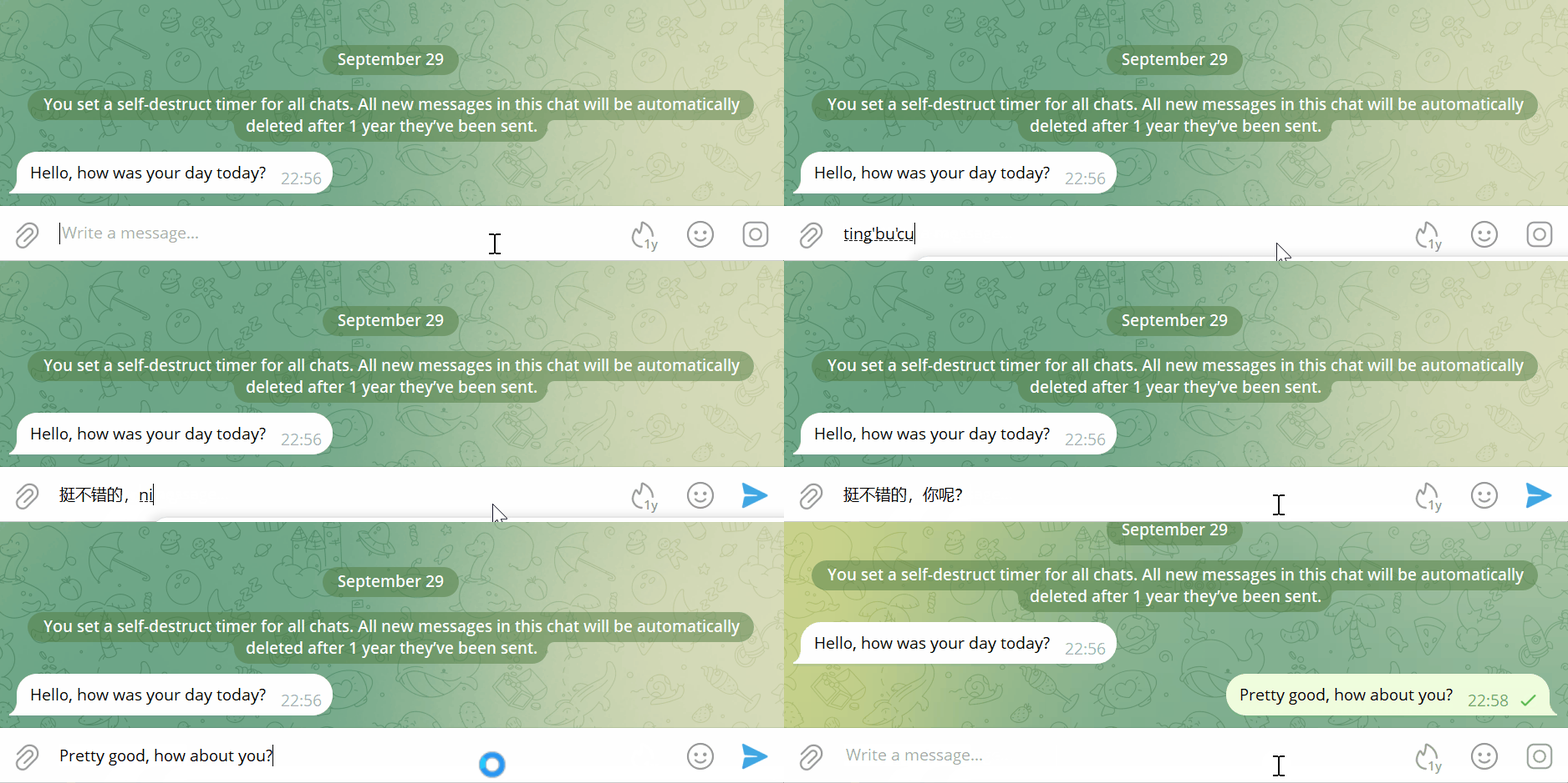
Every translation goes like this:
Copy → Switch window → Open translator → Paste → Wait → Copy result → Switch back → Paste → Send
When your browser has dozens of tabs and several apps running, every switch breaks your focus. It's not an efficiency problem — it's mental drain.
Type in any input field. Press Alt + X. Done.
Translation happens in-place, without breaking your flow. No window switching, no copy-paste. You just keep communicating.
| Traditional Translation | With InputTranslator |
|---|---|
| 6 steps (Copy → Switch → Paste → Copy → Switch → Paste) | 1 Hotkey |
| Breaks Your Flow | Stay Focused |
| Constant Window Switching | Complete In-Place |
- Translate Anywhere You Type — Browser, desktop apps, even game chat. Works in any input field on Windows.
- AI-Powered Understanding — Preserves formatting, links, and tone. Translations read like native writing.
- Scene-Based Translation — Built-in modes for Chat, Business, Customer Service, Social Media — the same sentence translates differently for each context.
- Privacy First — Zero data retention in the cloud. Translations are destroyed upon completion. History only exists on your device.
Works in virtually any desktop application:
| Category | Applications |
|---|---|
| Browsers | Chrome, Edge, Firefox, Safari |
| Messaging | WhatsApp, Telegram, Discord, Slack, WeChat |
| Gmail, Outlook | |
| Social | X/Twitter, Instagram, Facebook, TikTok, Reddit |
| Productivity | Notion, VS Code, Google Docs |
| Gaming | Full-screen game chat |
- Cross-border Customer Service — Reply to tickets and chats without switching back and forth
- Cross-border E-commerce — Product Q&A, buyer messages, procurement communication
- Gaming on Foreign Servers — Translate game chat in real-time, no lag, no distraction
- International Office — Email, chat, search, document writing across languages
- Download from inputtranslator.com
- Install and launch InputTranslator
- Type in any input field, press
Alt + Xto translate
See the Getting Started Guide for detailed setup instructions.
| Home | Settings |
|---|---|
 |
 |
| Free | Pro | |
|---|---|---|
| Price | Free forever | $4.16/mo (billed yearly) |
| Characters | 3,000/week | Unlimited |
| Per Translation | 200 chars | 10,000 chars |
| AI Models | Basic | Advanced (Gemini 2.5 Flash) |
| Translation Scenes | 1 | All |
| Multi-device | - | Unlimited |
Get Started Free · Subscribe to Pro
What if the installation prompts "unsafe"?
Since we haven't purchased expensive code signing certificates, some systems may show risk warnings. The software is completely safe — no viruses or malicious code. You can choose to continue installation with confidence.
Will my input be recorded or saved?
No. InputTranslator uses a zero data retention design — translations are destroyed upon completion and never stored in the cloud. Your translation history only exists on your local device.
How is this different from regular translation software?
Traditional translation software requires switching windows, copying, and pasting. InputTranslator is a typing translator — press a hotkey in any input field for instant translation and automatic backfill. No context switching needed.
Does it work on Windows and Mac?
Currently available on Windows. macOS support is coming soon — join the waitlist.
See more in our Full FAQ
- Report a Bug — Open an Issue
- Request a Feature — Open an Issue
- Contact — contact@inputtranslator.com
- Follow — @RedCat2046 on X
See CHANGELOG.md for release history.
InputTranslator is proprietary software. Free to use with the Free plan. See Terms of Service for details.
Download InputTranslator — Type in your language, translate seamlessly.