GRU Speech recognition for Raspberry Pi
Run pretrained model to recognize "Alina" word with 97% accuracy or train model for your dataset
list_input_device.py — to list all available microphones
main.py — to run pretrained model in real-time
train.py — to train new gru model
For now all constants are hardcoded in file constants.py. Argument parsing is coming soon!
You would like to modify this constants for you
For model
INPUT_SIZE — input size for model
HIDDEN_SIZE — hidden layer size in PyTorch.GRU
OUT_SIZE — number of classes
For audio data
RATE — number of records in Hz
WINDOW_TIME — window size in seconds
CHANNEL_NUMBER — number of audio channels
For live listening
CHUNK_SIZE — audio stream size per one read
MAX_QUEUE_LENGTH — max number of chunks you can send to the model
MODEL_FILE — directory to model file
SENSITIVITY — keyword recognition threshold. If number of ones in a row is greater than this constant then it's considered a keyword
INPUT_DEVICE_INDEX — microphone index for live speech recognition. To get your mic index use list_input_device.py
DEVICE — device you will use (cpu/gpu/tpu)
For training
EPOCH — number of epochs
LR — learning rate for adam
TRAIN_DATA_PERCENTAGE — percentage of training data. Cannot be greater than 1
TRAIN_KEYWORD_MARKER — how many windows to check for ones
For labeling data
KEYWORD_MARKER_NUMBER — number of ones at the end of the word
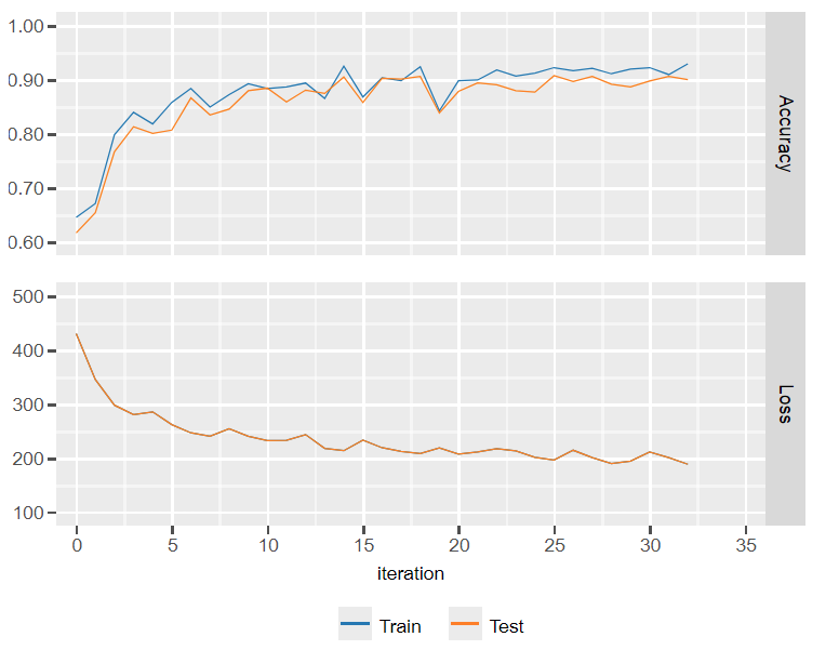
To visualize model loss and accuracy uncomment lines in train.py and use jupyter notebooks
Check this code on our colab
Coming soon - 19.04.2021
@Fyodor Likhachev & Vadim Maksimov