Home

There are two required files to use our GDApi:
- GDApi_Framework
- Google Mobile Ads SDK for iOS.
GDApi_Framework is located on Github and availabe to download.
You can find the Google Mobile Ads SDK at the following link: Google Mobile Ads SDK
After downloading the GDApi_Framework folder, to include it on your project workspace, you need to follow the steps below.
- Right-click on your project name on XCode
- Select "Add Files to Your Project".
Alternatively: you can also drag and drop GDApi_Framework into your project workspace on Xcode.
- Do not forget to add the 'Google Mobile Ads SDK' as well, otherwise it is won't be possible to receive Ads.

Some configuration is needed on "Info.plist" file of your project. In Xcode:
- Click info.plist
- Right-click under the list and select "Add Row"
- Name it as App Transport Security Settings (it should auto-fill) and add the following key-value pair:
| App Transport Security Settings | |
|---|---|
| Allow Arbitrary Loads | YES |
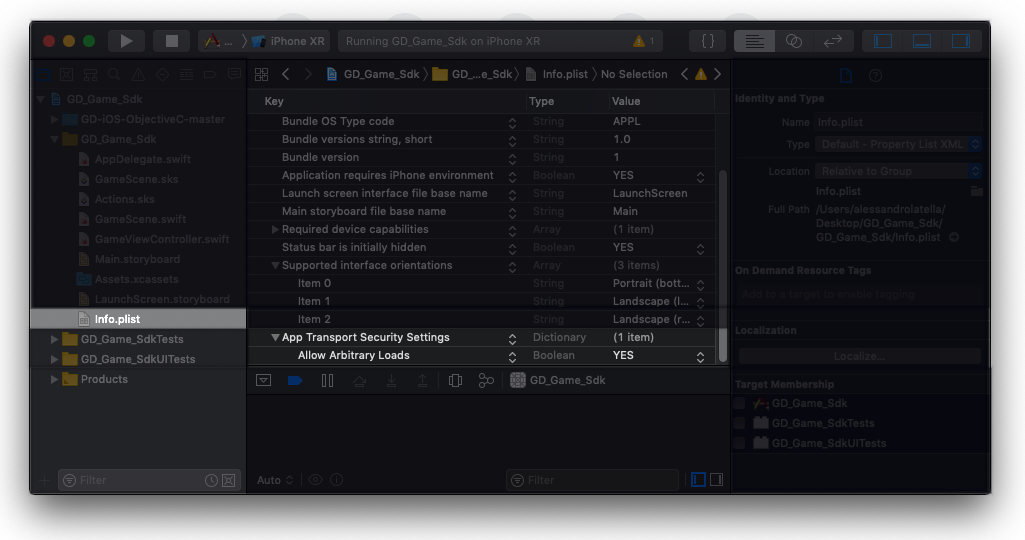
When all is done, you are ready to use our api!
#import <GDApi/GDApi.h>
// include GDApi.h as above to use in your implementation file (.m)
/* Params
  gid: Your game id
  regid: Your user id
  this initialization also shows an interstitial ad if preroll is enabled on your profile.
*/

  NSString *gid = @"51deada1cd904e0d8e2a4d33e889e038";
  NSString *regid = @"82B343C2-7535-41F8-A620-C518E96DE8F6-s1";
  [GDLogger init:gid andWithRegId:regid];

  [GDLogger debug:true]; // enable log messages
There are two types ads which the developer can request for: Interstitial and banner ads.

/*
  This function takes several params.
  isInterstitial: Boolean value
  aligntment: LEFT, CENTER or RIGHT of the screen  * for banner ad
  position: TOP, MIDDLE or BOTTOM  of the screen   * for banner ad
  size: BANNER, LARGE_BANNER, MEDIUM_RECTANGLE, FULL_BANNER or LEADERBOARD
*/
 Boolean isInterstitial = false;
 [GDLogger showBanner:isInterstitial]; // requesting for standart banner 320x50
 isInterstitial = true;
 [GDLogger showBanner:isInterstitial]; // requesting for a interstitial
 This shows a 320x50 banner on top and middle of the screen
 NSString* size = BANNER;
 NSString* alignment = CENTER;
 NSString* position = TOP;
 [GDLogger showBanner:size withAlignment:alignment withPosition:position];


/**
 * After adding event listener such as [GDLogger addEventListener:self]
 * Add methods below as how they are into your ViewController (where you want to listen events). Method names must be the same.
 */

-(void) onBannerReceived:(GDAdDelegate*) sender withData:(NSData*) data{
    NSDictionary *receivedData = (NSDictionary*) [NSKeyedUnarchiver unarchiveObjectWithData:data];
    NSLog(@"Banner received!"); // handle data however you want
    /*
     * Received data keys: adType, width, height
     */
}
-(void) onBannerClosed:(GDAdDelegate*) sender{
    NSLog(@"Banner closed!");
}
-(void) onBannerFailedToLoad:(GDAdDelegate*) sender withData:(NSData*) data{
    NSDictionary *errorData = (NSDictionary*) [NSKeyedUnarchiver unarchiveObjectWithData:data];
    NSLog(@"Banner failed to load!");
    /*
     * Error data keys: adType, error
     */
}
-(void) onBannerFailedToLoad:(GDAdDelegate*) sender withData:(NSData*) data{
    NSDictionary *adData = (NSDictionary*) [NSKeyedUnarchiver unarchiveObjectWithData:data];
    NSLog(@"Banner failed to load!");
}
-(void) onAPINotReady:(GDAdDelegate*) sender withData:(NSData*) data{
    NSDictionary *adData = (NSDictionary*) [NSKeyedUnarchiver unarchiveObjectWithData:data];
    NSLog(@"Api is not ready");
}
-(void) onAPIReady:(GDAdDelegate*) sender{
    NSLog(@"Api is ready.");
}
-(void) onPreloadFailed:(GDAdDelegate*) sender withData:(NSData*) data{
    NSLog(@"onPreloadFailed");
}
-(void) onAdPreloaded:(GDAdDelegate*) sender{
    NSLog(@"onAdPreloaded");
}
-(void) onPreloadedAdCompleted:(GDAdDelegate*) sender{
    NSLog(@"onPreloadedAdCompleted");
}

* **onBannerReceived**: This event is fired when an ad is received. Also "adType" of data contains the type of ads loaded.

* **onBannerStarted**: This event is fired when an ad starts to show up.

* **onBannerClosed**: This event is fired when an ad is closed.

* **onBannerFailed**: This event is fired when an ad is failed to load. Also, "message" of data contains why.

* **onAPIReady**: This event means the api is ready to serve ads. You can invoke "showBanner".

* **onAPINotReady**: When something goes wrong with the api, this event is invoked. Api is supposed to be init again.

* **onPreloadFailed**: This event is fired when preloaded ad is failed to show. Also, "message" of data contains why.

* **onPreloadedAdCompleted**: This event is fired when preloaded ad is closed.

* **onAdPreloaded**: This event is fired when an ad is preloaded.