Releases: GenieClient/Lamp
Major Rewrite with GUI!

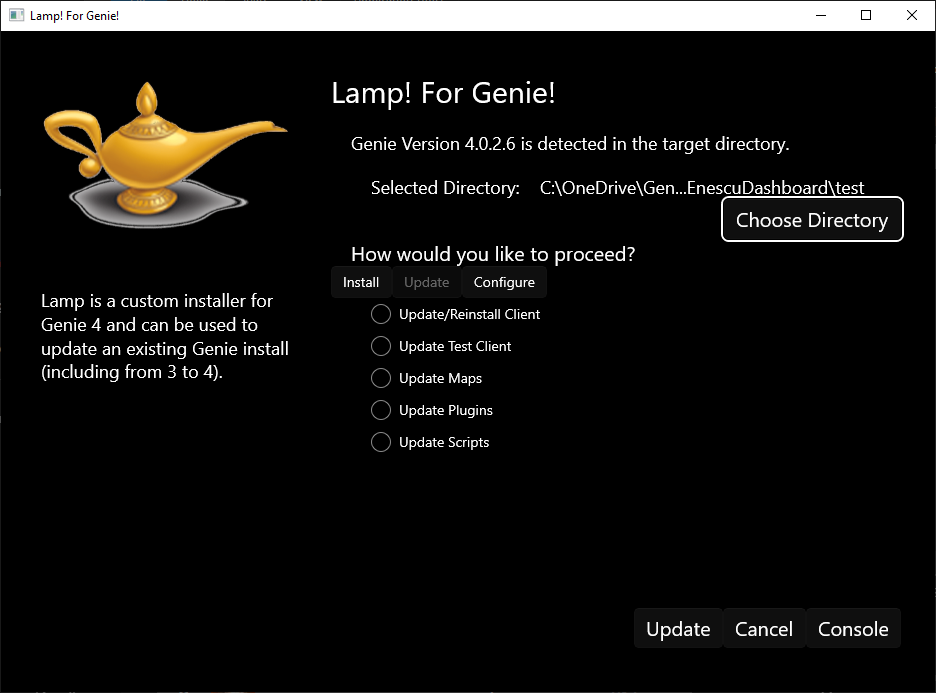
A new Major version is currently being tested and worked on.
This will install Genie, allow you to Update your maps, plugins, and scripts, and allow you to enter a repo to do so from.
Functional Rewrite
This is a significant rewrite to some of the underlying logic to handle errors that were not identified until the the bugs in Genie which were preventing Lamp from running correctly were addressed.
Also adds support for Art Repos.
Removes support for Local / AppData as Genie moves to keeping Configuration locally
Now reads the Genie Config file to retrieve directories and custom repo settings.
1.0.3.0 - Curated Script Support
Version 1.0.3.0 features some significant improvements under the hood. The first, and of interest to most users, is Script support.
It is not currently supported in Interactive mode, however it can be used with Genie 4.0.2.5 and later to download a targeted zip and unzip it into your script directory.
It no longer writes the downloaded zip to disk, instead holding the archive in memory and replacing only the files that need to be updated. This should, hopefully, resolve the heuristic false positive from AV software.
1.0.2.0 - Transmogrify
Introducing the Transmogrify Command!
This command is only accessible through the command line interface, it cannot be called with a launch parameter.
The purpose of the Transmogrify command is to help facilitate change away from using the CMD extension for scripts, by providing a method to bulk rename file extensions in a target directory. If done incorrectly this can be dangerous so it is designed to make sure you want to do this, and backup everything it can.
Syntax: TRANSMOGRIFY {PATH} {OLD EXTENSION} {NEW EXTENSION}
Example: TRANSMOGRIFY C:\Genie 4\Scripts cmd g4s
The rename function is NOT RECURSIVE which means it does not go into subdirectories and rename files in them. You will need to specify each directory you wish to transmogrify. Due to the sensitive nature of file extensions, we prefer to push you to be methodical.
Additionally,, this release features a couple changes to under-the-hood functionality to optimize zip file access and account for the shift to distributing a single build of Genie 4.
1.0.1.0 - Maps, Plugins, Config, and more!
A significant rewrite to the base flow of the program was done.
A whole series of new options are available.
command line arguments
--a --auto --automated
Set auto to replace the current version of Genie with the Server Version if the versions don't match
--f --force
Set force to automatically replace genie with the server version, regardless of current version
--t --test
Set to automatically deploy the Test Client
--l --local
If deploying config, maps, and/or plugins this will deploy in the local directory instead of appdata if no directory is specified
--c --config
Deploys the base config from the release zip. THIS WILL OVERWRITE EXISTING CONFIG IN THE DESTINATION FOLDER
--p --plugins
Set this to automatically update Plugins. Add a pipe and quotes to specify a path such as --p|"C:\Genie\Plugins"
--m --maps
Set this to automatically update Maps. Add a pipe and quotes to specify a path such as --p|"C:\Genie\Maps"
Interactive mode has also been updated to do perform these updates.
1.0.0.1 - Test Build Deployment Added
This Release refactors the Command Line switch logic to utilize more than one switch, as well as adds the option to deploy the Genie 4 Test Build
Introducing Lamp - the Genie Update Tool
Rub (run) the Lamp to update Genie in the directory it is run in.
That means put it in your genie directory and run it, follow the prompt.
There are 3 command line switches
--a --auto --automated
Set auto to replace the current version of Genie with the Server Version if the versions don't match
--f --force
Set force to automatically replace genie with the server version, regardless of current version
-i --interactive
Set to run in interactive mode, basically the same as manually running it.