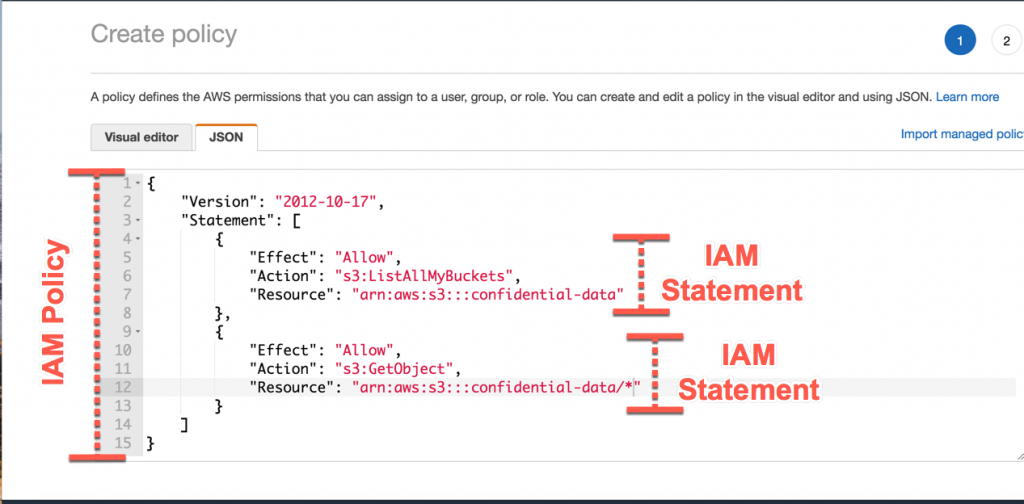
AWS IAM is way of creating an identity or a user and grouping them into groups or leaving them, making sure they are on a premission policy on what service to use in AWS. What I meant was that with IAM, you can create groups and then create users within such groups. Each user can be in multiple groups and each one of them have a permission policy on form of a JSON format. This JSON format states what service is AWS they have permission to use and how to use them. Making use of an AWS IAM account is better than using your root user account as this is more secure to use. But you cannot add groups in groups. The root user sohuld be only used for creating an IAM user but not be used for any other thing or shared. the users are people in an organization and they are part of a group Groups only contain users but not other groups Users may not be in any group and they can also be in multiple groups
AWS dated back to amazon e-commerce company where they felt the strength of their server infratrusture in 2002 and started innternally, It was in 2003 they realized they could make things such as IT for other people. In 2004, the AWS came up with a plan to create Amazon SQS and then upgraded to S3, EC2 in 2006. Now back today as they have taken over 47% of the cloud industry and have generated over 38 billion dollars in revenue, with Microsoft Azure being behind them taking up over 22% of the market

After controlling the market, they scattered a lot of regions and availability zones across the planet to ensure their services are worldwide and the issue of latency is a no no.
- Using the standard AWS console
- Using the AWS CLI(Command Line Interface) either on your device or the AWS CloudShell
- Using the AWS SDK

To use the amazon CLI you'll need to get your CLI installed from AWS website then after that, you'll configure your access keys. Try to make sure your access keys secrets are not revealed to someone else. then you type in the code below
aws --version
This is to check if your CLI installed successfully
Then after that you'll configure AWS, using the following command:
aws configure
Hello Cloud Enthusiasts! 👋 Today, let's take a deep dive into the functionalities of AWS CloudShell and the critical role Security Groups play in fortifying your AWS cloud infrastructure.
-
AWS CloudShell offers a convenient command line interface directly accessible from the AWS Management Console. No more dealing with installations or configurations – it's a hassle-free way to manage your AWS resources right from your browser.
How to Access AWS CloudShell:
Simply open CloudShell from the AWS Management Console. Leverage the AWS CLI directly in your browser for efficient resource management.
-
What are Security Groups? Security Groups act as virtual firewalls, managing inbound and outbound traffic to your AWS instances. They serve as the first line of defense for your cloud resources.
Granular Control: Define rules within Security Groups to control traffic based on sources, ports, and protocols. This granular control ensures that only authorized access is granted to your AWS resources.
-
Let's walk through the process of configuring Security Groups using AWS CloudShell:
Access AWS CloudShell from the console. Utilize the AWS CLI in the CloudShell for efficient security configurations.
-
Regular Review: Frequently review and update your Security Group rules to align with your evolving security requirements.
AWS CloudShell Benefits: Leverage AWS CloudShell for seamless command line access, making your security configurations more efficient and accessible.


Secure Shell (SSH) plays a crucial role in Amazon Web Services (AWS) by providing secure and encrypted communication for various tasks. Here are some specific uses of SSH in AWS:
- Purpose: SSH allows users to securely access and manage their AWS instances remotely.
- Benefit: This is particularly important for system administrators and developers who need to connect to their instances without compromising security.
- Purpose: SSH is used for secure file transfers between local machines and AWS instances.
- Benefit: Users can move files securely between their local environment and the cloud, ensuring the confidentiality and integrity of the transferred data.
- Purpose: SSH enables users to execute commands on AWS instances remotely.
- Benefit: This feature is essential for system administration, configuration management, and troubleshooting without requiring direct physical access to the servers.
- Purpose: SSH tunneling allows secure transmission of data between local machines and AWS instances.
- Benefit: Users can establish encrypted tunnels to transmit data, enhancing security for various applications, databases, or other services running on AWS.
-
Purpose: SSH supports key pair authentication, reducing reliance on passwords for accessing AWS instances.
- Benefit: Key pair authentication enhances security by using public and private key pairs, making it more resistant to unauthorized access compared to password-based authentication.
- Purpose: SSH can be used in conjunction with IAM roles to control access to AWS resources.
-
Benefit: This ensures that users and systems have the appropriate permissions to perform actions on AWS, following the principle of least privilege.
- Purpose: SSH is often used to access a bastion host (jump host), which serves as an intermediary for accessing other instances in a private subnet.
- Benefit: Bastion hosts add an additional layer of security by acting as a gateway for accessing resources in a secure manner.
Understanding and leveraging SSH in these scenarios contribute to a more secure and efficient management of AWS resources, ensuring the confidentiality and integrity of data and resources in the cloud environment.

EC2 Instance Connect (EIC) is a simple and secure method for connecting to your Amazon EC2 Linux instances using Secure Shell (SSH). It eliminates the need to manage SSH keys manually and offers enhanced security features.
-
No SSH Key Management: EIC generates one-time use SSH keys, eliminating the need to store and distribute permanent keys.
-
IAM-Based Access Control: You can control SSH access to instances using AWS Identity and Access Management (IAM) policies and principals, ensuring granular control over who can connect to which instances.
- Secure Logging: All connection attempts are logged to AWS CloudTrail, providing an audit trail for security and compliance.
- User Requests Connection: User initiates a connection request through the EC2 console, AWS CLI, or AWS SDKs.
- IAM Authorization: AWS verifies the user's IAM permissions to access the instance.
- One-Time SSH Key Generation: EIC generates a one-time SSH key pair and pushes the public key to the instance metadata.
- SSH Connection: The user's SSH client connects to the instance using the private key, and the instance validates the public key from the metadata.
- Session Establishment: Upon successful authentication, the SSH session is established, allowing interaction with the instance.

-
Enable EIC on the Instance: (if not already enabled)
  aws ec2 enable-instance-profile-on-instance \
  --instance-id instance-id \
  --instance-profile-name EC2InstanceConnect
-
Connect to Instance:
aws ec2-instance-connect send-ssh-public-key \ --instance-id instance-id \ --availability-zone availability-zone \ --instance-os-user ubuntu -
Additional Benefits:
Streamlined Access: Simplifies access for developers and administrators. Improved Security: Reduces security risks associated with managing SSH keys. Auditability: Provides clear records of SSH access for compliance and troubleshooting. Remember:
-
EIC is currently available for Linux instances only. It supports SSH connections for both interactive sessions and command execution. You can also use EIC to connect to instances using a web-based terminal in the EC2 console.
SOURCE: A medium blog
Imagine your cloud storage as a trusty toolbox. You need different tools for different jobs, and sometimes you need to expand your kit. Amazon EBS is like that magic toolbox that grows with you and adapts to your needs, with lightning-fast performance, limitless scalability, and unwavering reliability.
Supercharged Speed:

With EBS, data reads and writes happen in a blink, keeping your projects running smoothly like a well-oiled machine. Say goodbye to frustrating lag and hello to instant access!
Stretch Your Storage Legs:

No more worrying about running out of storage space! EBS expands effortlessly as your needs grow, ensuring you always have enough room for your ideas and data. Think of it as a bottomless storage bin for your digital treasures.
Fort Knox for Your Data:

EBS safeguards your data like a digital Fort Knox, with automatic backups and built-in redundancy that protect against unexpected bumps in the road. Rest assured, your information is always safe and sound.
Budget-Friendly Flexibility:

EBS offers a variety of storage plans to fit any budget, from budget-conscious beginners to high-performance power users. Choose the perfect option for your needs and watch your digital dollars stretch further.
Perfect for:
- Websites and Databases: Keep your online projects humming with stable, fast storage that handles all your data without breaking a sweat.
- Big Data Adventures: Dive into the world of massive datasets with confidence, knowing EBS can handle the heavy lifting and keep your analysis flowing smoothly.
- DevOps Dreams: Build, test, and deploy applications in record time with EBS's flexible storage options and effortless scaling.
Ready to ditch the clunky storage solutions and unlock the full potential of your cloud projects? Dive into the world of EBS and experience the difference!
Learn More:
- Official AWS EBS Documentation: https://docs.aws.amazon.com/AWSEC2/latest/UserGuide/AmazonEBS.html
- Get Started with EBS: [link to AWS EBS getting started guide]
- EBS Pricing: [link to AWS EBS pricing page]
Remember, EBS is like your partner in cloud crime, always there to support your projects and help you achieve your goals. So go forth, build, create, and innovate, knowing your data is in good hands!
Imagine a blueprint for your ideal cloud server. This blueprint includes the operating system, pre-installed software, and configurations you need to get your project running. That's what an Amazon Machine Image (AMI) is in the AWS cloud.
Think of it this way:
- Traditional VM: Like building a server from scratch, piece by piece, requiring time and effort.
- AWS AMI: Like using a prefabricated house – choose the design you like, move in quickly, and customize as needed.
Here are the key aspects of an AWS AMI:
- Template: It's a template containing the software and configuration of a server instance.
- Fast Deployments: Launch new server instances from the AMI in seconds, saving you time and effort.
- Variety: Choose from a massive library of pre-built AMIs for various operating systems and applications.
- Customization: Build and share your own custom AMIs with specific configurations tailored to your needs.
- Cost-Effective: Pay only for the resources you use with the chosen AMI instance type.
- Security: Leverage pre-baked security configurations and patch management for secure deployments.
Next, let's explore the different types of AMIs:
- Amazon-provided AMIs: Pre-built images for various OSes, software stacks, and applications.
- Community AMIs: Created and shared by other AWS users.
- Your own custom AMIs: Tailor-made images for specific needs and configurations.
In essence, AMIs are the building blocks for quick, flexible, and cost-effective deployments in the AWS cloud.
Imagine a file storage system that:
- Scales on demand: No need to pre-provision storage or worry about running out of space. It grows and shrinks automatically as your data needs change, just like magic!
- Eliminates servers: Ditch the clunky server racks and say goodbye to tedious server management. AWS EFS is fully serverless, letting you focus on your applications instead of the underlying infrastructure.
- Shares files effortlessly: Seamlessly share data across multiple Amazon Elastic Compute Cloud (EC2) instances, on-premises servers, and even containerized applications. Collaboration just got a whole lot easier!
- Delivers high performance: Get fast and consistent throughput for even the most demanding workloads, ensuring smooth operation and happy users.
- Keeps your data safe: Enjoy industry-leading security with features like encryption at rest and in transit, access control, and data durability that's practically unheard of (99.999999999%!).
- Pays only for what you use: No upfront costs or hidden fees. You only pay for the storage you actually use, making it a cost-effective solution for any budget.
That's AWS EFS in a nutshell! It's a revolutionary file storage service that simplifies data management in the cloud, making it ideal for a wide range of applications, from web and mobile apps to content management systems and big data processing.
Here's an image to help visualize what AWS EFS does:
Think of it as a bridge between your traditional on-premises storage and the limitless possibilities of the cloud. With AWS EFS, you can finally break free from the limitations of physical servers and embrace the agility, scalability, and cost-efficiency of cloud storage.
If you're interested in learning more, here are some helpful resources:
- AWS EFS website: https://aws.amazon.com/efs/
- AWS EFS documentation: https://docs.aws.amazon.com/efs/latest/ug/whatisefs.html
- Blog post: 5 Reasons to Use AWS EFS for Your Cloud Applications: https://aws.amazon.com/efs/customers/

The Amazon Application Load Balancer (ALB) is a managed service offered by Amazon Web Services (AWS) that helps you distribute incoming traffic across multiple targets, such as Amazon EC2 instances, containers, or IP addresses. Think of it as a sophisticated traffic cop for your cloud applications, ensuring smooth flow and preventing bottlenecks.
Here's how the ALB works:
- Distributes traffic: When a user visits your website or uses your application, their request hits the ALB. The ALB then intelligently routes the request to one of your available targets, ensuring everyone gets served quickly and efficiently.
- Scales on demand: As your traffic fluctuates, the ALB automatically scales up or down its resources to handle the load. This means you avoid paying for idle capacity during low traffic periods, and your users never experience slowdowns during peak times.
- Enhances security: The ALB offers built-in DDoS protection and TLS encryption to safeguard your applications from malicious attacks and protect sensitive data.
- Provides insights: The ALB offers detailed monitoring and reporting tools, giving you visibility into your traffic patterns and application health. This information helps you identify and troubleshoot issues before they impact your users.
Key benefits of using the ALB:
- Improved performance: Reduces website loading times and enhances user experience.
- Increased scalability: Adapts to fluctuating traffic without manual intervention.
- Enhanced security: Protects your applications from attacks and data breaches.
- Simplified management: Provides a centralized platform for managing your application infrastructure.
- Reduced costs: Pay only for the resources you use, thanks to automatic scaling.
Who can benefit from the ALB?
- Web developers: Distribute traffic across web servers to ensure optimal performance.
- App developers: Scale mobile and web applications effortlessly.
- DevOps engineers: Streamline application management and automate scaling.
- Anyone running cloud applications: Improve performance, security, and scalability.
In simple terms, the ALB is like having a highly trained traffic control center for your applications. It keeps traffic flowing smoothly, protects your applications from harm, and gives you full visibility into what's happening. This makes it a valuable tool for any organization running applications in the cloud.
I hope this explanation clarifies what the Amazon ALB is and how it can benefit you. If you have any further questions, feel free to ask!

Empowering Scalability and Reliability with Amazon Web Service Load Balancers
In the ever-evolving realm of web services, ensuring your application can gracefully handle varying levels of traffic is not just desirable but imperative. The ability to maintain performance and availability under fluctuating loads is a hallmark of a robust digital infrastructure. Enter Amazon Web Service (AWS) Load Balancers – a suite of tools designed to distribute incoming traffic across multiple targets efficiently. In this comprehensive guide, we'll delve deep into the world of AWS Load Balancers, exploring their types, connections, routing mechanisms, health checks, SSL/TLS capabilities, Server Name Indication (SNI), cross-zone load balancing, target groups, and more.
AWS offers three main types of Load Balancers, each tailored to specific use cases:
-
Classic Load Balancer (CLB): The traditional choice for basic load balancing across multiple EC2 instances. Operating at Layer 4 (Transport layer) of the OSI model, CLB makes routing decisions based on IP addresses and TCP ports. While it lacks some of the advanced features of its counterparts, it remains a viable option for simple applications.
-
Application Load Balancer (ALB): Engineered for HTTP/HTTPS traffic, ALB operates at Layer 7 (Application layer), allowing for advanced routing based on content, URL, and HTTP headers. This makes ALB an ideal choice for modern web applications composed of multiple microservices.
-
Network Load Balancer (NLB): Positioned for extreme performance and low-latency requirements, NLB operates at Layer 4 like CLB but with enhanced capabilities. It efficiently handles millions of requests per second, making it suitable for high-throughput applications and scenarios demanding minimal latency.
At the core of Load Balancers lie their ability to manage incoming traffic and distribute it across multiple targets. Load Balancers utilize algorithms such as round-robin or least connections to evenly spread the load among available targets. ALB and NLB take this a step further by offering sophisticated routing capabilities, enabling you to route requests based on various parameters like host, path, query string, and headers.
Health checks play a pivotal role in maintaining the availability of targets. Load Balancers periodically send requests to registered targets, evaluating their health based on responses received. Unhealthy targets are automatically removed from the pool, ensuring that incoming traffic is directed only to healthy instances. This proactive approach to health monitoring enhances the overall availability of the application.
In an era where data security is paramount, Load Balancers provide robust support for SSL/TLS encryption. By terminating SSL/TLS connections at the Load Balancer, the burden of encryption/decryption is lifted from backend servers, thus optimizing their performance. Moreover, ALB and NLB support Server Name Indication (SNI), enabling hosting multiple SSL certificates on a single IP address. This facilitates secure connections for multiple domains without the need for dedicated IP addresses.
By default, Load Balancers distribute traffic evenly across registered targets within the same Availability Zone. However, enabling cross-zone load balancing ensures that traffic is evenly distributed across all available zones, thereby enhancing fault tolerance and improving overall application performance. This distributed approach mitigates the impact of potential failures in a single zone, enhancing the resilience of the infrastructure.
Target Groups serve as logical groupings of targets registered with a Load Balancer. ALB and NLB leverage target groups to route requests to specific sets of targets based on defined routing rules. This granular control over traffic distribution enables features such as path-based routing and weighted target groups, allowing for optimized resource utilization and improved application performance.
Amazon Web Service Load Balancers represent a cornerstone of modern cloud architectures, offering unparalleled scalability, reliability, and advanced routing capabilities. Whether you're managing a simple web application or a complex microservices ecosystem, Load Balancers empower you to maintain high availability and optimal performance under varying workloads. By leveraging features such as SSL termination, advanced routing, and health checks, businesses can build resilient and scalable applications on AWS infrastructure, thereby driving continuous innovation and growth in today's digital landscape.
In conclusion, embracing AWS Load Balancers enables organizations to navigate the complexities of modern web services with confidence, ensuring robustness, scalability, and reliability in the face of evolving demands and challenges.
Think of an Amazon Auto Scaling Group as a team of virtual servers working together to handle your application's workload, just like a group of friends helping each other with a task. Each server is like a friend, and the group scales up or down automatically based on your needs.
Here's how it works:
1. You set the desired number of servers in the group: This is like deciding how many friends you need to help with the task.
2. Servers automatically spin up or down: If your website traffic suddenly increases, new servers are added to the group like more friends pitching in. Conversely, if things quiet down, some servers can take a break or even leave the group.
3. Servers are always healthy and working: Just like reliable friends, Amazon Auto Scaling continuously monitors the health of each server and replaces any unhealthy ones quickly, ensuring your application keeps running smoothly.
4. You pay only for what you use: This is like splitting the bill among your friends. You only pay for the servers that are actually working, not for the ones on standby.
Benefits of using Amazon Auto Scaling Groups:
- Cost-effective: No more overpaying for unused resources.
- Highly available: Your application stays up and running even during traffic spikes.
- Scalable: Easily handle changing demand without manual intervention.
- Manageable: Simplify your infrastructure management and focus on your application.
Here's an analogy to help you visualize:
- Think of your website as a restaurant. During peak hours, you need more waiters (servers) to handle the influx of customers. But during off-peak hours, you don't need as many. Amazon Auto Scaling is like having a team of waiters who automatically show up when needed and disappear when they're not, saving you money on labor costs.
In short, Amazon Auto Scaling Groups take the guesswork out of server scaling, giving you a reliable and cost-effective way to handle fluctuating demand for your cloud resources.
In today's ever-evolving digital landscape, maintaining optimal performance for your applications is not just a necessity but a competitive advantage. Enter AWS Auto Scaling Groups (ASG), a dynamic solution offered by Amazon Web Services to seamlessly scale your resources up or down based on demand. In this comprehensive guide, we'll delve deep into the capabilities of AWS Auto Scaling Groups, exploring how they empower your infrastructure to meet fluctuating workloads efficiently, along with their seamless integration with load balancers for enhanced performance.
At the core of AWS's scalability toolkit lies the Auto Scaling Groups, a fundamental component designed to automatically adjust the number of EC2 instances or other resources in response to changing application demands. Let's unpack the key features and functionalities of AWS Auto Scaling Groups:
AWS Auto Scaling Groups offer a range of scaling policies, allowing you to define precisely how your resources scale in or out based on various metrics such as CPU utilization, network traffic, or custom CloudWatch alarms. These policies enable you to tailor your scaling behavior to meet the unique requirements of your applications.
# Example of scaling policy using CPU utilization metric
autoscaling.put_scaling_policy(
    AutoScalingGroupName='my-auto-scaling-group',
    PolicyName='ScaleOutPolicy',
    PolicyType='TargetTrackingScaling',
    TargetTrackingConfiguration={
        'PredefinedMetricSpecification': {
            'PredefinedMetricType': 'ASGAverageCPUUtilization'
        },
        'TargetValue': 70
    }
)AWS Auto Scaling Groups continuously monitor the health of EC2 instances within the group, ensuring that only healthy instances are serving traffic. By leveraging health checks and metrics provided by Amazon CloudWatch, ASGs can detect and replace unhealthy instances automatically, maintaining the overall health and availability of your applications.
# Example of health check configuration for an Auto Scaling Group
autoscaling.create_auto_scaling_group(
    AutoScalingGroupName='my-auto-scaling-group',
    ...
    HealthCheckType='ELB',
    HealthCheckGracePeriod=300
)To achieve optimal performance and reliability, AWS Auto Scaling Groups seamlessly integrate with Elastic Load Balancers (ELB), distributing incoming traffic across multiple EC2 instances. Let's explore how this integration enhances the scalability and resilience of your applications:
By coupling Auto Scaling Groups with Elastic Load Balancers, incoming traffic is intelligently distributed across healthy instances, promoting high availability and fault tolerance. As ASGs dynamically adjust the number of instances based on workload, ELBs efficiently manage traffic distribution, ensuring consistent performance even during peak loads.
# Example of associating an Auto Scaling Group with an Elastic Load Balancer
autoscaling.attach_load_balancers(
    AutoScalingGroupName='my-auto-scaling-group',
    LoadBalancerNames=['my-load-balancer']
)The synergy between AWS Auto Scaling Groups and load balancers enables elastic scaling that adapts to varying traffic patterns. As ASGs scale resources in or out, ELBs automatically detect and route traffic to the newly provisioned instances, seamlessly integrating them into the application pool. This elasticity ensures your applications maintain responsiveness under any workload condition.
Load balancers play a pivotal role in health monitoring, continuously assessing the status of EC2 instances within the ASG. In the event of instance failure or degradation, ELBs swiftly reroute traffic away from the impaired instance to healthy ones, ensuring uninterrupted service delivery. This auto-healing mechanism enhances the resilience of your applications, mitigating potential disruptions.
In conclusion, AWS Auto Scaling Groups represent a powerful tool for achieving scalability and performance in your cloud infrastructure. By dynamically adjusting resources based on demand and seamlessly integrating with load balancers, ASGs empower businesses to maintain optimal performance while minimizing operational overhead. Whether you're facing sudden spikes in traffic or planning for future growth, AWS Auto Scaling Groups provide the flexibility and agility needed to thrive in today's digital landscape. Embrace the power of Auto Scaling Groups and unlock the full potential of your applications on the AWS cloud.
In today's digital landscape, businesses are generating and managing vast amounts of data, necessitating robust and scalable database solutions. Amazon Web Services (AWS) offers a suite of database services designed to meet the diverse needs of modern applications. Among these offerings are Amazon RDS (Relational Database Service), Amazon Aurora, and Amazon ElastiCache. Let's delve into each of these offerings, understand their capabilities, and explore how they can be integrated into various application architectures.
Amazon RDS simplifies the setup, operation, and scaling of relational databases in the cloud. It supports popular database engines such as MySQL, PostgreSQL, MariaDB, Oracle, and Microsoft SQL Server. With RDS, AWS takes care of routine database tasks like patching, backups, and scaling, allowing developers to focus on application development.
- Multi-AZ Deployments: Provides high availability by automatically replicating data across multiple Availability Zones (AZs).
- Read Replicas: Enables scaling read-heavy workloads by creating replicas of the primary database instance. Read replicas offload read traffic from the primary instance, improving performance and allowing for more concurrent connections.
- Automatic Backups: Automatically backs up databases and allows point-in-time recovery, ensuring data durability and compliance.
- Security: Offers built-in security features like encryption at rest and in-transit, IAM authentication, and network isolation, ensuring data protection and regulatory compliance.
Amazon Aurora is a MySQL and PostgreSQL-compatible relational database built for the cloud. It delivers high performance, availability, and durability while being cost-effective compared to traditional databases.
- Performance: Offers up to five times the performance of standard MySQL databases and three times the performance of standard PostgreSQL databases, enabling faster query execution and better application responsiveness.
- Storage Scalability: Automatically grows storage as needed, up to 64TB per database instance, allowing applications to handle growing datasets without manual intervention.
- Fault-Tolerant: Replicates data six ways across three Availability Zones, ensuring high availability and durability even in the event of AZ failures.
- Global Database: Allows for cross-region replication, enabling low-latency global applications and disaster recovery strategies.
Amazon ElastiCache is a fully managed in-memory caching service that supports two popular engines: Redis and Memcached. It helps improve application performance by reducing the load on databases.
- Caching: Speeds up data access by storing frequently accessed data in-memory, reducing database load and improving application responsiveness.
- Scale Out: Easily scales horizontally by adding or removing nodes to meet changing demand, ensuring optimal performance regardless of workload fluctuations.
- Data Persistence: Supports data persistence for Redis, ensuring data durability even in the event of a node failure or restart, maintaining data integrity.
- Multi-AZ Replication: Provides high availability through automatic failover in case of node failure, ensuring uninterrupted service and minimal downtime.
Integrating RDS, Aurora, or ElastiCache with web applications or CMS platforms like WordPress is straightforward and offers significant benefits.
- Database Connection String: Developers can use the connection string provided by AWS to connect their web applications to the respective database instances. This connection string contains the necessary information for establishing a connection, including the endpoint, port, username, and password.
- ORM Integration: Object-Relational Mapping (ORM) libraries such as SQLAlchemy (for Python) or Hibernate (for Java) simplify database interactions by abstracting SQL queries into native language objects, facilitating seamless integration with RDS or Aurora.
- Connection Pooling: Implementing connection pooling mechanisms helps manage database connections efficiently, reducing overhead and improving application performance, especially in high-traffic scenarios.
- WordPress Configuration: WordPress allows configuration of database settings through the
wp-config.phpfile. Developers can specify the database host, name, username, and password to establish a connection with the RDS or Aurora database instance. - Plugins and Themes: WordPress plugins and themes often require database interactions for functionality such as storing settings, user data, or content. These plugins and themes seamlessly integrate with RDS or Aurora databases, leveraging their performance and scalability benefits.
- Scalability: As WordPress websites grow in traffic and content, RDS or Aurora databases can seamlessly scale to handle increased demand without requiring manual intervention, ensuring optimal performance and user experience.
AWS CloudFormation allows for the automated provisioning of infrastructure resources, including RDS instances, Aurora clusters, ElastiCache clusters, and EC2 instances, using templates defined as code.
Resources:
  MyDBInstance:
    Type: AWS::RDS::DBInstance
    Properties:
      Engine: MySQL
      ...

  MyAuroraCluster:
    Type: AWS::RDS::DBCluster
    Properties:
      Engine: aurora
      ...

  MyElastiCacheCluster:
    Type: AWS::ElastiCache::CacheCluster
    Properties:
      Engine: redis
      ...
In conclusion, AWS provides a comprehensive suite of database services tailored to various application requirements. Whether you need a managed relational database, a high-performance database engine, or an in-memory caching solution, AWS has you covered. By leveraging these services and integrating them seamlessly into your architecture, you can build scalable, reliable, and efficient applications in the cloud.


Maximizing Database Efficiency with Amazon RDS Proxy
In today's fast-paced digital landscape, the efficient management of database connections is paramount for ensuring optimal application performance and scalability. Enter Amazon RDS Proxy, a fully managed database proxy service offered by Amazon Web Services (AWS). Let's explore the features, benefits, and practical applications of this innovative solution.
Understanding Amazon RDS Proxy At its core, Amazon RDS Proxy serves as a transparent intermediary between your application and the backend database. It allows applications to pool and share database connections, reducing the overhead associated with establishing and managing connections to the database. This pooling mechanism not only enhances the efficiency of database operations but also mitigates the risk of exhausting database resources, such as CPU and memory.
Key Features and Benefits
-
Enhanced Efficiency Amazon RDS Proxy significantly improves database efficiency by optimizing connection management. By minimizing the number of open connections and timeouts, RDS Proxy ensures smoother database operations and reduces latency, thereby enhancing the overall responsiveness of your applications.
-
Serverless and Autoscaling One of the standout features of RDS Proxy is its serverless architecture, which automatically scales up or down based on application demand. This eliminates the need for manual intervention in provisioning and managing proxy instances, allowing you to focus on building and deploying your applications without worrying about infrastructure management.
-
High Availability With multi-AZ deployment, Amazon RDS Proxy ensures high availability and fault tolerance. In the event of a database instance failure, RDS Proxy seamlessly redirects traffic to healthy instances, minimizing downtime and ensuring uninterrupted access to your databases.
-
Reduced Failover Time Failover events are a common occurrence in distributed database environments. Amazon RDS Proxy reduces failover time for RDS and Aurora instances by up to 66%, enabling faster recovery from database failures and enhancing the resilience of your applications.
-
Broad Compatibility Amazon RDS Proxy supports a wide range of database engines, including RDS (MySQL, PostgreSQL, MariaDB, MS SQL Server) and Aurora (MySQL, PostgreSQL). This broad compatibility makes it suitable for diverse application architectures and database workloads, providing flexibility and choice to developers.
-
Seamless Integration Integrating Amazon RDS Proxy with your existing applications is straightforward and requires minimal effort. Since no code changes are typically required, you can seamlessly incorporate RDS Proxy into your application stack without disrupting your development workflow.
-
Enhanced Security Security is a top priority in any cloud environment, and Amazon RDS Proxy doesn't disappoint in this regard. It enforces IAM authentication for database connections, ensuring that only authorized users and applications can access your databases. Additionally, RDS Proxy securely stores database credentials in AWS Secrets Manager, further enhancing data protection and compliance with industry regulations.
-
Private Accessibility To maintain the highest level of security, Amazon RDS Proxy is never publicly accessible and must be accessed from within your Virtual Private Cloud (VPC). This ensures that your database connections remain isolated from external threats and unauthorized access attempts, providing a secure environment for your critical data assets.
Conclusion Amazon RDS Proxy offers a compelling solution for optimizing database connectivity in cloud-based applications. By improving efficiency, scalability, availability, and security, RDS Proxy empowers developers to build high-performance, resilient, and secure applications with ease. Whether you're managing a small-scale application or a large enterprise workload, consider leveraging the power of RDS Proxy to unlock the full potential of your database infrastructure in the AWS cloud. With its rich feature set and seamless integration capabilities, RDS Proxy is poised to become an indispensable tool for modern cloud-native applications.
Rediscover Performance: Exploring Amazon MemoryDB for Redis
In today's fast-paced digital landscape, where milliseconds matter and reliability is non-negotiable, businesses are constantly seeking ways to optimize their data management strategies. Enter Amazon MemoryDB for Redis, a game-changing solution designed to meet the demands of modern applications with microservices architectures. Let's dive into the world of MemoryDB and uncover how it's reshaping the database landscape.
Unleashing Unrivaled Performance
At the heart of MemoryDB for Redis lies its commitment to delivering unparalleled performance. By harnessing the power of in-memory technology, MemoryDB ensures ultra-fast read and write operations, with latencies measured in microseconds for reads and single-digit milliseconds for writes. This blazing speed empowers applications to handle massive transaction volumes, reaching up to 160 million transactions per second per cluster.
Seamless Compatibility with Redis
MemoryDB seamlessly integrates with Redis, a beloved open-source data store renowned for its flexibility and user-friendly APIs. This compatibility allows developers to leverage familiar Redis data structures, APIs, and commands, minimizing the learning curve and accelerating application development. Whether you're building new applications or migrating existing ones, MemoryDB provides a smooth transition with minimal modifications required.
Durability and Reliability at Scale
MemoryDB doesn't compromise on durability and reliability. With built-in multi-AZ support, data is stored durably across multiple Availability Zones, ensuring resilience against failures and enabling rapid failover, database recovery, and node restarts. Each cluster benefits from strong consistency for primary nodes and guaranteed eventual consistency for replica nodes, ensuring data integrity across the board.
Scalability Made Simple
Scaling with MemoryDB is effortless, whether horizontally or vertically. Horizontal scaling allows for the addition or removal of nodes, while vertical scaling enables seamless transitions between different node types to meet evolving workload demands. Whether you need to boost write throughput by adding shards or enhance read throughput by adding replicas, MemoryDB provides the flexibility to scale according to your needs.
Robust Security and Compliance
Security is paramount in any data management solution, and MemoryDB rises to the challenge with comprehensive encryption options, including encryption in transit and at rest. User authentication and authorization are facilitated through Access Control Lists (ACLs), providing granular control over user access to data and commands. With support for AWS Graviton2 instance types and integration with AWS services like IAM, MemoryDB ensures a secure and compliant environment for your data.
Simplified Management and Integration
MemoryDB streamlines database management with fully-managed software patching and upgrades, freeing up valuable time and resources for innovation. Integration with AWS services such as CloudWatch, Amazon VPC, CloudTrail, and Amazon SNS further enhances monitoring, security, and notifications, enabling seamless operation within the AWS ecosystem.
A Closer Look at MemoryDB Components
MemoryDB's architecture revolves around key components:
- Clusters: Collections of nodes serving a single dataset, with each cluster running a specific Redis engine version.
- Nodes: The smallest building blocks running Redis instances within a cluster, providing the computational and memory capacity.
- Shards: Groupings of nodes within a cluster, facilitating data partitioning and replication.
- Parameter Groups: Manage runtime settings for Redis on your cluster, controlling memory usage and item sizes.
- Subnet Groups: Collections of subnets designated for clusters in an Amazon VPC environment.
- Access Control Lists: Control user access to Redis commands and data through user authentication and authorization.
- Users: Access data and issue commands on MemoryDB clusters, with permissions managed through ACLs.
Redis vs. ElastiCache: Choosing the Right Fit
When deciding between MemoryDB for Redis and ElastiCache for Redis, consider the following:
- MemoryDB for Redis: Ideal for workloads requiring ultra-fast, durable primary databases, simplifying application architectures, and lowering costs by consolidating cache and database functionalities.
- ElastiCache for Redis: Suited for caching workloads aimed at accelerating data access from existing primary databases or data stores, leveraging Redis data structures and APIs.
In conclusion, Amazon MemoryDB for Redis stands as a testament to innovation in database technology, offering unmatched performance, reliability, and scalability for modern applications. As businesses continue to push the boundaries of what's possible, MemoryDB provides the foundation for success in the digital age.
Strengthening Database Resilience: A Deep Dive into Amazon RDS Multi-AZ and Read Replicas
In the digital realm, maintaining database reliability is paramount. Amazon's Relational Database Service (RDS) offers crucial features to bolster database resilience, including Multi-AZ deployment and Read Replicas. Let's delve deeper into these features, their applications, disaster recovery capabilities, network costs, and deployment scenarios.
Amazon RDS Multi-AZ (Availability Zone) deployment is a vital tool for ensuring high availability and data durability. With Multi-AZ, your database is automatically replicated across different Availability Zones within a region. This redundancy minimizes downtime by enabling automatic failover to a standby replica in case of failures or maintenance events.
-
Critical Applications: Multi-AZ deployment is ideal for applications where uninterrupted service is crucial, such as e-commerce platforms or financial systems.
-
Disaster Recovery: It serves as a robust disaster recovery solution by maintaining synchronized replicas in different Availability Zones.
In case of a primary database failure, Amazon RDS swiftly promotes the standby replica to the primary instance, ensuring minimal downtime and uninterrupted service.
Read Replicas enhance scalability and performance by allowing multiple read-only copies of your database instance. These replicas asynchronously replicate data from the primary instance, offloading read-heavy workloads and distributing traffic effectively.
-
Scalability: Read Replicas are invaluable for scaling read-heavy applications, like reporting dashboards or analytics platforms.
-
Geographic Distribution: They can be deployed in different regions to reduce latency and improve user experience.
While Amazon RDS offers seamless replication and failover capabilities, it's essential to consider network costs. Data transfer costs may vary depending on the volume of data replicated and the regions involved.
In Multi-AZ deployment, synchronous replication ensures instantaneous data replication to the standby replica, ensuring data consistency and durability. Multi-AZ DB Cluster deployment extends this capability to Amazon Aurora, providing enhanced performance and availability for clustered database instances.
Amazon RDS Multi-AZ deployment and Read Replicas are indispensable for enhancing database reliability, scalability, and performance. By leveraging these features, businesses can achieve high availability, disaster recovery, and efficient workload distribution. However, it's crucial to assess network costs and deploy strategies aligning with specific use cases and performance needs. With Amazon RDS, businesses can build resilient, high-performance database solutions, driving success in today's digital landscape.
What is DNS?
Imagine the internet as a vast city with millions of buildings (websites). Each building has a street address (IP address), but we navigate using names (domain names). DNS is like the city's phone book, translating human-readable names (e.g., bard.ai) into their corresponding addresses (e.g., 93.184.216.34).
How does it work?
When you type a domain name, your computer sends a query to a network of servers called DNS resolvers. These resolvers then consult with other servers until they find the correct IP address for the website you requested. Once they have it, they send it back to your computer, and your browser can connect to the website.
Why is DNS important?
- Speed: DNS significantly reduces the time it takes to load websites by eliminating the need to search for IP addresses manually.
- Accuracy: It ensures you're always reaching the correct website, avoiding phishing scams and malicious websites.
- Security: Some DNS resolvers offer additional security features like malware filtering and parental controls.
- Efficiency: Without DNS, the internet would be a much slower and more confusing place.
Fun facts about DNS:
- There are millions of DNS servers around the world, working together 24/7 to keep the internet running smoothly.
- The first DNS server was created in 1983!
- Some countries have their own top-level domains, like .cn for China or .fr for France.
- You can actually change your DNS server to improve your internet speed or security.
Want to learn more?
I can share some interesting resources about DNS, like:
- Interactive DNS tutorial: https://www.cloudshark.org/captures/56802b91286a
- Video explaining DNS in simple terms: https://www.youtube.com/watch?v=72snZctFFtA
- Article about the history of DNS: https://cabulous.medium.com/domain-name-dns-resolution-how-it-works-bddafa0246ed

Unraveling the Mysteries of DNS: The Cornerstone of Internet Connectivity
In the sprawling labyrinth of the internet, where billions of devices communicate seamlessly, there exists a silent yet indispensable force known as the Domain Name System (DNS). DNS serves as the backbone of the internet, facilitating the translation of human-friendly domain names into machine-readable IP addresses, thus enabling smooth communication across the digital landscape.
The Role of DNS: Bridging the Gap Between Human and Machine
Imagine navigating the digital realm without names like google.com or amazon.com but instead having to remember strings of numerical IP addresses—such a scenario would undoubtedly be chaotic and cumbersome. DNS elegantly bridges this gap, translating human-friendly domain names into machine-readable IP addresses, thus enabling users to access websites and services with ease.
Hierarchical Naming Structure: The Foundation of DNS
At the heart of DNS lies its hierarchical naming structure, resembling an intricate tree with domains branching out into subdomains and further subdivisions. For instance, consider the domain example.com, which is part of the broader .com top-level domain (TLD). This hierarchical organization not only facilitates efficient management but also ensures scalability and resilience across the internet's vast expanse.
DNS in Action: Resolving Hostnames to IP Addresses
User Request: A user opens a web browser and enters a domain name, such as www.google.com, into the address bar. DNS Query Initiation: The browser initiates a DNS query to resolve the domain name into its corresponding IP address. DNS Resolver Engagement: The DNS query is forwarded to the DNS resolver, typically managed by the user's Internet Service Provider (ISP) or another intermediary. Root Name Server Inquiry: The DNS resolver forwards the query to a DNS root name server, which holds information about the root level of the DNS hierarchy. Top-Level Domain (TLD) Name Server Request: The root name server directs the resolver to the appropriate Top-Level Domain (TLD) name server responsible for the domain's TLD (e.g., .com, .org, .net). Route 53 Name Server Selection: The TLD name server provides the resolver with the authoritative name servers for the queried domain, such as those managed by Amazon Route 53. Authoritative DNS Query: The resolver sends the DNS query to one of the authoritative DNS servers associated with the domain, chosen from the provided list. Record Retrieval: The authoritative DNS server looks up the requested record (e.g., A record for www.google.com) in its zone file and retrieves the corresponding IP address. Response Transmission: The IP address is returned to the DNS resolver, completing the resolution process. Caching and Response Delivery: The DNS resolver caches the resolved IP address for future use and returns it to the user's web browser. Web Server Communication: The web browser sends an HTTP request to the obtained IP address, initiating communication with the corresponding web server. Content Delivery: The web server processes the request and delivers the requested content (e.g., a webpage) back to the user's web browser for display.
Authoritative DNS vs. Recursive DNS
Two key components of the DNS ecosystem are authoritative DNS and recursive DNS services. Authoritative DNS servers hold the definitive records for specific domains, providing authoritative responses to DNS queries. On the other hand, recursive DNS servers act as intermediaries, fetching DNS information on behalf of clients and caching it for future requests, thereby optimizing performance and reducing latency.
Route 53: Amazon's Authoritative DNS Service
In the realm of cloud computing, Amazon Route 53 stands as a prominent example of an authoritative DNS service. With its global distribution and robust infrastructure, Route 53 ensures reliable and efficient domain resolution for countless web applications and services hosted on the AWS platform.
The Importance of DNS in Web Traffic Routing
DNS not only translates domain names to IP addresses but also plays a pivotal role in routing web traffic to the appropriate destination. By mapping domain names to IP addresses of web servers or other resources, DNS enables seamless communication between users and online services, ensuring a smooth browsing experience for millions worldwide.
Conclusion
In essence, DNS is the unsung hero of the internet, silently orchestrating the seamless exchange of data across cyberspace. From translating domain names to IP addresses to facilitating web traffic routing, DNS remains an indispensable component of the digital landscape. Understanding its fundamentals not only empowers us as users but also underscores the intricate infrastructure that underpins our interconnected world.
Overview:
Managed Domain Name System (DNS) service offered by Amazon Web Services (AWS). Provides highly available and scalable DNS resolution for your websites and applications. Supports a variety of features, including: Domain registration and management Routing traffic to different resources based on geographic location or other criteria Health checks to ensure your applications are available Monitoring and reporting Integration with other AWS services Benefits:
Simplified DNS management: No need to manage DNS servers manually. High availability and scalability: Route 53 is built on AWS infrastructure, ensuring its reliability and ability to handle large traffic volumes. Security features: Route 53 offers built-in security features like DNSSEC to protect your domains from unauthorized access. Cost-effectiveness: You only pay for the resources you use with Route 53's flexible pricing model. Integration with other AWS services: Route 53 integrates seamlessly with other AWS services, making it a valuable tool for building cloud-based applications. Use Cases:
Websites and web applications Mobile applications API endpoints Any other resource that requires a DNS name Additional Resources:
Amazon Route 53 is a powerful and versatile Domain Name System (DNS) web service offered by Amazon Web Services (AWS). It is designed to provide high availability and scalability for managing DNS routing and domain registration, along with health checking capabilities. Route 53 serves as a fundamental component for ensuring that users can reliably access your web resources.
Amazon Route 53 can be utilized for three primary functions, either individually or in combination:
-
Domain Registration: Route 53 enables you to register domain names for your websites or web applications. This step is essential as it provides your online presence with a recognizable name, such as example.com.
-
DNS Routing: Once you have registered your domain, Route 53 helps to route internet traffic to the resources associated with your domain. When users enter your domain name or subdomain name in their web browser, Route 53 facilitates the connection between the browser and your website or application.
-
Health Checking: Route 53 offers health checking functionality by regularly sending automated requests over the internet to verify the reachability, availability, and functionality of your resources, such as web servers. Additionally, it provides options to receive notifications and route traffic away from unhealthy resources to maintain the reliability of your services.
To fully leverage the capabilities of Route 53, it's recommended to follow these steps:
-
Register Domain Names: Begin by registering your desired domain names through Route 53. This step gives your website a unique identity on the internet.
-
Route Internet Traffic: Once your domain is registered, configure Route 53 to route internet traffic to the resources associated with your domain. This ensures that users can access your website or application seamlessly.
-
Check Resource Health: Set up health checks for your resources to ensure their availability and functionality. Route 53 continuously monitors the health of your resources and takes action to maintain the reliability of your services.
Apart from its core DNS functionality, Route 53 offers several additional features to enhance your DNS management and traffic routing capabilities:
-
Route 53 Resolver: Provides recursive DNS for Amazon VPCs, AWS Outposts racks, and on-premises networks, along with features like conditional forwarding and private hosted zones resolution.
-
Route 53 Resolver on Outposts: Connects Route 53 Resolver on Outpost racks with DNS servers in on-premises data centers, enabling DNS query resolution between Outposts racks and other on-premises resources.
-
Route 53 Resolver DNS Firewall: Offers protection for recursive DNS queries within Route 53 Resolver by allowing the creation of domain lists and firewall rules to filter outbound DNS traffic.
-
Traffic Flow: Facilitates global traffic management by routing end-users to the best endpoint based on various factors such as geoproximity, latency, and health, ensuring optimal performance and availability.
-
Amazon Route 53 Profiles: Enables the application and management of DNS-related Route 53 configurations across multiple VPCs and AWS accounts, providing centralized management and consistency.
By leveraging the capabilities of Amazon Route 53 and its additional features, organizations can efficiently manage their DNS infrastructure, ensure high availability of their web resources, and deliver a seamless user experience to their customers.
In today's digital landscape, where every click and tap relies on seamless connectivity, understanding the intricacies of Domain Name System (DNS) and its various record types is essential. Among the plethora of DNS service providers, Amazon Route 53 stands out for its robust features and comprehensive support for diverse record types. In this exhaustive guide, we embark on a journey through Route 53's supported DNS record types, exploring their functionalities, use cases, and best practices for implementation.
The Domain Name System (DNS) serves as the internet's address book, translating human-readable domain names into machine-readable IP addresses. Amazon Route 53, a highly scalable and reliable cloud-based DNS service, empowers businesses and developers to manage domain names and route traffic efficiently across the internet.
DNS operates through various record types, each serving a specific purpose in domain management and traffic routing. Let's delve into the core DNS record types supported by Amazon Route 53:
The A record, short for Address record, is one of the foundational DNS record types. It maps a domain name to an IPv4 address, facilitating the routing of internet traffic to web servers and other resources.
<Record>
    <DomainName>example.com</DomainName>
    <RecordType>A</RecordType>
    <Value>12.34.56.78</Value>
    <RoutingPolicy>-</RoutingPolicy>
    <TTL>-</TTL>
</Record>With the proliferation of IPv6, the AAAA record type becomes increasingly important. It maps a domain name to an IPv6 address, enabling connectivity over the latest IP protocol.
Canonical Name (CNAME) records alias one domain name to another, providing flexibility in setting up canonical names for various services or subdomains.
NS records identify the name servers for a hosted zone, dictating how traffic is routed for a domain. Understanding NS records is pivotal for delegating responsibilities across subdomains and configuring white-label name servers.
Certificate Authority Authorization (CAA) records offer granular control over SSL/TLS certificate issuance by specifying authorized certificate authorities (CAs) for a domain or subdomain.
MX records specify the mail servers responsible for receiving email on behalf of a domain, prioritizing mail server routing for efficient email delivery.
Name Authority Pointer (NAPTR) records facilitate value conversion or replacement, crucial for Dynamic Delegation Discovery System (DDDS) applications.
<Record>
    <DomainName>example.com</DomainName>
    <RecordType>NAPTR</RecordType>
    <Value>100 50 "u" "E2U+sip" "!^(\\+441632960083)$!sip:\\1@example.com!" .</Value>
    <RoutingPolicy>-</RoutingPolicy>
    <TTL>-</TTL>
</Record>
PTR records perform reverse DNS lookups, mapping IP addresses to corresponding domain names, often used for verifying email server legitimacy.
Start of Authority (SOA) records provide essential information about a domain and its corresponding Route 53 hosted zone, fundamental for managing DNS zones effectively.
<Record>
    <DomainName>example.com</DomainName>
    <RecordType>SOA</RecordType>
    <Value>ns-2048.awsdns-64.net hostmaster.awsdns.com 1 1 1 1 60</Value>
    <RoutingPolicy>-</RoutingPolicy>
    <TTL>-</TTL>
</Record>Sender Policy Framework (SPF) records, now transitioned to TXT records, play a crucial role in email authentication and combating email spoofing.
Service (SRV) records define the location of services within a domain, facilitating service discovery and enabling seamless communication across networks.
TXT records contain arbitrary text strings and are widely used for various purposes, including SPF records, DKIM authentication, and domain verification for services like Google Workspace and Microsoft 365.
When implementing DNS record types in Amazon Route 53, several best practices ensure optimal performance, reliability, and security:
-
Proper TTL Configuration: Set Time-to-Live (TTL) values appropriately to balance caching efficiency with the need for timely updates.
-
Use Alias Records: Where applicable, leverage Route 53's alias records to seamlessly route traffic to AWS resources like CloudFront distributions and S3 buckets.
-
Security Considerations: Implement CAA records to control SSL/TLS certificate issuance and SPF records (now as TXT records) for email authentication.
-
Regular Monitoring and Maintenance: Continuously monitor DNS configurations for inconsistencies or vulnerabilities, and promptly address any issues that arise.
In this comprehensive guide, we've explored the diverse landscape of DNS record types supported by Amazon Route 53. From foundational A and AAAA records to nuanced CAA and NAPTR records, each type serves a unique purpose in domain management, traffic routing, and security enforcement.
By mastering Route 53's supported DNS record types and adhering to best practices in implementation and maintenance, businesses and organizations can optimize their online presence, enhance security, and ensure seamless connectivity for their users and customers.
As the internet continues to evolve, Amazon Route 53 remains a trusted ally, providing unparalleled support and innovation in the realm of DNS services. With its scalable infrastructure, robust feature set, and commitment to reliability, Route 53 empowers users to navigate the complexities of domain management with confidence and precision.
In the ever-expanding digital landscape, where every millisecond counts, Amazon Route 53 stands as a beacon of stability, ensuring that businesses can deliver their services to the world with speed, reliability, and security.
Demystifying Route 53 Public Hosted Zones: A Comprehensive Guide
In the vast landscape of internet infrastructure, the management of DNS (Domain Name System) plays a pivotal role in ensuring seamless connectivity and accessibility of websites and web services. Among the myriad of tools available for DNS management, Amazon Route 53 stands out as a robust and versatile solution, offering a wide array of features to facilitate efficient traffic routing and domain administration. In this comprehensive guide, we will delve deep into the intricacies of Route 53 Public Hosted Zones, exploring their functionalities, best practices, and advanced techniques for optimal utilization.
Understanding DNS and Hosted Zones
Before delving into the specifics of Route 53 Public Hosted Zones, it's essential to have a solid understanding of DNS and the concept of hosted zones. At its core, DNS is a decentralized naming system that translates human-readable domain names (e.g., example.com) into IP addresses (e.g., 192.0.2.1) that computers use to identify each other on the internet. This translation process is crucial for facilitating communication between client devices and web servers.
A hosted zone, in the context of Route 53, is a container for DNS records that define how traffic should be routed for a specific domain and its subdomains. Think of it as a virtual repository where you store instructions for directing internet traffic to various destinations associated with your domain. Each hosted zone corresponds to a single domain name and encapsulates all the DNS records pertinent to that domain.
Types of Hosted Zones
Route 53 supports two main types of hosted zones: public and private. While private hosted zones are used for routing traffic within an Amazon Virtual Private Cloud (VPC), public hosted zones are designed for managing DNS records that route traffic over the public internet. In this guide, we will focus exclusively on public hosted zones and their functionalities.
Working with Public Hosted Zones
Creating and managing public hosted zones in Route 53 is a straightforward process, facilitated by an intuitive user interface and comprehensive documentation. Let's explore the key steps involved in working with public hosted zones:
- Creation: Public hosted zones can be created automatically when you register a domain with Route 53 or manually by transferring DNS service for an existing domain to Route 53. Once created, you can populate the hosted zone with DNS records specifying how traffic should be routed for the domain and its subdomains.
import boto3

# Create a Route 53 client
client = boto3.client('route53')

# Define domain name
domain_name = 'example.com'

# Create a public hosted zone
response = client.create_hosted_zone(
    Name=domain_name,
    CallerReference=str(hash(domain_name))
)

print(response)- Record Management: The heart of a public hosted zone lies in its DNS records, which contain essential information about routing preferences, such as IP addresses, aliases, and routing policies. Route 53 offers support for various types of DNS records, including A, AAAA, CNAME, MX, TXT, and more, allowing for granular control over traffic routing configurations.
# Define record sets
record_sets = [
    {
        'Name': 'www.example.com',
        'Type': 'A',
        'TTL': 300,
        'ResourceRecords': [
            {'Value': '192.0.2.1'}
        ]
    },
    {
        'Name': 'mail.example.com',
        'Type': 'MX',
        'TTL': 300,
        'ResourceRecords': [
            {'Value': '10 mail.example.com'}
        ]
    }
]

# Create DNS records
response = client.change_resource_record_sets(
    HostedZoneId='HOSTED_ZONE_ID',
    ChangeBatch={
        'Changes': [
            {
                'Action': 'UPSERT',
                'ResourceRecordSet': record_set
            } for record_set in record_sets
        ]
    }
)

print(response)- NS and SOA Records: Upon creating a public hosted zone, Route 53 automatically generates two critical records: the Name Server (NS) record and the Start of Authority (SOA) record. The NS record specifies the authoritative name servers for the hosted zone, while the SOA record contains essential administrative details, such as refresh intervals and TTL values.
# Retrieve NS and SOA records
response = client.get_hosted_zone(
    Id='HOSTED_ZONE_ID'
)

print(response['DelegationSet'])
print(response['HostedZone']['Config'])
Advanced Techniques and Best Practices
While Route 53 simplifies the process of DNS management, mastering advanced techniques and adhering to best practices can enhance the efficiency and reliability of your DNS infrastructure. Here are some tips to consider:
- Traffic Routing Policies: Route 53 offers a variety of traffic routing policies, including simple routing, weighted routing, latency-based routing, and geolocation routing. By leveraging these policies strategically, you can optimize performance, enhance fault tolerance, and implement advanced traffic management strategies.
# Example: Weighted Routing Policy
response = client.create_traffic_policy(
    Name='WeightedPolicy',
    Document="""{
        "AWSPolicyFormatVersion": "2015-10-01",
        "Statement": [
            {
                "Effect": "Allow",
                "Action": "route53:CreateHealthCheck",
                "Resource": "*"
            },
            {
                "Effect": "Allow",
                "Action": "route53:GetHealthCheck",
                "Resource": "*"
            }
        ]
    }""",
)

print(response)- Health Checks and Failover: Implementing health checks and failover configurations can ensure high availability and fault tolerance for your web applications. Route 53 allows you to define health checks for endpoints and automatically route traffic away from unhealthy or unavailable resources to healthy alternatives.
# Define health check
health_check = {
    'CallerReference': 'example-health-check',
    'HealthCheckConfig': {
        'IPAddress': '192.0.2.1',
        'Type': 'HTTP',
        'ResourcePath': '/',
        'Port': 80,
        'FailureThreshold': 3
    }
}

# Create health check
response = client.create_health_check(
    HealthCheckConfig=health_check['HealthCheckConfig'],
    CallerReference=health_check['CallerReference']
)

print(response)- Monitoring and Metrics: Utilize Amazon CloudWatch to monitor DNS query metrics, track performance, and detect anomalies in your DNS infrastructure. By analyzing query volumes, latency, and error rates, you can identify potential issues proactively and fine-tune your routing configurations for optimal performance.
import boto3

# Create a CloudWatch client
cloudwatch = boto3.client('cloudwatch')

# Retrieve DNS query metrics
response = cloudwatch.get_metric_data(
    MetricDataQueries=[
        {
            'Id': 'dns_queries',
            'MetricStat':

 {
                'Metric': {
                    'Namespace': 'AWS/Route53',
                    'MetricName': 'DNSQueries',
                    'Dimensions': [
                        {
                            'Name': 'HostedZoneId',
                            'Value': 'HOSTED_ZONE_ID'
                        }
                    ]
                },
                'Period': 300,
                'Stat': 'Sum'
            }
        }
    ],
    StartTime='2024-01-01T00:00:00Z',
    EndTime='2024-01-02T00:00:00Z'
)

print(response)- Security and Compliance: Implement security best practices, such as enabling DNSSEC (Domain Name System Security Extensions) to mitigate DNS spoofing and cache poisoning attacks. Additionally, ensure compliance with regulatory requirements by implementing logging and auditing mechanisms for DNS activity.
# Example: Enable DNSSEC
response = client.enable_dnssec(
    HostedZoneId='HOSTED_ZONE_ID'
)

print(response)
Conclusion
In conclusion, Route 53 Public Hosted Zones serve as the cornerstone of effective DNS management in the AWS ecosystem. By leveraging the capabilities of Route 53, you can orchestrate intricate traffic routing configurations, optimize performance, and ensure the reliability and availability of your web applications and services. Whether you're launching a new website, migrating existing DNS infrastructure, or managing a complex network architecture, understanding and mastering Route 53 Public Hosted Zones is essential for success in the dynamic world of internet technology.
Expanding Your Knowledge
To further enhance your understanding of Route 53 Public Hosted Zones and DNS management, consider exploring the following topics:
-
Advanced Traffic Routing Techniques: Dive deeper into advanced routing policies and techniques offered by Route 53, such as multivalue routing and weighted routing with health checks.
-
DNS Security Best Practices: Learn about best practices for securing your DNS infrastructure, including DNSSEC implementation, DDoS protection, and DNS firewall configurations.
-
Integrating Route 53 with Other AWS Services: Explore how Route 53 integrates with other AWS services, such as AWS CloudFormation, AWS Lambda, and Amazon Route 53 Resolver, to automate and streamline DNS management tasks.
-
Real-World Use Cases and Case Studies: Discover how organizations across various industries leverage Route 53 Public Hosted Zones to achieve their business objectives, improve scalability, and enhance reliability.
By continuously expanding your knowledge and staying updated on emerging trends and technologies in DNS management, you can unlock new possibilities and maximize the value of Route 53 for your organization.
Note: The provided Python code snippets demonstrate examples of interacting with Route 53 and CloudWatch using the AWS SDK for Python (Boto3). Actual usage may vary based on specific requirements and configurations.
In the realm of cloud computing and infrastructure management, seamless networking and domain resolution are paramount for the smooth operation of applications and services. Amazon Route 53, a highly scalable and reliable Domain Name System (DNS) web service, offers a robust solution for managing DNS routing and resolution in the Amazon Web Services (AWS) ecosystem. One of its powerful features is the concept of private hosted zones, which provide a mechanism for fine-grained control over DNS resolution within Virtual Private Clouds (VPCs). In this comprehensive guide, we'll delve into the intricacies of private hosted zones, exploring their functionality, configuration, best practices, and more.
Understanding Private Hosted Zones At its core, a private hosted zone serves as a container for DNS records related to a specific domain, enabling organizations to define how DNS queries for that domain and its subdomains are resolved within their VPCs. Unlike public hosted zones, which are accessible over the internet, private hosted zones are designed to cater to internal network traffic within the AWS infrastructure.
How Private Hosted Zones Work The workflow of private hosted zones in Amazon Route 53 is straightforward yet powerful:
Creation and Association: To establish a private hosted zone, users specify the domain name (e.g., example.com) and associate it with one or more VPCs. Initially, a single VPC is designated, with the flexibility to add more VPCs later.
Record Configuration: Users define DNS records within the hosted zone to dictate the resolution behavior for domain-related queries. These records can include A, AAAA, CNAME, MX, and other record types, allowing precise control over routing.
Resolution Process: When an application within a VPC issues a DNS query for a domain or subdomain present in the private hosted zone, Route 53 responds with the corresponding IP address or resource record. This ensures seamless connectivity to resources hosted within the VPC environment.
Key Components of Private Hosted Zones Private hosted zones rely on several components and configurations to function effectively:
Name Servers: Upon creation, private hosted zones are assigned a set of name servers, which are utilized for DNS resolution within the associated VPCs. These name servers are reserved and distinct from those used in public hosted zones.
Amazon VPC Settings: To utilize private hosted zones, certain Amazon VPC settings, including enableDnsHostnames and enableDnsSupport, must be enabled. These settings facilitate DNS resolution and hostname assignment within the VPC environment.
Routing Policies: Private hosted zones support various routing policies, such as simple routing, failover routing, weighted routing, and latency-based routing. These policies enable advanced traffic management and failover capabilities within the internal network.
Split-View DNS: Organizations can implement split-view DNS using Route 53, allowing simultaneous management of internal and external DNS configurations under the same domain name. This facilitates seamless access to both internal resources and public-facing services.
Best Practices and Considerations When leveraging private hosted zones, it's essential to adhere to best practices and consider certain factors:
Amazon VPC Settings: Ensure that the necessary VPC settings are configured correctly to enable DNS support and hostname resolution within the VPC environment.
Route 53 Health Checks: While health checks can be associated with certain record types in private hosted zones, it's important to understand their limitations and applicability to specific routing policies.
Supported Routing Policies: Familiarize yourself with the supported routing policies for records within private hosted zones and choose the appropriate policy based on your requirements.
Split-View DNS Configuration: Follow recommended steps for configuring split-view DNS, ensuring consistent and secure resolution of internal and external resources.
Namespace Overlaps: Exercise caution when dealing with overlapping namespaces, both between public and private hosted zones and within multiple private hosted zones. Route 53 Resolver employs a specific resolution hierarchy to handle such scenarios effectively.
Route 53 Resolver Rules: Understand the interaction between private hosted zones and Route 53 Resolver rules, as conflicting configurations can impact DNS resolution precedence.
Delegating Subdomains: Note that NS records cannot be created within private hosted zones for delegating responsibility for subdomains. Consider alternative approaches for managing subdomain delegation if required.
Custom DNS Servers: If custom DNS servers are employed within the VPC environment, ensure proper configuration to route private DNS queries to the designated Amazon-provided DNS servers.
IAM Permissions: Grant necessary IAM permissions for both Route 53 and Amazon EC2 actions to facilitate the creation and management of private hosted zones.
Creating and Managing Private Hosted Zones The process of creating and managing private hosted zones in Amazon Route 53 is straightforward, whether through the AWS Management Console or programmatically via the API:
Creation: Users can create private hosted zones via the Route 53 console, specifying the domain name and associated VPC(s). Additionally, VPC settings must be configured to enable DNS support and hostnames within the VPC(s).
Association: After creation, users can associate additional VPCs with the private hosted zone, providing expanded access to resources across multiple VPCs within the AWS infrastructure.
Management: Through the Route 53 console or API, users can manage DNS records, update configurations, and perform other administrative tasks related to private hosted zones.
Associating VPCs with Private Hosted Zones Across AWS Accounts In certain scenarios, users may need to associate a VPC created in one AWS account with a private hosted zone created in a different AWS account. While Route 53 provides mechanisms to facilitate this association, it requires careful coordination and authorization between the accounts involved.
To associate an Amazon VPC with a private hosted zone created with a different AWS account, follow these steps:
Authorization: Using the account that created the hosted zone, authorize the association of the VPC with the private hosted zone. This can be done through the AWS CLI, AWSSDK, AWS Tools for Windows PowerShell, or the Amazon Route 53 API. Specify the hosted zone ID and follow the required authorization process.
Association: Using the account that created the VPC, associate the VPC with the hosted zone. This step involves using the AWS SDK, Tools for Windows PowerShell, AWS CLI, or the Route 53 API to perform the association. Utilize the AssociateVPCWithHostedZone action if using the API.
Cleanup (Recommended): Once the association is established, consider deleting the authorization to prevent future associations. Deleting the authorization does not impact the existing association but prevents reassociation without repeating the authorization process.
By following these steps, users can seamlessly associate VPCs across different AWS accounts with private hosted zones, facilitating efficient resource management and network configuration in complex multi-account environments.
Disassociating VPCs from Private Hosted Zones In certain scenarios, users may need to disassociate VPCs from a private hosted zone, either due to resource reconfiguration or network restructuring. Route 53 provides mechanisms to disassociate VPCs from private hosted zones, ensuring efficient traffic routing and resource management.
To disassociate VPCs from a private hosted zone, follow these steps:
Access Route 53 Console : Sign in to the AWS Management Console and navigate to the Route 53 console.
Select Hosted Zone: Choose the private hosted zone from which you want to disassociate VPCs.
Edit Zone: Select the option to edit the hosted zone configuration.
Remove VPC Association: Identify the VPC(s) you wish to disassociate and remove them from the hosted zone configuration.
Save Changes: After removing the VPC association, save the changes to update the hosted zone configuration.
By following these steps, users can effectively disassociate VPCs from private hosted zones, enabling granular control over network configurations and resource access within the AWS environment.
Deleting Private Hosted Zones In certain scenarios, users may need to delete private hosted zones, either due to resource cleanup or organizational changes. Route 53 provides mechanisms to delete private hosted zones, ensuring efficient resource management and cleanup within the AWS environment.
To delete a private hosted zone using the Route 53 console, follow these steps:
Access Route 53 Console: Sign in to the AWS Management Console and navigate to the Route 53 console.
Confirm Zone Contents: Confirm that the hosted zone to be deleted contains only default SOA and NS records. If additional records are present, delete them before proceeding with the deletion process.
Select Hosted Zone: Choose the option to delete the hosted zone from the Route 53 console.
Confirmation: Type the confirmation key to confirm the deletion process.
By following these steps, users can effectively delete private hosted zones, ensuring efficient resource cleanup and management within the AWS environment.
In conclusion, private hosted zones represent a foundational component of modern cloud architectures, enabling seamless connectivity and efficient resource management within the AWS ecosystem. By harnessing the capabilities of Amazon Route 53 and adhering to established best practices, organizations can unlock the full potential of private hosted zones to drive innovation and achieve their business objectives in the cloud-native era.
Title: Understanding Alias Records in Amazon Route 53: Choosing Between Alias and Non-Alias Records
Introduction Amazon Route 53 offers a specialized feature called alias records, providing a Route 53-specific extension to DNS capabilities. Alias records enable the routing of traffic to various AWS resources, offering unique advantages over traditional CNAME records.
Key Features of Alias Records Alias records facilitate routing traffic to selected AWS resources, including:
- Amazon S3 buckets
- CloudFront distributions
- Another record within the same Route 53 hosted zone
Comparison with CNAME Records
| Aspect | Alias Records | CNAME Records |
|---|---|---|
| Resources | Limited to selected AWS resources | Can redirect DNS queries to any DNS record |
| Zone Apex | Can be created at the zone apex | Cannot be created for the zone apex |
| Pricing | No charge for alias queries to AWS resources | Charges incurred for CNAME queries |
| DNS Query Response | Based on specified name and type in query | Redirects queries for a record name regardless of type |
Benefits of Alias Records
- Automatic adaptation to changes in associated AWS resources
- Simplified management with automatic TTL handling by Route 53
Considerations
- Limited to selected AWS resources within Route 53 hosted zones
- Pricing implications for DNS queries, particularly with CNAME records redirecting to Route 53 hosted zones
- DNS query response based on specified name and type in the query
Visibility in Dig or Nslookup Queries Alias records appear as the specified record type (e.g., A or AAAA) with the alias property visible only in the Route 53 console or in programmatic requests.
Conclusion Understanding the distinctions between alias and CNAME records is crucial for effectively leveraging Route 53's capabilities. By considering the advantages and considerations of each record type, users can make informed decisions tailored to their specific requirements, ensuring efficient and reliable DNS routing within AWS environments.